A monitor that feels fast in a game does not always feel right for a film. Movies reward deep black levels that do not turn grey in a dark room, accurate color in the DCI-P3 range used for modern streaming, enough size to feel immersive at desk distance, and clean handling of 24-frame-per-second playback. The best PC monitor for movies balances those qualities with HDMI ports for a streaming stick or console, built-in speakers if you want a simple setup, and variable refresh rate support from a PC.

This guide compares four monitors currently sold on Amazon US: a curved ultrawide QD-OLED built for immersion, a curved 4K VA panel with built-in speakers, and two 4K IPS models with wide color and strong all-round desk credentials. Each also works as a primary PC display for work and play.
As an Amazon Associate we earn from qualifying purchases.
Quick Comparison
| Model | Size and panel | Resolution | Refresh rate | Ports listed | VRR listed |
|---|---|---|---|---|---|
| Samsung Odyssey OLED G8 (G85SD) | 34-inch QD-OLED, curved | 3440 x 1440 | 175Hz | HDMI, DisplayPort | AMD FreeSync Premium Pro, G-Sync Compatible |
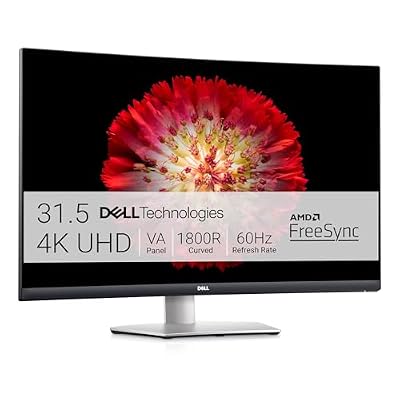
| Dell S3221QS | 32-inch VA, curved | 3840 x 2160 | 60Hz | HDMI, DisplayPort | AMD FreeSync |
| LG UltraGear 27GR93U | 27-inch IPS | 3840 x 2160 | 144Hz | HDMI, DisplayPort | NVIDIA G-Sync Compatible, AMD FreeSync |
| LG UltraFine 32UP83AK-W | 31.5-inch IPS | 3840 x 2160 | 60Hz | HDMI, DisplayPort, USB Type-C | Not emphasised in the listing |
Read the table as a starting point, not a ranking by numbers alone. For films, panel type and contrast usually matter more than refresh rate, while size and aspect ratio decide how large letterboxed films actually appear on screen.
The Picks
1. Samsung Odyssey OLED G8 (G85SD) — Best for Immersion and Dark Rooms
The 34-inch Odyssey OLED G8 uses a QD-OLED panel in a curved ultrawide format, listed by Samsung as the G85SD, model LS34DG856SNXZA. Its native resolution is 3440 x 1440, its refresh rate reaches 175Hz, and the listing names AMD FreeSync Premium Pro and G-Sync compatibility. For movies, the attraction is the combination of OLED black levels and the wider 21:9 shape.
That shape matters. Many films are presented wider than 16:9, so on a standard monitor they sit between black bars. On a 21:9 ultrawide they can fill more of the panel, making a desk feel closer to a small cinema screen. OLED also handles dark scenes distinctively: individual pixels dim independently, so a night scene does not lift the whole image as a backlit panel often does.
The trade-off is 16:9 content, including many series, which leaves unused space at the sides. This is a deliberate entertainment-first choice. If your desk is mainly for films and games in a dim room, it is the most distinctive option here; if you split time evenly with documents, consider the 4K models below first.
2. Dell S3221QS — Best Curved 4K Pick With Built-In Speakers
The Dell S3221QS is a 32-inch curved monitor with a VA panel, 3840 x 2160 resolution, and a 60Hz refresh rate. Dell lists AMD FreeSync, HDMI and DisplayPort connections, built-in speakers, 90% DCI-P3 and 99% sRGB coverage in the product name and description on Amazon. The listing also describes HDR content playback support and a curved 1800R screen intended to expand the field of vision.
For movie nights, this combination is easy to live with. VA panels are generally chosen for stronger native contrast than typical IPS panels, which helps shadow detail in films. The curve wraps the image slightly toward a centrally seated viewer. Built-in dual speakers, described in the listing as 5W units, remove the need for separate speakers for dialogue-driven films, although headphones or a soundbar will give a larger sound.
The 60Hz refresh rate is the clear limit: it matches most films and series, but it will not give the high-refresh feel of the Samsung or LG UltraGear for gaming. Picture-by-Picture and Picture-in-Picture are also listed. Choose this Dell for a large, curved 4K screen, simpler audio, and film-friendly contrast over speed.
3. LG UltraGear 27GR93U — Best for Movies and High-Refresh Gaming on One Desk
The LG UltraGear 27GR93U is a 27-inch monitor with an IPS panel, 3840 x 2160 resolution, and a 144Hz refresh rate. The Amazon listing names HDR 10, NVIDIA G-Sync compatibility and AMD FreeSync, along with DisplayPort and HDMI connections. At 27 inches, 4K resolution produces a very sharp image, so fine detail in costumes, sets, and subtitles stays crisp at a normal desk distance.
This is the pick for a mixed-use desk: a sharp IPS display with wide viewing angles by day, accurate-looking color for films in the evening, and high-refresh gaming without a second monitor. If you are also comparing dedicated gaming displays, our guide to the best PC monitors for gaming covers that side in more depth.
Size is the compromise. A 27-inch screen shows a letterboxed film on a smaller area than the 32-inch and 34-inch models, so it feels less cinematic if you sit back. Plan on headphones or external speakers, too. Pick it if sharpness, viewing angles, and refresh rate matter more than maximum screen area.
4. LG UltraFine 32UP83AK-W — Best 4K IPS Pick With USB-C and Speakers

The LG 32UP83AK-W is a 31.5-inch UltraFine monitor with an IPS panel, 3840 x 2160 resolution, and a 60Hz refresh rate. Its Amazon listing names HDR10, a built-in speaker, HDMI, DisplayPort, and USB Type-C with 60W power delivery, plus a tilt, height, and pivot adjustable stand. That port mix makes it especially convenient for a laptop-based desk: one USB-C cable can carry the picture while charging a compatible laptop, with HDMI and DisplayPort left free for a PC or a streaming device.
For movies, the appeal is size plus IPS consistency. A 32-inch 4K screen gives films more presence than a 27-inch model, and IPS angles keep color more consistent if you lean back or watch with another person. HDR10 support is listed, so it can accept HDR signals from compatible services and players; the visible impact depends on the content and settings.
At 60Hz, like the Dell, it is aimed at films and work rather than high-refresh gaming. Choose it for a larger 4K IPS canvas, a cleaner laptop connection, and built-in sound in one tidy package.
How to Choose the Best PC Monitor for Movies
Panel type and contrast
OLED and QD-OLED models produce the deepest blacks because pixels make their own light. VA panels usually offer stronger contrast than IPS, which is why the Dell suits films. IPS trades some contrast for wider viewing angles and consistent color, which matters for shared viewing or work.
Size, resolution, and aspect ratio
At desk distance, 32 inches in 16:9 is a comfortable step up without overwhelming a workspace, while a 34-inch ultrawide changes the shape of the experience, not just the size. A 3840 x 2160 screen looks very sharp for 4K streaming, while 3440 x 1440 spreads its pixels over a wider area.
Refresh rate and VRR
Films use low frame rates compared with games, so 60Hz is not a barrier to movie watching. Higher refresh rates help mainly for gaming. FreeSync and G-Sync compatibility are primarily gaming features, but they signal a monitor designed to sync cleanly with a PC source.
Ports, speakers, and HDR format
A PC, console, and streaming stick can quickly fill HDMI and DisplayPort inputs, so check the exact listing before ordering. USB-C with power delivery suits laptop desks. Built-in speakers save space but rarely replace a soundbar. Treat HDR10 or a DisplayHDR tier as one factor, not a guarantee.
FAQ
Is 4K worth it for movies on a PC monitor?
Yes, if you watch 4K streaming or UHD files and sit at typical desk distance. A 3840 x 2160 panel can show that detail directly, and the benefit is clearest on 27-inch to 32-inch screens where the pixel density stays high. For services or files limited to lower resolutions, panel contrast and size will matter more than resolution alone.
Is OLED or IPS better for movies?
OLED is better for dark-room contrast and black depth, because each pixel controls its own light. IPS is often the safer all-round choice for a bright room, shared viewing angles, and long hours of mixed work. VA sits between them, with film-friendly contrast and a lower emphasis on speed in the 60Hz models in this guide.
Do I need a high refresh rate for films?
No. Most films and series use frame rates that a 60Hz monitor handles comfortably. A 144Hz or 175Hz model earns its place when you also play games on the same desk, not because a standard film requires it.
How large should a movie monitor be for a desk?
For a single desk, 32 inches in 16:9 and 34 inches in ultrawide are practical upper sizes for most people. They give letterboxed films a larger picture than a 27-inch screen while still fitting normal viewing distances. Measure your desk depth first, because sitting too close to a large screen can make the edges harder to take in.
Can I use a streaming stick with these monitors?
In general, a streaming stick needs an HDMI port, a power source, and a way to hear the audio, either through built-in speakers or through your PC setup. Check the specific listing for the number of HDMI ports on the model you choose, and confirm that your service and plan support the resolution you expect on a computer monitor.
Conclusion
The best PC monitor for movies depends on how you watch. Choose the Samsung Odyssey OLED G8 (G85SD) for ultrawide immersion and OLED contrast, the Dell S3221QS for a curved 4K screen with built-in speakers, the LG UltraGear 27GR93U for sharp 4K IPS picture quality plus high-refresh gaming, or the LG UltraFine 32UP83AK-W for a larger 4K IPS desk with USB-C convenience. Compare panel, size, ports, and VRR against your room and your sources, and the right pick becomes clear without chasing specifications that films never use.