Swinging through Marvel’s New York is demanding in a different way from a corridor shooter. Marvel’s Spider-Man Remastered streams a dense open city, loads new districts as you move, and adds ray-traced reflections on supported hardware. A laptop that only just clears the minimum specification can launch the game, but it will not give you the smooth traversal and quick loading that make the city feel alive. The best gaming laptop for spider man remastered laptop requirements is therefore not the cheapest machine that boots the game. It is a machine that comfortably clears the recommended tier, has headroom for higher settings, and can sustain that performance while plugged in.
This guide works backwards from the published requirements, checking processor and graphics power, documented GPU power limits, display, memory, storage, ports, warranty, and upgradeability.
As an Amazon Associate we earn from qualifying purchases.
What Marvel’s Spider-Man Remastered Actually Requires
Minimum and recommended tiers
At the minimum tier, aimed at 720p and 30 frames per second on very low settings, the game lists an Intel Core i3-4160 or AMD equivalent, a GeForce GTX 950 or AMD equivalent, 8GB of RAM, 75GB of hard drive space, and Windows 10 64-bit. That is a baseline for older hardware, not a buying target for a new laptop.
The recommended tier, aimed at 1080p and 60 frames per second on the medium preset, lists an Intel Core i5-4670 or AMD Ryzen 5 1600, a GeForce GTX 1060 6GB or Radeon RX 580, 16GB of RAM, a 75GB SSD, and Windows 10 64-bit. For a new purchase, treat this as the floor: 16GB of RAM, solid-state storage with room beyond the 75GB install, and a dedicated GPU clearly above the GTX 1060 class.
Very High and ray tracing tiers
The Very High tier for 4K and 60 frames per second lists a GeForce RTX 3070 or Radeon RX 6800 XT, an Intel Core i5-11400 or Ryzen 5 3600, 16GB of RAM, and a 75GB SSD. The Amazing Ray Tracing tier, for 1440p at 60 frames per second or 4K at 30 frames per second with ray tracing on high, also lists an RTX 3070 class GPU, with a Core i5-11600K or Ryzen 7 3700X and 16GB of RAM. The Ultimate Ray Tracing tier, for 4K at 60 frames per second with ray tracing on very high, lists an RTX 3080 or Radeon RX 6950 XT, a Core i7-12700K or Ryzen 9 5900X, 32GB of RAM, and a 75GB SSD.
Laptop GPUs share names with desktop parts but run within a laptop power and cooling budget, so do not treat a laptop RTX 4060 or RTX 4070 as identical to a desktop card with a similar name. What matters is GPU class, its documented power limit, cooling, and support for features the PC version uses, including DLSS upscaling on GeForce RTX hardware. If you are also weighing a desktop build for the sequel, our guide to the best GPU for Spider-Man 2 covers that side of the decision.
Quick Comparison
| Laptop | CPU | GPU | RAM | SSD | Display |
|---|---|---|---|---|---|
| ASUS ROG Strix G16 G614JV-AS74 | Intel Core i7-13650HX | GeForce RTX 4060, 140W Max TGP as listed | 16GB DDR5 | 1TB PCIe Gen4 | 16-inch FHD, 165Hz |
| Lenovo Legion Pro 5i Gen 8 | Intel Core i7-13700HX | GeForce RTX 4070, 8GB GDDR6 as listed | 32GB DDR5 | 1TB PCIe NVMe | 16-inch WQXGA 2560 x 1600, 165Hz |
| Acer Predator Helios 16 PH16-71-74UU | Intel Core i7-13700HX | GeForce RTX 4060 | 16GB DDR5 | 1TB Gen 4 | 16-inch 2560 x 1600, 165Hz, G-SYNC as listed |
| ASUS ROG Strix G16 G614JV-AS73 | Intel Core i7-13650HX | GeForce RTX 4060, 140W Max TGP as listed | 16GB DDR5 | 512GB PCIe | 16-inch FHD, 165Hz |
All four clear the recommended CPU, GPU class, RAM, and SSD points. The Lenovo adds 32GB of RAM, matching the memory amount listed for the Ultimate Ray Tracing tier, while the 1TB configurations give the most breathing room around the 75GB install.
The Picks in Detail
1. ASUS ROG Strix G16 G614JV-AS74

View the ASUS ROG Strix G16 G614JV-AS74 on Amazon
The listing for this configuration names an Intel Core i7-13650HX, an NVIDIA GeForce RTX 4060 Laptop GPU at 140W Max TGP, 16GB of DDR5-4800MHz memory, and a 1TB PCIe Gen4 SSD, running Windows 11. The display is a 16-inch FHD panel at 165Hz with 100% sRGB coverage as listed, and connectivity includes Wi-Fi 6E.
That is a strong 1080p package: the processor sits well above the tier processors, the RTX 4060 supports ray tracing and DLSS, and the documented 140W Max TGP matters because RTX 4060 laptop performance varies by power limit. The 1TB SSD leaves space for other titles after the install. Choose it for 1080p play with higher settings, using DLSS with ray-traced reflections. Confirm configuration and warranty on the listing, and check ASUS documentation before assuming any part can be upgraded.
2. Lenovo Legion Pro 5i Gen 8

View the Lenovo Legion Pro 5i Gen 8 on Amazon
This listing names an Intel Core i7-13700HX, an NVIDIA GeForce RTX 4070 with 8GB GDDR6, 32GB of DDR5 RAM, and a 1TB PCIe NVMe M.2 SSD, running Windows 11 Home. The display is 16-inch WQXGA at 2560 x 1600, IPS, anti-glare, 165Hz, with 100% sRGB and 300 nits as listed. Listed ports include four USB-A 3.2 Gen 1, two USB-C 3.2 Gen 2, RJ-45 Ethernet, HDMI, and a headphone and microphone combo jack, plus Wi-Fi 6 and Bluetooth as listed.
That makes it the pick here for 1440p-class play and ray tracing with DLSS. The 32GB of RAM matches the Ultimate Ray Tracing tier amount and helps with multitasking, and wired Ethernet suits large downloads. Use DLSS at the native 2560 x 1600 resolution, and judge this laptop RTX 4070 by settings, not desktop naming. Confirm seller, configuration, and warranty on the listing.
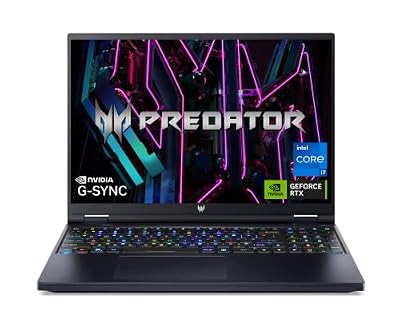
3. Acer Predator Helios 16 PH16-71-74UU
View the Acer Predator Helios 16 PH16-71-74UU on Amazon
The Helios 16 listing names a 13th Gen Intel Core i7-13700HX, an NVIDIA GeForce RTX 4060, a 16-inch 2560 x 1600 display at 165Hz with G-SYNC, 16GB of DDR5, a 1TB Gen 4 SSD, and Killer Wi-Fi 6E, with model code PH16-71-74UU.
The higher-resolution panel is the reason to pick this one: 2560 x 1600 is sharper than 1080p, and G-SYNC as listed helps smooth frame pacing. Native resolution is harder to drive, so plan on DLSS and balanced settings with ray-traced reflections. The 16GB of RAM meets the recommended amount and the 1TB SSD comfortably covers the install. Verify the specification at checkout and check Acer documentation for this model code before planning any change.
4. ASUS ROG Strix G16 G614JV-AS73

View the ASUS ROG Strix G16 G614JV-AS73 on Amazon
This Strix G16 configuration lists an Intel Core i7-13650HX, a GeForce RTX 4060 Laptop GPU at 140W Max TGP, 16GB of DDR5, a 512GB PCIe SSD, Wi-Fi 6E, and Windows 11, with a 16-inch 16:10 FHD display at 165Hz and model code G614JV-AS73.
It covers the same core ground as the AS74: same processor, GPU class, documented power limit, and memory, well above the recommended tier for 1080p play. The difference is storage: 512GB holds the install but fills faster with several large games. Pick it if core hardware matters most and you can manage storage. Do not confuse it with the 1TB AS74.
How to Choose: Selection Criteria That Matter
CPU, GPU, and power limits
The processor has to feed the GPU while the city streams in. All four picks use HX-class Intel processors well above the tier processors. Pair that with an RTX 4060 or RTX 4070 for ray tracing and DLSS, and check the documented GPU power limit where published, as on the Strix listings. Two laptops with the same GPU name can differ by power limit and cooling, so prefer clear documentation, keep vents unobstructed, and play plugged in.
Display, RAM, SSD, ports, and warranty
Match settings to the panel: 1080p suits higher settings on an RTX 4060, while 2560 x 1600 is sharper and benefits more from DLSS. Treat 16GB of RAM as baseline and 32GB as a comfort upgrade. A 1TB SSD is stress-free; 512GB works if you manage your library. Count ports you use, read warranty terms for the exact seller and region, and trust only documentation tied to your exact model code for upgradeability.
FAQ
Can a laptop with 16GB of RAM run the game well?
Yes. 16GB is the amount listed for the recommended, Very High, and Amazing Ray Tracing tiers, so it is a sensible baseline. 32GB, as in the Legion pick, adds multitasking headroom and matches the amount listed for the Ultimate Ray Tracing tier.
Is an RTX 4060 laptop enough, or should I get an RTX 4070 laptop?
An RTX 4060 laptop with a clearly documented power limit is a strong fit for 1080p play above the recommended tier, especially with DLSS. An RTX 4070 laptop gives more headroom for a 2560 x 1600 panel and for ray tracing settings. Laptop and desktop parts with similar names are not identical, so judge by resolution, settings, and power limit.
How much storage do I really need?
The game requires 75GB of available space, and the recommended tier specifies SSD storage. Budget extra space for updates, saves, and other games. That is why 1TB configurations are easier to live with than 512GB ones, even though both can install the game.
Should I play at native resolution or use DLSS?
On a 1080p panel, native resolution is a reasonable baseline. On a 2560 x 1600 panel, or with ray-traced reflections, DLSS helps keep frame rates smooth on GeForce RTX hardware.
Conclusion
Begin from the requirements, not from marketing labels. The sensible buying floor is the recommended tier: 16GB of RAM, SSD storage beyond the 75GB install, a dedicated GPU above the GTX 1060 class, and a modern multi-core processor. The ASUS ROG Strix G16 AS74 is a balanced 1080p choice with generous storage, the Lenovo Legion Pro 5i is the pick for a sharper panel, 32GB of RAM, and the RTX 4070, the Acer Predator Helios 16 pairs an RTX 4060 with a 2560 x 1600 G-SYNC panel as listed, and the Strix G16 AS73 covers the same core hardware with less storage. Verify the exact configuration, ASIN, and warranty on the listing before you order.