As an Amazon Associate we earn from qualifying purchases
A portable keyboard earns its place in a school bag only if it solves a real problem: typing essays on a tablet in the library, answering discussion posts from a Chromebook on the train, or turning a phone into a note-taking station between classes. The best portable keyboards for back to school travel are light enough to carry every day, pair over Bluetooth with more than one device, and protect their keys — or fold away — so a semester in a backpack does not wreck them.
The five keyboards below cover the main shapes a student will actually meet: two tri-fold designs that shrink to roughly phone size — one keeping a full layout with a number pad, the other adding a touchpad — plus three one-piece boards, an ultra-thin model with its own built-in cover, a rounded everyday keyboard that also works at a dorm desk, and a backlit slim board for evening study. Every specification quoted here comes from the manufacturer or the product listing, and battery figures are the makers’ own ratings, which assume moderate daily typing.
How to Choose a Portable Keyboard for School Travel
Decide between folding and one-piece first. A folding keyboard packs smallest, but the fold lines split the layout and the keys are usually smaller than laptop keys. A one-piece slim keyboard keeps normal key spacing and feels closer to a laptop, at the cost of needing a sleeve or a flat pocket in your bag. If you type long essays, layout matters more than packed size; if you only type short notes on the move, packed size wins.
Check multi-device Bluetooth pairing. Students rarely type on one screen. A keyboard that stores two or three Bluetooth pairings lets you jump from a tablet to a laptop to a phone with a key press instead of re-pairing each time. Four of the five picks here support three devices. Also check whether a USB receiver is included: the Pebble Keys 2 below can also work through a Logitech Bolt receiver, which helps with older laptops, while the folding models are Bluetooth-only.
Match the operating system, not just the connector. All five keyboards list support for some mix of Windows, macOS, iPadOS, iOS, Android and Chrome OS, but shortcut rows are printed for specific systems. Chromebook users should confirm the board lists Chrome OS support, and iPad users should check whether features such as a touchpad are fully supported on iPadOS before relying on them.
Think about power before the semester starts. Rechargeable models such as the ProtoArc XK01, iClever BK08 and Arteck HB030B charge over USB every few weeks or months. The two Logitech boards instead run on replaceable batteries — coin cells in the Keys-To-Go 2, AAA cells in the Pebble Keys 2 — rated by Logitech for up to 36 months, so there is nothing to charge, but you will eventually need spare cells and, on the Keys-To-Go 2, a small screwdriver to reach them.
Do not ignore key size and travel. Makers state the numbers: the XK01 uses full-width 0.65-inch keycaps, the Keys-To-Go 2 has 1 mm of key travel, and the BK08’s keycaps are smaller than laptop size at about 13 mm across, as its own listing warns. If you have large hands or write for hours, the wider boards here are the safer choice.
The Picks at a Glance
| Keyboard | Layout | Packed size / weight | Connection | Battery (maker rating) |
|---|---|---|---|---|
| ProtoArc XK01 | Tri-fold, 105 keys with number pad | Folds to 8.46 x 4.68 x 0.78 in, about 10.5 oz | Bluetooth 5.1, 3 devices | USB-C rechargeable, up to 150 days standby |
| iClever BK08 | Tri-fold, compact keys with touchpad | Pocket-size fold, about 201 g | Bluetooth, 3 devices | USB-C rechargeable, about 60 days per charge |
| Logitech Keys-To-Go 2 | One-piece slim, compact layout | 250 x 105 x about 8.8 mm, 222 g | Bluetooth, 3 devices | 2 CR2032 cells, up to 36 months |
| Logitech Pebble Keys 2 K380s | One-piece compact, round keys | 279 x 124 x 16 mm, 415 g with batteries | Bluetooth and Logi Bolt, 3 devices | 2 AAA cells, up to 36 months |
| Arteck HB030B | One-piece ultra-slim, backlit | 9.7 x 5.9 x 0.24 in, about 0.37 lb | Bluetooth 3.0 | Rechargeable, maker rates it in months per charge |
ProtoArc XK01: The Folding Keyboard That Keeps the Number Pad

Most folding keyboards shrink the layout; the XK01 folds the full thing instead. ProtoArc fits 105 keys, including a number pad, function row and navigation keys, into a tri-fold body that closes to 8.46 x 4.68 x 0.78 inches at about 10.5 ounces. Open, it stretches to roughly 15.2 inches wide, so it needs a real table rather than a narrow tray table.
The keys are scissor switches with 0.65-inch keycaps, close to laptop key width, and ProtoArc says the internal aluminium hinges are tested for more than 10,000 folds. Bluetooth 5.1 holds three pairings with one-button switching. Charging is over USB-C, with up to 150 days of standby quoted; this base XK01 has no backlight, which ProtoArc reserves for a separate Plus version. For students in accounting, statistics or data-heavy courses, this is the only pick here that keeps number entry fast without giving up the fold.
- View on Amazon: https://www.amazon.com/dp/B09TW35H1Z
iClever BK08: A Touchpad Built Into a Pocket-Size Fold
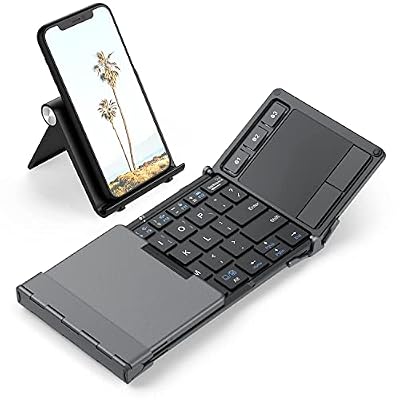
The BK08 takes the opposite trade: a compact 63-key tri-fold layout with smaller-than-laptop keycaps, in exchange for a built-in multi-touch touchpad — pair it with a tablet or phone and you can leave the mouse at home. The frame pairs an aluminium bottom case with an ABS top, and the folded package is pocket-sized at about 201 g.
iClever lists Bluetooth pairing with up to three devices across iPad, iPhone, Windows, Mac and Android, with scissor switches and a 210 mAh battery that charges over USB-C in roughly two hours and is rated at about 60 days per charge. Two honest limits from the listing itself: it is Bluetooth-only, with no USB receiver and no wired typing mode, and the keys are not backlit. Touchpad gesture support also varies by operating system, so iPad users should treat it mainly as a pointing device.
- View on Amazon: https://www.amazon.com/dp/B01MTVC775
Logitech Keys-To-Go 2: Ultra-Thin, With Its Own Cover

The Keys-To-Go 2 is built for the way students actually carry a keyboard: flat against a tablet, unprotected, in a crowded bag. Logitech’s answer is a built-in cover that folds over the keys, on a body just 250 x 105 mm, under 9 mm thick and 222 g — no folding mechanism, no separate case to lose.
Under the cover are scissor keys with 1 mm of travel, a full shortcut row, and Easy-Switch keys for three Bluetooth pairings. The universal version sold here works with Windows, Android, Chrome OS, iPadOS and macOS, so it can move between a Chromebook at school and an iPad at home. Power comes from two replaceable CR2032 coin cells rated by Logitech for up to 36 months; changing them means opening a screwed compartment. There is no backlight and no stand.
- View on Amazon: https://www.amazon.com/dp/B0D2FG84F5
Logitech Pebble Keys 2 K380s: The One That Also Lives on Your Desk

Not every student travels light every day. The Pebble Keys 2 is a one-piece compact keyboard with round, scooped keys, slim enough for a bag at 279 x 124 x 16 mm and 415 g with batteries, yet comfortable enough to stay on a dorm desk all semester. It is the heaviest pick here, and the one that feels most like a normal keyboard.
It pairs with up to three devices over Bluetooth and can also connect through a Logitech Bolt USB receiver, handy for older Windows laptops. Logitech lists support for Windows, macOS, iPadOS, Android, Chrome OS and Linux, and the shortcut keys can be customised in the Logi Options+ app. Two pre-installed AAA batteries are rated for up to 36 months. There is no backlight and no number pad, and the round keycaps take a day or two to get used to, but for a student who types mostly on a laptop, it is the most conventional option here.
- View on Amazon: https://www.amazon.com/dp/B0BT4DP7SC
Arteck HB030B: Backlit and Featherweight for Evening Study

The HB030B is the pick for typing after dark. Arteck builds a seven-colour backlight with adjustable brightness into a stainless, ultra-slim body measuring 9.7 x 5.9 x 0.24 inches and weighing about 0.37 lb — the lightest keyboard here. That makes it an easy permanent resident in a tablet sleeve.
It connects over Bluetooth 3.0, an older standard than the Logitech and ProtoArc boards use, and Arteck lists compatibility with iOS, iPadOS, Android, macOS and Windows. The rechargeable battery is rated by the maker at up to six months per charge with the backlight off; heavy backlight use shortens that considerably. The layout is compact with no number pad and no multi-device shortcut system, so it suits a student who mainly types on one tablet.
- View on Amazon: https://www.amazon.com/dp/B00X5P8BJO
Who Should Choose What
- You type numbers or long documents on the move: choose the ProtoArc XK01 — the only folding board here with a full 105-key layout and number pad.
- Your whole setup is a tablet or phone: choose the iClever BK08. The built-in touchpad removes the mouse from your bag, and nothing else here packs smaller.
- You carry a tablet in a full backpack every day: choose the Logitech Keys-To-Go 2, for its built-in cover, 222 g weight and slim profile.
- You want one keyboard for bag and desk: choose the Logitech Pebble Keys 2 K380s, especially if an older laptop makes the Bolt receiver useful.
- You study in dim rooms and pack the lightest bag: choose the Arteck HB030B for its backlight and featherweight build.
Still weighing folding against one-piece designs for longer trips? Our guide to portable keyboards for travel use walks through the same decision for other trip scenarios.
FAQ
Can one of these keyboards work with a Chromebook and an iPad?
Yes, if the model lists both systems. The Logitech Keys-To-Go 2 and Pebble Keys 2 both list Chrome OS and iPadOS support and store three Bluetooth pairings, so you can switch between a school Chromebook and a home iPad with the device keys.
Is a folding keyboard good enough for long essays?
It depends on the model. The ProtoArc XK01 keeps full-width keycaps and a complete layout, so it behaves most like a laptop keyboard. Compact folders such as the iClever BK08 use smaller keys, fine for notes and short assignments but tiring over several thousand words. If essays are your main workload, favour key size over packed size.
Do I need a stand or case as well?
Usually, yes for the screen. These are standalone keyboards: none of them props up your tablet. The Keys-To-Go 2’s built-in cover protects the keyboard itself, not the tablet, so pair any of these with a tablet case that has a stand before you travel.
How long will the battery realistically last during a semester?
Maker ratings assume light daily typing: up to 36 months for the two replaceable-battery Logitech boards, about 60 days per charge for the iClever BK08, and months per charge for the Arteck with its backlight off. Backlight use and long daily sessions shorten those figures, so rechargeable models are best topped up at the start of each term.