As an Amazon Associate we earn from qualifying purchases
The best external hard drives for Xbox Series X fall into two very different jobs, and Microsoft’s own storage rules decide which job a drive can do. A USB drive can store any game in your library, including titles optimised for Xbox Series X|S, but it can only play Xbox One, Xbox 360 and original Xbox games directly. Optimised titles will not launch from USB storage, no matter how fast the drive is, because they are built for the console’s internal NVMe storage and its Xbox Velocity Architecture. To play one, it has to live on the internal drive or on a Storage Expansion Card in the dedicated slot on the back of the console.
That rule shapes this whole guide. Below is one expansion card that behaves like extra internal storage, plus USB drives that are better understood as library space: room to archive optimised games for copying back instead of re-downloading, and direct play for the three older generations.
The Xbox Series X storage rules that matter
Microsoft sets the terms for external storage, the same for every brand:
- USB drives store everything, play older games. Any compatible USB 3.0-or-faster drive can hold Series X|S games, but only Xbox One, Xbox 360 and original Xbox titles can be played from it.
- Optimised games need internal-class storage. They play only from the internal SSD or a Storage Expansion Card.
- The expansion slot is separate from USB. Storage Expansion Cards use a dedicated port on the rear of the console, not a USB port, and match the internal drive’s performance, including Quick Resume support.
- Formatting is destructive. When you connect a USB drive, the console offers to format it for games and apps. That erases the drive, so back up anything on it first.
- Moving beats re-downloading. Copying an archived optimised game back from a USB hard drive is usually quicker than downloading it again, which is why a big hard drive still earns its place next to a Series X.
How to choose an external drive for Xbox Series X
Decide whether you need to play or just to store. If your internal drive is full of optimised games you are actively playing, only the expansion card adds playable space. If you mostly need somewhere to park finished games and a large back catalogue of Xbox One titles, a USB hard drive does that job with far more room per drive.
Match capacity to your library habits. Game installs keep growing, and a drive fills faster than most people expect. A 1TB drive suits a modest library, 2TB is a comfortable middle ground for Xbox One collections, and a 5TB hard drive is the archive option that rarely asks you to delete anything.
Hard drive or SSD on USB? Both obey the same play rules. An SSD such as the Samsung T7 below copies games faster than a spinning drive, but the console’s USB ports, not the drive, set the ceiling on a Series X. A hard drive gives you far more terabytes for the same segment of the market. Choose the SSD for transfer speed; choose the hard drive for sheer room.
Check the interface and form factor. Every USB pick here connects over USB 3.0 or faster, which the console requires for game storage, and all are bus-powered, so none needs a separate power supply.
The drives compared
| Product | Type | Capacity listed | Interface | Plays optimised games |
|---|---|---|---|---|
| Seagate Storage Expansion Card 1TB | NVMe expansion card | 1TB | Dedicated expansion slot | Yes |
| WD_BLACK P10 Game Drive for Xbox 1TB | Portable hard drive | 1TB | USB 3.2 Gen 1 | No |
| Seagate Game Drive for Xbox 2TB | Portable hard drive | 2TB | USB 3.2 Gen 1 | No |
| WD_BLACK P10 Game Drive 5TB | Portable hard drive | 5TB | USB 3.2 Gen 1 | No |
| Samsung T7 Portable SSD 1TB | Portable SSD | 1TB | USB 3.2 Gen 2 | No |
Seagate Storage Expansion Card for Xbox Series X|S 1TB

This is the only product in this guide that truly expands the console’s playable storage. The Seagate Storage Expansion Card is an NVMe solid state drive in a compact card format (model STJR1000400) that pushes into the dedicated Storage Expansion port on the back of the Series X. Built to the console’s own storage specification, it is described by Seagate and Microsoft as matching the internal drive’s performance through the Xbox Velocity Architecture, so games on it, including optimised Series X|S titles and Quick Resume states, run exactly as they do from internal storage.
There is no cable and no extra power supply; the card becomes part of the console. Seagate sells it in 512GB, 1TB and 2TB capacities, and the 1TB version here roughly doubles the usable space on a Series X while keeping every game on it fully playable.
- Amazon US: https://www.amazon.com/dp/B08K3S6WJM
WD_BLACK P10 Game Drive for Xbox 1TB
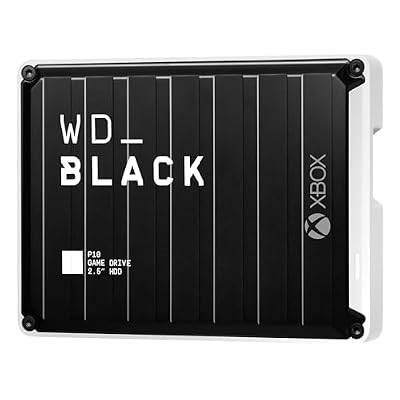
The WD_BLACK P10 Game Drive for Xbox (model WDBA6U0010BBK-WESN) is a portable 2.5-inch hard drive built and licensed specifically for Xbox consoles, in a rugged housing designed to be carried between rooms or consoles. It connects over USB 3.2 Gen 1 and is bus-powered, so setup is a single cable and the console’s format prompt.
On a Series X its role follows Microsoft’s rules: it plays Xbox One, Xbox 360 and original Xbox games directly, and stores optimised Series X|S games so they can be copied back to internal storage when you want them. At 1TB it suits players whose overflow is mostly older-generation titles, or who want a dedicated drive to carry to a second console.
- Amazon US: https://www.amazon.com/dp/B08FMS25DL
Seagate Game Drive for Xbox 2TB

Seagate’s Game Drive for Xbox (model STKX2000403) is the company’s officially licensed portable hard drive for the platform: a 2.5-inch, bus-powered drive connecting over USB 3.2 Gen 1. Seagate includes its Rescue Data Recovery Services with this model, an unusual extra for a game drive and worth having if the drive will also hold captures and clips you care about.
The 2TB capacity is the sweet spot for a backward-compatible library: a large collection of Xbox One games, all playable directly from the drive, leaving internal storage free for optimised titles, with room left to archive several big Series X|S installs.
- Amazon US: https://www.amazon.com/dp/B08Y1Q62JF
WD_BLACK P10 Game Drive 5TB

The 5TB version of the WD_BLACK P10 (model WDBA3A0050BBK-WESN) is the archive drive. It uses the same portable, bus-powered hard drive design as the 1TB Xbox model, connecting over USB 3.2 Gen 1, and WD’s listing describes the same Series X|S behaviour: play and store Xbox One games, and archive Xbox Series X and Series S games for copying back later.
Five terabytes changes how you manage a library: instead of deleting optimised games and downloading them again next season, you park them here, and your whole Xbox One collection stays installed and playable. Copying a large game back takes a while on a spinning drive, but it is the most capacity you can attach in this guide.
- Amazon US: https://www.amazon.com/dp/B07VNTFHD5
Samsung T7 Portable SSD 1TB

The Samsung T7 (model MU-PC1T0T/AM) is the USB SSD option, for players who value transfer speed and a drive that disappears into a pocket. Samsung rates it at read speeds up to 1,050 MB/s and write speeds up to 1,000 MB/s over USB 3.2 Gen 2 on a capable host, with 256-bit AES hardware encryption. It ships with USB-C to USB-C and USB-C to USB-A cables, and the line is also sold in 500GB and 2TB capacities.
Two honest limits apply on a Series X. The console’s USB ports cap throughput well below the T7’s rated maximum, so its speed advantage shows up in faster game copies than a hard drive, not in headline speeds on the console. And the platform rule still applies: it plays Xbox One and older games and stores optimised games, but cannot launch them. Within those limits it is the fastest, quietest USB option here.
- Amazon US: https://www.amazon.com/dp/B0874XN4D8
Who should choose what
- You play optimised Series X|S games constantly and the internal drive is always full: get the Seagate Storage Expansion Card, the only option that adds playable space for those games.
- Your overflow is mostly Xbox One, 360 and original Xbox titles: the Seagate Game Drive for Xbox 2TB plays them all directly.
- You want a small, dedicated Xbox drive to carry between consoles: the WD_BLACK P10 Game Drive for Xbox 1TB.
- You archive everything and hate re-downloading: the WD_BLACK P10 5TB, with optimised games copied back when needed.
- You want the fastest USB transfers and a drive that also serves your PC: the Samsung T7, accepting that the console’s ports and play rules cap its speed on the Xbox itself.
Our guide to the best external hard drives for Xbox One covers the previous generation’s drives and the rules that carried over.
FAQ
Can I play Xbox Series X games from a USB hard drive?
No. Optimised games can be stored on a USB drive, but they only play from the internal SSD or a Storage Expansion Card. Xbox One, Xbox 360 and original Xbox games play directly from USB storage.
Will an external SSD make optimised games playable from USB?
No. Microsoft applies the same rule to every USB device, hard drive or SSD. An SSD copies games faster, but it cannot launch optimised Series X|S games from USB.
How is a Storage Expansion Card different from a USB drive?
The card uses the dedicated expansion slot on the back of the console rather than a USB port and matches the internal storage’s performance, so every game on it, including optimised titles and Quick Resume, works as if it were internal. A USB drive is library space with the play restrictions described above.
Do I need to format a new drive for the Xbox Series X?
Yes, to store games and apps on it. The console offers to format a connected USB drive, and formatting erases everything on it, so back up any files first.
Can I move a USB drive between my Xbox Series X and a PC?
A drive formatted by the console for games is dedicated to that format and will not behave like a normal PC drive. Expect to reformat when switching a drive between console game storage and PC use.