Pairing a Ryzen 7 9800X3D with an RTX 5070 for gaming is one of the more interesting combinations of this generation. The processor is a top-tier gaming chip with AMD’s 3D V-Cache, while the graphics card is a mid-to-upper-range model. That raises a fair question about balance. This PC build guide for 2026 explains whether the pairing makes sense, what to buy around it, how pre-built options such as an Asus gaming PC compare with building it yourself, and which parts matter most.
Ryzen 7 9800X3D with RTX 5070: Is the Pairing Balanced?
The 9800X3D is an eight-core processor with a large stack of extra cache that boosts gaming performance, especially in CPU-limited situations. The RTX 5070, meanwhile, is built for 1080p and 1440p play. In most games at 1440p, the graphics card is the limiting factor, not the processor. That means the CPU sits with spare capacity, and the pairing is slightly CPU-heavy by design.
That is not a flaw. It has real advantages:
- Headroom for future GPU upgrades. You can swap in a faster card later without replacing the CPU.
- High frame rates in esports titles. At 1080p, where the GPU is less stressed, the processor’s strength shows.
- Strong minimum frame rates. The large cache helps smooth out dips in simulation, strategy and open-world games.
- Efficiency. X3D chips are known for strong gaming performance relative to power use.
The trade-off is cost allocation. If your budget is fixed, putting more money into the GPU often yields a bigger visible gain at 1440p and above. A cheaper processor paired with a stronger card can look better on paper. But if you want a platform that will last through several GPU generations, the 9800X3D is a sound anchor.
What This Combination Does Well
At 1440p, expect a smooth experience in modern games with DLSS upscaling and frame generation available to push frame rates up. At 1080p, you can chase very high refresh rates for competitive play. The CPU shines in titles that lean on a single fast thread and big caches: city builders, MMOs, flight and racing simulators, and many esports games.
If your main interest is competitive shooters, pair the build with a fast monitor and read our guide to the best FPS gaming setups for settings and peripherals that improve responsiveness. Matching the screen to the hardware also matters, so see the best refresh rate for gaming before you choose a monitor.
Parts List Template for a 2026 Build
Instead of fixed models, which change fast, here is a category-by-category plan you can fill from current listings.
| Part | What to look for |
|---|---|
| Processor | Ryzen 7 9800X3D, AM5 socket |
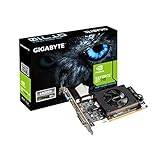
| Graphics card | GeForce RTX 5070 from any reputable board partner |
| Motherboard | AM5 board with stable power delivery; B-series chipsets are often enough |
| Memory | 32 GB DDR5 in a two-stick kit, with a rated speed that matches AMD’s sweet spot |
| Storage | Fast NVMe SSD, 1 TB or more |
| Cooling | Good air cooler or 240 to 360 mm liquid cooler |
| Power supply | Quality unit with sufficient wattage and the right GPU cable |
| Case | Good airflow, with room for the card length you choose |
Check each listing for the exact configuration, since compatibility details like BIOS version, memory support and card dimensions vary between models.
Where to Spend and Where to Save
Spend on the processor, graphics card and power supply. These define performance and safety. A weak or poorly rated power supply risks instability, and it is the wrong component to economize on.
Save on cosmetic extras: RGB fans, branded memory heat spreaders and oversized cases. Motherboards need to be reliable, but you rarely need the most expensive model. A mid-range AM5 board covers this platform well. Memory beyond a sensible speed adds little in games.
If you need to trim the total, our overview of the best budget gaming PC shows which compromises hurt least and which parts are worth protecting.
Best Asus Gaming PC Options in 2026: Pre-Built vs DIY
Many shoppers searching for the best Asus gaming PC are weighing a pre-built system against assembling parts. Asus sells desktops under its ROG and TUF families, and some configurations may combine a Ryzen X3D chip with a GeForce card. Whether a specific model with a 9800X3D and 5070 is on sale depends on the market and the season, so check the listing for the exact configuration.
Pre-built pros and cons:
- Pros: ready to use, warranty on the whole system, tested cooling and assembly, easy support.
- Cons: proprietary parts in some models, limited upgrade paths, power supplies or coolers that may be modest, and a premium for assembly.
DIY pros and cons:
- Pros: you choose every part, better upgrade paths, usually better value per component.
- Cons: you handle assembly and troubleshooting, and separate warranties apply.
If you pick a pre-built, inspect the listing for the power supply rating, memory configuration (two sticks versus one), storage size and cooler type. Those are the places where manufacturers sometimes cut corners.
Step-by-Step Assembly Overview
- Prepare the motherboard outside the case. Install the CPU, memory and M.2 drive first, then the cooler mounting plate if required.
- Mount the cooler. Apply paste if the cooler does not come pre-applied, and tighten evenly.
- Install the power supply and board. Fit the I/O shield if separate, then secure the motherboard with standoffs.
- Connect front panel and fan headers. Check the manual for pin layouts.
- Install the graphics card. Use the correct power cables directly from the power supply, and make sure the connector is fully seated.
- First boot. Update the BIOS if needed, enable the memory profile, and confirm temperatures.
- Install Windows and drivers. Use the latest chipset and graphics drivers.
Tuning After the Build
Enable the memory’s rated profile in the BIOS, since memory often runs at a default lower speed until you do. Check that resizable BAR is on. Set the monitor to its full refresh rate in Windows settings, which people frequently forget. In-game, use DLSS where available and test frame generation to see whether the added latency bothers you in the games you play.
FAQ
Is a Ryzen 7 9800X3D overkill for an RTX 5070?
It is more CPU than the card strictly needs at 1440p, but it gives upgrade headroom and shines at 1080p high refresh rates.
Can I use this combination for 4K?
Yes with upscaling and adjusted settings, though the 5070 is better matched to 1440p.
How much memory should I get?
32 GB of DDR5 is a comfortable target for modern gaming and multitasking.
Is a pre-built Asus PC a good choice?
It can be, for convenience and warranty, but check component details like the power supply and upgrade options in the listing.
What power supply do I need?
Follow the graphics card maker’s stated requirement for your model, and choose a quality unit with some margin.