As an Amazon Associate we earn from qualifying purchases
Baldur’s Gate 3 is a turn-based RPG, and that changes what a good gaming laptop looks like. There are no twitch shots to land and no leaderboard that rewards a 240Hz panel, so the budget is better spent on the parts this game leans on hardest: a strong processor, generous memory, and fast SSD storage. Larian Studios publishes a recommended specification built around a six-core desktop-class CPU, 16GB of RAM, a graphics card with 8GB of VRAM, and 150GB of SSD space. Every laptop below clears that bar with room to spare, and each was chosen for how it handles the way this game loads a machine.
The five picks share a few deliberate traits. All use full-power versions of their laptop GPUs instead of low-wattage variants, all ship with at least 16GB of DDR5 memory and a PCIe SSD, and all can be opened for memory or storage upgrades later. They differ in screen, in how much RAM they carry out of the box, and in how much CPU headroom they hold for the dense city streets of Act 3, where weaker machines feel the strain.
What Baldur’s Gate 3 actually asks of a laptop
Start with the processor. Combat is resolved in turns, and between those turns the game simulates a crowded world: dozens of NPCs going about their routines, physics objects, spell effects, and pathfinding across large maps. That workload lands on the CPU, and it peaks in Act 3, where the city packs far more characters and systems into each area than the wilderness maps of the first two acts. Larian’s recommended specification names the Intel Core i7-8700K or AMD Ryzen 5 3600, both six-core processors. A modern laptop chip such as the Core i7-13650HX or i7-13700HX offers more cores, higher clocks, and far stronger per-core performance, which is exactly the profile this game rewards.
Memory is the second priority. The recommended specification calls for 16GB of RAM, the sensible floor for a laptop bought for this game. A machine with 32GB leaves more headroom for the operating system, build guides, voice chat, and the game’s own appetite in the largest areas. Storage is not optional either: Larian requires an SSD and 150GB of free space, so a 512GB drive is workable but 1TB is far more comfortable.
Graphics matter, but with a ceiling. The recommended GPU tier is the GeForce RTX 2060 Super or Radeon RX 5700 XT with 8GB of VRAM. A laptop RTX 4060 or RTX 4070 sits above that class, supports DLSS upscaling, and holds 8GB of VRAM. One caution applies to every laptop GPU: wattage matters as much as the model name. The same RTX 4060 can be configured from a low-power variant up to a full 140W version, and the full-power configuration is the one to buy.
Finally, the display. Because encounters play out in turns, a readable, sharp image beats extreme refresh rates. A 165Hz panel is fast enough for smooth camera pans and spell animations, and resolution and colour accuracy do more for long sessions spent reading tooltips and dialogue. Two machines below step up to 2560 x 1600.
A laptop is only half of a comfortable setup for a hundred-hour campaign, so it is worth pairing the machine with the right keyboard for Baldur’s Gate 3 once the laptop itself is chosen.
The five laptops, compared for this game
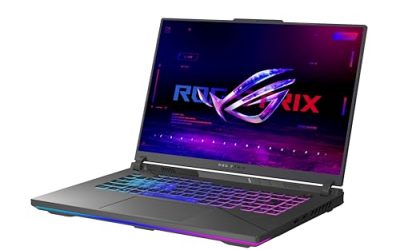
ASUS ROG Strix G16 (G614JV-AS74)

The Strix G16 is the most balanced machine here for this title. Its Core i7-13650HX brings 14 cores and boost clocks up to 4.9GHz, the single-thread strength and multi-core depth that keep turn resolution and city exploration smooth. The RTX 4060 runs at a 140W maximum TGP, the full-power configuration, and a MUX switch with Advanced Optimus lets the discrete GPU drive the display directly. The 16-inch 1920 x 1200 panel runs at 165Hz with full sRGB coverage.
Upgradeability is a genuine strength. Two SO-DIMM slots accept up to 32GB of DDR5, and two M.2 slots mean the 1TB factory drive can gain a second SSD later instead of being replaced. Cooling uses liquid metal on the CPU, which suits the sustained processor loads this game produces.
Specs
- CPU: Intel Core i7-13650HX, 14 cores, up to 4.9GHz
- GPU: NVIDIA GeForce RTX 4060 Laptop GPU, 8GB GDDR6, up to 140W max TGP, MUX Switch with Advanced Optimus
- Display: 16-inch FHD+ (1920 x 1200), 165Hz, 100% sRGB
- RAM: 16GB DDR5-4800, two SO-DIMM slots, upgradeable to 32GB
- Storage: 1TB PCIe 4.0 NVMe SSD, two M.2 slots
- Ports: Thunderbolt 4, USB-C 3.2 Gen 2 with DisplayPort, 2x USB-A 3.2 Gen 2, HDMI 2.1, RJ45 Ethernet, combo audio jack
- Wireless: Wi-Fi 6E
- Operating system: Windows 11 Home
- Warranty: 1-year limited warranty
Lenovo Legion Pro 5i Gen 8 (82WK)

For players who want the settings sliders pushed to the right, the Legion Pro 5i Gen 8 is the step up. The Core i7-13700HX raises the core count to 16 with boost clocks up to 5.0GHz, and the RTX 4070 Laptop GPU runs at 140W, giving this machine the most combined CPU and GPU headroom on the list. That headroom keeps the Lower City feeling fluid when the screen fills with guards, crowds, and spell effects.
That panel is a 16-inch 2560 x 1600 display at 165Hz, noticeably sharper than 1080p for reading small interface text. The 32GB of DDR5 fitted from the factory removes any need to plan a memory upgrade, and storage can grow through a second M.2 slot. Rear ports, including USB-C with DisplayPort output and charging support, HDMI 2.1, and Ethernet, make it an easy machine to dock at a desk.
Specs
- CPU: Intel Core i7-13700HX, 16 cores, up to 5.0GHz
- GPU: NVIDIA GeForce RTX 4070 Laptop GPU, 8GB GDDR6, 140W TGP
- Display: 16-inch WQXGA (2560 x 1600), 165Hz, G-SYNC
- RAM: 32GB DDR5, two SO-DIMM slots
- Storage: 1TB PCIe SSD, two M.2 slots
- Ports: USB-C 3.2 Gen 2 with DisplayPort 1.4 and charging support, USB-C 3.2 Gen 2, USB-A 3.2 ports, HDMI 2.1, RJ45 Ethernet, combo audio jack
- Wireless: Wi-Fi 6
- Operating system: Windows 11 Home
- Warranty: 1-year limited warranty
Lenovo Legion 5i (16-inch, 32GB RAM configuration)

This Legion 5i configuration is the pick for players who mod heavily or keep several applications open beside the game. It pairs the same Core i7-13650HX and full-power 140W RTX 4060 combination as the Strix above with 32GB of RAM installed from the start, double Larian’s recommended amount. That extra memory is the cheapest insurance against slowdowns in the most crowded areas and against the gradual appetite of a growing mod list.
The 16-inch QHD panel runs at 165Hz with G-SYNC, and the 1TB SSD swallows the game’s 150GB installation with room for a healthy library besides. Like the Pro model, it offers two SO-DIMM slots and two M.2 slots, so storage can still expand later.
Specs
- CPU: Intel Core i7-13650HX
- GPU: NVIDIA GeForce RTX 4060 Laptop GPU, 8GB GDDR6, TGP 140W
- Display: 16-inch QHD, 165Hz, G-SYNC
- RAM: 32GB DDR5, two SO-DIMM slots
- Storage: 1TB SSD, two M.2 slots
- Ports: USB-C with DisplayPort output, USB-A ports, HDMI 2.1, RJ45 Ethernet, combo audio jack
- Wireless: Wi-Fi 6E
- Operating system: Windows 11 Home
- Warranty: 1-year limited warranty
Acer Predator Helios Neo 16 (PHN16-71-76H5)

The Helios Neo 16 is the value play among the full-power machines. Acer specifies a maximum graphics power of 140W for its RTX 4060, matching the Strix and Legion models watt for watt, and the Core i7-13650HX is the same processor found in two other picks here. Its 16-inch 1920 x 1200 display runs at 165Hz with G-SYNC and Advanced Optimus.
Two details define this model. First, storage starts at 512GB, which holds Baldur’s Gate 3 and a few other titles but fills quickly; second, Acer leaves the second M.2 slot empty, so adding another PCIe Gen 4 SSD later is a quick job rather than a replacement. Memory is dual-channel DDR5 upgradeable to 32GB. Connectivity is the strongest here, with two Thunderbolt 4 ports alongside HDMI 2.1, Ethernet, and Killer Wi-Fi 6E.
Specs
- CPU: Intel Core i7-13650HX
- GPU: NVIDIA GeForce RTX 4060 Laptop GPU, 140W maximum graphics power
- Display: 16-inch WUXGA (1920 x 1200), 165Hz, G-SYNC, Advanced Optimus
- RAM: 16GB DDR5 dual-channel, upgradeable to 32GB
- Storage: 512GB PCIe Gen 4 SSD, two M.2 slots with one slot free
- Ports: 2x Thunderbolt 4, 2x USB 3.2 Gen 2, 1x USB 3.2 Gen 1, HDMI 2.1, RJ45 Ethernet, combo audio jack
- Wireless: Intel Killer Wi-Fi 6E
- Operating system: Windows 11 Home
- Warranty: 1-year limited warranty
ASUS TUF Gaming A15 (FA507NV-EH74)

The TUF Gaming A15 is the AMD-based option and the most travel-friendly chassis of the five. Its Ryzen 7 7735HS is an eight-core processor comfortably beyond the six-core class Larian recommends, and the RTX 4060 again runs at up to 140W maximum TGP, so nothing is given away on graphics power. The 15.6-inch full HD panel runs at 144Hz with full sRGB coverage, suiting a game where clarity matters more than extreme refresh rates.
Practical touches suit it to long campaigns away from a desk: a 90Wh battery for hours spent in menus and dialogue away from the charger, a 1TB SSD as standard, and a chassis built to military-grade durability standards. Upgrades mirror the larger machines, with two SO-DIMM slots supporting up to 32GB of DDR5 and two M.2 slots for storage.
Specs
- CPU: AMD Ryzen 7 7735HS, 8 cores
- GPU: NVIDIA GeForce RTX 4060 Laptop GPU, 8GB GDDR6, up to 140W max TGP
- Display: 15.6-inch FHD (1920 x 1080), 144Hz, 100% sRGB
- RAM: 16GB DDR5, two SO-DIMM slots, upgradeable to 32GB
- Storage: 1TB PCIe SSD, two M.2 slots
- Ports: USB-C 3.2 Gen 2 with DisplayPort and G-SYNC, USB-C 3.2 Gen 2, 2x USB-A, HDMI 2.1, RJ45 Ethernet, combo audio jack
- Wireless: Wi-Fi 6
- Battery: 90Wh
- Operating system: Windows 11 Home
- Warranty: 1-year limited warranty
How to choose between them
Work through three questions. First, how much do you value the final act’s heaviest areas? If the answer is a great deal, the Legion Pro 5i pairs the strongest CPU here with the RTX 4070 and 32GB of memory. Second, do you mod or multitask? Then the 32GB Legion 5i configuration answers that directly, with a lower tier of graphics hardware this game does not punish. Third, are you comfortable opening a laptop later? The Helios Neo 16 asks for a storage upgrade sooner but rewards it with the strongest port selection, while the Strix G16 splits the difference with 1TB fitted and both upgrade paths open. The TUF A15 is the one to take when the laptop has to travel.
Whichever model you choose, install the game on the internal SSD, because Larian specifies SSD storage and area transitions stream constantly from disk. And check the GPU power figure on any alternative configuration before buying, because a low-wattage variant of the same chip is a materially slower machine.
Frequently asked questions
How much RAM does Baldur’s Gate 3 need on a laptop?
Larian’s recommended specification calls for 16GB, and that is the right minimum for a new purchase. A 32GB machine adds headroom for Act 3’s crowded areas, mods, and background applications, and every laptop here either ships with 32GB or can be upgraded to it.
Is a laptop RTX 4060 enough for Baldur’s Gate 3?
Yes, provided it is a full-power configuration. Larian recommends a desktop RTX 2060 Super with 8GB of VRAM, and a 140W laptop RTX 4060 matches that VRAM capacity and adds DLSS upscaling. The wattage figure matters more than the badge, so confirm the TGP before buying any configuration not listed here.
Why does performance dip in Act 3, and which part helps most?
The city areas simulate far more NPCs, objects, and systems than the earlier acts, and that simulation is processor work rather than graphics work. A stronger CPU is the hardware answer, which is why the HX-series processors in these laptops suit the game better than thin-and-light chips.
Should I pick a higher resolution or a higher refresh rate for this game?
Resolution, within reason. Combat is turn-based, so the jump from 165Hz to 240Hz changes little, while a 2560 x 1600 panel makes dialogue text, tooltips, and inventory grids easier to read across a long campaign.
Conclusion
Baldur’s Gate 3 rewards a balanced laptop rather than an extreme one: a modern HX or HS processor, 16GB of RAM as a floor with 32GB preferred, an SSD with at least 150GB free, and a full-power RTX 4060 or better. The Strix G16 is the default recommendation for most players, the Legion Pro 5i is the choice for maximum settings and long-term headroom, the 32GB Legion 5i serves modders and multitaskers, the Helios Neo 16 trades initial storage for value and ports, and the TUF Gaming A15 takes the campaign on the road.