

Affiliate disclosure: As an Amazon Associate we earn from qualifying purchases. This post contains affiliate links — if you buy through them we may earn a small commission at no extra cost to you. This never affects our recommendations.
PS5 Tempest 3D Audio is one of the most powerful spatial audio systems in consumer gaming, capable of rendering sound from hundreds of simultaneous sources in three-dimensional space. To experience it fully, you need a headset that connects via USB (either directly or via USB dongle) and has drivers with enough resolution to render the spatial cues Tempest generates. Not every headset marketed as PS5 compatible delivers the full Tempest experience — many 3.5mm connections bypass Tempest processing entirely and deliver stereo audio through the DualSense built-in DAC instead.
This guide identifies which headsets genuinely activate PS5 Tempest 3D Audio, which work best via 3.5mm with DualSense, and which wireless options deliver the best PS5 gaming experience. Budget and premium options are both covered.
In a hurry? See the top-rated Gaming Headsets for PS5 deals available right now:
🛒 Check Gaming Headsets For Ps5 Prices on Amazon →🛒 Best Price Today on Amazon
Prime members get fast, free shipping on everything above, plus member-only deals. New members get a 30-day free trial — cancel anytime.
Start 30-Day Prime Free Trial →See Today’s Amazon DealsTop Picks at a Glance
| Product | Best For |
|---|---|
| SteelSeries Arctis Nova Pro Wireless Multi | Best overall PS5 wireless |
| HyperX Cloud II | Best wired PS5 under $100 |
| Razer BlackShark V2 X Special Edition | Best PS5 under $40 |
| FIFINE USB 7.1 | Best USB PS5 streaming mic |
| Gtheos 2.4GHz Wireless | Best budget PS5 wireless |
As an Amazon Associate we earn from qualifying purchases at no extra cost to you.

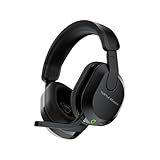






Gtheos 2.4GHz Wireless PS5/PS4
The Gtheos is the budget gateway to wireless PS5 gaming headsets. At $29.99, it connects via USB 2.4GHz dongle directly to PS5 and activates Tempest 3D Audio processing. Battery life reaches 15 hours. Audio quality is warm and enjoyable for casual gaming. The fixed boom mic handles party chat clearly in quiet home environments. Build is all plastic but keeps weight minimal. The Gtheos punches well above its price for PS5-specific wireless functionality.
- Pros: 2.4GHz wireless under $30, PS5 USB Tempest compatible, 15-hour battery, lightweight
- Cons: Fixed mic, plastic build, audio quality clearly below premium options, no software EQ
HyperX Cloud II
The Cloud II connects to PS5 via 3.5mm into the DualSense controller for excellent stereo audio, or via USB for virtual 7.1 surround — note that the Cloud II USB 7.1 is HyperX own processing rather than native PS5 Tempest. For most PS5 gaming this distinction matters less than it sounds: the Cloud II 53mm drivers render game audio with impressive clarity regardless of the processing chain, and its detachable mic is excellent for PS5 party chat. The definitive wired PS5 headset under $100.
- Pros: 53mm neodymium drivers, detachable studio-quality mic, memory foam cushions, aluminum build
- Cons: HyperX 7.1 not native PS5 Tempest, wired only, leatherette can warm during extended sessions
SteelSeries Arctis Nova Pro Wireless Multi
The premium choice for PS5. Connects via 2.4GHz USB dongle that supports PS5 Tempest 3D Audio natively. Hi-Fi grade drivers with 10–40,000 Hz response render the full resolution of Tempest spatial processing — you will hear positional audio detail in PS5 games that lesser headsets cannot resolve. Dual hot-swap battery eliminates downtime during extended gaming sessions. Simultaneous Bluetooth lets you take phone calls without removing the headset. If you want the absolute best PS5 audio experience available in 2025, this is it.

- Pros: Native PS5 Tempest 3D Audio, Hi-Fi drivers, dual hot-swap battery, simultaneous Bluetooth, multi-platform
- Cons: $279.99, requires base station, heaviest build on this list
Razer BlackShark V2 X Special Edition
The BlackShark V2 X connects to PS5 via 3.5mm into the DualSense. This is the most common PS5 connection method for non-wireless headsets, and while it bypasses PS5 Tempest processing, it delivers excellent stereo audio through the DualSense built-in DAC. TriForce 50mm drivers extract strong performance from the 3.5mm signal. The detachable HyperClear mic handles PS5 party chat clearly. Best-value wired PS5 headset under $40.
- Pros: Universal 3.5mm PS5 DualSense compatible, TriForce drivers, detachable mic, Razer quality
- Cons: 3.5mm bypasses Tempest 3D Audio, no virtual surround on PS5 via 3.5mm
FIFINE USB 7.1
The FIFINE connects to PS5 via USB, activating PS5 Tempest 3D Audio processing. FIFINE mic expertise translates to the best voice chat quality in the sub-$40 PS5 headset category — relevant for streamers who game on PS5 and need clear audio pickup. 50mm drivers handle Tempest spatial audio reasonably well. At $37.99 it bridges the gap between the budget Gtheos wireless and the more expensive HyperX Cloud II with USB Tempest compatibility.

- Pros: USB PS5 Tempest compatible, best mic under $40 for PS5, 7.1 virtual surround, reliable brand
- Cons: USB only (no 3.5mm fallback), driver quality trails Cloud II
Buying Guide
3.5mm vs USB on PS5: What Is the Difference
3.5mm into DualSense delivers stereo audio processed by DualSense internal DAC. Works with any headset. No Tempest 3D Audio. Good quality for casual gaming. USB into PS5 activates PS5 Tempest 3D Audio engine with compatible headsets. Provides full 3D positional audio as Sony intended. Required for the complete PS5 audio experience in games designed for Tempest such as Returnal, Ratchet and Clank: Rift Apart, and Horizon Forbidden West.
Wireless Options for PS5
PS5 supports both Sony proprietary PlayStation wireless (for Sony headsets) and generic 2.4GHz USB dongle connections. Third-party wireless headsets with USB dongles (SteelSeries Nova Pro Multi, Gtheos, Logitech G PRO X Wireless) work via USB dongle and typically activate Tempest. Bluetooth headsets do not activate Tempest and experience latency issues. For wireless PS5 gaming, 2.4GHz USB dongle is the correct connection method.

Budget Path to PS5 Tempest Audio
The Gtheos at $29.99 is currently the lowest-cost path to genuine 2.4GHz wireless with Tempest activation on PS5. For wired Tempest, the FIFINE USB 7.1 at $37.99 is the budget entry. You do not need to spend $100+ to experience PS5 Tempest 3D Audio — the system is powerful enough that even budget-appropriate headsets reveal its spatial capabilities over stereo 3.5mm connections.
PS5 Tempest Games to Test Your Headset
Best games for evaluating PS5 Tempest 3D Audio: Returnal (rain, enemy audio from all directions), Ratchet and Clank: Rift Apart (detailed spatial audio design), Horizon Forbidden West (natural ambient soundscape), Spider-Man: Miles Morales (urban environmental layering). Play any of these for 10 minutes in a quiet room to immediately hear the difference between USB Tempest and 3.5mm stereo connections.
Frequently Asked Questions
Does Tempest 3D Audio work with any headset?
Tempest 3D Audio processes audio and outputs it through any connected headset — the processing happens in PS5 hardware, not in the headset. However, the headset driver quality determines how much of Tempest spatial detail you actually hear. Budget drivers with narrow frequency response will miss spatial cues that Hi-Fi drivers resolve clearly. Any headset works; better headsets reveal more of what Tempest is doing.
Can I use a PC gaming headset on PS5?
Yes — any headset with 3.5mm works on PS5 via DualSense. USB headsets designed for PC (like the FIFINE and Cloud II) also work on PS5 via USB and most activate Tempest. The only PC-specific headsets that do not work on PS5 are those requiring proprietary PC software to function at all — most gaming headsets are hardware-functional without software.
What headsets officially work with PS5 Tempest?
Sony certifies its own PlayStation headsets (Pulse 3D, Pulse Explore, Pulse Elite) for deepest Tempest integration. Third-party USB headsets work with Tempest without official certification — Tempest activates for any USB audio device. The certification distinction matters more for Sony-specific features (PlayStation Link wireless, haptic audio features) than for core Tempest spatial audio functionality.
Is the SteelSeries Arctis Nova Pro Wireless Multi worth $280 for PS5?
If PS5 gaming is your primary use case and you also play on PC or Switch, yes. The multi-platform simultaneous connectivity, Hi-Fi drivers that extract maximum quality from Tempest, dual hot-swap battery, and ANC justify the price for serious PS5 gamers who want no compromises. If you game only on PS5, Sony Pulse Elite at a lower price with PlayStation Link wireless provides more integrated PS5-specific features.
Verdict
For the best PS5 gaming audio, the SteelSeries Arctis Nova Pro Wireless Multi is the uncompromising pick — Hi-Fi drivers fully exploit Tempest 3D Audio while wireless freedom and dual connectivity add practical value. For most PS5 gamers, the HyperX Cloud II at $59.99 hits the ideal value point with excellent audio quality and the best mic in its price tier. Budget-first PS5 gamers get wireless Tempest access with the Gtheos at just $29.99.
Related Articles
Looking for more on this topic? Browse the hand-picked guides below — each one applies the same scoring rubric used in this review.
Ready to decide? Our #1 pick for 2026 is the SteelSeries Arctis Nova Pro Wireless Multi.
Live price & availability on Amazon.













