

Affiliate disclosure: As an Amazon Associate we earn from qualifying purchases. This post contains affiliate links — if you buy through them we may earn a small commission at no extra cost to you. This never affects our recommendations.
Xbox Series X|S and Xbox One support three headset connection methods: 3.5mm jack into the Xbox controller (most common, works with any standard headset), USB-A into the console (for USB headsets, enables Dolby Atmos and DTS Headphone:X processing), and Xbox Wireless (Microsoft proprietary protocol, exclusively for Xbox-licensed wireless headsets). Each method has advantages: 3.5mm is universal, USB enables spatial audio processing on Xbox, and Xbox Wireless delivers the lowest-latency wireless experience for certified headsets.
The five picks below cover every budget tier and connection method available for Xbox gaming. Whether you want to spend $20 or $120, there is a quality option here that works with your Xbox setup and gaming style.
In a hurry? See the top-rated Gaming Headsets for Xbox deals available right now:
🛒 Check Gaming Headsets For Xbox Prices on Amazon →🛒 Best Price Today on Amazon
Prime members get fast, free shipping on everything above, plus member-only deals. New members get a 30-day free trial — cancel anytime.
Start 30-Day Prime Free Trial →See Today’s Amazon DealsTop Picks at a Glance
| Product | Best For |
|---|---|
| Razer BlackShark V2 X Xbox Edition | Best overall for Xbox |
| HyperX Cloud II | Best wired Xbox under $100 |
| Logitech G733 Lightspeed | Best wireless for Xbox |
| Ozeino 7.1 PC/Xbox | Best budget Xbox headset |
| Razer BlackShark V2 X Special Edition | Best cross-platform option |
As an Amazon Associate we earn from qualifying purchases at no extra cost to you.





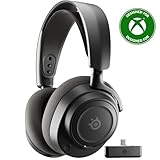


Razer BlackShark V2 X Xbox Edition
The Xbox Edition of the BlackShark V2 X is identical in driver hardware to the PC/Standard variant — same TriForce 50mm titanium-coated drivers, same HyperClear detachable cardioid mic, same FlowKnit memory foam ear cushions — but tuned and certified for Xbox. The 3.5mm connection plugs directly into the Xbox controller and audio is processed by Xbox onboard mixer. The Xbox-specific EQ tuning delivers a warmer, more game-balanced sound that works well across the Xbox game library. Available in Xbox signature black-and-green colorway.
- Pros: Xbox-certified, TriForce 50mm drivers, detachable HyperClear mic, memory foam, Xbox tuning
- Cons: 3.5mm only (no Xbox Wireless), Xbox tuning less optimal for PC use
HyperX Cloud II
The Cloud II connects to Xbox via 3.5mm into the Xbox controller or USB into the console for virtual 7.1 processing. The 53mm neodymium drivers deliver premium performance on Xbox with wide soundstage and strong positional imaging for competitive titles like Halo Infinite, Call of Duty, and Forza Horizon. The detachable mic performs excellently for Xbox party chat. At $59.99, the Cloud II remains the best wired gaming headset for Xbox under $100.
- Pros: 53mm neodymium drivers, USB 7.1 on Xbox, detachable quality mic, aluminum build, memory foam
- Cons: Wired only, HyperX USB 7.1 not DTS Headphone:X native (Xbox preferred spatial format)
Logitech G733 Lightspeed
Xbox wireless gaming with the G733 uses the USB-A dongle connection rather than native Xbox Wireless protocol, but LIGHTSPEED 2.4GHz delivers low-latency performance that is competitive. The 29-hour battery eliminates charging anxiety during long Xbox gaming sessions. Blue VO!CE microphone delivers broadcast-quality voice for Xbox parties. The suspension headband design makes the G733 one of the most comfortable wireless gaming headsets for extended sessions. Available in multiple colors for personalization.

- Pros: LIGHTSPEED wireless, 29-hour battery, Blue VO!CE mic, suspension headband comfort, RGB lighting
- Cons: Uses USB dongle rather than native Xbox Wireless, USB-A only
Ozeino 7.1 PC/Xbox
At $19.99, the Ozeino is the logical budget entry for Xbox gaming. It ships with explicit Xbox compatibility, connecting via 3.5mm into the controller or USB for virtual 7.1 on PC. For Xbox use specifically, the 3.5mm connection delivers solid stereo audio through the controller. The retractable mic handles party chat adequately. LED lighting adds aesthetic alignment with gaming setups. For a younger Xbox gamer or a secondary headset, the Ozeino represents outstanding value.
- Pros: Under $20, Xbox-compatible, USB + 3.5mm included, retractable mic, LED lighting
- Cons: Basic audio quality, plastic build, virtual 7.1 on PC only (not native Xbox), limited comfort for extended sessions
Razer BlackShark V2 X Special Edition
The Standard/Special Edition BlackShark V2 X works on Xbox via 3.5mm identically to the Xbox Edition at the same $34.99 price. The primary difference is that the Xbox Edition carries Razer Xbox certification and specific Xbox color theme; the Special Edition uses a standard black design that works cross-platform. If you game on both Xbox and PC and want one headset for both, the Special Edition is marginally more versatile than the Xbox-specific variant.

- Pros: Same TriForce drivers as Xbox Edition, cross-platform flexibility, Razer Synapse on PC, detachable mic
- Cons: Not Xbox-certified (functions identically but lacks certification), no Xbox-specific audio tuning
Buying Guide
Xbox Connection Methods Explained
3.5mm into any Xbox controller delivers stereo audio processed by the controller DAC. Universal compatibility, no spatial audio activation. USB into Xbox Series X|S or Xbox One enables Dolby Atmos for Headphones and DTS Headphone:X via Xbox spatial audio apps (available on Microsoft Store, some free). Xbox Wireless is Microsoft proprietary protocol for licensed headsets — lowest latency and most integrated experience, but requires Xbox Wireless certified headsets only.
Dolby Atmos and DTS on Xbox
Xbox support for Dolby Atmos for Headphones and DTS Headphone:X via USB headsets is one of the platform most significant audio advantages. Both are available as app purchases on Xbox ($15–$20 each, with trial periods). For competitive gaming with positional audio in Halo Infinite, Call of Duty, or Apex Legends — Dolby Atmos on Xbox with a USB headset like the Cloud II or FIFINE USB provides genuinely competitive spatial audio at modest cost.

Xbox Wireless vs 2.4GHz USB Dongle
Xbox Wireless headsets pair directly via Xbox Wireless protocol without a USB dongle, freeing up USB ports. Third-party 2.4GHz wireless headsets (Logitech G733, Gtheos) use a USB dongle. Both achieve low latency. Xbox Wireless is slightly more integrated and convenient for Xbox-primary users; USB dongles are more portable and work on PC as well. Unless you specifically want Xbox Wireless protocol, USB dongle wireless works excellently on Xbox.
Best Xbox Games for Evaluating Headset Audio
Halo Infinite multiplayer for footstep and weapon positioning. Forza Horizon 5 for detailed engine audio and environmental soundscape. Elden Ring or Baldur’s Gate 3 for atmospheric spatial audio. Call of Duty for competitive positional audio. Use these titles to evaluate whether your new headset spatial audio and directional accuracy meet your needs within the first hour of use.
Frequently Asked Questions
Do all gaming headsets work with Xbox?
Any headset with 3.5mm works with Xbox via the controller jack. USB headsets with USB-A connectors work on Xbox Series X|S USB ports. Xbox Wireless is exclusively for certified headsets. Bluetooth headsets do not connect to Xbox natively. The 3.5mm method ensures near-universal compatibility with virtually any gaming headset on the market.
Is the Razer BlackShark V2 X Xbox Edition better than the standard version for Xbox?
The audio hardware is identical — same TriForce drivers, same HyperClear mic. The Xbox Edition has Xbox-specific audio tuning optimized for Xbox audio stack and controller DAC output. In A/B testing the difference is subtle. If you plan to use the headset exclusively on Xbox, the Xbox Edition is the better purchase. For cross-platform use, the Special Edition is more versatile.
Can I use wireless headsets on Xbox One as well as Xbox Series X|S?
Yes — USB-A ports on Xbox One support 2.4GHz wireless dongle headsets. The Logitech G733 and Gtheos both work on Xbox One via USB dongle. Xbox Wireless certified headsets also work on Xbox One. Some audio features (Dolby Atmos, DTS) require Xbox One firmware updates that may not be current on original Xbox One hardware.
What is the cheapest good gaming headset for Xbox?
The Ozeino 7.1 at $19.99 is the cheapest headset we recommend for Xbox. It connects via 3.5mm into the controller and delivers functional audio and party chat. The step up to the Razer BlackShark V2 X Xbox Edition at $34.99 is worth it if your budget allows — the difference in driver quality and mic performance is substantial enough to justify the extra $15.
Verdict
The Razer BlackShark V2 X Xbox Edition at $34.99 is the best combination of price, Xbox certification, and audio performance for most Xbox gamers. For those who want the best wired experience under $100, the HyperX Cloud II remains the benchmark. Wireless Xbox gamers will find the Logitech G733 29-hour battery and LIGHTSPEED technology hard to beat at $119.99. Budget-first Xbox gamers have a legitimate option in the Ozeino at $19.99.
Related Articles
Looking for more on this topic? Browse the hand-picked guides below — each one applies the same scoring rubric used in this review.
Ready to decide? Our #1 pick for 2026 is the Razer BlackShark V2 X Xbox Edition.
Live price & availability on Amazon.













