

- Top Pick: CyberPowerPC Gaming PC, AMD Ryzen 9 9900X, GeForce RTX 5070 12GB
- Best Value: iBUYPOWER Element Gaming PC Desktop Computer AMD Ryzen 9 7900X CPU, NVIDIA GeForce RTX 5070 12GB GPU, 32GB DDR5 RAM, 1TB NVMe SSD, Windows 11 Home, Gamer Keyboard and Mouse – EWA9N5702
- Premium Choice: iBUYPOWER Slate Gaming PC Desktop Computer AMD Ryzen 9 7900X CPU, NVIDIA GeForce RTX 5080 16GB GPU, 32GB DDR5 5200MHz RAM, 2TB NVMe SSD, Windows 11 Home, Gamer Keyboard and Mouse – SBA9N5801
Affiliate disclosure: As an Amazon Associate we earn from qualifying purchases. This post contains affiliate links — if you buy through them we may earn a small commission at no extra cost to you. This never affects our recommendations.
- Quick Picks
- 3D V-Cache Explained: Why It Matters for Gaming
- Ryzen 9 vs Ryzen 7: Do You Actually Need Ryzen 9 for Gaming?
- Ryzen 9 vs Core i9: AMD vs Intel at the High End
- Top 5 AMD Ryzen 9 Gaming CPUs
- Full Comparison Table
- What to Look For When Buying a Ryzen 9
- Verdict
- Related Articles
- Frequently Asked Questions
- Related Articles
As an Amazon Associate we earn from qualifying purchases at no extra cost to you.
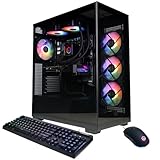


In a hurry? See the top-rated AMD Ryzen 9 Gaming CPU deals available right now:
🛒 Check Amd Ryzen 9 Gaming Cpu Prices on Amazon →🛒 Best Price Today on Amazon
Prime members get fast, free shipping on everything above, plus member-only deals. New members get a 30-day free trial — cancel anytime.
Start 30-Day Prime Free Trial →See Today’s Amazon DealsQuick Picks
| # | CPU | Best For | Price Range |
|---|---|---|---|
| 1 | Ryzen 9 7900X3D | Pure gaming, highest FPS | ~$379 |
| 2 | Ryzen 9 7950X3D | Gaming + heavy workloads | ~$549 |
| 3 | Ryzen 9 9950X | Content creation + gaming | ~$599 |
| 4 | Ryzen 9 7900X | Streaming + gaming on AM5 | ~$299 |
| 5 | Ryzen 9 5950X | Budget workstation + gaming | ~$249 |
3D V-Cache Explained: Why It Matters for Gaming
AMD’s 3D V-Cache stacks additional L3 cache directly on top of the CPU die using through-silicon via (TSV) technology. The result: dramatically more cache available to the CPU cores, which is exactly what games need.
Modern games are latency-sensitive workloads. The CPU is frequently waiting on data that lives just outside the L1/L2 cache — and every time a cache miss occurs at L2, the core has to fetch from L3, or worse, main memory. Adding 64MB of stacked L3 on top of existing cache cuts those miss penalties dramatically.
In practical terms: 3D V-Cache CPUs regularly land 10–25% higher 1% lows and average framerates in CPU-bound scenarios compared to their non-stacked counterparts. In titles like Baldur’s Gate 3, Hogwarts Legacy, Cyberpunk 2077, and most competitive shooters, the difference is measurable and consistent.
The tradeoff is clock speed. The stacked cache adds thermal overhead, which forces AMD to reduce the maximum boost frequency slightly. The 7900X3D, for example, boosts to 5.6 GHz — a hair below the 7900X’s 5.6 GHz ceiling — but gains so much in cache efficiency that real-world gaming performance is substantially better.
If gaming is your primary use case, 3D V-Cache is worth every dollar.
Ryzen 9 vs Ryzen 7: Do You Actually Need Ryzen 9 for Gaming?
Short answer: probably not for gaming alone.
The Ryzen 7 7800X3D is one of the best gaming CPUs ever made. It has the same stacked cache architecture as the 7900X3D, runs cooler, costs less, and in pure gaming benchmarks sits within 2–5% of the 7900X3D in most titles. For a gaming-only build, the Ryzen 7 7800X3D is the smarter buy.
So when does Ryzen 9 make sense?
- You stream while gaming and need the extra cores for encoding
- You run creative workloads — 3D rendering, video editing, photo batch processing — alongside gaming
- You want a single CPU that handles both your game sessions and your production work
- You’re building a workstation that also needs to game, not a gaming rig that also needs to work
Ryzen 9 CPUs bring 12 or 16 cores versus the Ryzen 7’s 8. In lightly threaded gaming, those extra cores sit idle. But the moment you fire up OBS, run a background VM, or export a DaVinci timeline between sessions, those cores matter enormously.
If your build is a dedicated gaming rig: go Ryzen 7 7800X3D. If it’s a hybrid workstation-gaming machine: Ryzen 9 earns its price premium.
Ryzen 9 vs Core i9: AMD vs Intel at the High End
Intel’s Core i9-14900K and i9-13900K were competitive when they launched, but their efficiency story is rough. Both draw 250W+ under load and require serious cooling. The i9-13900KS and 14900KS push even higher. You’re paying a power and thermal premium for performance that AMD largely matches or beats.
In gaming specifically, AMD’s 3D V-Cache CPUs outperform the Core i9 lineup in the majority of tested titles. Intel trades better in workloads that favor high single-thread clock speeds — but that gap has narrowed with Zen 5 (Ryzen 9000 series).
With Zen 5 in the Ryzen 9 9950X, AMD improved IPC by roughly 16% generation over generation while improving power efficiency. The 9950X runs hot under full load but is more disciplined than Intel’s flagship alternatives.
Intel’s 14th-gen also suffered from a high-profile instability problem tied to aggressive power limits. While a microcode patch addressed the worst of it, the reputational damage was real and the workarounds required some users to manually configure power limits in BIOS.
For gaming: AMD 3D V-Cache CPUs win the head-to-head.
For workstation parity: Ryzen 9 9950X and Core i9-14900K are close, with AMD holding a small efficiency edge.
For platform longevity: AM5 is newer and has a longer support roadmap than Intel’s LGA1700, which was discontinued.

Top 5 AMD Ryzen 9 Gaming CPUs
1. AMD Ryzen 9 7900X3D — Best Pure Gaming Ryzen 9
Specs:
- Cores/Threads: 12C / 24T
- Base / Boost: 4.4 GHz / 5.6 GHz
- L3 Cache: 128MB (64MB 3D V-Cache + 64MB standard)
- TDP: 120W
- Socket: AM5
- PCIe: 5.0
Gaming Performance: Exceptional. The single-CCD design means all cores benefit from the full 3D V-Cache stack — no split-CCD scheduling penalty. In CPU-bound scenarios, it trades blows with or beats the 7950X3D in gaming FPS.
Workload Performance: Solid for content creation. 12 cores handle streaming, light video editing, and productivity without issue. Not ideal for heavy 3D rendering where you’d want all 16 cores of the 7950X3D.
Pros:
- Best gaming performance per dollar in the Ryzen 9 family
- Single CCD = no CCD scheduler inefficiency
- Lower power draw than 7950X3D
- Strong 1% lows thanks to 128MB L3
Cons:
- 12 cores limits ceiling for heavily threaded workloads
- Requires AM5 platform (DDR5 cost)
Who It’s For: Gamers who also stream or do light content work and want the best AMD gaming CPU under $400.
Verdict: Best overall pick for gaming-focused Ryzen 9 buyers.
2. AMD Ryzen 9 7950X3D — Best Gaming + Workstation Hybrid
Specs:
- Cores/Threads: 16C / 32T
- Base / Boost: 4.2 GHz / 5.7 GHz
- L3 Cache: 144MB (64MB 3D V-Cache on one CCD + 32MB standard on second CCD)
- TDP: 120W
- Socket: AM5
- PCIe: 5.0
Gaming Performance: Outstanding, with a caveat. The 7950X3D uses a dual-CCD design: one CCD has the 3D V-Cache stack, the other does not. Games need to land on the V-Cache CCD for maximum performance. Windows 11 and AMD’s Ryzen Master utility handle this automatically via a preferred-core scheduler, but edge cases exist where some titles schedule incorrectly. In practice, gaming performance is close to the 7900X3D — within 1–4% in most tested titles.
Workload Performance: Dominant. 16 cores and 32 threads make this the best CPU AMD makes for combining intensive creative work with gaming. Blender renders, Premiere exports, and compiling large codebases run faster here than any other Ryzen gaming chip.
Pros:
- Best of both worlds: gaming + workstation
- 16 cores for any threaded workload
- Runs surprisingly cool for its core count
- Future-proofed for increasingly threaded software
Cons:
- Dual-CCD means occasional scheduler imprecision in gaming
- More expensive than 7900X3D
- Overkill if gaming is 90%+ of your use case
Who It’s For: Creative professionals who game seriously — video editors, 3D artists, streamers with heavy production pipelines.
3. AMD Ryzen 9 9950X — Best Ryzen 9 for Content Creation + Gaming
Specs:
- Cores/Threads: 16C / 32T
- Base / Boost: 4.3 GHz / 5.7 GHz
- L3 Cache: 64MB (no 3D V-Cache)
- TDP: 170W
- Socket: AM5
- PCIe: 5.0
- Architecture: Zen 5
Gaming Performance: Very good, not exceptional. Without 3D V-Cache, the 9950X falls 10–20% behind the 7900X3D in CPU-bound gaming scenarios. In GPU-limited scenarios (4K, high settings), the gap narrows to near zero. At 1440p and 1080p competitive framerates, the cache deficit shows.

Workload Performance: Class-leading. Zen 5’s 16% IPC improvement over Zen 4 makes the 9950X the fastest non-HEDT CPU AMD has made for production work. Video encoding, 3D rendering, compiling, ML inference tasks — the 9950X leads or matches anything at this price.
Pros:
- Fastest IPC in AMD’s current consumer lineup
- Best-in-class for creation workloads
- Strong upgrade path on AM5
- Good gaming performance at GPU-limited resolutions
Cons:
- No 3D V-Cache hurts at 1080p/1440p gaming
- 170W TDP demands a premium cooler (360mm AIO minimum recommended)
- Priced higher than the 7900X3D with less gaming upside
Who It’s For: Content creators who game — not gamers who also create. If your work comes first and gaming comes second, this is your CPU.
4. AMD Ryzen 9 7900X — Best for Streaming + Gaming on AM5
Specs:
- Cores/Threads: 12C / 24T
- Base / Boost: 4.7 GHz / 5.6 GHz
- L3 Cache: 64MB
- TDP: 170W
- Socket: AM5
- PCIe: 5.0
Gaming Performance: Good at GPU-limited settings. At 4K with a high-end GPU, the 7900X delivers excellent framerates. At 1080p in CPU-bound scenarios, it trails both 3D V-Cache options meaningfully. This is a streaming chip that can game well — not a gaming chip that can stream.
Workload Performance: Strong. 12 cores at high boost clocks handle streaming encode (x264/NVENC assisted), productivity tasks, and moderate creative work with ease. Pairs well with a capture card setup for dual-PC streaming alternatives in a single-CPU configuration.
Pros:
- Strong multi-core performance for streaming
- High boost clock for gaming at GPU-limited settings
- AM5 platform longevity
- Good price after 9000-series launched
Cons:
- No 3D V-Cache limits 1080p gaming ceiling
- High TDP (170W) — needs solid cooling
- 7900X3D costs little more and games better
Who It’s For: Streamers or content creators on AM5 who want respectable gaming without paying for 3D V-Cache. Also a good pick if you find it significantly discounted versus the X3D models.
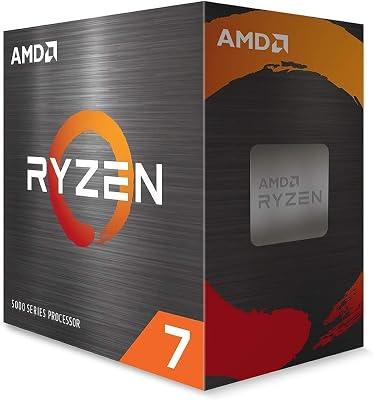
5. AMD Ryzen 9 5950X — Best Budget Workstation + Gaming on AM4
Specs:
- Cores/Threads: 16C / 32T
- Base / Boost: 3.4 GHz / 4.9 GHz
- L3 Cache: 72MB
- TDP: 105W
- Socket: AM4
- PCIe: 4.0
- Architecture: Zen 3
Gaming Performance: Respectable but aging. Zen 3 IPC is good — the 5950X is not slow in games. But the lower boost clock compared to AM5 chips and the lack of 3D V-Cache mean it trails current-gen options in CPU-bound workloads. At 1440p and 4K with a modern GPU, it still delivers smooth experiences.
Workload Performance: Still competitive. 16 cores on Zen 3 can handle demanding video editing, Blender scenes, and streaming workflows without embarrassment. The platform (DDR4, AM4) is mature, affordable, and widely available secondhand.
Pros:
- Significant cost savings on AM4 platform (DDR4, cheaper boards)
- 16 cores for demanding work
- Low 105W TDP — efficient and cooler-friendly
- Widely available new and refurbished
Cons:
- AM4 platform is at end of life — no upgrade path
- Slower than AM5 alternatives in gaming and workloads
- PCIe 4.0 limits future GPU bandwidth (less critical at current GPU speeds)
- No 3D V-Cache option on AM4 Ryzen 9
Who It’s For: Budget-conscious builders upgrading an existing AM4 system or building a workstation-class rig without spending AM5 platform costs.
Full Comparison Table
| CPU | Cores | L3 Cache | Boost Clock | TDP | Gaming (1080p) | Workload | Price Est. | Socket |
|---|---|---|---|---|---|---|---|---|
| Ryzen 9 7900X3D | 12C/24T | 128MB | 5.6 GHz | 120W | Excellent | Good | ~$379 | AM5 |
| Ryzen 9 7950X3D | 16C/32T | 144MB | 5.7 GHz | 120W | Excellent | Excellent | ~$549 | AM5 |
| Ryzen 9 9950X | 16C/32T | 64MB | 5.7 GHz | 170W | Very Good | Best | ~$599 | AM5 |
| Ryzen 9 7900X | 12C/24T | 64MB | 5.6 GHz | 170W | Good | Good | ~$299 | AM5 |
| Ryzen 9 5950X | 16C/32T | 72MB | 4.9 GHz | 105W | Decent | Good | ~$249 | AM4 |
What to Look For When Buying a Ryzen 9
Core Count
More cores do not equal better gaming. Games rarely saturate more than 8–10 cores. Where extra cores pay off is in simultaneous workloads — running OBS while gaming, rendering in background, or multitasking heavily. For pure gaming, 12 cores is plenty. For hybrid use, 16 gives headroom.
3D V-Cache
If gaming at 1080p or 1440p matters to you — especially at high framerates in competitive titles — prioritize 3D V-Cache. The cache advantage shows most in CPU-bound scenarios. At 4K with GPU-limited framerates, the benefit shrinks but remains present in 1% lows.
TDP and Cooler Requirements
- 120W (7900X3D, 7950X3D): A 240mm AIO or strong air cooler like a Noctua NH-D15 handles these well
- 170W (9950X, 7900X): A 280mm–360mm AIO is strongly recommended; air coolers struggle under sustained all-core loads
- 105W (5950X): Very manageable — a mid-tier air cooler works fine
Buying a premium CPU and pairing it with an inadequate cooler leaves performance on the table. AMD’s boost algorithm scales down aggressively when thermals are hit.
Platform Costs
AM5 (all Ryzen 7000 and 9000 series) requires DDR5 and a 600-series motherboard. The platform premium is real but the upgrade runway is longer — AMD has committed to AM5 support through at least 2027. AM4 (Ryzen 5000 series) is cheaper to build on today but has no upgrade path remaining.
Memory Configuration
All AM5 chips benefit from DDR5-6000 in EXPO mode. That’s the sweet spot for Infinity Fabric synchronization on AM5 — performance measurably improves over DDR5-4800 stock speeds. Budget DDR5-6000 kits are widely available and should be considered mandatory for any AM5 Ryzen 9 build.
Verdict
Best AMD Ryzen 9 gaming CPU overall: Ryzen 9 7900X3D
The single-CCD design, 128MB of cache, and competitive pricing make it the best pure gaming option in the Ryzen 9 family. It handles streaming and light creative work without breaking a sweat, runs cooler than higher-TDP alternatives, and delivers the highest consistent gaming FPS of any Ryzen 9 chip.
Best for workstation + gaming: Ryzen 9 7950X3D
If you need 16 cores for demanding professional work and also want elite gaming performance, the 7950X3D is the chip AMD built for exactly that use case. The scheduler handles CCD routing transparently in most workflows.
Best for pure content creation: Ryzen 9 9950X
Zen 5’s IPC gains make this the fastest consumer CPU AMD has released. If rendering pipelines, transcoding, and simulation workloads dominate your use, the 9950X earns its price — and handles gaming well enough at GPU-limited settings.
Best budget entry: Ryzen 9 5950X
If AM4 is your platform and you already own a board, the 5950X remains a capable chip for under $250. Don’t build a new AM4 system around it in 2026, but as an upgrade or an entry point into 16-core workstation performance, it still delivers.
Whatever your use case, avoid over-spending on cores you won’t use. Match the CPU to your actual workflow — then pair it with fast DDR5, adequate cooling, and let the GPU do the heavy lifting.
Related Articles
Looking for more on this topic? Browse the hand-picked guides below — each one applies the same scoring rubric used in this review.
Frequently Asked Questions
What is the best gaming cpu ryzen 9 in 2026?
The best gaming cpu ryzen 9 depends on your budget and how you plan to use it. The options compared above are our top-rated picks based on real customer ratings, build quality, and overall value — start with the highest-rated model that fits your budget.
How much should I expect to spend on a gaming cpu ryzen 9?
Prices vary by brand and features. Budget options cover the essentials, while mid-range and premium models add durability, performance, and extra features. Compare the prices in the list above to find the best value for your needs.
What should I look for when buying a gaming cpu ryzen 9?
Focus on what matters most for your use case — build quality, compatibility, performance, warranty, and verified customer reviews. Every pick above is selected to balance these factors.
Are budget gaming cpu ryzen 9 options worth it?
Yes. For most people a well-reviewed budget or mid-range gaming cpu ryzen 9 delivers excellent value. You only need to spend more if you specifically require premium materials or top-tier performance.
How did we choose these gaming cpu ryzen 9 picks?
We compare current Amazon ratings, review counts, key features, and price to surface the options with the best real-world value. The list is refreshed as ratings and availability change.












