
Best CPU for Productivity and Gaming in 2026: A Buyer’s Guide
Many PC builders do not have one job. They open a game after a day of editing video, compiling code, rendering a 3D scene or running large spreadsheets and simulations. A processor for that kind of machine has to do two things at once. It needs strong single-thread speed for games and interactive apps, and it needs enough cores to finish heavy background work without slowing everything else down. This guide explains how to choose a CPU for that mixed role in 2026.
This is a buying guide, not a benchmark roundup. It does not publish scores, render times or frame rates, because those change with software versions, memory settings and cooling. Instead, it sets out the criteria that matter and shows how the listings below fit them. Use current reviews to confirm performance in the exact applications you run.
The listing below is the primary pick for this search and the alternatives are close options in the same high-core product space. The listing above may not match the exact model you have in mind, so check the card for the precise model, core count and price before ordering.
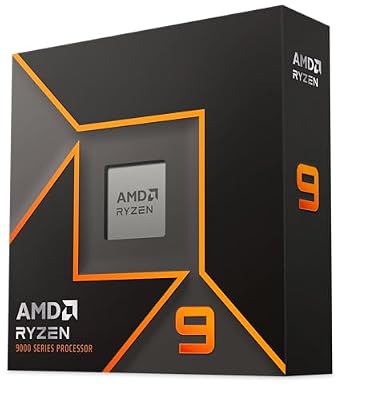

AMD Ryzen 9 9950X3D 16-Core Processor


AMD Ryzen 9 9900X3D 12-Core Processor
What Makes a Productivity-and-Gaming CPU Different
A pure gaming CPU and a productivity CPU are not always the same product. Gaming favors a small number of fast cores and, on some AMD chips, a large cache that keeps frame times steady. Productivity favors more cores and threads, because rendering, encoding, compiling and simulation scale well across many threads. The best hybrid choice is a chip with enough cores to keep background work from competing with the game, plus enough per-core speed that the game does not feel sluggish.
Core Count and Thread Count
More cores help when several heavy tasks run at once. A video export, a compile or a render can take many threads, and a high core count lets you keep working while the export finishes. Thread count matters too. Some Intel hybrid designs use efficiency cores rather than simultaneous multithreading, so the number of cores and the number of threads may not match. Read the spec sheet rather than assuming.
Single-Thread Speed for Interactive Work
Even a productivity-heavy build spends much of its time on responsive tasks: opening project files, navigating timelines, browsing and running the game itself. Strong single-thread performance keeps those tasks snappy. A chip with a huge core count but weak per-core speed can feel slow in interactive work and in games that rely on a few main threads. Balance is the goal.
Cache and Gaming Consistency
Cache can help gaming consistency even on a productivity-focused chip. A large L3 cache reduces the time the processor spends fetching data, which can smooth out frame times in games. Some AMD X3D models add stacked cache for this reason, but the benefit applies mainly to games and some specific workloads. It is not a universal speed boost for every program.
AMD Ryzen™ 9 9900X 12-Core, 24-Thread Unlocked Desktop Processor


As an Amazon Associate we earn from qualifying purchases. Product prices and availability are accurate as of the date/time indicated.
Comparison Table: Productivity and Gaming CPU Options
The table compares the listings by the role they play in a mixed build. Prices and ratings are left out because they change and vary by seller. Use the table to match each option to your workload.
| Option | Best for | Typical price range | Trade-off to check |
|---|---|---|---|
| Primary pick (hero listing) | Balanced builds that game and run heavy tasks | Check current price | Confirm the exact model and platform |
| Alternative 1 | Gamers who also render or encode on the CPU | Check current price | Higher power draw under full load |
| Alternative 2 | Creators who want the most cores | Check current price | Total platform and cooling cost |
| Alternative 3 | Players who want a cache-focused gaming feel | Check current price | Less benefit for purely non-gaming work |
| Alternative 4 | Builders matching a specific motherboard | Check current price | Socket and memory compatibility |
The table is a shortlist rather than a ranking of absolute speed. The right option depends on how many hours you spend on each task and whether your games are limited by the processor or by the graphics card.
Choosing the Right Balance for Your Work
If Gaming Comes First
If you game most evenings and only run occasional heavy tasks, a chip with a strong gaming reputation and a healthy core count is usually the right call. You keep the game responsive while still having room for a background export or a compile. A graphics card that matches your resolution matters more than an extra pair of cores in most titles. The best CPU for 1440p gaming guide covers that balance in more depth.
If Production Comes First
If your income depends on rendering, encoding or large builds, the highest core count you can afford usually pays back in time saved. Look at the chips that combine many cores with good single-thread speed, and plan the platform around them. The Ryzen 9 9950X3D review and the Ryzen 9 9900X review show how AMD’s high-core models approach this trade-off.
Platform, Memory and Cooling
A high-core CPU places more demand on the rest of the build. Choose a motherboard with stable power delivery, enough memory slots for your target capacity and the M.2 slots you need. For memory, a 32GB or 64GB kit is common for mixed workloads, and the best 32GB DDR5 RAM guide and the best 64GB DDR5 RAM guide help size the kit. Cooling should match the chip’s sustained load, because long renders test a cooler far more than a short game session does. The AIO cooler guide for Ryzen 9 covers the options for high-core AMD chips.
AMD Ryzen 9 9950X3D 16-Core Processor


As an Amazon Associate we earn from qualifying purchases. Product prices and availability are accurate as of the date/time indicated.
How the Intel Options Compare
Intel’s high-core hybrid chips take a different approach. Efficiency cores take on background work at lower power, which can help a mixed workload stay smooth. The Ryzen 9 9950X versus Core Ultra 9 285K comparison places an Intel flagship against a high-core AMD rival, and it is a good starting point if you are choosing between platforms. For Intel’s broader lineup, the best Intel Core for gaming guide and the Core Ultra 9 285K review give more detail on how those chips behave in a gaming-first build.
Frequently Asked Questions
Is a high-core CPU worth it for gaming?
Only if you also run heavy background or production work. For gaming alone, extra cores often bring little benefit, and a strong graphics card and fast memory matter more. If your workload spans both, the extra cores can save a lot of waiting time.
Do productivity CPUs need more cooling?
Often yes. Long renders and compiles keep the processor under sustained load, which is harder on a cooler than a typical game session. A capable tower cooler or a quality AIO is a sensible choice for a high-core chip.
Should I choose AMD or Intel for a mixed workload?
Both can handle mixed work well. AMD high-core chips use a more uniform core design, while Intel’s hybrid chips add efficiency cores for background tasks. Compare the applications you run most in current reviews before choosing.
How much RAM does a productivity and gaming PC need?
Many mixed builds start at 32GB and move to 64GB when they edit large files or run virtual machines. Check your software’s memory guidance and choose a kit that is stable on your motherboard.
Final Verdict
The best CPU for productivity and gaming in 2026 is the one that balances enough cores for your heaviest tasks with enough per-core speed for games and interactive work. Start by estimating how many hours you spend on each job, then choose a platform and cooling plan that holds up under sustained load. Confirm the exact model, core count and price on the listing card before you buy, and check current reviews for the applications you use most.





