A graphic design monitor earns its place with colour, not refresh rate. Brand work, packaging, print layouts and digital illustration all depend on one chain of trust: the colour picked on screen should be the colour a client sees in a proof, a browser or a printed sheet. That trust comes from measurable things — how much of the sRGB, Adobe RGB and DCI-P3 colour spaces a panel covers, how close it sits to its target colours from the factory, whether it can be recalibrated in hardware as it ages, and whether brightness and colour stay even from centre to corners.
This guide takes the colour-accuracy-led angle. The site also keeps a broader roundup of monitors for graphic design that mixes in general-purpose and budget panels; the five below are narrower and more demanding. Every pick is factory-calibrated, with published gamut figures, a published Delta E claim and a calibration path — hardware look-up table (LUT) calibration at the top end, manufacturer calibration software further down. Refresh rate is secondary throughout, as it should be for layout, illustration and photo-led design.
As an Amazon Associate we earn from qualifying purchases.
What actually decides colour quality
Gamut coverage. sRGB is the working space for web and interface design, and full coverage is the minimum bar — every pick claims 99 to 100 percent of it. Adobe RGB matters for print because it reaches further into cyans and greens that CMYK presses can reproduce; an sRGB-only monitor can hide colours the press will print. DCI-P3 and Display P3 are wider than sRGB in reds and greens and are the native language of modern Apple devices and video. Designers who split time between print and screen should look for high figures in both Adobe RGB and P3 — only two picks here fully deliver that.
Delta E. The measured distance between the colour shown and the colour requested. A figure of 2 or below is the usual professional threshold. Every monitor below is factory calibrated to a published figure of Delta E 2 or better, most with a calibration report in the box. These are factory figures: they describe the panel as shipped, and recalibration keeps it there.
Hardware LUT versus software calibration. Software calibration builds a correction profile in the graphics card output. Hardware calibration writes it into the monitor’s own look-up table, so it survives a change of computer and costs no tonal steps. The SW272U is the clear hardware example here, with a 16-bit 3D LUT. The others rely on manufacturer software — normal at their level, but a step down for print-critical studios.
Uniformity. A panel can measure perfectly at the centre and drift at the edges. Uniformity technology fine-tunes brightness and colour across hundreds of sub-regions at the factory, so a proof checked in a corner means the same as one in the middle. Three picks publish a named system.
10-bit colour, stated honestly. A true 10-bit path shows 1.07 billion colours and smooths gradients in skies, shadows and brand blends. Makers reach that number differently: some panels are native 10-bit, others use 8-bit plus frame rate control (FRC). Where a maker explicitly publishes 10-bit depth, this guide says so; where a listing only gives a 1.07-billion figure, the construction is flagged as undisclosed rather than guessed.
1. BenQ PhotoVue SW272U — the print-first hardware pick

The SW272U is the most complete colour tool here, and the natural first choice for designers whose work ends up on paper. BenQ publishes 99 percent Adobe RGB and 99 percent DCI-P3 and Display P3 coverage, a factory accuracy figure of Delta E ≤ 2, and a 10-bit colour depth driven through a 16-bit 3D LUT. Calibration is written into the monitor itself using BenQ’s Palette Master Ultimate and AQCOLOR Pilot software with a separate calibrator. Uniformity Technology adjusts luminance and chrominance across the screen, and the fine-coated Nano Matte panel carries a TÜV anti-reflection certification for a paper-like surface — reinforced by Paper Color Sync and Pantone Validated and Pantone SkinTone Validated status.
Supporting hardware is equally print-minded: a shading hood is included, a wireless Hotkey Puck switches colour modes, and USB-C carries the picture with 90W power delivery alongside HDMI and DisplayPort. The panel runs at 60Hz — the deliberate trade of this class, where colour takes the budget a gaming panel spends on speed.
Specs
- Size and panel: 27-inch IPS, Nano Matte fine coating
- Resolution: 3840 x 2160 (4K UHD), 60Hz
- Colour gamut (maker-published): 99% Adobe RGB, 99% DCI-P3 / Display P3
- Factory accuracy: Delta E ≤ 2, individual calibration report included
- Calibration: Hardware calibration, 16-bit 3D LUT, Palette Master Ultimate / AQCOLOR Pilot
- Colour depth: 10-bit colour depth as published by BenQ, 1.07 billion colours
- Uniformity: BenQ Uniformity Technology
- Ports: USB-C with 90W power delivery, 2 x HDMI 2.0, DisplayPort, USB hub, SD card reader
- Extras: Shading hood, wireless Hotkey Puck, HDR10, Pantone Validated
Best for: print, packaging and brand designers who need Adobe RGB coverage and hardware recalibration they can repeat for years.
2. ASUS ProArt Display PA279CRV — wide gamut for print and screen in one panel

The PA279CRV is the balanced prosumer option: a 27-inch 4K IPS panel publishing the same headline gamut pairing as the BenQ above — 99 percent DCI-P3 and 99 percent Adobe RGB, with full sRGB — so one desk can serve print layouts in the morning and P3 digital work in the afternoon. ASUS factory-calibrates each unit to Delta E less than 2, the model is Calman Verified, and a calibration report is in the box. ASUS lists 1.07 billion display colours; the listing does not present that as a native 10-bit panel claim, so it is reported exactly as published.
Calibration comes through ASUS ProArt Calibration software rather than a published 3D hardware LUT, and there is no named uniformity system — the two honest gaps against the SW272U. In return, connectivity is polished: USB-C with 96W power delivery, DisplayPort daisy-chaining, HDMI and a USB hub, plus DisplayHDR 400. At 60Hz it stays firmly a design panel.
Specs
- Size and panel: 27-inch IPS
- Resolution: 3840 x 2160 (4K UHD), 60Hz
- Colour gamut (maker-published): 99% DCI-P3, 99% Adobe RGB, 100% sRGB
- Factory accuracy: Delta E < 2, Calman Verified, calibration report included
- Calibration: ASUS ProArt Calibration software; no hardware 3D LUT published
- Colour depth: 1.07 billion colours as listed; native-versus-FRC construction not disclosed in the listing
- Uniformity: No named uniformity system published
- Ports: USB-C with 96W power delivery, DisplayPort with daisy-chain output, HDMI, USB hub
- Extras: VESA DisplayHDR 400, ergonomic stand
Best for: freelance and studio designers who split work between print (Adobe RGB) and digital (DCI-P3) and want one calibrated 4K panel with single-cable laptop docking.
3. BenQ PD3225U — the larger 4K canvas with uniformity control

Designers who find 27 inches tight for layered layouts should look at the PD3225U, a 32-inch-class 4K display on IPS Black technology with a 2000:1 contrast ratio — double a conventional IPS figure — giving shadows and dark themes more separation. Its colour brief is screen-led: 98 percent DCI-P3 with 100 percent sRGB and Rec.709, factory calibration to Delta E ≤ 2 with a report in the box, and the same Uniformity Technology family as the SW272U. It is Pantone and Pantone SkinTone Validated.
There is no Adobe RGB headline figure and no hardware LUT, so print specialists should stay with the SW272U; in exchange, this is the strongest dock in the group. Two Thunderbolt 3 ports provide 85W power delivery, daisy-chaining and a KVM switch, backed by HDMI, DisplayPort and a USB hub. BenQ lists 1.07 billion display colours; as with the ASUS, the headline listing does not disclose the construction behind that figure.
Specs
- Size and panel: 31.5-inch (32-inch class) IPS Black
- Resolution: 3840 x 2160 (4K UHD), 60Hz
- Contrast: 2000:1 native
- Colour gamut (maker-published): 98% DCI-P3 / Display P3, 100% sRGB, 100% Rec.709
- Factory accuracy: Delta E ≤ 2, calibration report included
- Calibration: Manufacturer software calibration; no hardware LUT published
- Colour depth: 1.07 billion colours as listed; construction not disclosed in the listing
- Uniformity: BenQ Uniformity Technology
- Ports: 2 x Thunderbolt 3 with 85W power delivery, HDMI, DisplayPort, USB hub, KVM switch, daisy chain
Best for: UI, web and digital designers who want a larger 4K canvas, even colour across it, and a Thunderbolt dock that replaces a separate hub.
4. BenQ PD2730S — 5K sharpness for Mac-based designers
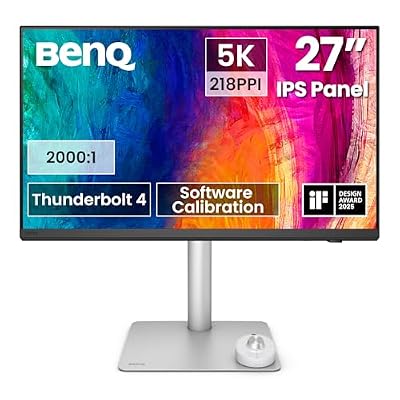
The PD2730S answers a different problem: text and vector edges. Its 27-inch 5K panel packs 5120 x 2880 pixels at 218 pixels per inch, the density class of Apple’s Retina displays, so type, icon grids and mock-ups render at laptop sharpness without scaling compromises. Colour is handled properly: 98 percent P3, Delta E ≤ 2, corner-to-corner uniformity through micro-zone correction, and Pantone validation. The IPS Black panel gives 2000:1 contrast, and the Nano Matte finish keeps reflections down.
Calibration is software calibration, as BenQ’s own launch material states, supported by the Display ColorTalk matching tool — a step below the SW272U’s hardware LUT, and worth knowing before choosing it for print-critical work; it also publishes no Adobe RGB headline figure. Connectivity is the most modern here: Thunderbolt 4 with 90W power delivery, daisy-chaining up to dual 5K displays, HDMI, DisplayPort, a USB hub and KVM switching. Refresh stays at 60Hz.
Specs
- Size and panel: 27-inch IPS Black, Nano Matte
- Resolution: 5120 x 2880 (5K), 218 ppi, 60Hz
- Contrast: 2000:1 native
- Colour gamut (maker-published): 98% DCI-P3 / Display P3
- Factory accuracy: Delta E ≤ 2
- Calibration: Software calibration as published by BenQ, Display ColorTalk support; no hardware LUT
- Uniformity: Full-screen uniformity correction across micro-zones
- Ports: Thunderbolt 4 with 90W power delivery, HDMI, DisplayPort, USB hub, KVM switch, 5K daisy chain
- Extras: Pantone Validated and Pantone SkinTone Validated, HDR10, wireless Hotkey Puck
Best for: Mac-based designers, UI specialists and 3D or VFX artists who value Retina-class sharpness and P3 colour over Adobe RGB print coverage.
5. Dell UltraSharp U2725QE — the hub monitor with a high factory standard

The U2725QE is the pick for a designer whose monitor is also the centre of the desk’s wiring. Its 27-inch 4K IPS Black panel publishes the deepest contrast here at 3000:1, a 450-nit brightness figure, and the tightest factory accuracy claim: Dell’s technical specifications list a calibration accuracy of Delta E < 1.5 average. Gamut coverage is screen-focused — 99 percent DCI-P3, 99 percent Display P3, 100 percent sRGB and 100 percent BT.709 — with no Adobe RGB figure, so, like the two PD-series models, it suits digital-first work better than CMYK proofing. Dell lists 1.07 billion supported colours without presenting the figure as a native panel claim.
Calibration is handled in software through Dell’s colour management tools; there is no hardware LUT and no named uniformity system, keeping it a step behind the SW272U for purists. The compensation is everything around the panel: a Thunderbolt 4 hub with up to 140W power delivery, HDMI 2.1, DisplayPort, USB expansion, Ethernet and KVM, plus a 120Hz refresh rate — the one place speed appears here, a bonus for motion work that changes nothing about colour. DisplayHDR 600 rounds out the sheet.
Specs
- Size and panel: 27-inch IPS Black
- Resolution: 3840 x 2160 (4K UHD), 120Hz
- Contrast and brightness: 3000:1 native, 450 nits as listed by Dell
- Colour gamut (maker-published): 99% DCI-P3, 99% Display P3, 100% sRGB, 100% BT.709
- Factory accuracy: Delta E < 1.5 average per Dell technical specifications
- Calibration: Dell colour management software; no hardware LUT published
- Colour depth: 1.07 billion colours as listed by Dell; construction not presented as a native claim
- Ports: Thunderbolt 4 hub with up to 140W power delivery, HDMI 2.1, DisplayPort 1.4, USB hub, Ethernet, KVM switch
- Extras: VESA DisplayHDR 600
Best for: digital designers who want one Thunderbolt hub monitor to run the whole desk, with a strong factory calibration figure and P3 colour for screen work.
How to choose among the five
Start with the destination. For print, Adobe RGB and hardware calibration narrow the field immediately: the SW272U is the full answer, the PA279CRV the alternative. For screen work, P3 coverage, uniformity and resolution matter more — the PD3225U for a larger canvas, the PD2730S for 5K sharpness, and the U2725QE for a hub-first desk.
Then check the calibration path. A factory Delta E figure describes day one. Studios that recheck colour monthly should weight the SW272U’s hardware LUT heavily; occasional software calibrators will be well served by any of the other four. Finally, match ports to the computer: Thunderbolt 4, Thunderbolt 3 and high-wattage USB-C picks here all collapse the desk to a single cable — the feature felt every day, long after gamut figures fade into the background of a well-made file.