

Buying a VR headset for work is a different decision from buying one for games. What decides it is whether you can read small text for hours without hunting for a sharp spot, whether the passthrough cameras show your real keyboard and notebook clearly enough to use them, and whether the battery plan survives a full morning of meetings. Headline field of view and game libraries matter far less than resolution per eye, lens type and how the headset charges.
This guide serves three groups: remote workers who want virtual monitors on a desk that is too small for real ones, people who take meetings inside VR, and solo workers who use a headset as a focus tool. Every pick is sold on Amazon US, and each one is described from the product name and specifications printed on its Amazon page, including storage, displays and what the box contains.
Quick Picks
As an Amazon Associate we earn from qualifying purchases
| Product | Best for | Key spec from title |
|---|---|---|
| Meta Quest Pro | Meetings and a mixed-reality desk | 256GB storage, eye and face tracking |
| HTC VIVE Focus Vision | Reading and writing text all day | 2448 x 2448 per eye, DisplayPort mode |
| HTC VIVE XR Elite | Work that moves between places | Detachable battery cradle, glasses-style mode |
| Meta Quest 3S 256GB | A first work headset or team seats | 256GB storage, Snapdragon XR2 Gen 2 |
How to Choose
Text Clarity Comes From Resolution and Lenses
Per-eye resolution is the figure that decides whether documents stay readable. The VIVE Focus Vision in this guide renders 2448 x 2448 pixels per eye, while the Quest 3S renders 1832 x 1920, and that gap is visible in spreadsheets and code. Lens design matters just as much: pancake lenses hold clarity across most of the frame, while Fresnel lenses keep a smaller sharp centre, so your eyes must point at text rather than glance at it. For work, rank resolution and lens type above refresh rate.
Passthrough Decides Whether You Can Use Your Real Desk
Colour passthrough is what turns a headset from a sealed box into a desk tool. With it, you can find keys on a physical keyboard, read a notebook, or check a phone without lifting the headset. All four headsets here have colour passthrough cameras, but the quality still varies with room lighting, so a bright, even desk light helps every model. If your work style mixes screens with paper, treat passthrough as a core specification, not a bonus feature, and plan your lighting around it.
Plan Power and Comfort for a Full Work Block
No headset in this guide runs a full workday on one charge; roughly two hours per charge is the norm. The difference is the recovery plan. The Focus Vision swaps batteries without shutting down, the Quest Pro sits on a charging dock between sessions, and the XR Elite moves its battery to a detachable cradle. Weight distribution matters more than the gram figure: a balanced headset with a rigid strap stays comfortable through a long document, while a front-heavy one needs constant adjustment.
Match the Platform to Your Work Software
Decide whether your work apps run on the headset itself or on a PC. Standalone platforms carry virtual monitor apps and meeting rooms natively, which suits laptop-free travel. A PC link adds your full desktop: the Focus Vision offers a wired DisplayPort mode for a lossless feed, while the Quest models stream over USB or Wi-Fi. If your employer locks software to Windows machines, the PC route is the safer pick. Our guide to the best VR headsets of 2026 covers the gaming-first models this work shortlist leaves out.
The 4 Best Options
Meta Quest Pro
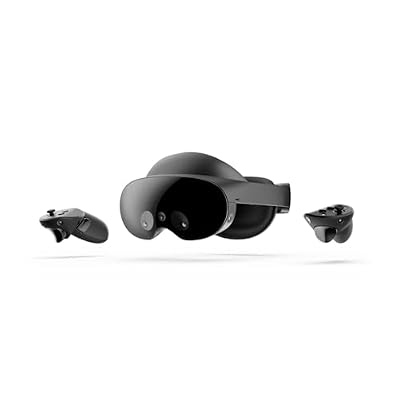
Meta built the Quest Pro around work rather than games. Full-colour passthrough lets you keep a real keyboard and notebook in view, eye and face tracking drive a more expressive avatar in meeting rooms, and the pancake lenses keep text steady across the frame instead of only in the centre. The included charging dock gives it a home between sessions, so it starts each meeting full. It runs Meta’s work software, including virtual monitor apps and Horizon Workrooms, with 256GB of storage for a serious app library.
Specs
- Storage: 256GB
- Memory: 12GB RAM
- Processor: Snapdragon XR2+
- Resolution: 1800 x 1920 per eye
- Refresh rate: 90Hz
- Lenses: Pancake
- Full-colour mixed reality passthrough
- Eye tracking and face tracking
- Touch Pro controllers
- Charging dock included
- Model number: 899-00412-01
Best for: People whose VR workday is mostly meetings plus a mixed-reality desk.
Watch out for: Meta has wound down Quest Pro sales through its own store, so check the seller, confirm the unit is new, and make sure both Touch Pro controllers are included and working.
ASIN: B09Z7KGTVW
HTC VIVE Focus Vision

The Focus Vision is the text worker’s pick. Its 2448 x 2448 resolution per eye is the highest in this guide, eye tracking adjusts the lens spacing automatically, and a DisplayPort mode feeds it a direct, uncompressed picture from a work PC when you want your full desktop at native sharpness. Used standalone, it runs HTC’s business software for meetings and virtual screens. The battery swaps out without powering down, which makes back-to-back focus blocks realistic: keep a charged spare and the headset never waits on a cable.
Specs
- Resolution: 2448 x 2448 per eye
- Field of view: up to 120 degrees
- Refresh rate: 90Hz
- Processor: Snapdragon XR2
- Storage: 128GB, expandable with a microSD card
- Eye tracking with automatic IPD adjustment
- DisplayPort mode for PC VR streaming
- Hot-swappable battery
- Model number: 2QD4100
Best for: Solo professionals who read and write text for hours and want a PC link that does not compress the image.
Watch out for: Confirm what the Consumer Edition box includes for wired PC streaming before ordering, since the DisplayPort streaming kit is a separate accessory line from HTC.
ASIN: B0DDRLX7V4
HTC VIVE XR Elite
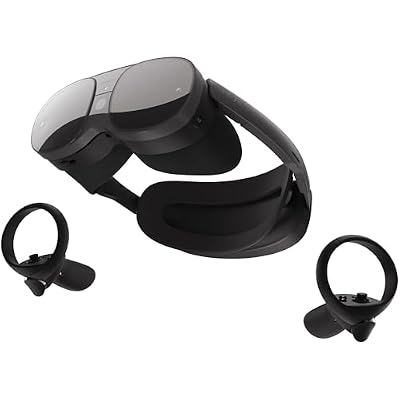
The XR Elite is the convertible of this group. Its battery sits in a detachable cradle at the back, which balances the headset for desk sessions, and the cradle comes off entirely to leave a glasses-style frame for short tasks, calls and travel. Colour passthrough keeps your surroundings visible in both forms. Resolution per eye is lower than the Focus Vision’s, so documents are a step softer, but for meetings, quick document checks and a second screen in a hotel room, the flexibility is the point.
Specs
- Resolution: 1920 x 1920 per eye
- Field of view: 110 degrees
- Refresh rate: 90Hz
- Processor: Snapdragon XR2
- Memory: 12GB RAM
- Storage: 128GB
- Detachable battery cradle with glasses-style temple mode
- Full-colour passthrough
- Model number: 99HATS002-00
Best for: Hybrid workers who split the week between a home desk, an office and travel.
Watch out for: In glasses mode the headset draws power over USB-C from a phone or power bank, so check the listing’s box contents for the cradle, straps and cables your routine needs.
ASIN: B0BQXDFLJ6
Meta Quest 3S 256GB

The Quest 3S is the low-commitment way into working in VR. It runs the same virtual monitor and meeting apps as the Quest Pro on the Snapdragon XR2 Gen 2 platform, with colour passthrough for your real desk, and the 256GB storage holds a full work library without housekeeping. The compromises are optical: Fresnel lenses keep text sharpest in the centre of the frame, and the basic strap suits shorter sessions better than long ones. As a first headset, or as several identical seats for a small team, it covers the work basics honestly.
Specs
- Storage: 256GB
- Processor: Snapdragon XR2 Gen 2
- Memory: 8GB RAM
- Resolution: 1832 x 1920 per eye
- Lenses: Fresnel
- Full-colour passthrough
- Touch Plus controllers
- Battery: up to 2.5 hours
- Part number: Q3S256
Best for: A first work headset, or standardised seats for a small team testing VR work.
Watch out for: Check the listing is the 256GB model, part number Q3S256, before ordering, since the 128GB version shares the same product name and photos.
ASIN: B0DDJZW3C9
Which One Fits Your Situation
Your Workday Is Mostly Meetings
Pick the Quest Pro. Face and eye tracking make your avatar noticeably more present in meeting rooms, the colour passthrough keeps your desk in reach between calls, and the dock means it is charged whenever a meeting appears. The Focus Vision is sharper for documents, but the Pro is the better communications tool.
You Read and Write Text All Day
Pick the VIVE Focus Vision. Resolution per eye is the specification your eyes will judge for eight hours, and this headset leads the group by a wide margin. The DisplayPort mode also matters here: a direct cable feed from your work PC keeps fine text free of streaming artefacts during long editing sessions.
You Work From More Than One Place
Pick the VIVE XR Elite. The detachable cradle makes it the easiest headset here to pack, and the glasses-style mode handles short tasks in a train seat or hotel room without a full strap setup. You give up some text sharpness against the Focus Vision, but you gain a headset that actually leaves the house.
You Are Testing VR Work for a Team
Pick the Quest 3S 256GB. Every seat runs the same software as the Quest Pro, the 256GB storage avoids per-user housekeeping, and standardising on one model keeps setup guides and spare straps simple. If the trial succeeds, the sharper headsets above become individual upgrades rather than a second fleet purchase.
Common Mistakes
- Buying on field of view or refresh headlines instead of per-eye resolution and lens type, which are what text work actually depends on.
- Assuming the battery lasts a workday; every headset here runs about two hours per charge, so a dock, spare battery or cable plan is part of the purchase.
- Skipping the platform check: confirm whether your work apps run standalone or need a PC link, and whether the cable or streaming kit for that link is included.
- Ignoring fit with glasses; check for a glasses spacer in the box or plan on prescription lens inserts, because a poor fit blurs text at the edges.
- Ordering a marketplace listing for a discontinued model without confirming the condition, the controllers and the return terms in writing.
Frequently Asked Questions
Can you really work a full day in a VR headset?
In blocks, yes; in one sitting, no. Plan around sessions of one to two hours with the headset off between them, and use each model’s power answer: a dock for the Quest Pro, a spare battery for the Focus Vision, a USB power source for the XR Elite. Most people mix headset blocks with normal screen time.
Which of these headsets is clearest for reading text?
The VIVE Focus Vision, by specification and by design. Its 2448 x 2448 resolution per eye is the highest here, and its DisplayPort mode avoids the compression of streamed video. The Quest Pro’s pancake lenses keep text even across the frame, while the Quest 3S, with Fresnel lenses, is clearest only in the centre.
Can I use my Windows or Mac desktop inside these headsets?
Yes, through virtual monitor software. The Quest Pro and Quest 3S run virtual display apps that mirror Windows and Mac desktops over Wi-Fi, and both also link to a PC by cable. The HTC headsets stream a PC desktop over Wi-Fi or, on the Focus Vision, over DisplayPort for the sharpest result.
Is passthrough clear enough to type on a real keyboard?
For finding keys and glancing at a notebook, yes. All four headsets here have colour passthrough, so your keyboard, phone and desk stay visible while screens float above them. Fine print on paper is still harder work than on a monitor, so keep paper documents for breaks from the headset rather than long reading sessions inside it.









