

Racing in VR is a seated job, and that changes what a good headset means. You are not swinging your arms or walking a room boundary; you are reading brake markers at speed, glancing at mirrors, and holding your head steady against a wheel for stints that can run past an hour. The real decision is how the headset connects to your PC and how stable its picture stays, because a compressed or drifting image hurts lap times far more than a missing standalone game library.
This guide serves league racers building a permanent rig, PC gamers adding VR to an existing setup, and drivers who want one headset for racing and general play. Every pick is sold on Amazon US and described from the product name and specifications on its Amazon page. For the wider field beyond racing, see our roundup of the best VR headset options for 2026.
Quick Picks
As an Amazon Associate we earn from qualifying purchases
| Product | Best for | Key spec from title |
|---|---|---|
| Pimax Crystal Light | Reading distant brake markers on a tethered rig | 2880 x 2880 per eye, QLED with local dimming |
| HTC Vive Pro 2 Virtual Reality System | A fixed cockpit that never moves | 5K resolution, 120Hz, SteamVR Tracking 2.0 |
| Meta Quest 3 512GB | A first VR racing setup beside a gaming PC | 2064 x 2208 per eye, Link and Air Link |
| HTC Vive Focus Vision | Racing plus standalone play in one unit | 2448 x 2448 per eye, DisplayPort mode |
| HTC Vive XR Elite | A compact rig in a small room | 1920 x 1920 per eye, 128GB storage |
How to Choose
Start With the Cable, Not the Screen
A DisplayPort tether carries the picture from your graphics card without compressing it, which keeps dashboard text and distant corners clean at speed. Link cables and wireless streaming squeeze the image to fit, and that squeeze shows up first in fine detail and fast pans across a windscreen. Standalone headsets can still race well over a wired link, but check exactly which connection the listing promises. If your rig is permanent, a dedicated DisplayPort headset removes a whole layer of settings, battery management and signal troubleshooting from every session.
Match Refresh Rate to Your Frame Rate
A headset only looks smooth when your PC can feed it frames at the rate the panel runs. A 120Hz panel fed by a game dipping to 70 frames will judder through corners, while a 90Hz panel held at a locked 90 feels calm and predictable. Look at the refresh figures on the listing, then be honest about your graphics card and the settings you run in titles like iRacing or Assetto Corsa Competizione. Many headsets offer several refresh modes, so you can step down a mode rather than slash in-game detail.
Weigh Field of View Against Clarity
A wide field of view puts mirrors and apexes in your peripheral vision, which is how a real cockpit works. Resolution per eye decides whether the brake board at the end of a straight is readable or a smudge. The two fight each other: spreading pixels across a wider view lowers sharpness in the centre. Racing drivers usually gain more from central clarity, because the car ahead and the corner entry matter more than the edges. Compare the per-eye resolution and the stated field of view together on each listing, never either figure alone.
Check Tracking and Fit Around a Fixed Rig
Seated tracking has an easy life compared with room-scale play, but it still fails in predictable ways. Inside-out cameras need light and some visual texture around the rig, and they can lose the wheel rim when it blocks their view. Base-station tracking ignores all of that and stays locked in a dark room. Fit matters just as much: a headset that presses on your forehead or slides under braking will end a long stint early. Look for a rear dial or balanced strap design on the listing, and plan cable routing so the tether never tugs at your shoulder mid-corner.
The 5 Best Options
Pimax Crystal Light

The Crystal Light is built around one idea: put as many pixels as possible in front of a seated driver. Its per-eye resolution is the highest in this guide, and the listing pitches it directly at flight and racing simulators, naming iRacing among them. Because it is a tethered PC headset with inside-out tracking, there are no base stations to mount and no battery to manage during a long race. For a rig that lives in one place and a PC with the graphics muscle to feed it, this is the clarity-first pick.
Specs
- Resolution: 2880 x 2880 pixels per eye
- Display: QLED with local dimming
- Refresh rate: up to 120Hz
- Tracking: inside-out 6DoF, no base stations
- Connection: DisplayPort tether to a PC
- Controllers: two controllers included
- Optional extras named on the listing: DMAS audio and Lighthouse tracking faceplate
Best for: drivers who want the sharpest dashboard and distance detail from a fixed PC rig.
Watch out for: the listing is Pimax’s Prime version, which splits payment between Amazon and a later step in Pimax Play, so read the purchase terms on the page before ordering.
ASIN: B0D49YV587
HTC Vive Pro 2 Virtual Reality System

The Vive Pro 2 full system is the traditional high-end route: a 5K headset, two SteamVR base stations and two controllers in one box. Base-station tracking is the most dependable option for a cockpit that sits in a spare room or a dark sim corner, because the headset’s position never depends on what its cameras can see. The 120Hz ceiling gives headroom for fast, smooth pans, and the wide field of view keeps mirrors in sight. It asks for setup effort up front, then disappears into the rig.
Specs
- Resolution: 2448 x 2448 pixels per eye, 5K combined
- Refresh rate: 120Hz
- Field of view: 120 degrees
- Tracking: SteamVR Tracking 2.0 with base stations
- Included: headset, two base stations, two controllers and link box
- Audio: Hi-Res certified headphones with 3D spatial sound
- Connection: DisplayPort and USB 3.0
Best for: a permanent cockpit where tracking reliability matters more than quick setup.
Watch out for: the base stations need mounting points with a clear line of sight to the headset, so measure your rig space before buying.
ASIN: B09FPCT3H8
Meta Quest 3 512GB

The Quest 3 is the simplest way into VR racing. It runs on its own for standalone games, then connects to a PC by a Link cable or wirelessly through Air Link when you want iRacing or Assetto Corsa. The pancake lenses keep the image clear across more of the view than older Fresnel designs, and there are no base stations or sensors to place. The 512GB of storage leaves room for a large standalone library beside the racing sims. It is the flexible pick rather than the sharpest one.
Specs
- Resolution: 2064 x 2208 pixels per eye
- Processor: Snapdragon XR2 Gen 2
- Storage: 512GB
- Lenses: pancake lenses
- Tracking: inside-out, no external sensors
- PC connection: Quest Link cable or Air Link wireless streaming
- Controllers: Touch Plus controllers included
- Model number: 899-00585-01
Best for: a first VR racing setup that also has to earn its place outside the cockpit.
Watch out for: PC racing over Air Link depends on your router and network, so budget for a wired Link cable if your Wi-Fi is shared or distant.
ASIN: B0CD1JTBSC
HTC Vive Focus Vision

The Focus Vision is a standalone headset that takes PC racing seriously. Its headline feature for drivers is a DisplayPort mode that carries an uncompressed picture from the PC, alongside the usual USB and Wi-Fi streaming routes. Eye tracking drives automatic IPD adjustment, so the lenses line up without a manual dial, and the battery is detachable for swaps between sessions. Resolution matches the Vive Pro 2 per eye, which keeps cockpits and trackside detail crisp. It suits racers who split time between the rig and standalone play.
Specs
- Resolution: 2448 x 2448 pixels per eye
- Refresh rate: 90Hz, with 120Hz support in DisplayPort mode
- Field of view: up to 120 degrees
- Memory and storage: 12GB RAM, 128GB, microSD expansion up to 2TB
- Tracking: inside-out with eye tracking and auto IPD adjustment
- Connectivity: DisplayPort mode compatible, USB and Wi-Fi
- Battery: detachable design
- Model number: 2QD4100
Best for: racers who want DisplayPort-quality PC play and standalone use from one headset.
Watch out for: DisplayPort mode needs HTC’s wired streaming kit with its converter, which is separate from the standard box, so confirm what the listing includes.
ASIN: B0DDRLX7V4
HTC Vive XR Elite
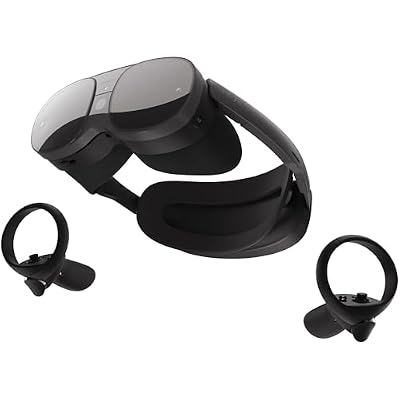
The XR Elite takes the opposite approach to the big PC headsets: it folds the whole system into a compact, glasses-style unit that converts between a full headset and a lighter frame. For a small room where the rig shares space with a desk, that small footprint and quick setup are the appeal. It plays standalone games on its own processor and streams PC titles over a USB-C connection through Vive Streaming. Resolution and refresh rate sit a step below the leaders here, so it trades outright sharpness for convenience.
Specs
- Resolution: 1920 x 1920 pixels per eye
- Refresh rate: 90Hz
- Field of view: 110 degrees
- Storage: 128GB
- Tracking: inside-out 6DoF
- PC connection: USB-C streaming through Vive Streaming
- Design: convertible headset and glasses form
- Model number: 99HATS002-00
Best for: a compact racing corner where the headset must pack away between sessions.
Watch out for: PC play runs through a streamed USB-C link rather than a native DisplayPort feed, so expect some compression compared with the tethered picks above.
ASIN: B0BQXDFLJ6
Which One Fits Your Situation
You Race in a League on a Permanent Rig
Choose between the Pimax Crystal Light and the Vive Pro 2. The Crystal Light gives the sharpest picture with the least hardware around the rig, while the Pro 2 gives base-station tracking that never depends on room lighting. Both are tethered, both stay set up, and both reward a strong graphics card.
You Are Adding VR to an Existing Gaming PC
Start with the Meta Quest 3. It needs no extra sensors, works with a single Link cable for PC racing, and still plays standalone games when the rig is off. If you find the streamed picture soft on your network, the same headset keeps working while you improve the router or switch to the cable full time.
You Want One Headset for Racing and Everything Else
The Vive Focus Vision covers both lives. Standalone, it handles its own library; at the rig, its DisplayPort mode delivers the uncompressed feed that racing rewards. The XR Elite is the alternative if the headset also has to travel or share a small room, accepting a softer picture in exchange for its compact convertible design.
Your Room Is Dark or Your Rig Sits in a Corner
Pick the Vive Pro 2 system. Its base stations track the headset independently of light and room texture, which removes the two common failure points of camera-based tracking in a dim sim corner. Mount the stations once, aim them at the seat, and the headset’s position stays repeatable every time you sit down to drive.
Common Mistakes
- Buying the highest resolution panel your budget allows, then running it on a graphics card that cannot hold its refresh rate.
- Judging field of view or resolution on its own, instead of how the two combine in the centre of the image.
- Assuming a standalone headset’s wireless streaming will match a DisplayPort cable for fine detail at speed.
- Forgetting the extras a system needs, such as base-station mounts, a streaming kit or a longer link cable.
- Setting up camera-based tracking in a dark room with bare walls, then blaming the headset for drift.
Frequently Asked Questions
Is a tethered headset always better for sim racing than a standalone one?
For picture quality at the rig, usually yes. A DisplayPort tether avoids the compression that streaming adds, and it never runs out of battery mid-race. A standalone headset with a good wired link gets close, and it wins on flexibility. If racing is the only job, tethered is the safer pick; if the headset must do more, standalone earns its compromises.
What refresh rate should I aim for in VR racing?
Ninety hertz is a sensible floor, and it suits most drivers when the frame rate stays locked to it. Higher modes such as 120Hz feel smoother in fast head movements, but only when your PC can actually deliver that many frames in your sim. A steady 90 beats an uneven 120 every lap.
Do I need base stations for a racing cockpit?
No. Inside-out tracking handles a seated driver well, because your head moves in a small, predictable space. Base stations still help in dark rooms or where the wheel and screens block the headset’s cameras. Treat them as a reliability upgrade for difficult rooms, not a requirement for getting started.
Can one headset cover both my racing rig and standalone games?
Yes, and two picks here are built for exactly that. The Quest 3 and the Vive Focus Vision both run standalone libraries and connect to a PC for racing. The Focus Vision adds a DisplayPort mode for the cleanest PC picture, while the Quest 3 keeps the process simpler with its Link cable and wireless options.









