Buying a first gaming PC for a child is really a decision about restraint. The games most kids actually play, such as Minecraft, Roblox and Fortnite, run well on modest hardware, so the trap is paying for flagship parts that sit idle while the parts that matter day to day, like storage space and fan noise, get overlooked. A sensible family machine pairs an entry or mid-range graphics card with enough memory, a fast solid-state drive and a case that fits the room it will live in.
This guide serves three kinds of buyers: parents choosing a first desktop for a younger child, families who want one shared machine for games and schoolwork, and parents of older kids who need a PC that will not feel dated within a year. Every pick below was chosen from the product names and specifications printed on its Amazon page, so the configurations described here match what each listing states.
Quick Picks
As an Amazon Associate we earn from qualifying purchases
| Product | Best for | Key spec from title |
|---|---|---|
| iBUYPOWER Scale (SCA5N3501) | A first PC for a younger child | Ryzen 5 5500 with RTX 3050 6GB |
| Lenovo IdeaCentre Gaming 5i (90T00004US) | Games plus schoolwork on one machine | RTX 3060 with 512GB SSD and 1TB HDD |
| CyberPowerPC Gamer Xtreme VR (GXiVR8060A11) | The simplest entry configuration | Core i5-11400F with RTX 2060 6GB |
| CyberPowerPC Gamer Xtreme VR (GXiVR8060A20) | An older child who will keep it for years | Core i5-14400F with RTX 4060 8GB |
How to Choose
Match the Graphics Tier to the Games They Play
Start with the library, not the badge on the box. Sandbox and building games, browser-based titles and popular competitive games are designed to run on modest graphics hardware, and an entry card handles them at 1080p without strain. A step up in graphics tier only earns its place when an older child is moving into demanding open-world releases or a high-refresh monitor. Check the graphics card named in the listing title first, then confirm its memory figure, because two cards with similar names can carry different amounts of graphics memory.
Memory and Storage That Survive a Growing Library
Sixteen gigabytes of system memory is the comfortable point for a family PC, since it leaves room for a game, a voice chat and a browser to run together. Eight gigabytes works for lighter titles but becomes the first bottleneck as games grow. Storage fills faster than most parents expect: a handful of modern games can consume several hundred gigabytes, so a 500GB drive is a starting point rather than a finish line. A machine that pairs a solid-state drive with a larger hard drive, or ships with a 1TB or 2TB SSD, postpones the delete-and-redownload cycle.
Case Size, Noise and Where the PC Will Live
A tower that sits in a child’s bedroom or a shared family room needs to be quiet at idle and compact enough for the desk or floor space available. Smaller cases with a restrained fan setup suit bedrooms, while larger towers trade footprint for airflow and easier cleaning. If space is genuinely tight, or the computer needs to move between rooms, a laptop may serve the family better, and our guide to the best gaming laptops for kids covers that side of the decision. For a fixed desk, a tower remains easier to repair and upgrade.
An Upgrade Path That Grows With Their Skills
Kids outgrow hardware in stages, and a good first PC lets you respond one part at a time. Standard tower cases with accessible memory slots and spare drive bays allow a parent, or an older child learning the hobby, to add storage or memory later instead of replacing the whole machine. Check what the listing states about the memory configuration and drive capacity before buying, and favour mainstream processor platforms with several years of support ahead of them. A machine bought for a nine-year-old should accept a stronger graphics card when that child turns thirteen.
The 4 Best Options
iBUYPOWER Scale (SCA5N3501)
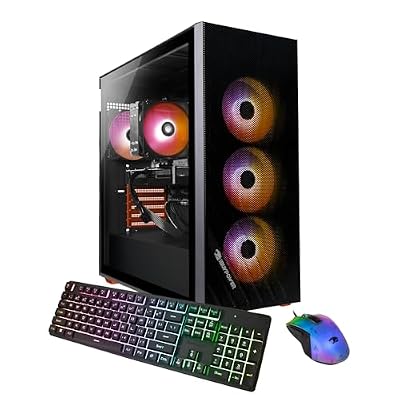
The Scale is the natural starting point for a younger child’s first desktop. Its Ryzen 5 5500 and RTX 3050 pairing is aimed squarely at the games younger players live in, with enough headroom for school projects and video calls on the same machine. The 16GB of memory is fitted as two 8GB modules, which keeps the system responsive when a game, a launcher and a browser are open together. The orange-accented case will appeal to kids without looking out of place in a family room, and the standard tower layout leaves the door open to a storage or graphics upgrade later.
Specs
- Processor: AMD Ryzen 5 5500
- Graphics: NVIDIA GeForce RTX 3050, 6GB
- Memory: 16GB DDR4 3200MHz (2 x 8GB)
- Storage: 500GB NVMe SSD
- Connectivity: WiFi ready
- Operating system: Windows 11 Home
- Model: SCA5N3501
Best for: a first gaming PC for a child roughly eight to twelve years old.
Watch out for: the 500GB drive fills quickly once several large games are installed, so confirm the listing’s storage figure and plan for an added drive later.
ASIN: B0DFLGNQG4
Lenovo IdeaCentre Gaming 5i (90T00004US)

Lenovo’s IdeaCentre Gaming 5i suits the family that wants one machine to cover games, homework and everything between. The RTX 3060 is a clear step above entry graphics, and the storage layout is the most practical in this group: a 512GB solid-state drive for Windows and favourite games, plus a 1TB hard drive for the rest of the library, photos and school files. The listing includes a keyboard and mouse in the box, which removes two extra purchases from the first setup. Its plain black tower styling also blends into a shared room more easily than most gaming designs.
Specs
- Processor: Intel Core i5-12400
- Graphics: NVIDIA GeForce RTX 3060
- Memory: 16GB RAM
- Storage: 512GB SSD plus 1TB HDD
- Operating system: Windows 11
- Included: keyboard and mouse
- Model: 90T00004US
Best for: a shared family PC that splits its time between games and schoolwork.
Watch out for: confirm the exact storage pairing on the listing before ordering, since this model line has been sold in several configurations.
ASIN: B0BDQMYSHJ
CyberPowerPC Gamer Xtreme VR (GXiVR8060A11)

This Gamer Xtreme VR configuration is the simplest route onto PC gaming in the group. The Core i5-11400F and RTX 2060 combination is an older pairing, and it is matched to the lighter end of a child’s library: sandbox games, platformers and competitive titles at 1080p. The trade-off sits in the memory figure, since 8GB is the minimum a modern family PC should carry and will be the first thing to upgrade. Treat this one as a starter machine with a planned memory addition, and it gives a child a standard tower they can learn to maintain and improve over time.
Specs
- Processor: Intel Core i5-11400F, 2.6GHz
- Graphics: NVIDIA GeForce RTX 2060, 6GB
- Memory: 8GB DDR4
- Storage: 500GB NVMe SSD
- Connectivity: WiFi ready
- Operating system: Windows 11 Home
- Model: GXiVR8060A11
Best for: a starter tower for lighter games, with a memory upgrade planned.
Watch out for: the 8GB memory figure is printed in the listing title and details, so check it carefully and budget the upgrade path around a second module.
ASIN: B09DHP9M9G
CyberPowerPC Gamer Xtreme VR (GXiVR8060A20)

The second CyberPowerPC here is a genuinely different configuration, built for the older child who is past the starter stage. Its Core i5-14400F is a newer ten-core processor, the RTX 4060 brings current-generation graphics features, and the memory moves to 16GB of DDR5. The standout figure is storage: a 2TB PCIe Gen4 solid-state drive holds a large library without the shuffle of uninstalling games to make room. This is the pick that stretches furthest before an upgrade conversation starts, which suits a teenager whose tastes are moving toward bigger releases and creative software alongside games.
Specs
- Processor: Intel Core i5-14400F, 2.5GHz
- Graphics: NVIDIA GeForce RTX 4060, 8GB
- Memory: 16GB DDR5
- Storage: 2TB PCIe Gen4 SSD
- Connectivity: WiFi ready
- Operating system: Windows 11 Home
- Model: GXiVR8060A20
Best for: an older child or teenager who will keep the same PC for several years.
Watch out for: this model line is sold in many configurations under similar names, so match the model code on the listing to GXiVR8060A20 before ordering.
ASIN: B0CW28S6TY
Which One Fits Your Situation
A First PC for a Younger Child
Choose the iBUYPOWER Scale. Its graphics tier matches the games younger children actually play, the 16GB of memory avoids the most common starter bottleneck, and the tower is a standard layout that a parent can open for cleaning or a storage upgrade. It asks nothing complicated of the family on day one.
One Machine for Games and Schoolwork
Choose the Lenovo IdeaCentre Gaming 5i. The split storage layout is the deciding factor: fast space for games, a large hard drive for documents, photos and recordings, and a keyboard and mouse included in the box. The RTX 3060 also leaves more room for an older child’s growing library than entry graphics would.
The Simplest Start on a Standard Tower
Choose the CyberPowerPC GXiVR8060A11 if the priority is getting a child started on a conventional desktop they can learn with. Go in knowing the 8GB of memory is a starting figure rather than a final one, and treat a memory upgrade as the planned first project once the basic setup feels familiar.
A PC an Older Child Keeps for Years
Choose the CyberPowerPC GXiVR8060A20. The newer processor, DDR5 memory and 2TB drive give it the longest useful life in this group, and the RTX 4060 covers both current games and the creative tools teenagers tend to adopt next. It is the configuration least likely to need attention before the next school stage.
Common Mistakes
- Buying flagship graphics for games that run happily on entry hardware, then skimping on storage and memory.
- Choosing a PC with 8GB of memory and no plan to upgrade it, even though modern games and launchers crowd that figure quickly.
- Ignoring where the tower will live, then discovering the case is too large for the desk or too loud for a bedroom.
- Forgetting the extras: a monitor, headset and parental control setup are separate decisions from the tower itself.
- Assuming a child’s library stays small, when a few large games can fill a 500GB drive within months.
Frequently Asked Questions
How much memory does a kids’ gaming PC need?
Sixteen gigabytes is the sensible target. It lets a game run alongside a voice chat, a launcher and a browser without slowdowns, and it postpones the first upgrade. Eight gigabytes still works for lighter titles such as Minecraft and Roblox, but it is the figure most likely to feel tight within a year or two of regular use.
Is an entry graphics card enough for the games kids play?
For the most popular children’s games, yes. Minecraft, Roblox, Fortnite and similar titles are built to run on modest hardware, and an entry card handles them at 1080p. A stronger card matters when an older child moves into large open-world releases or starts chasing high refresh rates on a gaming monitor.
Should a child’s first PC be a desktop or a laptop?
A desktop suits a fixed desk at home: it is easier to clean, repair and upgrade, and one part can be replaced at a time as needs grow. A laptop makes more sense when the computer must move between rooms or homes. Decide based on where the machine will spend most of its life.
What should I check on the listing before ordering?
Confirm four figures printed on the page: the exact processor model, the graphics card and its memory, the amount of system memory, and the storage size and type. Prebuilt model lines are often sold in several configurations under near-identical names, and the model code is the reliable way to confirm you are ordering the configuration you chose.