

- Top Pick: Dell Latitude 7300 Business Laptop | Intel Core i7 8th Gen Quad Core | 16GB RAM | 500GB NVMe | 13.3” Full HD (1920×1080) Display | Backlit Keyboard | Webcam | Windows 11 Pro | (Renewed)
- Best Value: Phatom 15.6" FHD Laptop Computer 4GB RAM 128GB SSD Windows 11 Compatible | Upgradeable RAM+SSD,Pentium (Beats Celeron), Support UP to 2TB, 1080P HDMI, for Business, Student laptops for school
- Premium Choice: HP 14" Laptop Computer for 2026 Student Business Productivity, MS Office & Win 11 Pro, Copilot AI, Intel 4-Core CPU, 4GB DDR5 RAM, 628GB Storage (128GB UFS+500GB Ext), Wi-Fi 6, HubxcelAddon, Lavender
A business laptop under 500 dollars forces a trade that glossier gaming guides never mention: you can have a recognizable work-class brand, or you can have generous memory and storage, but rarely both on the same sticker. The listings in this group lean one way or the other, from renewed corporate hardware to brand-new budget machines padded with cloud storage and an external drive.
This roundup is for freelancers, small-office staff and side-business owners who mostly live in email, spreadsheets, video calls and browser tabs in 2026. It reads the spec lines each seller chose to publish, so the point is to show what each machine actually offers for daily office work and where it is likely to feel slow or cramped.
Quick Picks
As an Amazon Associate we earn from qualifying purchases at no extra cost to you.
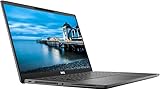




| Product | Best for | Key spec from the title |
|---|---|---|
| Dell Latitude 7300 (Renewed) | Business-class build on a tight cap | Core i7 8th Gen, 16GB RAM, 500GB NVMe, 13.3-inch Full HD |
| Phatom 15.6-inch FHD | Basic office tasks, upgrade path | 4GB RAM, 128GB SSD, upgradeable RAM and SSD |
| HP 14-inch (Lavender, DDR5) | Light productivity with Pro OS | 4GB DDR5, Windows 11 Pro, Wi-Fi 6 |
| ThinkPad E16 Gen 3 (16GB) | Serious office work | Intel Ultra 5 225H, 16GB DDR5, 512GB SSD |
| HP 14-inch Ultra-Portable (Lavender) | Commuters | 4-core Intel, 4GB RAM, Windows 11 Pro |
| HP Everyday Student Laptop | Office subscription included | 1-year Office 365, 128GB UFS, Wi-Fi 6 |
| HP Ultrabook 14 | Home-office hybrids | Quad-core Intel, Windows 11 Home |
| Lenovo Business 15.6-inch | Roomy screen, modern ports | 8GB DDR5, USB-C, anti-glare screen |
| ThinkPad E16 Gen 3 (32GB) | Data-heavy spreadsheets | 32GB DDR5, 1TB SSD, Intel Ultra 5 225H |
| HP 14-inch Slim (Rose Gold) | Multitasking on a thin body | 16GB RAM, quad-core Intel, Windows 11 Pro |
How to Choose
Memory sets how long the laptop stays usable
For a browser plus a mail client, spreadsheets and a video call at once, 8GB is the floor and 16GB is comfortable. The 4GB listings here will cope with one or two light tasks, but a dozen tabs and a conference app will push them. Soldered memory cannot be added later, so what you buy is usually what you keep. The exception is a listing that states an upgrade path, which is worth confirming before you commit to a thin configuration.
Read the storage line carefully
Several listings advertise 628GB of storage, which is a 128GB internal UFS drive plus a 500GB external disk. The operating system and apps live on the 128GB, so the larger number is not all internal. Look for an internal SSD of 256GB or more if you install accounting suites or keep local files, and treat an external drive as backup space.
Operating system and business features
Windows 11 Pro adds device encryption management, remote desktop hosting and domain join, which matter for client work. Windows 11 Home covers personal use and most small business needs. A backlit keyboard and a Full HD display are worth the attention, since they decide how the machine feels over an eight-hour day.
Where budget models cut corners
Expect thin webcams, plastic bodies, mediocre speakers and lower-tier processors at this tier. A Full HD panel, USB-C and Wi-Fi 6 are the details sellers often skip. Renewed units can carry older processors, but the business chassis and keyboard often outclass new consumer models. Check that the unit comes with a charger and a stated return window.
The 10 Best Options
Dell Latitude 7300 (Renewed)
This is the only renewed unit in the group, and it brings a recognizable business line: 8th Gen Core i7 quad-core, 16GB of RAM, a 500GB NVMe drive and a 13.3-inch Full HD display, with a backlit keyboard and Windows 11 Pro. It suits a user who values build and memory over a new warranty, such as a consultant who carries the laptop between client offices and wants a keyboard built for long typing sessions.
- Strength: 16GB RAM and NVMe storage are rare at this tier.
- Strength: backlit keyboard and a compact 13.3-inch Full HD screen.
- Trade-off: renewed status and an older processor generation.
Skip it if you want a brand-new unit or a larger display.
Phatom 15.6-inch FHD Laptop
The Phatom listing pairs a 15.6-inch FHD screen with a Pentium processor, 4GB of RAM and a 128GB SSD, then mentions upgradeable RAM and SSD up to 2TB plus HDMI output. It is for someone who wants a big screen for documents and plans to add memory later, for instance a bookkeeper working at a fixed desk who can live with a slower start while the machine is expanded.
- Strength: the stated upgrade path for RAM and SSD.
- Strength: HDMI output for an external monitor.
- Trade-off: 4GB of RAM out of the box is thin for business multitasking.
Skip it if you do not want to open the case, or you need a recognized business brand.
HP 14-inch Laptop (Lavender, 4GB DDR5)
A 14-inch HP with a 4-core Intel CPU, 4GB of DDR5, Windows 11 Pro, Wi-Fi 6 and a 128GB UFS drive with a 500GB external companion. It suits light office work and note-taking more than heavy multitasking, so think meeting notes, email and a single spreadsheet open at a time.
- Strength: Windows 11 Pro on a budget machine.
- Strength: Wi-Fi 6 and a compact screen size.
- Trade-off: 4GB of memory limits heavy tab use.
Skip it if you juggle many applications at once.
Lenovo ThinkPad E16 Gen 3 (16GB, 512GB SSD)
The first ThinkPad pairs an Intel Ultra 5 225H processor with 16GB of DDR5 and a 512GB SSD, plus a 500GB external HDD and a backlit keyboard. It is the clear pick for buyers who want a real business line and enough memory to last, and the external drive gives a convenient place for nightly backups of client files.
- Strength: Intel Ultra 5 225H processor with 16GB DDR5.
- Strength: 512GB SSD plus an external drive for backups.
- Trade-off: sits in the premium tier of this group, so strict-cap buyers should confirm the final configuration.
Skip it if the cap leaves no room for a higher tier.
HP 14-inch Ultra-Portable (Lavender, 4GB)
Like its sibling, this HP lists a 4-core Intel CPU, 4GB RAM, Windows 11 Pro and the same 628GB combined storage, with a long-battery mention. The Ultra-Portable name signals a travel-friendly role, which suits sales staff or field workers who open the laptop in cars, cafes and waiting rooms.
- Strength: Windows 11 Pro and Microsoft Office are named in the title.
- Strength: portable, with a battery-life claim from the seller.
- Trade-off: 4GB RAM without a stated DDR5 upgrade.
Skip it if you need more than basic office apps.
HP Everyday Student Laptop (Office 365)
This HP lists 500GB external HDD and 128GB UFS, a one-year Office 365 subscription, Copilot AI and Wi-Fi 6, described as thin and portable for business. The bundled subscription is the pull, since a new business owner can write documents and build spreadsheets without a separate software purchase in the first year.
- Strength: one-year Office subscription named in the title.
- Strength: Wi-Fi 6 and a slim form.
- Trade-off: memory is not stated, so verify before ordering.
Skip it if the subscription is not needed or you require a stated RAM amount.
HP Ultrabook 14
The Ultrabook 14 lists a quad-core Intel CPU, Windows 11 Home and lifetime Microsoft Office for the web. It is a modest home-office pick rather than a corporate one, aimed at someone running a small side business from the kitchen table who wants a lightweight machine.
- Strength: Office for the web is included.
- Strength: quad-core processor and a thin-and-light class.
- Trade-off: Windows 11 Home lacks some Pro business features, and memory is unstated.
Skip it if you need Pro-level management features.
Lenovo Business 15.6-inch FHD
This Lenovo lists 8GB of DDR5, 128GB of storage, USB-C, Wi-Fi 6, an anti-glare screen and Office 365 with Copilot AI. The anti-glare 15.6-inch panel suits bright rooms and long document sessions, which helps in shared offices with overhead lighting or a window behind the screen.
- Strength: 8GB DDR5 is a workable middle for multitasking.
- Strength: USB-C and an anti-glare Full HD screen.
- Trade-off: only 128GB of storage.
Skip it if you store large local files.
Lenovo ThinkPad E16 Gen 3 (32GB, 1TB SSD)
The larger ThinkPad configuration lists 32GB of DDR5, a 1TB SSD, the same Intel Ultra 5 225H and an additional 500GB external HDD. It targets buyers with big spreadsheets, virtual machines or local databases, and it is also the one to look at if you expect to keep the same laptop for several years.
- Strength: 32GB RAM and 1TB internal storage.
- Strength: backlit keyboard and a business-line chassis.
- Trade-off: the top tier of this group, so a strict cap may rule it out.
Skip it if your work fits in a browser and office suite.
HP 14-inch Slim (Rose Gold, 16GB)
A slim 14-inch HP with a quad-core Intel CPU, 16GB of RAM, Windows 11 Pro and Wi-Fi 6, plus 128GB UFS and a 500GB external drive. It is the multitasker among the HP 14-inch units, with enough memory for a video call, a browser full of tabs and a document open together.
- Strength: 16GB RAM with Windows 11 Pro.
- Strength: slim body with Office Suite named in the title.
- Trade-off: only 128GB of internal storage.
Skip it if you want a dedicated business line like ThinkPad.
Which One Fits Your Situation
You want the sturdiest feel at a tight cap
The renewed Dell Latitude 7300 gives business-class hardware, 16GB and fast storage and a portable footprint that fits a briefcase or a small desk.
You live in spreadsheets and video calls
The ThinkPad E16 Gen 3 with 16GB covers it, and the 32GB model is there for heavy datasets.
You need Pro features on a light machine
The HP 14-inch Slim with 16GB and Windows 11 Pro is the practical middle.
You want a big screen and plan to upgrade
The Phatom 15.6-inch gives room to grow, and the Lenovo Business 15.6-inch gives USB-C and an anti-glare panel.
Common Mistakes
- Counting an external drive as internal storage.
- Buying 4GB of RAM for a multitasking job.
- Assuming Windows 11 Home has the same management tools as Pro.
- Ignoring the renewed label and warranty terms on refurbished units.
- Choosing a brand name without checking the memory and storage lines.
Related guides
- Battery Operated Smoke And Carbon Monoxide Detectors
- Combination Smoke And Carbon Monoxide Detectors
- Aio Liquid Coolers For High Performance Gaming
Frequently Asked Questions
Is 8GB enough for a business laptop?
For email, documents and calls, yes. Add memory if you routinely keep many browser tabs and several apps open. Buyers who plan to run accounting software next to a video call should lean toward 16GB.
Does a renewed laptop make sense for work?
It can, because older business models often have better keyboards and ports. Confirm the seller’s return terms and battery condition.
What is the difference between UFS and SSD storage?
Both are flash storage, and an NVMe or SATA SSD is typically more capable than UFS. For heavy file work, prefer a larger SSD.
Do I need Windows 11 Pro?
Choose Pro if you need device encryption controls, remote desktop hosting or a work domain. Otherwise Home is enough, particularly for a solo owner who does not manage other devices or connect to a company network.









