

1440p at 144Hz used to cost $500+. It doesn’t anymore. You can get a solid 27-inch IPS panel hitting that spec for $180-$230 right now, which makes this the easiest upgrade in PC gaming if you’re still on a 1080p 60Hz screen. The catch is knowing which corners got cut to hit that price, because not all of them matter equally.
As an Amazon Associate we earn from qualifying purchases at no extra cost to you.

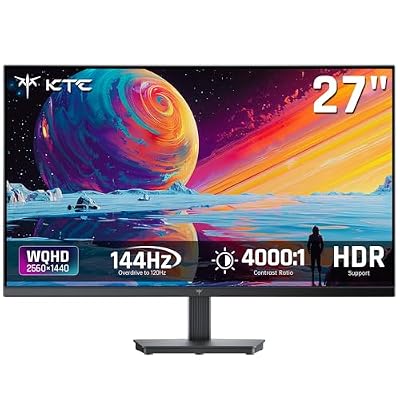


Why this combo is the sweet spot
1440p (2560×1440) sits in the gap between 1080p’s softness and 4K’s GPU demands. A mid-range card like an RTX 4060 Ti or RX 7700 XT can push most modern games well past 100fps at 1440p with high settings, which is exactly what you need to feel the benefit of a 144Hz panel. Pair 1440p with 4K and you’re often GPU-limited below 144fps anyway, so you’re paying for refresh rate you can’t use. Pair it with 1080p and you’re leaving visible sharpness on the table for no reason, since the panels cost nearly the same now.
144Hz itself is the bigger jump than people expect coming from 60Hz. Mouse look smooths out, scrolling and camera pans stop looking like a slideshow, and competitive shooters feel noticeably more responsive. Going from 144Hz to 240Hz is a much smaller improvement, and at budget prices it’s rarely worth it.
Panel type is the real budget decision
Almost every budget 1440p 144Hz monitor is IPS or VA. TN still exists at the bottom of the market but it’s not worth considering anymore, color and viewing angles are bad enough to notice even in casual use.
| Panel | Color/contrast | Response time | Best for | Watch out for |
|---|---|---|---|---|
| IPS | Good color, weaker black depth | Fast, minimal smearing | Competitive gaming, mixed use | IPS glow in dark scenes |
| VA | Deep blacks, high contrast | Slower, can smear in dark transitions | Single-player, movies, RPGs | Black smearing in fast dark scenes |
| TN | Washed out, narrow angles | Fastest on paper | Nothing worth recommending at this price | Color shift if not looking dead-on |
If you split your time between games and general use, or you care about color for photo/video work on the side, go IPS. If you mostly play atmospheric or story-driven games and want blacks that actually look black, VA’s contrast ratio (often 3000:1-4000:1 versus IPS’s typical 1000:1) is a genuine advantage. For fast-paced competitive shooters, IPS is the safer pick because VA’s slower pixel response can cause visible trailing when dark objects move against dark backgrounds.
Specs that actually matter at this price
Refresh rate and resolution get the marketing attention, but these are the specs that determine whether a budget monitor feels budget:
Response time (GtG): Listed numbers are marketing-optimized and rarely tell the full story, but anything claiming 1ms GtG on a sub-$250 panel is using overdrive settings that introduce overshoot artifacts. Don’t chase the number, read a couple of independent reviews for ghosting at your target refresh rate.
VRR support: FreeSync is standard on budget panels and works fine with both AMD and Nvidia cards (Nvidia just calls its validated tier “G-Sync Compatible”). Don’t pay extra for a “G-Sync Ultimate” certification on a budget panel, it’s not necessary for a good experience.
HDR labeling: “HDR400” on an IPS panel without local dimming is close to meaningless, you’re not getting real HDR contrast, just a wider color gamut at best. Don’t let an HDR sticker push you toward a worse panel.
Stand and ports: Budget monitors cut height adjustment and swivel first. If ergonomics matter to you, check whether the stand tilts only, since a fixed-height stand on a desk that’s the wrong height is a real daily annoyance. Also confirm DisplayPort 1.4 is present, since some ultra-budget units skip it and only offer HDMI 2.0, which caps 1440p at 144Hz on older HDMI ports.
When it’s worth spending more
If you’re buying for competitive shooters specifically, going up to a 165Hz or 180Hz IPS panel in the $250-$300 range usually gets you a better overdrive implementation and less overshoot, not just a higher number. That’s a reasonable upgrade if esports titles are most of your playtime. For everyone else, the jump from 144Hz to 165Hz is not perceptible enough to justify the price gap on its own.
Where spending more clearly pays off is panel uniformity and factory calibration. Budget panels have more unit-to-unit variance, so you might get a great panel or one with mild color shift across the screen. If you’re doing any color-sensitive work, that variance is the actual cost of going cheap, not the refresh rate or resolution.
What to actually buy
For most people building a budget 1440p 144Hz setup, start by browsing 27-inch 1440p 144Hz IPS monitors and filter by recent review dates, since panel revisions change quietly and older reviews may not reflect the current unit. If deep blacks for single-player games matter more to you than competitive response time, look at VA panel alternatives in the same size and refresh class.
Don’t overspend on certifications or marketing specs you won’t use. Do spend the extra $20-$30 for a model with a height-adjustable stand if you’ll be sitting at it for hours, that’s a comfort upgrade you’ll notice every day, unlike the difference between HDR400 and no HDR badge at all.














