Buying an interface for gaming is really a decision about two things: whether your microphone gets enough clean gain to sound clear in voice chat without hiss, and whether you can monitor your own voice with low enough latency that speaking feels natural while you stream or play. Channel count, sample-rate ceilings, extra routing, and character options only matter after those two basics match your microphone, your headphones, and the way your desk is actually used every day.
This shortlist serves single-microphone players, streamers who need game audio folded into their mix, players who record instruments between matches, and desk setups that regularly handle a second voice. Every pick was chosen from the product names and specifications shown on its Amazon product page, cross-checked against the evidence gathered for each model before inclusion.
Quick Picks
As an Amazon Associate we earn from qualifying purchases
| Product | Best for | Key spec from title |
|---|---|---|
| Focusrite Scarlett Solo 4th Gen | One quiet dynamic microphone on a single-player desk | 4th Gen mic preamp with up to 69 dB of gain |
| MOTU M2 | Streamers who want visible level metering and loopback | Full-color LCD metering with driver loopback |
| Universal Audio Volt 2 | Players who also record vocals or instruments | Vintage Mic Preamp mode on two combo inputs |
| Audient EVO 4 | Beginners who struggle to set microphone levels | Smartgain automatic level setting with loopback |
How to Choose
Mic Preamp Gain and Phantom Power
Start with the microphone you already own, because it dictates the gain you need. Condenser microphones require +48V phantom power, which all four interfaces here provide, while dynamic microphones run without it but usually arrive quieter and demand more from the preamp. A low-output dynamic used close for voice chat can need roughly 55 to 70 dB of usable gain, so compare published figures directly: the Scarlett Solo 4th Gen reaches 69 dB, while the EVO 4 offers a 58 dB range. Buying headroom now avoids running any preamp at its noisy maximum later.
Sample Rate and Driver Stability
Every model here records at 24-bit depth, yet their ceilings differ, with the EVO 4 topping out at 96 kHz and the other three reaching 192 kHz. For gaming, set 48 kHz instead, because games, Discord, and streaming software are built around that rate, and matching it in the manufacturer’s panel, Windows Sound settings, and each app prevents pitched or garbled audio. Install the vendor driver rather than relying on the generic Windows driver, since it unlocks buffer controls and routing. MOTU lists ASIO and Wave drivers, Audient provides its EVO Control app, and Focusrite and Universal Audio likewise supply their own software.
Direct Monitoring and Loopback
Direct monitoring sends your microphone straight to your headphones inside the interface, bypassing the round trip through the PC, so your voice arrives without a distracting echo. Loopback solves the opposite problem by routing computer audio back into the recording path, letting a stream carry game sound and voice together without extra software. MOTU states that its driver provides loopback channels for the M2, and Audient builds loopback into the EVO 4. If your desk also uses speakers rather than headphones alone, our guide to retro gaming speakers and audio setups covers that side of the setup.
Headphone Output and Monitoring Control
A dedicated headphone output matters because it moves listening away from noisy motherboard audio and gives you a physical level control within reach mid-game. Check how each box handles that control: the Scarlett Solo 4th Gen provides an independent headphone volume control, the EVO 4 uses a Monitor Mix control to balance direct input against playback, and the Volt 2 and M2 both provide direct monitoring alongside their headphone outputs. Also confirm the monitor outputs suit your speakers, since connections vary from balanced monitor outputs on the Scarlett to balanced TRS and mirrored RCA outputs on the M2.
The 4 Best Options
Focusrite Scarlett Solo 4th Gen

One microphone, one instrument, and nothing superfluous: that focus makes the Solo the natural starting point for a single-player gaming desk. Its fourth-generation preamp delivers the highest gain figure in this group, which suits quiet dynamic microphones that otherwise need an inline booster. Air mode adds a switchable character option, phantom power covers condensers, and a separate headphone level control keeps adjustments simple during a match. Anyone planning a second microphone should look at the two-input models instead, because this chassis stops at one preamp.
Specs
- Configuration: 2-in / 2-out, USB-C connection, USB bus powered
- Mic preamps: 1 fourth-generation Scarlett preamp, up to 69 dB gain
- Phantom power: +48V, switchable, for condenser microphones
- Conversion: 24-bit / 192 kHz, with 120 dB converter dynamic range per Focusrite
- Inputs: 1 XLR microphone input plus 1 Hi-Z instrument input
- Features: Air mode, independent headphone volume control, balanced monitor outputs
Best for: A solo player or streamer running one quiet dynamic microphone who wants maximum gain headroom without extra channels.
Watch out for: Count your future inputs before buying, because the single microphone preamp cannot grow into a two-person or stereo setup.
ASIN: B0C5JSHP7M
MOTU M2

Guesswork disappears when levels sit in front of you, and the M2’s full-color LCD meters every input and output continuously. Two combo inputs accept a microphone and an instrument, or two microphones, each with its own phantom power switch, while driver loopback folds computer audio into a stream mix without separate routing software. MOTU also quotes a round-trip latency figure of 2.5 ms at 96 kHz with a 32-sample buffer, relevant when monitoring through software effects. Add 5-pin MIDI for keyboard controllers, and this becomes the most complete streaming box here.
Specs
- Configuration: 2-in / 2-out, USB-C, USB bus powered
- Mic preamps: 2 combo XLR/TRS mic/line/Hi-Z inputs, individual +48V phantom power switches
- Conversion: 24-bit / 192 kHz, ESS Sabre32 Ultra DAC, 120 dB dynamic range on main outputs per MOTU
- Latency: 2.5 ms round-trip at 96 kHz with a 32-sample buffer, per MOTU
- Metering: 160 x 120 pixel full-color LCD for input and output levels
- Extras: driver loopback for streaming, hardware direct monitoring, 5-pin MIDI in/out, balanced TRS and mirrored RCA outputs
Best for: Streamers who want visible metering, loopback for game audio, MIDI connections, and two flexible combo inputs.
Watch out for: Download the current MOTU driver before setup, because loopback and the quoted latency performance depend on that driver rather than the generic Windows one.
ASIN: B0812B26TN
Universal Audio Volt 2

Players who record voice work or music between gaming sessions get something distinctive here: a Vintage Mic Preamp mode derived from UA’s 610 tube preamp, switchable per channel across two combo inputs. The remaining brief covers a typical two-person or mic-plus-instrument desk, with phantom power, direct monitoring, a dedicated headphone output, and MIDI in and out for controllers. Supported sample rates run from 44.1 kHz up to 192 kHz at 24-bit depth. Streaming needs more planning, though, since no loopback feature is stated, so game audio requires software routing.
Specs
- Configuration: 2-in / 2-out, USB 2.0 with USB Type-C connector, USB bus powered
- Mic preamps: 2 combo XLR/TRS inputs with Vintage Mic Preamp mode
- Phantom power: switchable +48V
- Conversion: 24-bit / 192 kHz; supported sample rates 44.1, 48, 88.2, 96, 176.4 and 192 kHz
- Monitoring: direct monitoring and a dedicated headphone output
- Extras: 5-pin MIDI in/out, monitor outputs on 6.3 mm jacks, Windows 10 64-bit compatibility listed by the manufacturer
Best for: A gamer who also records vocals or instruments and wants the Vintage preamp character on either of two inputs.
Watch out for: Confirm your operating system matches the listed Windows 10 64-bit compatibility, and plan software routing if your stream needs loopback.
ASIN: B09J1W1TYN
Audient EVO 4
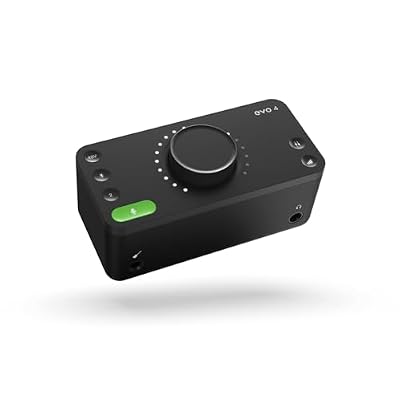
Setting gain wrong ruins more first streams than any other mistake, and the EVO 4 attacks that problem directly. Smartgain listens while you speak or play for a few seconds, then sets the input level automatically, which suits anyone who wants Discord levels right without learning gain staging. Two EVO preamps provide a 58 dB gain range with phantom power, loopback is built in for streaming, and a JFET instrument input covers guitar or bass. One large control knob keeps the compact box uncluttered, although the 96 kHz ceiling and missing MIDI may matter to recording-focused buyers.
Specs
- Configuration: 2-in / 2-out, USB connection, USB bus powered
- Mic preamps: 2 EVO preamps, 58 dB gain range, +48V phantom power
- Conversion: 24-bit / 96 kHz, 113 dB dynamic range per Audient
- Instrument input: JFET input for guitar or bass
- Features: Smartgain automatic level setting, built-in loopback, Monitor Mix control for direct monitoring
- Software: EVO Control app for Windows and macOS; listed as compatible with Windows 10 or later
Best for: Beginners and streamers who want automatic gain setting, built-in loopback, and two preamps in a compact box.
Watch out for: Check the 96 kHz maximum sample rate and the absence of MIDI against any recording plans beyond gaming and streaming.
ASIN: B084BGC5LR
Which One Fits Your Situation
You Play Solo With One Dynamic Microphone
Choose the Scarlett Solo 4th Gen. Its 69 dB of preamp gain gives a quiet dynamic microphone the headroom it needs without an inline booster, and the single-input layout keeps a one-person desk simple. Phantom power still covers a later switch to a condenser, while the separate headphone volume control handles everyday adjustments without opening software.
You Stream and Need Game Audio in the Mix
Pick the MOTU M2 if metering and MIDI matter, because its LCD shows levels constantly and its driver provides loopback channels. Choose the EVO 4 instead when setting levels is your weak point, since Smartgain handles gain automatically and loopback is built in. Either route avoids bolting separate routing software onto your stream setup.
You Record Instruments or a Second Voice Too
Take the Universal Audio Volt 2 when character matters, because its Vintage Mic Preamp mode can be switched per channel across two combo inputs, and MIDI connects a keyboard controller. The M2 remains the alternative when you would rather have LCD metering and loopback alongside those two inputs than a tube-style preamp mode.
You Keep Fighting Levels, Echo, or Crackle
Start with the EVO 4 if microphone level is the recurring problem, because Smartgain resets it automatically after a short test. If echo is the issue instead, any model here with direct monitoring helps once software monitoring is muted. Persistent crackle usually points to buffer or USB problems, which the questions below address step by step.
Common Mistakes
- Buying on the highest sample rate, then running games at 48 kHz anyway, instead of comparing gain, routing, and driver support first.
- Leaving phantom power off for a condenser microphone, or raising volume later in Windows or Discord instead of setting proper gain at the interface, which lifts noise along with voice.
- Monitoring through the interface and through software at the same time, producing an echo that gets blamed on the hardware.
- Plugging the interface into a USB hub or front-panel port, then chasing crackle that a direct rear motherboard port would have prevented.
- Choosing a one-preamp interface while planning a second microphone, forcing a replacement purchase rather than a simple upgrade path.
Frequently Asked Questions
Why does my audio interface crackle or pop during games?
Crackle usually means the buffer is too small for the PC to keep up, or the USB connection is unstable. Raise the buffer one step in the manufacturer’s control panel, from 64 to 128 samples for example, then retest. Move the interface to a direct rear USB port with its supplied cable, bypassing hubs. Record a minute of voice while a game loads to confirm the fix held.
How do I fix the echo I hear of my own voice?
An echo almost always means direct monitoring and software monitoring are running together. Enable direct monitoring on the interface and mute the monitoring path inside your game, chat app, or recording software, or do the reverse, but never use both. If software effects require software monitoring, lower the buffer size and stay at 48 kHz. A single clap near the microphone should then sound simultaneous in your headphones.
Why is my microphone too quiet in Discord or in game chat?
Work through the chain in order. Switch phantom power on for a condenser microphone, then raise gain at the interface until speech peaks sit comfortably below clipping instead of boosting volume later in software. Confirm the app uses the interface as its input device rather than a webcam or headset microphone. On the EVO 4, run Smartgain again. Verify everything with a test recording at your normal speaking distance.
What sample rate should I set for PC gaming?
Set 48 kHz everywhere: in the manufacturer’s control panel, in Windows Sound settings for both playback and recording, and inside each game or app, then restart any app that was already open. Mismatched rates cause pitched, garbled, or refused recordings, and aligning them is fully reversible. Higher rates such as 96 or 192 kHz remain available for recording work, but they bring no benefit to voice chat or streaming.