

A 4K webcam promises sharper, more detailed video than the 720p and 1080p cameras most people are used to, and for streamers, creators and anyone who lives on video calls, that clarity makes a real difference. But the ‘4K’ label gets used loosely: some cameras pack a genuine 4K UHD sensor and output crisp ultra-high-definition footage, while others are marketed around a 4K sensor yet actually record at 1080p. We will be straight about which is which throughout this guide, because honesty about output resolution is the whole point when you are paying for detail. This roundup gathers the best 4K webcams in 2026 across budgets and feature sets.
- Best 4K Webcams at a Glance
- 1. NexiGo N60 Pro 4K Webcam for PC, 4K UHD Sony Sensor, Autofocus
- 2. Logitech 4K Webcam
- 3. NexiGo N680E Pro 4K Webcam with Ring Light, PDAF Autofocus, Dual Noise-Cancelling Mics
- 4. NexiGo N660P Pro 4K Webcam with Distortion-Free Lens, 1080p 60fps Autofocus
- 5. NexiGo N660P Pro 4K Webcam with Distortion-Free Lens, 1080p 60fps Autofocus USB
- 6. Anker PowerConf C200 2K Webcam, Low-Light Correction
- How to Choose a 4K Webcam
- Frequently Asked Questions
- Related Guides
- Related Articles
Our picks were chosen on what genuinely matters for a high-quality webcam: sensor quality, autofocus performance, low-light handling, and useful extras like built-in lighting or noise-cancelling microphones — plus honest framing of real output resolution. We have included a price spread from around $60 up to around $119, and we lead with the cameras that deliver true 4K UHD capture, then cover strong 1080p-output models that use 4K-class sensors and a capable 2K option, flagging each clearly. Below is an at-a-glance comparison of all six, then a closer look at each and a buyer’s guide built around sensors, autofocus and lighting — the things that decide how good you actually look on camera.
As an Amazon Associate we earn from qualifying purchases at no extra cost to you.


🛒 Best Price Today on Amazon
Prime members get fast, free shipping on everything above, plus member-only deals. New members get a 30-day free trial — cancel anytime.
Best 4K Webcams at a Glance
| Webcam | Best For | Standout Spec | Approx Price |
|---|---|---|---|
| NexiGo N60 Pro 4K | True 4K UHD capture | 4K UHD Sony sensor, autofocus | around $70 |
| Logitech 4K Webcam | Premium 4K calls | 4K-capable, trusted brand | around $119 |
| NexiGo N680E Pro 4K (Ring Light) | Streaming with built-in light | 4K sensor, ring light, dual mics | around $71 |
| NexiGo N660P Pro 4K (Distortion-Free) | Distortion-free 1080p60 | 4K sensor, 1080p 60fps output | around $80 |
| NexiGo N660P Pro 4K (Autofocus USB) | Autofocus 1080p60 value | 4K sensor, 1080p 60fps, autofocus | around $70 |
| Anker PowerConf C200 2K | Low-light 2K value | 2K sensor, low-light correction | around $60 |
1. NexiGo N60 Pro 4K Webcam for PC, 4K UHD Sony Sensor, Autofocus
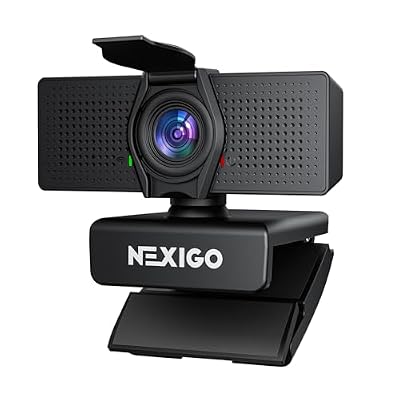
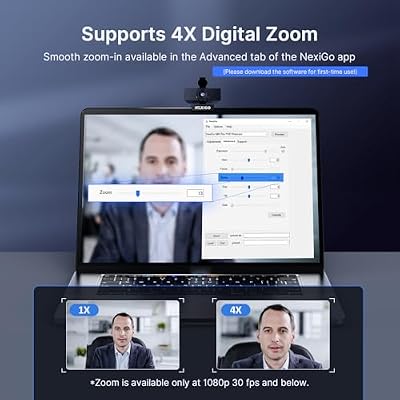
NexiGo N60 Pro 4K Webcam for PC, 4K UHD Sony Sensor, Autofocus, 1080p 60 fps, Noise-Canceling Mics, Privacy Cover, Distortion-Free Lens, 4X Digital Zoom, Works with Switch 2/Zoom/Teams/Google Meet




As an Amazon Associate we earn from qualifying purchases. Product prices and availability are accurate as of the date/time indicated.
The NexiGo N60 Pro leads this list because it delivers what the category promises: true 4K UHD capture. It is built around a 4K UHD Sony sensor with autofocus, so it records genuinely ultra-high-definition footage rather than upscaled or sensor-only marketing 4K, and it also offers a smooth 1080p 60fps mode for fast motion. At around $70 it is outstanding value for a real 4K webcam.
This is the camera for the streamer or creator who wants the sharpest possible image and is buying a 4K webcam specifically for that UHD detail. The Sony sensor captures fine texture and clarity, the autofocus keeps you crisp as you move, and the 1080p 60fps option gives you fluid motion when you do not need full resolution. For anyone who wants authentic 4K capture without paying a premium-brand price, the N60 Pro is the standout pick and the natural top of this list.
Pros: Genuine 4K UHD capture, quality Sony sensor, reliable autofocus, 1080p 60fps mode, great value.
Cons: True 4K is demanding on bandwidth and CPU; needs good lighting to shine.
2. Logitech 4K Webcam

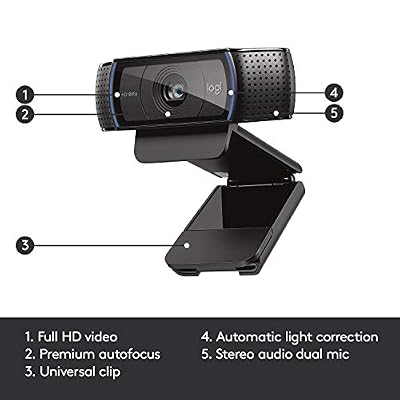
Logitech HD Pro Webcam C920, Widescreen Video Calling and Recording, 1080p Camera, Desktop or Laptop Webcam




As an Amazon Associate we earn from qualifying purchases. Product prices and availability are accurate as of the date/time indicated.
The Logitech 4K Webcam is the premium pick for 4K calls and content, carrying the most trusted name in webcams. As Logitech’s 4K-capable camera it pairs ultra-high-definition capture with the brand’s well-regarded optics, color handling and software support, and at around $119 it is the most expensive option here — a reflection of that pedigree and ecosystem.
This is the camera for the professional, executive or serious creator who values brand reliability, polished software and consistent image quality, and is willing to pay for it. Logitech’s color science tends to produce a natural, flattering image, the build and support are dependable, and high-dynamic-range handling helps in mixed lighting. It is the priciest webcam on this list, so value hunters may prefer the NexiGo options, but if you want a premium, no-compromise 4K camera from the category leader, the Logitech is the established choice.
Pros: Trusted Logitech quality, 4K-capable capture, strong color and software, dependable for calls.
Cons: Most expensive option here; you pay a premium for the brand and ecosystem.
3. NexiGo N680E Pro 4K Webcam with Ring Light, PDAF Autofocus, Dual Noise-Cancelling Mics

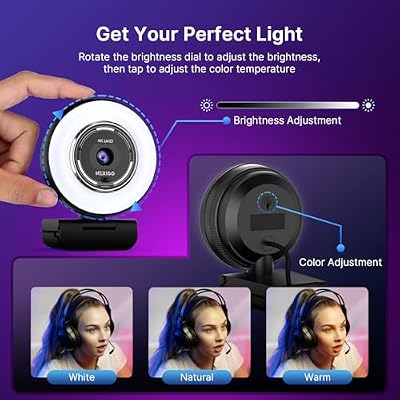
NexiGo N680E Pro 4K Webcam with Ring Light, PDAF Autofocus, 1080p 60FPS, Dual Noise-Canceling Mics, Privacy Shutter, USB Plug-and-Play for Zoom, Teams, Twitch, Google Meet




As an Amazon Associate we earn from qualifying purchases. Product prices and availability are accurate as of the date/time indicated.
The NexiGo N680E Pro is the pick for streaming with built-in lighting. It combines a 4K sensor with a surrounding ring light, fast PDAF (phase-detection) autofocus, and dual noise-cancelling microphones — an all-in-one package aimed squarely at creators who want to look and sound good without extra gear. At around $71 it bundles a lot of streaming-friendly features into one camera.
This is the camera for the streamer or remote worker who lacks dedicated lighting and wants the webcam to handle it. The integrated ring light brightens and flatters your face directly from the camera, the PDAF autofocus locks on quickly as you move, and the dual noise-cancelling mics clean up your voice without a separate microphone. It is a true 4K-sensor camera with genuinely useful built-in lighting, which is its real differentiator. If a self-contained look-good, sound-good setup appeals to you, the N680E Pro is the standout.
Pros: Built-in ring light, fast PDAF autofocus, dual noise-cancelling mics, 4K sensor, all-in-one value.
Cons: Built-in ring light is no substitute for a full key light in tough conditions.
4. NexiGo N660P Pro 4K Webcam with Distortion-Free Lens, 1080p 60fps Autofocus

NexiGo N660P Pro 4K Webcam with Distortion-Free Lens, 1080p 60 fps Autofocus USB Streaming Camera, 3DNR, Noise-Canceling Mics & Privacy Cover, Web Cam for Gaming/Live Streaming/PC/Mac/Switch 2, Pink


As an Amazon Associate we earn from qualifying purchases. Product prices and availability are accurate as of the date/time indicated.
The NexiGo N660P Pro (distortion-free version) is the pick for clean, natural-looking 1080p video. In the interest of honesty, this model uses a 4K-class sensor but outputs at 1080p 60fps rather than full 4K — so think of it as a high-quality Full HD camera that leans on a larger sensor and a distortion-free lens for image quality, not a true 4K recorder. At around $80 its strengths are sharpness and a geometrically accurate, undistorted frame.
This is the camera for the caller or creator who cares more about a clean, flattering, distortion-free 1080p image and smooth 60fps motion than about raw 4K resolution. The distortion-free lens keeps straight lines straight and avoids the fisheye look of cheaper webcams, the larger sensor helps clarity, and 1080p 60fps stays fluid for gaming or gestures. As long as you go in knowing it records at 1080p rather than 4K, it is an excellent Full HD webcam that punches above typical 1080p cameras.
Pros: Distortion-free lens, larger 4K-class sensor, smooth 1080p 60fps, sharp natural image.
Cons: Outputs 1080p, not true 4K, despite the 4K-sensor branding.
5. NexiGo N660P Pro 4K Webcam with Distortion-Free Lens, 1080p 60fps Autofocus USB
This second NexiGo N660P Pro listing is the autofocus 1080p value pick, and the same honesty applies: it is built on a 4K-class sensor but outputs at 1080p 60fps, so it is a high-quality Full HD camera rather than a genuine 4K recorder. It pairs reliable autofocus with the distortion-free lens over a simple USB connection, and at around $70 it is the more affordable of the two N660P Pro variants.
This is the camera for the value-minded user who wants dependable autofocus, a clean distortion-free 1080p image and plug-and-play USB simplicity without overspending. The autofocus keeps you sharp as you shift position, the lens avoids fisheye distortion for a natural look, and 1080p 60fps handles motion smoothly. It is essentially the same well-rounded Full HD webcam as the other N660P Pro at a slightly lower price — just remember it is a 1080p-output camera, not a true 4K one, and it makes excellent sense for the money.
Pros: Reliable autofocus, distortion-free lens, smooth 1080p 60fps, simple USB, lower price.
Cons: Like its sibling, it outputs 1080p rather than true 4K despite 4K-sensor branding.
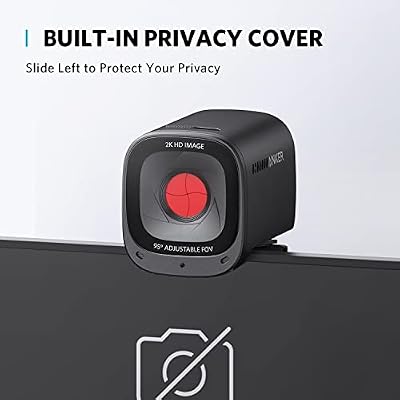
6. Anker PowerConf C200 2K Webcam, Low-Light Correction

Anker PowerConf C200 2K Webcam for PC/Laptop/Mac, Low-Light Correction | Conference Microphone, 360° Voice Coverage, Smart Voice Enhancement, Powerful Sound, Desktop PC Speaker, Online Meetings



As an Amazon Associate we earn from qualifying purchases. Product prices and availability are accurate as of the date/time indicated.
Rounding out the list is the Anker PowerConf C200, and we are upfront that it is a 2K camera, not a 4K one — included here as the budget, low-light value option for buyers cross-shopping high-resolution webcams. It captures sharp 2K (1440p) video, adds automatic low-light correction, and offers adjustable field of view, all at around $60, the lowest price on this list.
This is the camera for the home worker or caster in a dim room who wants a noticeable step up from a basic 1080p webcam without paying for 4K. The 2K resolution is crisper than standard Full HD, the low-light correction brightens and cleans up the image in poor lighting where many cameras struggle, and the adjustable field of view lets you frame yourself or a wider scene. It is not a 4K camera, so true-UHD seekers should look higher up the list, but as an affordable, low-light-friendly 2K option, the C200 is a smart, honest value choice.
Pros: Affordable, sharp 2K resolution, strong low-light correction, adjustable field of view.
Cons: It is a 2K camera, not 4K, so it does not deliver true ultra-high-definition detail.
How to Choose a 4K Webcam
Choosing a 4K webcam starts with a dose of honesty about resolution, because the label is used loosely. A true 4K webcam, like the NexiGo N60 Pro or the Logitech here, actually captures and outputs ultra-high-definition video. Several cameras marketed around a ‘4K sensor’, including both NexiGo N660P Pro models on this list, in fact output at 1080p — they are excellent Full HD cameras, but not true 4K recorders. Decide whether you genuinely need UHD detail, then check the actual output resolution rather than trusting the headline number.
The sensor is the heart of any webcam, and it matters more than the resolution spec alone. A larger, higher-quality sensor — such as the Sony unit in the N60 Pro — gathers more light and resolves more detail, producing a cleaner image than a small sensor stretched to a big resolution. When comparing cameras, favour a strong sensor and good optics over a bigger number on the box, since those are what actually make you look sharp, especially once the light is less than perfect.
Autofocus and lighting are the practical features that decide how good you look in real use. Reliable autofocus — and faster PDAF phase-detection, as on the N680E Pro — keeps you crisp as you lean in, gesture or move around, which fixed-focus cameras cannot. Lighting is just as important: a camera with a built-in ring light like the N680E Pro flatters your face directly, and low-light correction like the Anker’s rescues a dim room. No webcam looks its best in darkness, so weigh built-in lighting and low-light handling alongside the sensor.
Finally, balance extras, connection and budget against how you will use the camera. Dual noise-cancelling microphones, distortion-free lenses and adjustable fields of view all add real value depending on your setup, and a simple USB connection keeps things plug-and-play. Remember that true 4K capture demands more bandwidth and CPU than 1080p, so confirm your PC and upload can handle it before paying for UHD. Set your resolution honestly, prioritise a good sensor and autofocus, factor in lighting, and pick the webcam on this list that fits how you actually appear on camera.
Frequently Asked Questions
Do all ‘4K’ webcams actually record in 4K?
No, and this is worth checking carefully. Some cameras have a true 4K UHD sensor and output ultra-high-definition video, like the NexiGo N60 Pro and the Logitech here. Others are marketed around a ‘4K sensor’ but actually output at 1080p — both NexiGo N660P Pro models on this list are excellent 1080p cameras rather than true 4K recorders. Always confirm the real output resolution, not just the sensor branding.
Is a 4K webcam worth it over a good 1080p one?
It depends on your needs. If you want the sharpest possible image for high-quality streaming or detailed content, true 4K like the N60 Pro delivers noticeably more clarity. For typical video calls a strong 1080p or 2K camera with a good sensor, autofocus and decent lighting often looks great and is easier on bandwidth. Match the resolution to whether fine UHD detail genuinely matters for your use.
How important is lighting for webcam quality?
Very important — arguably as much as the camera itself. No webcam, even a 4K one, looks its best in a dim room. A model with a built-in ring light like the NexiGo N680E Pro lights your face directly, and low-light correction such as the Anker C200’s helps in poor conditions. For the best image, pair a good sensor with proper lighting, whether built into the camera or added separately.
Will a 4K webcam slow down my PC or stream?
True 4K capture uses more bandwidth and processing power than 1080p, so it asks more of your computer and your upload connection. On a capable PC with a solid internet connection it is fine, but on older hardware or a slower upload, a quality 1080p or 2K camera may run more smoothly. Confirm your system and upload can handle UHD before committing to a 4K workflow.
Related Guides
- Best Streaming Microphones
- Best Streaming CPUs
- Best Ring Lights for Streaming
- Best Gaming Monitors
- Best Capture Cards
- Best Gaming Headsets
Affiliate Disclosure: As an Amazon Associate, we earn from qualifying purchases. If you click a link and make a purchase, we may earn a small commission at no extra cost to you. Prices and availability are accurate as of publication and may change.










