

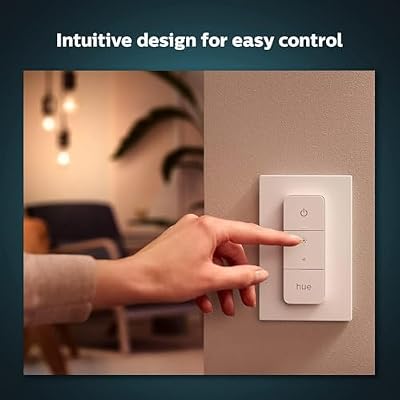
The Philips Hue Smart Wireless Dimmer Switch V2 is the redesigned second-generation Hue dimmer — a battery-powered Zigbee remote that controls Philips Hue lights with a physical button rather than the Hue app or a voice command. It is a small puck that can be left loose on a desk, magnetically mounted to its included wall plate or stuck via the included 3M backing to any surface, with four buttons: on, off, brighter and dimmer. A long-press cycles through scenes you have configured in the Hue app. It is not a smart device in its own right — there is no microphone, no display, no Wi-Fi — but as a physical control surface for a Hue system it is the missing piece that makes smart lighting feel like normal lighting again. This Hue Dimmer Switch V2 review covers setup, the use cases, smart-home integration, and who should buy.

Philips Hue Smart Wireless Dimmer Switch V2 (Installation-Free, Exclusive Philips Hue Lights) for Indoor Home Lighting, Livingroom, Bedroom





As an Amazon Associate we earn from qualifying purchases. Product prices and availability are accurate as of the date/time indicated.
🛒 Best Price Today on Amazon
Prime members get fast, free shipping on everything above, plus member-only deals. New members get a 30-day free trial — cancel anytime.
As an Amazon Associate we earn from qualifying purchases.




Philips Hue Dimmer Switch V2 at a Glance
| Component | Specification |
|---|---|
| Type | Battery-powered wireless dimmer remote (Zigbee) |
| Length / Wattage | Compact puck — no wired power; uses CR2032 coin-cell battery (~2-3yr life) |
| Connectivity | Zigbee 3.0 — pairs to Hue Bridge or directly to Bluetooth-only Hue bulbs |
| Voice assistant | None — physical remote only (controls Hue lights, which themselves do voice) |
| Color | N/A — this is a controller, not a light |
| App support | Philips Hue app for setup and scene assignment |
| Power source | Coin-cell battery (CR2032 included) |
| Music sync | No — this is a manual control surface, not an effect light |
| Approx price | around $25 |
Setup & App Experience
Setup is a one-minute job. Pop the included CR2032 coin cell into the back of the puck, open the Hue app and walk through ‘add accessory’. With a Hue Bridge installed the app finds the dimmer via Zigbee and lets you assign it to a room — which automatically wires the four buttons to control all the Hue lights in that room. Without a Hue Bridge the dimmer can pair directly to Bluetooth-only Hue bulbs in a smaller install. The wall plate is magnetic — the puck snaps onto the plate and detaches just as easily, so the same dimmer can live mounted on the wall as a switch and be taken to the bedside as a remote when needed. The plate is held to the wall by the included 3M adhesive (no wiring, no screws into drywall required), which means installation is a true no-tools job. The Hue app’s scene assignment screen is the place to customise what the on button does on a long-press: by default it cycles through several scenes (the colors and brightness you have saved), but you can pick exactly which scenes the cycle includes.
Lighting Quality & Color Accuracy
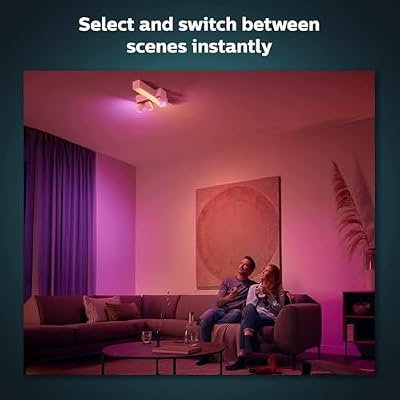
This is a remote, not a light — there is no lighting to evaluate here. What matters is how cleanly the remote drives the lights it controls, and on that the V2 dimmer is excellent. The on button gives an instant on (faster than a voice command), the brighter and dimmer buttons step the lights up and down smoothly, and the off button cuts everything in the assigned room. Latency from button-press to light response is essentially imperceptible on a Hue Bridge system. The scene-cycle on long-press is the killer feature: a single button can cycle a room from ‘bright work’ through ‘reading warm’ to ‘cinema amber’ without touching a phone, which is what most households actually want from a wall switch in a smart-lighting room.
Smart Home Compatibility
The dimmer is a controller, not a smart-home endpoint — Alexa, Google and HomeKit do not see it directly because there is nothing to control. What it does instead is provide a physical control surface for the Hue lights, which are themselves seen by voice assistants. That distinction matters: a Hue light controlled by Alexa via voice and by the dimmer via button-press will reflect both inputs cleanly, and the Hue app shows the current state regardless of which control method was used last. For households where some members are happy with voice and others prefer a physical button, the dimmer is the bridge between those preferences. It does not replace a smart-home hub; it complements one. For non-Hue smart lights (Govee, etc.) this dimmer does not apply — it talks Zigbee to Hue specifically, not generic smart-light protocols. For a household with a Hue Bridge plus other smart-home devices, the dimmer also integrates with Alexa Routines: long-press on the dimmer can trigger ‘Alexa, run cinema scene’ which then dims a smart plug, the Hue lights and a fan simultaneously. See the Amazon Smart Plug review for matching control of non-smart appliances.
Music Sync & Effects
This is a remote, not an effect light, so there is no music sync to evaluate. What it adds to a Hue system is the ability to interrupt a running scene cleanly with a single button-press — useful for example to break out of a Hue Sync gaming scene back to ‘normal warm white’ for the room without grabbing a phone or shouting at a voice assistant. For households that run Hue Sync from a PC for gaming or movie use, the dimmer is the natural ‘stop the effect and bring up the work scene’ button that lives on the desk. The button feel is the underrated detail: the buttons are real physical buttons with a clear click, not capacitive touch, which means they work in the dark, with gloves on and through bedside-table sleep fog without any of the misfires that capacitive controls cause.
Setup Tips — Behind TV / Desk / Ceiling
The mounting choice is the install question. For a desk install the standard layout is to place the magnetic wall plate on the side of the monitor or under the desk lip, where the dimmer is in easy reach without taking desk surface area. For a wall install — replacing a traditional dumb wall switch in a room where the wall switch wiring runs to a non-Hue fixture — the magnetic plate goes on the wall at standard switch height, with the puck sitting in place as if it were a normal switch. For a bedside install the puck can sit loose on the nightstand as a remote, with no plate needed. For a wall-mount install that removes the dumb wall switch entirely, do not actually remove the wall switch — leave it on permanently and use the Hue dimmer over it, so the household never accidentally cuts power to the smart bulbs. That preserved-always-on wall switch is the most important install rule for any smart-bulb retrofit. Pair the dimmer with the Philips Hue A19 Color Ambiance bulbs in this round-up for the full control story.
Verdict
At around $25 the Philips Hue Smart Wireless Dimmer Switch V2 earns a strong recommendation for any Hue household. It solves the single most common frustration with smart bulbs — the inability of guests, children and bleary-eyed sleepers to control them — by adding a physical, no-app, no-voice control surface that takes one minute to install and runs for years on a single coin cell. The scene-cycle long-press is genuinely useful, the magnetic mount is clever, and the buttons feel like real switches. The honest caveats are that it is Hue-specific (it does not work with Govee, Wyze or other smart lights) and that it adds nothing to a household that has no Hue lights yet. For an established Hue install, it is the missing piece. Buyers should also see the Philips Hue Bridge Multi-Room System review in this round-up for the full Hue platform, or compare the Govee LED Strip alternatives if Hue is too rich for the budget.
Frequently Asked Questions
Does the Philips Hue Dimmer Switch V2 need a Hue Bridge?
Not strictly — it can pair directly to Bluetooth-only Hue bulbs in smaller installs. For multi-room systems the Hue Bridge is recommended, and the dimmer integrates fully with the Bridge over Zigbee for whole-room control.
Can the Hue Dimmer Switch V2 control non-Hue smart lights?
No. The dimmer talks Zigbee to Hue specifically — it does not work with Govee, Wyze, LIFX or other smart-light brands.
How long does the Hue Dimmer Switch V2 battery last?
Roughly 2-3 years on a single CR2032 coin cell with normal household use. The Hue app shows battery level for replacement planning.
Can I mount the Hue Dimmer Switch V2 on the wall?
Yes. It ships with a magnetic wall plate that adheres with 3M tape (no screws, no wiring). The puck snaps onto the plate and detaches as a portable remote when needed.
More Smart Light Reviews
- Philips Hue Smart 75W A19 Soft Warm Review: White-Only 2-Pack
- Philips Hue Bridge Review: Multi-Room Smart Lighting Hub
- Govee RGBIC Floor Lamp Basic Review: 1000lm SmartThings RGBIC Lamp
- Govee White LED Strip Review: 16.4ft 6500K Daylight Strip
- SILFU Neon Rope LED Strip Review: 50FT IP67 Waterproof Outdoor Light
- DAYBETTER LED Strip Lights Review: 32.8ft Budget RGB Kit
- Govee Car LED Lights Review: Smart Interior App-Control RGB Kit
- Govee Smart RGB WiFi LED Strip Review: 16.4ft Alexa Google Strip
Affiliate Disclosure: As an Amazon Associate, we earn from qualifying purchases. If you click a link and make a purchase, we may earn a small commission at no extra cost to you. Prices and availability are accurate as of publication and may change.










