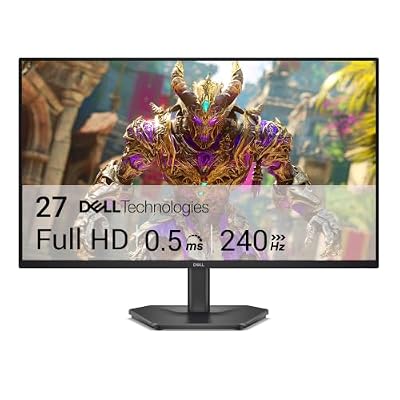
- Top Pick: Dell 27 240Hz Gaming Monitor – SE2726HG – 27-inch FHD (1920×1080) Display, in-Plane Switching (IPS) Technology, AMD FreeSync Premium, TÜV 3-Star, 2X HDMI, DisplayPort 1.4, Tilt
- Best Value: Acer 27in FHD 1920×1080 IPS 120Hz Gaming Monitor | Office KB272 G0bi
- Premium Choice: Samsung 27" Odyssey G5 (G51F) Series QHD (1440P) Gaming Monitor
A 27 inch monitor under $150 is one of the few places left in PC hardware where the budget tier doesn’t feel like a compromise. Panel prices have dropped enough that you can get a 1080p IR panel with 100Hz+ refresh and decent color at this price, which was a $300 proposition five years ago. The catch is resolution and panel quality consistency, not refresh rate.
As an Amazon Associate we earn from qualifying purchases at no extra cost to you.


The resolution trade-off nobody mentions
At 27 inches, 1920×1080 gives you roughly 82 pixels per inch. That’s noticeably softer than the 1440p you’d want at this size, text edges look a bit fuzzy up close, and fine UI elements in games can look blocky. You will see this immediately if you’re coming from a laptop screen or a smaller 1080p monitor. It’s not bad, it’s just visibly budget. A few monitors under $150 do 2560×1440 at 27 inches, but they’re usually 75Hz or lower refresh and the panel bit depth tends to be weaker. You’re picking one weakness or the other at this price, not avoiding both.
If text clarity and desktop work matter as much as gaming, lean toward the 1440p option and accept the lower refresh. If you’re mainly gaming and want smoothness, take the 1080p 100-144Hz route. There isn’t a free lunch here.
Panel types you’ll actually find
Almost everything at this price point is VA or IPS, with VA being more common below $130. VA gives you better contrast, often 3000:1 or higher static contrast versus 1000:1 on IPS, so blacks look genuinely darker in dark scenes and movies. The trade-off is slower pixel response, which shows up as smearing in fast-moving dark content, think shadows trailing behind a character in a dim corridor. IPS panels in this range have weaker contrast and sometimes visible IPS glow in dark rooms, but motion clarity and color consistency off-angle are better.
TN panels still exist under $150 but they’re increasingly rare at 27 inches and I’d skip them unless the price gap is huge. Color and viewing angles are noticeably worse, and the refresh rate advantage TN used to have is gone now that VA and IPS panels hit 144Hz at this price too.
What refresh rate actually buys you here
60Hz at this size and price is basically obsolete for anyone buying a monitor branded or marketed as “gaming.” You’ll find 100Hz, 144Hz, and occasionally 165Hz monitors under $150, and the jump from 60 to 144Hz is the single biggest feel upgrade available in this budget, bigger than any resolution or color improvement you’ll get for the same money. Competitive games like shooters benefit most. Slower single-player games benefit less, so if that’s most of your library, a 100Hz panel is plenty and you can put the savings toward a better panel type.
Be skeptical of advertised response times like “1ms.” At this price it’s almost always a manufacturer’s best-case gray-to-gray number, not a real-world figure, and actual pixel response especially on VA panels is often 4-8ms in dark transitions. This is why VA monitors with high advertised refresh rates can still show ghosting in dark competitive games.
Quick comparison of what you’re choosing between
| Spec combo | Typical price | Best for | Weak point |
|---|---|---|---|
| 1080p VA, 144Hz | $110-140 | Fast games, dark room movie watching | Smearing in dark fast motion |
| 1080p IPS, 100-144Hz | $120-150 | Mixed use, color accuracy, off-angle viewing | Weaker blacks, possible IPS glow |
| 1440p VA/IPS, 75Hz | $140-150 | Desktop work, sharper text, slower games | Lower refresh, less fluid in fast games |
| 1080p TN, 144Hz+ | $90-120 | Pure budget speed, nothing else | Washed out color, bad viewing angles |
What actually matters when you’re picking one
Check the stand before anything else. Sub-$150 monitors frequently cut costs on the stand first, meaning tilt-only adjustment and no height adjustment, which can leave the screen too low or too high depending on your desk. If ergonomics matter, confirm VESA mount compatibility (100x100mm is standard) so you can add an arm later instead of living with a bad stand.
Also check the actual port list, not just “HDMI available.” Some budget 144Hz monitors only hit their full refresh rate over DisplayPort, with HDMI capped lower depending on the HDMI version used. If you’re on a console or an older GPU without DisplayPort, this matters more than the headline refresh number.
For shopping, it helps to compare current listings directly rather than going by spec sheets alone, since pricing and available panel types shift. Browsing options for a 27 inch 144Hz monitor will show you the current VA versus IPS split at this price, and if 1440p sharpness matters more to you than refresh rate, looking at a 27 inch 1440p monitor under $150 will narrow things down fast since there aren’t many.
Where the cheap option is genuinely fine
If you’re gaming casually, watching video, and browsing, a $120 1080p VA 144Hz panel does the job with no real downside versus spending more. The place people get burned is buying one of these expecting 1440p sharpness or OLED-level blacks, then feeling disappointed by something that was never designed to deliver that. Match the panel type to what you actually do most: VA for dark room contrast, IPS for color work and shared viewing angles, and skip 1440p at this price unless you’ve already accepted the refresh rate hit that comes with it.