

- Top Pick: Sceptre New 22-Inch Gaming Monitor, FHD 1080p, Up to 144Hz, HDMI, DisplayPort, Built-in Speakers, Machine Black (E225W-FW144 Series, 2026)
- Best Value: msi PRO MP243L E14 24-inch IPS 1920 x 1080 (FHD) Gaming Office Monitor, 144Hz, Free-Synch, HDR Ready, HDMI, VGA Port,VESA Mountable, Tilt, 4-Side Slim Bezel,1ms, Black
- Premium Choice: ArcticPro 24 Inch Gaming Monitor 144Hz, FHD 1080p Computer Monitor, IPS
The 144Hz monitor remains the smartest value upgrade in PC gaming, and that is unlikely to change in 2026. Going from a standard 60Hz screen to 144Hz is the single most noticeable jump most players will ever feel — motion becomes dramatically smoother, the cursor glides, fast camera pans stay clear, and the whole system simply feels more responsive. Crucially, 144Hz is far easier to drive than 240Hz, so a wider range of graphics cards can actually reach those frame rates, which is exactly why it is the refresh rate that hits the sweet spot of price and performance.
- Best 144Hz Monitors at a Glance
- 1. KOORUI E2411K 24-inch 144Hz IPS Monitor
- 2. LG 27GL83A-B 27-inch QHD 144Hz Monitor
- 3. KOORUI 24-inch 144Hz Ultra-Slim IPS Monitor
- 4. Sceptre 24-inch 165Hz IPS Gaming Monitor
- 5. SANSUI 27-inch Curved 160Hz Gaming Monitor
- How to Choose a 144Hz Monitor
- Frequently Asked Questions
- Related Guides
- Related Articles
This guide rounds up six of the best 144Hz (and faster) monitors for all-round gaming, ranging from around $86 to about $259. Rather than chasing the highest possible refresh rate, these picks balance smooth high-refresh motion with the things that matter for everyday play and varied game libraries: crisp IPS colour, sensible resolutions from Full HD to QHD, and adaptive sync for tear-free images. Whether you want an affordable IPS panel or a sharp QHD screen for both fast shooters and beautiful single-player games, there is a well-judged option here.
As an Amazon Associate we earn from qualifying purchases at no extra cost to you.






🛒 Best Price Today on Amazon
Prime members get fast, free shipping on everything above, plus member-only deals. New members get a 30-day free trial — cancel anytime.
Best 144Hz Monitors at a Glance
| Product | Best For | Standout Spec | Approx Price |
|---|---|---|---|
| KOORUI E2411K 24″ | Budget 144Hz IPS | 24″ FHD IPS, Adaptive Sync | around $86 |
| LG 27GL83A-B 27″ | QHD all-rounder | 27″ QHD IPS, 144Hz, G-Sync | around $259 |
| KOORUI 24″ IPS | Slim FHD value | 24″ FHD IPS, ultra-slim | around $90 |
| Sceptre 24″ 165Hz IPS | 165Hz on a budget | 24″ FHD IPS, FreeSync | around $120 |
| SANSUI 27″ Curved 160Hz | Curved immersion | 27″ 1500R, 160Hz FHD | around $110 |
1. KOORUI E2411K 24-inch 144Hz IPS Monitor

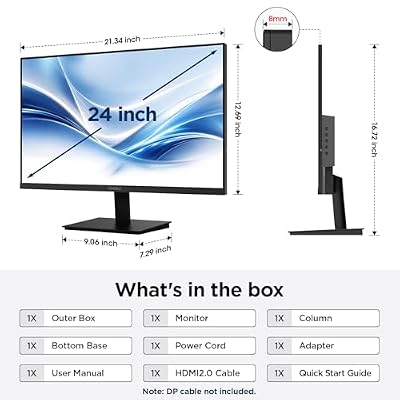
KOORUI 24" FHD IPS PC Monitor, 144Hz Adaptive Sync, Eye Care, Tilt Adjustable, HDMI & VGA, VESA Mount for Home Office, Streaming and Casual Gaming


As an Amazon Associate we earn from qualifying purchases. Product prices and availability are accurate as of the date/time indicated.
The KOORUI E2411K is the budget hero of this roundup and a brilliant entry point into high-refresh gaming. At around $86 it delivers a 24-inch Full HD IPS panel running at 144Hz with adaptive sync — a combination that just a few years ago would have cost far more. The IPS panel is the key here: it gives you wide viewing angles and more accurate, vibrant colour than the cheap TN screens that used to dominate this price bracket, so games look good as well as smooth.
It is a genuinely sensible all-rounder. The 144Hz refresh transforms fast-paced games, the adaptive sync keeps motion tear-free, and built-in eye-care features and a tilt-adjustable stand make long sessions more comfortable. For a first gaming monitor, a second display, or simply a no-fuss way to get smooth 144Hz IPS gaming on a tight budget, the E2411K is exceptional value and an easy recommendation.
Pros: Outstanding value around $86; smooth 144Hz refresh; colour-accurate IPS panel; adaptive sync for tear-free motion; eye-care features and tilt stand.
Cons: Full HD resolution only; basic build and feature set; stand offers tilt but limited height adjustment.
2. LG 27GL83A-B 27-inch QHD 144Hz Monitor
The LG 27GL83A-B is the premium all-rounder of the group and a long-standing favourite for good reason. It pairs a 27-inch QHD (2560×1440) IPS panel with a 144Hz refresh rate and a fast 1ms response, plus G-Sync compatibility — a specification that hits the ideal balance for players who want one monitor to do everything well. The step up to QHD makes a real difference at 27 inches: text is crisper, games are noticeably sharper, and the extra desktop space is welcome for work too.
LG’s Nano IPS technology delivers excellent, vibrant colour and wide viewing angles, so this screen is as good for atmospheric single-player adventures as it is for competitive shooters. At around $259 it is the most expensive pick here, but you are paying for a proven, high-quality panel that balances resolution, speed and colour better than almost anything else at this level. For a do-it-all gaming monitor that will not need replacing soon, it is the standout choice.
Pros: Sharp 27-inch QHD resolution; fast 144Hz with 1ms response; vibrant Nano IPS colour; G-Sync compatible; superb all-round gaming and productivity screen.
Cons: Most expensive option here; QHD at 144Hz needs a capable GPU; no height adjustment on the basic stand variant.
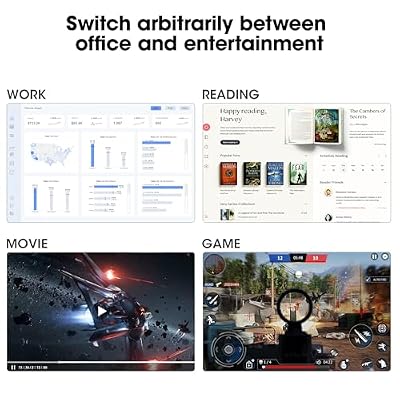
3. KOORUI 24-inch 144Hz Ultra-Slim IPS Monitor

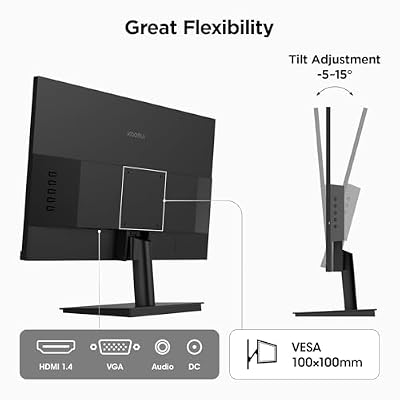
KOORUI 24 Inch Gaming Monitor 144Hz Full HD 1920 x 1080p IPS Ultra-Slim Display with HDMI VGA, Adaptive Sync, 99% SRGB, VESA 100x100mm, Eye Care, Tilt, HDMI 2.0, Black, E2411K




As an Amazon Associate we earn from qualifying purchases. Product prices and availability are accurate as of the date/time indicated.
The second KOORUI on this list is a sleek, ultra-slim take on the budget 144Hz IPS formula. At around $90 it offers the same core appeal — a 24-inch Full HD IPS panel at 144Hz — in a noticeably thinner, more modern-looking chassis with slim bezels that suit a clean desk or a tidy multi-monitor arrangement. The IPS panel again brings the accurate colour and wide viewing angles that make games and everyday content look their best.
It is a great pick for someone who values aesthetics alongside performance, or who is building a dual-screen setup where slim bezels minimise the gap between displays. The smooth 144Hz motion and IPS image quality are the substance behind the style. If you like the value of the E2411K but want a more contemporary, low-profile design, this ultra-slim KOORUI delivers it for just a few dollars more.
Pros: Sleek ultra-slim design with thin bezels; smooth 144Hz IPS panel; accurate colour and wide angles; great for tidy or dual-monitor setups; strong value around $90.
Cons: Full HD resolution; thin chassis means a fairly basic stand; limited port selection.
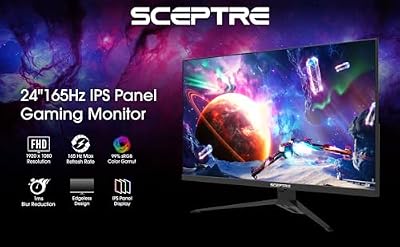
4. Sceptre 24-inch 165Hz IPS Gaming Monitor

Sceptre 24-Inch Gaming Monitor, 99% sRGB, 1ms, Up to 180Hz, FreeSync, Eye Care, FPS/RTS, DisplayPort, HDMI, Built-in Speakers, Machine Black (E248B-FPT168 Series)



As an Amazon Associate we earn from qualifying purchases. Product prices and availability are accurate as of the date/time indicated.
The Sceptre 24-inch nudges past the 144Hz baseline with a 165Hz IPS panel, giving you a little extra smoothness for the same modest outlay. At around $120 it is a well-rounded gaming monitor that combines the colour accuracy and wide viewing angles of IPS with a 165Hz refresh rate and FreeSync support, so motion is both fluid and tear-free. That 21Hz bump over 144Hz is minor in isolation, but it is a welcome bonus at this price.
Sceptre includes thoughtful eye-care features to ease the strain of long sessions, and the 24-inch Full HD format keeps frame rates easy to reach across a wide range of graphics cards. It is a dependable, value-focused choice for the player who wants smooth IPS gaming with a touch more headroom than the entry-level 144Hz panels, without stepping up to a pricier QHD screen. A solid, sensible all-rounder.
Pros: Slightly faster 165Hz refresh; colour-accurate IPS panel; FreeSync for tear-free motion; eye-care features for long sessions; good value around $120.
Cons: Full HD resolution; the jump over 144Hz is modest; build and stand are budget-grade.
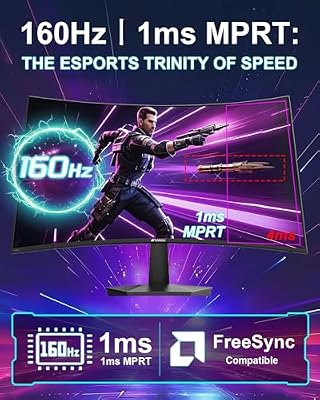
5. SANSUI 27-inch Curved 160Hz Gaming Monitor

SANSUI 27 Inch Curved 160Hz Gaming Monitor 144Hz FHD 1080P Computer Monitor | 27” 1500R Curved PC Monitor, FPS/RTS, MPRT 1Ms, FreeSync, HDR, 4000:1, 110% sRGB, Low Blue Light, HDMI DP Ports for Gaming



As an Amazon Associate we earn from qualifying purchases. Product prices and availability are accurate as of the date/time indicated.
For players who want immersion alongside smooth motion, the SANSUI 27-inch curved monitor brings a 1500R curve to the high-refresh formula. At around $110 it offers a 27-inch Full HD panel running at 160Hz, so you get a larger, more enveloping screen than the 24-inch options plus a refresh rate comfortably above the 144Hz baseline. The gentle curve wraps the edges of the picture toward you, adding a sense of depth that flat panels cannot quite match.
The 27-inch size is a popular choice for a primary gaming display, big enough to feel cinematic in single-player games yet still manageable for fast-paced play, and the 160Hz refresh keeps motion fluid throughout. Full HD at this size keeps the GPU demand light, so high frame rates are easy to reach. For a buyer who wants a curved, immersive 144Hz-class monitor without spending much, this SANSUI is a likeable and affordable option.
Pros: Immersive 27-inch curved panel; 160Hz refresh above the 144Hz baseline; affordable around $110; FHD keeps frame rates easy to hit; good size for a main display.
Cons: 1080p over 27 inches is less sharp than QHD; VA-style curved panels can smear slightly versus IPS; modest ergonomic adjustment.
How to Choose a 144Hz Monitor
The appeal of a 144Hz monitor is that it is the value sweet spot, so choosing one is about balance rather than chasing a single extreme. Start with panel type: for all-round gaming, an IPS panel is the smart default because it delivers accurate, vibrant colour and wide viewing angles, making it equally good for competitive shooters and beautiful single-player worlds. That versatility is exactly why most of the picks here are IPS — you get smooth high-refresh motion without sacrificing image quality, which matters when your library spans many genres.
Resolution is the next decision, and 144Hz gives you room to think beyond pure frame rate. Full HD (1080p) is the easiest to drive and keeps even mid-range graphics cards comfortably above 144fps, which is why it dominates the budget options. Stepping up to QHD (1440p), as the LG 27GL83A-B does, gives a noticeably sharper, more detailed picture and extra desktop space for productivity, at the cost of needing a more capable GPU to maintain high frame rates. Pick 1080p for maximum smoothness and value, or QHD for sharpness and a screen that doubles as a great work display.
Finally, consider size and adaptive sync. A 24-inch screen is compact, keeps the action in view and pairs naturally with 1080p; a 27-inch panel feels more immersive and suits QHD or a curved design like the SANSUI. Always make sure the monitor supports FreeSync or G-Sync so its refresh rate syncs to your GPU for tear-free, stutter-free motion — every option here does. Match the panel and resolution to your games and graphics card, choose a size that fits your desk and viewing distance, and a 144Hz monitor will give you the biggest, most satisfying upgrade in smoothness for the money.
Frequently Asked Questions
Is 144Hz enough for gaming in 2026?
Absolutely. 144Hz remains the value sweet spot — the jump from 60Hz is the most noticeable upgrade most players ever feel, motion is dramatically smoother, and it is far easier to drive than 240Hz. Only dedicated competitive players chasing the last edge truly need to go higher.
Should I get a 1080p or 1440p 144Hz monitor?
Choose 1080p for the easiest path to high frame rates and the best value, ideal on a mid-range GPU. Choose 1440p, like the LG 27GL83A-B, for a sharper, more detailed image and extra desktop space, provided your graphics card is strong enough to sustain high frame rates.
Are IPS panels good for 144Hz gaming?
Yes, IPS is the recommended all-round choice. Modern IPS panels combine accurate, vibrant colour and wide viewing angles with fast response times, so they look great in both competitive and cinematic games. That is why most monitors in this guide use IPS panels.
Do I need FreeSync or G-Sync on a 144Hz monitor?
It is strongly recommended. Adaptive sync matches the monitor’s refresh rate to your GPU’s frame output, eliminating screen tearing and stutter for a smoother, cleaner image. Every monitor in this roundup supports FreeSync or G-Sync compatibility.
Related Guides
- best curved gaming monitors
- best gaming monitors under $400
- best gaming monitors under $500
- best gaming monitor for PS5
- best gaming monitor for Xbox Series X
- best gaming keyboards
Affiliate Disclosure: As an Amazon Associate, we earn from qualifying purchases. If you click a link and make a purchase, we may earn a small commission at no extra cost to you. Prices and availability are accurate as of publication and may change.
















