Atelier Ayesha: The Alchemist of Dusk opened Gust’s Dusk trilogy on consoles, and its Steam presence is simpler than most of the series: a single DX listing, released in January 2020, with nothing else attached to it. That simplicity makes the Linux question easy to ask precisely. Is there a native Linux build, or is this a Proton game?
The records give a split answer depending on where you play. Steam’s own flags say the game is Windows only, so there is no native build. On a Linux desktop, though, the community record is as strong as it gets, while Valve’s Steam Deck record points the other way. This article reads each record on its own terms.
As an Amazon Associate, we earn from qualifying purchases.
Quick answer
No. Atelier Ayesha: The Alchemist of Dusk DX has no native Linux build: Steam’s record for its single listing flags Windows only, and its Linux requirements tab is an empty shell. Desktop Linux play runs through Proton, where ProtonDB rates it Platinum. Valve rates it Unsupported on Steam Deck, and no GOG edition exists.
| Question | Answer |
|---|---|
| Native Linux build | No |
| ProtonDB tier | Platinum |
| Steam Deck verdict | Unsupported |
| GOG edition | None |
The Steam record: one listing, Windows only
Steam’s store search returns exactly one app for this title: Atelier Ayesha: The Alchemist of Dusk DX, app 1152300, developed and published by Koei Tecmo Games and released on 14 January 2020. There is no older, non-DX Steam listing underneath it to compare against. Whatever the record says, it says about this one app.
The appdetails record flags platforms as windows true, mac false and linux false. The linux_requirements block is an empty shell: the Minimum and Recommended headings are present, but both lists under them are empty, a store-template leftover rather than a real Linux specification tab. The category record lists single-player, Steam Achievements, Family Sharing, a gamepad-recommended tag and partial controller support. No anti-cheat is named, the record carries no DRM notice, and nothing asks for a third-party launcher or account. The published Windows minimum asks for a 64-bit Windows 10 system, a Core i5 at 2.6 GHz, 4 GB of RAM, a GeForce GTX 660 class card with 2 GB of memory, DirectX 11 and 17 GB of storage — modest demands that any current Linux desktop clears easily.
The family sweep that finds no family
The soundtrack trap this series of articles watches for — a music app flagging Linux and making a Windows game look native — cannot fire here, because there is no family to hide in. The game app’s record carries no DLC list at all: no expansions, no costume packs, no BGM packs, and no standalone soundtrack app. A store search on the title returns the game alone. Across every app attached to Atelier Ayesha on Steam, the Linux flag count is zero, and it is zero because there is only the one app, flagging Windows only. The verdict therefore rests exactly where it should: on the game app itself.
ProtonDB: a unanimous desktop file
ProtonDB’s summary record for app 1152300 is the cleanest shape the tracker publishes. The headline tier is Platinum, the best-reported tier is Platinum and the trending tier is Platinum, across 21 reports, with the tracker’s confidence rated good. There is no split to explain and no early-history drag to discount: the desktop Linux file simply says this Windows game runs at the top tier through Proton. Twenty-one reports is a moderate pool rather than a census, and the article carries it as such, but a unanimous Platinum file at good confidence is the strongest community signal a non-native game can hold.
Steam Deck: the badge that disagrees
Valve’s compatibility record tells a different story. Read through tuxDB’s republication of Valve’s own compatibility data — Valve’s endpoint itself was unusable in this session — the record rates the game Unsupported on Steam Deck, with the published line stating that Steam Deck does not support this game. The record read publishes no test date, and none is claimed here. Because the badge is Unsupported, the gear section below is a desktop selection, not a handheld one.
The disagreement with the desktop file is worth stating plainly rather than smoothing over. Valve’s badge is a verdict about the game as shipped, under its own test criteria, and Steam’s record lists only partial controller support alongside a gamepad-recommended tag. ProtonDB also carries Steam Deck reports from owners who run the game after manually forcing a Proton version, and who describe needing touchscreen or mouse emulation to get past the launcher. That texture fits the badge: a game that can be made to run by hand is not the same thing as a game Valve counts as supported, and the official record is the one a buyer should plan around.
The GOG ruling
There is no DRM-free alternative to weigh. GOG’s catalogue searches return zero products for this title, its filtered games endpoint returns zero, and its catalogue API returns no purchasable product either — the title appears there only as a Dreamlist wishlist entry, which is a voting page, not an edition. The Steam DX listing is the only PC copy to buy, and the Proton route above is the only Linux route.
Gear for desktop Linux play
Logitech G502 HERO

Alchemy menus, gathering lists and inventory grids fill an Atelier session with pointer work. This wired mouse brings a precise sensor and enough programmable buttons to move the common actions off the keyboard.
Specs
- HERO sensor, up to 25,600 DPI
- 11 programmable buttons
- Adjustable weight system with five 3.6 g weights
- LIGHTSYNC RGB lighting
- Wired USB connection
8BitDo Ultimate 2 Bluetooth Controller

Steam lists partial controller support for this game, so treat any pad as a Steam Input mapping device rather than a natively recognised one. This pad suits that role well, with TMR sticks, Hall effect triggers and two back buttons to remap once the mapping is set.
Specs
- Connectivity: Bluetooth wireless and USB-C wired
- Joysticks: TMR electromagnetic, anti-drift design
- Triggers: Hall effect, with mode switching
- Extras: two remappable back buttons, motion control
- In the box: charging dock included
Xbox Wireless Controller, Carbon Black

The standard-layout mapping option: Steam Input support is universal, the glyphs match what most games display, and it pairs over Bluetooth or its own wireless standard. As with every pad here, Steam’s partial-support listing means Steam Input’s mapping layer does the presenting.
Specs
- Connectivity: Xbox Wireless and Bluetooth
- Port: USB-C for wired play
- Controls: hybrid D-pad, dedicated Share button
- Power: AA batteries or optional rechargeable pack
Keychron V3

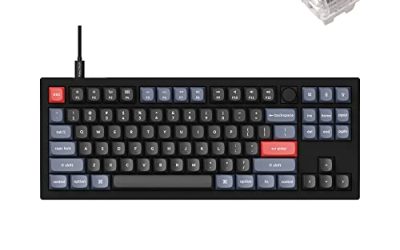
A desktop game with this many menus rewards a board you can remap at the hardware level. This tenkeyless keyboard’s QMK and VIA support lets you move synthesis and menu keys where you want them, and the layout keeps the mouse close during long sessions.
Specs
- Tenkeyless layout with rotary knob
- QMK and VIA remapping support
- Hot-swappable K Pro Brown switches
- Wired USB-C connection
- Maker-rated 1,000 Hz polling
Samsung T9 Portable SSD 2TB

For moving a Linux game library between a desktop and a laptop, or keeping an offline backup of installers, a fast USB-C drive is the simple answer. The headline figure needs a Gen 2×2 host port; on a lesser port the drive runs at that ceiling instead.
Specs
- Capacity: 2 TB portable SSD
- Interface: USB 3.2 Gen 2×2, USB-C connector
- Maker-rated speeds: up to 2,000 MB per second read, 1,950 MB per second write
- Features: Dynamic Thermal Guard, maker-rated drop resistance
How to choose
Choose the machine first: this is a desktop purchase. Buy the Steam DX listing — it is the only listing and the only PC edition — and play it on a Linux desktop or laptop, where the unanimous Platinum ProtonDB file applies. Set your controller expectations from Steam’s own record: partial support means whichever pad you pick works through Steam Input’s mapping layer, so choose on stick feel and layout rather than on promises of native recognition. Leave the Steam Deck out of the plan entirely; Valve’s record does not support the game there, and no second storefront offers an alternative copy.
Who should skip
Steam Deck owners should skip this one as a handheld purchase: Valve’s verdict is Unsupported, whatever individual owners have coaxed into running. Native-build purists should also pass — the single app flags Windows only and there is no Linux build anywhere in its (nonexistent) family. Players who dislike launchers that ask for touchscreen or mouse input should know the Deck reports describe exactly that behaviour. And anyone holding out for a GOG copy is waiting for an edition that does not exist; the Dreamlist page is a wish list, not a release plan.
FAQ
Is Atelier Ayesha native on Linux?
No. Steam’s appdetails record for app 1152300 flags windows true and linux false, and its Linux requirements block is an empty shell with headings and no content. The game runs on Linux through Proton, not through a native build.
How well does it run on desktop Linux?
ProtonDB rates it Platinum on its headline, best-reported and trending tiers alike, across 21 reports at good confidence. It is a unanimous top-tier community file for a Windows-only game.
Can I play it on Steam Deck?
Not under Valve’s current record. The Deck verdict is Unsupported, read through a republication of Valve’s compatibility data. Some owners report running it after forcing a Proton version manually, but that is hand-tinkering, not support.
Is there a GOG version?
No. GOG’s catalogue returns no purchasable product for the title; it exists there only as a Dreamlist wishlist entry. The Steam DX listing is the only PC edition.
Final verdict
Atelier Ayesha is the simplest family tree in this run of articles — one app, no add-ons, no soundtrack, no second listing — and its record is just as plainly split. On desktop Linux it is an easy recommendation: a Windows-only game with a unanimous Platinum ProtonDB file and no anti-cheat or third-party account in the way. On Steam Deck, Valve’s Unsupported badge closes the door. Buy the DX listing on Steam for a desktop or laptop, and the first chapter of the Dusk trilogy runs exactly where the records say it should.
Product and ASIN Reference
| Product | ASIN |
|---|---|
| Logitech G502 HERO | B07GBZ4Q68 |
| 8BitDo Ultimate 2 Bluetooth Controller | B0F194QFT2 |
| Xbox Wireless Controller, Carbon Black | B08DF248LD |
| Keychron V3 | B0B2DMMMG2 |
| Samsung T9 Portable SSD 2TB | B0CHFS9K14 |