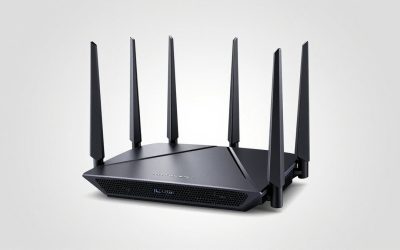
- Top Pick: ASUS TUF Gaming WiFi 6 Router (TUF-AX6000) -Dedicated Gaming Port, Dual 2.5G Port, 3 Steps Port Forwarding, Extendable Router with AiMesh (Renewed)
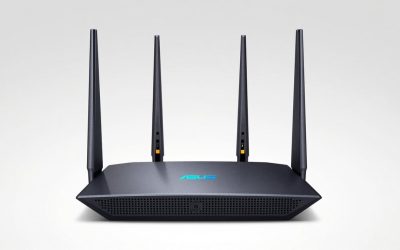
- Best Value: ASUS Tuf Gaming Ax3000 V2 Wireless Router Gigabit Ethernet, W128823798 (Router Gigabit Ethernet Dual-Band (2.4 Ghz / 5 Ghz) Black, Orange)
- Premium Choice: ASUS RT-BE55 WiFi 7 Router, 3.6Gbps, 2,000 sq. ft., Mesh + VPN Support
The ASUS TUF Gaming AX3000 V2 is a sensible buy if your internet plan is 1 Gbps or slower and you want a no-nonsense Wi-Fi 6 router with genuinely useful gaming QoS — but its single 2.5G port is WAN-only, which is the one spec-sheet detail that changes who should buy it. The tuf gaming ax3000 v2 (also listed as the TUF-AX3000 V2) delivers real-world 5 GHz throughput of roughly 600–900 Mbps to a typical 2×2 client in the same room, and its Adaptive QoS measurably prevents ping spikes when the connection is loaded — though it cannot lower ping on a line that isn’t congested. Here’s the breakdown that matters.
As an Amazon Associate we earn from qualifying purchases at no extra cost to you.


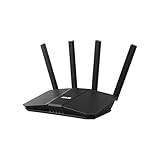

Hardware and specs, translated
The TUF-AX3000 V2 is a dual-band Wi-Fi 6 (802.11ax) router in the AX3000 class: 574 Mbps on 2.4 GHz plus 2402 Mbps on 5 GHz. Those are link rates, not throughput — more on that below. The V2 revision over the original TUF-AX3000 added the 2.5G WAN port and a faster Broadcom quad-core processor, which matters because NAT acceleration and QoS at gigabit speeds need CPU headroom.
| Spec | TUF-AX3000 V2 |
|---|---|
| Wi-Fi class | AX3000 dual-band (574 + 2402 Mbps) |
| 5 GHz radio | 2×2 MIMO, up to 160 MHz channels |
| CPU / RAM | Broadcom quad-core 1.7 GHz / 512 MB |
| Wired ports | 1x 2.5G WAN, 4x 1G LAN, 1x USB 3.2 Gen 1 |
| Antennas | 4x external, fixed |
| Mesh | AiMesh (router or node) |
| Security / extras | WPA3, AiProtection Pro, Dual WAN, Open NAT |
Real-world Wi-Fi 6 throughput
The 2402 Mbps figure assumes a 2×2 client on a clean 160 MHz channel. TCP goodput on Wi-Fi 6 typically lands at 55–65% of link rate, and most phones and mid-range laptops only negotiate 80 MHz — a 1201 Mbps link. So the realistic math is:
- Same room, 160 MHz-capable laptop: 2402 Mbps link → ~900 Mbps+ real, but transfers to a wired PC cap at ~940 Mbps because every LAN port is gigabit.
- Same room, typical phone (80 MHz): 1201 Mbps link → ~600–750 Mbps real.
- One wall away (~8 m): link drops to ~700–1000 Mbps → ~350–500 Mbps real.
- Two walls or one floor: ~120–250 Mbps — fine for 4K streaming (~25 Mbps) and gaming (~5 Mbps), borderline for big downloads.
- 2.4 GHz at range: ~40–100 Mbps, but it holds that speed through walls better than 5 GHz.
One caveat on 160 MHz: it only works on DFS channels, which the router must vacate if radar is detected — a forced channel change mid-match looks exactly like a connection drop. If you live near an airport or weather radar, run the 5 GHz band at 80 MHz for stability. The ~300 Mbps you lose in peak throughput is invisible to a gigabit internet plan anyway.
The 2.5G port: what it does and doesn’t do
The single 2.5G port is hard-assigned to WAN. That’s the deciding factor most reviews gloss over:
- If your plan is 1 Gbps or slower, the port is pure future-proofing. A gigabit port would do the same job today.
- If you have 1.2–2 Gbps fiber, the 2.5G WAN lets the router actually ingest that speed — but only Wi-Fi clients benefit. Every wired device still caps at ~940 Mbps because all four LAN ports are gigabit.
- If you run a NAS or wired gaming PC, this is the weak point. Wired file transfers top out around 113 MB/s, and there’s no way to get multi-gig to a single LAN device on this router. You’d need a model with a 2.5G LAN port (ASUS’s own GT-AX6000 or RT-AX88U Pro class) or an external multi-gig switch on a different router entirely.
The fourth LAN port can be reassigned as a second WAN for failover or load balancing, and the USB 3.2 port handles light NAS duty, a 4G/5G dongle backup, or media sharing — useful, but USB storage on any consumer router is slow compared to a real NAS.
AiMesh and range planning
The tuf ax3000 v2 works as either an AiMesh main router or a node paired with almost any other ASUS router — handy if you’re upgrading and want to reuse an older RT-AX unit as a node. Two honest limitations:
- Wireless backhaul costs throughput. With only two bands, the node shares its 5 GHz radio between the backhaul link and client traffic — expect roughly half the node’s potential speed under load. Tri-band systems avoid this by dedicating a radio to backhaul.
- Wired backhaul caps at ~940 Mbps since it runs through a gigabit LAN port. For a gigabit-or-lower internet plan that’s a non-issue.
For a typical apartment or modest two-bedroom house, a single unit centrally placed covers it. Multi-storey homes should budget for a second node with Ethernet backhaul rather than hoping one router penetrates floors — no 2×2 radio beats building materials.
Does the gaming QoS actually reduce ping?
Only when your line is congested — and that’s the correct answer, not a hedge. On an idle connection, QoS has nothing to fix: a game packet already travels at line rate. Where it earns its keep is bufferbloat.
Worked example: on a 35 Mbps upload, someone starts a cloud backup. If the modem/router buffers ~256 KB of queued data, that’s 2.1 Mbit ÷ 35 Mbps ≈ 60 ms of added latency sitting ahead of your game packets. Your 25 ms ping becomes an 85 ms spike-fest. Enable Adaptive QoS with upload set to ~90% of your measured speed (31–32 Mbps here), and the router keeps its own queue nearly empty — loaded ping stays within ~5–15 ms of idle instead of +60.
Settings that actually matter, in order:
- Adaptive QoS → set bandwidth manually to 90–95% of a real speed test. Setting it to your plan’s advertised rate leaves zero headroom; the shaper only works if it’s slightly slower than the real bottleneck.
- Drag “Games” to the top priority tier if the preset didn’t already.
- Gear Accelerator / Mobile Game Mode: pin your console’s MAC or your phone to the highest queue. This is what keeps your packets ahead of a roommate’s Steam download.
- Open NAT: use the per-game presets instead of manual port forwarding — it maps the right ports for things like Call of Duty or Fortnite matchmaking without opening more than needed.
- What QoS can’t fix: a bad route to the server, Wi-Fi interference, or a congested ISP node upstream. If your ping is bad on an idle line, run Ethernet, change channels, or accept that no router setting rewrites your ISP’s routing table.
Who should buy the AX3000 V2
It typically sells in the $90–$130 range, where it competes on features-per-dollar rather than raw speed. Match your situation:
| Your situation | Verdict |
|---|---|
| Internet 600 Mbps or less, apartment, mostly wireless | Easy fit — nothing in it bottlenecks you |
| Gigabit fiber, mixed wired + Wi-Fi | Good fit; treat the 2.5G WAN as headroom |
| Multi-gig fiber + wired PC or NAS | Skip — all LAN ports are 1G; look at dual-2.5G models |
| Large or multi-floor home | Only as part of an AiMesh pair, wired backhaul preferred |
| Shared connection, competitive gaming | Strong fit — QoS genuinely prevents loaded ping spikes |
FAQ
Can I use the 2.5G port for a PC or NAS?
No — it’s WAN-only on this model. If wired multi-gig matters, that’s a reason to step up to a router with a configurable or dedicated 2.5G LAN port.
Will it mesh with my existing ASUS router?
Yes, if the other router supports AiMesh — nearly every ASUS AX-class router does. Either unit can be the main node; put the AX3000 V2 wherever the 2.5G WAN matters.
Is it overkill for a 300 Mbps plan?
Modestly, yes — but the AiProtection security suite, QoS, and AiMesh upgrade path justify it over a bargain AX1800 router, and the price gap is usually small.