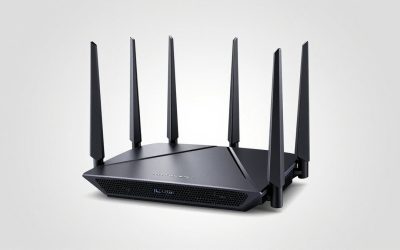
The ASUS RT-AX82U AX5400 dual band WiFi 6 gaming router is still a sensible buy in 2026 if your internet plan is 1Gbps or slower and your home is under roughly 1,600 square feet — beyond those two limits, its gigabit Ethernet ports and dual-band radio become the bottleneck, not the AX5400 link rate printed on the box. Here’s what that actually means for real speeds, real distances, and whether you should pay more for its bigger sibling.
As an Amazon Associate we earn from qualifying purchases at no extra cost to you.


AX5400 in plain terms: what the radio actually delivers
“AX5400” is a marketing sum of two theoretical link rates: 4,804 Mbps on the 5GHz band (4×4 MIMO, 160MHz channels, 1024-QAM) plus 574 Mbps on 2.4GHz. No single device will ever see 5,400 Mbps — the number describes aggregate capacity across bands, which matters when several devices share the airtime at once.
What matters more is the client side. A modern 2×2 Wi-Fi 6 laptop or flagship phone negotiates 2,402 Mbps at 160MHz. A PS5 is a 2×2 Wi-Fi 6 client on 80MHz channels, capping its link at 1,201 Mbps. The Xbox Series X and Switch are Wi-Fi 5 clients, slower still. So for console gaming specifically, the AX82U is rarely the weak link.
Real-world throughput by distance
PHY rates assume a lab. In a typical home with drywall construction, expect TCP throughput to land around 55–65% of the negotiated link rate. Here’s what that looks like for a 2×2, 160MHz-capable client on 5GHz:
| Location | Obstructions | Expected 5GHz throughput |
|---|---|---|
| Same room, 3–5 m line of sight | None | 850–940 Mbps (port-limited) |
| Adjacent room, ~8 m | 1 drywall wall | 480–650 Mbps |
| Opposite end of home, ~13 m | 2 walls | 180–320 Mbps |
| One floor up or down, ~15 m | Floor + wall | 80–200 Mbps |
| Far corner, 20 m+ | Multiple walls | 30–80 Mbps |
The 2.4GHz band holds up differently: roughly 110–140 Mbps close in, decaying gently to 30–60 Mbps at long range. It’s the better choice for a smart TV or IoT device two floors away, but it’s too slow and too congested for game downloads or cloud gaming.
The gigabit ceiling math
Here’s the spec-sheet gap most reviews miss. A 4×4 client could theoretically pull ~2,900 Mbps of real air throughput from this radio — but every path that reaches the internet, a wired NAS, or a wired PC crosses one of the RT-AX82U’s 1GbE ports, which deliver about 940 Mbps of TCP goodput after overhead. The AX5400 headroom never shows up as a faster single-device speed; it shows up as smoother performance when three or four wireless devices are active simultaneously, because OFDMA can slice that airtime without anyone waiting in line.
Practical consequence: if your internet plan is 1.5Gbps or 2Gbps, this router silently caps you at ~940 Mbps before WiFi even enters the picture.
Mobile Game Mode and Gear Accelerator, explained
ASUS ships two distinct “gaming” features that buyers routinely confuse:
- Mobile Game Mode is a toggle in the ASUS Router smartphone app. Tap it and the router bumps that specific phone’s traffic to the front of the queue. It’s per-device, session-based prioritization — ideal for a 20-minute ranked match, pointless left on all day.
- Gear Accelerator lives in the web interface under Game Boost. You pick one device’s MAC address (a console, a PC) and it’s permanently prioritized. Simple, set-and-forget device QoS.
- Adaptive QoS is the third option: category-based rules (gaming > streaming > downloads) applied network-wide.
When QoS helps — and when it costs you speed
All three features only matter when your WAN link is saturated. If a 4K Netflix stream and a Steam download are choking a 300 Mbps plan, Gear Accelerator genuinely lowers your console’s latency and jitter. On a lightly loaded gigabit connection, it does nothing measurable.
There’s also a real trade-off: enabling full bandwidth-limiter QoS disables Broadcom’s hardware NAT acceleration (CTF), which can cost 200–400 Mbps of routing throughput on slower CPU models. Keep it to Gear Accelerator or Adaptive QoS rather than hard caps, or leave QoS off entirely on plans at 500 Mbps and above.
Which homes the dual-band AX5400 actually covers
| Home size / layout | AX82U alone? | What to expect |
|---|---|---|
| Apartment or 1-bedroom, under ~900 sq ft | Yes | Full-speed 5GHz everywhere |
| 2–3 bedroom, single floor, ~1,000–1,600 sq ft | Yes, if centrally placed | 300–600 Mbps in farthest rooms |
| Two-story, ~1,700–2,500 sq ft | Marginal | Dead zones upstairs; add one AiMesh node |
| Over 2,500 sq ft, or brick/concrete walls | No | Mesh system or tri-band router needed |
The 5GHz band is where gaming speeds live, and its effective radius through real walls is roughly 12–15 meters. If your router sits in a corner office and your console sits diagonally across the house, no AX5400-class router fixes that physics — placement or a mesh node does. The AX82U supports AiMesh, so you can add a cheap ASUS node later rather than replacing it.
RT-AX82U vs RT-AX86U: pay up or pocket the difference?
The inevitable comparison is the ASUS RT-AX86U, an AX5700 dual band WiFi 6 gaming router that shares the same 5GHz radio. To a PS5 or Xbox sitting eight feet away, the ASUS RT-AX86U WiFi 6 gaming router delivers identical in-game latency — the extra money buys wired headroom and CPU, not wireless rate.
| RT-AX82U (AX5400) | RT-AX86U (AX5700) | |
|---|---|---|
| 5GHz / 2.4GHz link rates | 4,804 / 574 Mbps | 4,804 / 861 Mbps |
| CPU / RAM | 1.5GHz tri-core / 512MB | 1.8GHz quad-core / 1GB |
| Ethernet | GbE WAN + 4× GbE LAN | GbE WAN + 4× GbE + 1× 2.5GbE |
| Extras | Aura RGB, USB 3.2 | 2.5G gaming port, extra USB |
| Typical 2026 price range | ~$140–$180 | ~$200–$270 |
The decision rule is simple: if your internet is ≤1Gbps, your home is under ~1,600 sq ft, and you want the savings — take the AX82U. If you have a multi-gig plan, run heavy QoS/VPN workloads, or want the 2.5G port for a wired gaming PC or NAS, the AX86U earns its premium.
Settings to change on day one
- Split the SSIDs. Smart Connect occasionally parks a latency-sensitive device on 2.4GHz. Give 5GHz its own name and pin consoles and PCs to it.
- Enable 160MHz on 5GHz unless you see DFS radar channel hops (common near airports/weather radar) — then lock 80MHz on channels 149–161 for stability.
- Force 20MHz on 2.4GHz and use channels 1, 6, or 11 only. 40MHz on 2.4GHz adds interference, not speed.
- Use WPA2/WPA3 mixed mode. WPA3-only breaks older consoles and smart devices.
- QoS stays off by default on 500 Mbps+ plans; enable Gear Accelerator only when congestion actually bites.
FAQ
Does the RT-AX82U support internet plans over 1Gbps?
Its WAN port is gigabit Ethernet, so anything beyond ~940 Mbps is wasted. For multi-gig service, you need a router with a 2.5G port — the AX86U is the in-family upgrade.
Is Mobile Game Mode only for phones?
Yes — it’s triggered from the ASUS Router app and prioritizes that phone’s traffic. For consoles and PCs, use Gear Accelerator or Adaptive QoS instead.
AX82U or AX86U for PS5?
Both cap out identically for the PS5’s 2×2 radio. Choose the AX86U only if you also need its 2.5G port or stronger CPU for other devices.
Can I expand coverage later?
Yes — AiMesh lets you pair the AX82U with any compatible ASUS router or node as a wired or wireless backhaul extender.