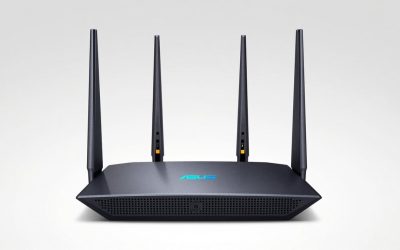
- Top Pick: ASUS ROG Rapture GT6 (2PK) AX10000 Tri-Band WiFi 6 Gaming Mesh System, Covers up to 5,800 sq ft, 2.5 Gbps Port, Triple-Level Game Acceleration, UNII 4, Free Lifetime Internet Security, Black
- Best Value: ASUS ROG Rapture GT-AX11000 Pro Tri-Band WiFi 6 Extendable Gaming Router, 10G & 2.5G Ports, ASUS RangeBoost Plus, Triple-Level Game Acceleration (Renewed)
- Premium Choice: ASUS GT-BE19000AI Tri-Band WiFi 7 AI Gaming Router – 10G, Game Boost
The fastest ASUS ROG Rapture tri-band gaming router you can buy in 2026 is the Wi-Fi 7 GT-BE96 — but for anyone on a 1–2.5 Gbps connection, the older GT-AX11000 Pro delivers essentially identical in-game latency for roughly half the money. The tri-band label now spans six Rapture models across three Wi-Fi generations, and the real differences only show up in throughput ceilings and ping-under-load behaviour, not in spec-sheet class numbers. This review compares all of them on the metrics that matter in a match: sustained real-world speed and what happens to your ping when someone else in the house saturates the line.
As an Amazon Associate we earn from qualifying purchases at no extra cost to you.




Which Rapture models does “tri-band” actually cover?
“Tri-band” means three separate radios sharing airtime duties. In the Rapture range it covers dual-5GHz Wi-Fi 5/6 designs, 2.4+5+6GHz Wi-Fi 6E and Wi-Fi 7 designs, and one mesh system. It does not cover the quad-band flagships (GT-AXE16000, GT-BE98 Pro), which add a second 5GHz or 6GHz radio and sit in a different price tier.
| Model | Wi-Fi class | Bands | Fastest wired port | Typical price |
|---|---|---|---|---|
| GT-AC5300 | Wi-Fi 5 (AC5300) | 2.4 + 5 + 5 GHz | 1 GbE | Legacy/used market |
| GT-AX11000 | Wi-Fi 6 (AX11000) | 2.4 + 5 + 5 GHz | 2.5 GbE | $200–$280 |
| GT-AX11000 Pro | Wi-Fi 6 (AX11000) | 2.4 + 5 + 5 GHz | 10 GbE + 2.5 GbE | $250–$350 |
| GT-AXE11000 | Wi-Fi 6E (AXE11000) | 2.4 + 5 + 6 GHz | 2.5 GbE | $300–$420 |
| GT6 (2-pack mesh) | Wi-Fi 6 (AX10000) | 2.4 + 5 + 5 GHz | 2.5 GbE | $400–$550 |
| GT-BE96 | Wi-Fi 7 (BE19000) | 2.4 + 5 + 6 GHz | Dual 10 GbE | $550–$700 |
The dual-5GHz models solve airtime congestion (one 5GHz radio can be reserved purely for gaming devices); the 6GHz models solve interference (the 6GHz band is still nearly empty in most neighbourhoods). Those are different problems — pick based on which one you actually have.
Link rate vs real-world throughput
Class numbers like AX11000 and BE19000 are sums across all three bands — a single client only ever uses one band. What a real device gets is the per-radio rate times real-world efficiency, which on Wi-Fi runs at roughly 55–70% of PHY rate:
- Worked example — GT-BE96, 6GHz band: a 2-stream Wi-Fi 7 client at 320MHz links at 5,764 Mbps. TCP goodput ≈ 0.6 × 5,764 ≈ 3.4–3.9 Gbps in the same room. That exceeds a 2.5G port, which is exactly why the GT-BE96 ships with 10G ports — on a 2.5G uplink the radio would be throttled to ~2.3 Gbps by the wire.
- Worked example — GT-AX11000, 5GHz-2 band: a 2-stream Wi-Fi 6 client at 160MHz links at 2,402 Mbps → ≈ 1.4–1.7 Gbps real throughput. It saturates a gigabit plan with headroom, but cannot feed a 2.5G plan fully wirelessly.
| Radio / band | Typical client link rate | Same-room TCP | One wall away |
|---|---|---|---|
| 2.4 GHz (all models) | 574 Mbps | 150–300 Mbps | 80–200 Mbps |
| 5 GHz, Wi-Fi 6, 160MHz | 2,402 Mbps | 1.4–1.7 Gbps | 0.7–1.0 Gbps |
| 6 GHz, Wi-Fi 6E, 160MHz | 2,402 Mbps | 1.5–1.8 Gbps | 0.9–1.2 Gbps |
| 6 GHz, Wi-Fi 7, 320MHz (GT-BE96) | 5,764 Mbps | 3.2–4.0 Gbps | 1.0–2.0 Gbps |
| Wired, 10G LAN (Pro / BE96) | 10,000 Mbps | ~9.4 Gbps | — |
Note the 6GHz column: faster in-room, faster-degrading through walls. If the PC is two rooms from the router, a clean 5GHz signal can out-deliver an attenuated 6GHz one.
Ping under load: the numbers that actually decide matches
Idle ping is set by your ISP and route — no router fixes that. What a router controls is added latency when the link is congested, i.e. bufferbloat. The math explains why uploads hurt most:
- A typical unmanaged queue of ~1 MB in a modem or upstream hop holds ~8 Mbit of data. On a 20 Mbps upload (common cable tier) that equals ~400ms of potential added delay. On a 940 Mbps symmetric fiber upload, the same buffer drains in ~8.5ms.
- That is why bufferbloat is a low-upload problem first — and why QoS results differ wildly between cable and fiber households.
Typical added latency figures for this router class on a 500/20 Mbps cable line, game server baseline of 12ms:
| Condition | No QoS | Adaptive QoS + Game Boost | QoS + 90% bandwidth cap |
|---|---|---|---|
| Idle line | +0 ms | +0 ms | +0 ms |
| Download saturated (500 Mbps) | +40–150 ms | +8–20 ms | +5–12 ms |
| Upload saturated (20 Mbps) | +200–600 ms | +15–40 ms | +8–20 ms |
| Both saturated + game traffic | Frequent spikes >1s | ~+20 ms, occasional spikes | ~+10–15 ms, stable |
The pattern: the ASUS gaming QoS genuinely cuts lag under load, and manually capping the QoS bandwidth slightly below line rate cuts it further — because the router, not the ISP’s oversized buffer, then owns the queue.
Do the gaming features earn their keep?
- Adaptive QoS / Game Boost: priority-based scheduling that pushes game packets ahead of bulk traffic. Real and effective for queue delay — the table above is where it pays for itself. Honest limit: it’s prioritisation, not true SQM (fq_codel/cake), so the manual 90% bandwidth cap does real work. The community Asuswrt-Merlin firmware adds cake-style SQM on supported models.
- Gear Accelerator / gaming LAN port: hard-priorities a wired device. Simple, works, zero cost — use it for the main gaming PC or console.
- OpenNAT / game profiles: convenience port-forwarding presets. Helps matchmaking NAT issues, not latency.
- Triple-level acceleration / GPN routing (WTFast on select models): can shave a few ms on badly routed ISP paths, but it’s situational — test before paying for a subscription.
What QoS cannot do: create bandwidth, beat server-side tickrate, or fix a congested ISP node at 8pm. If your unloaded ping is already 60ms to the nearest server, no Rapture changes that.
Settings that turn spec numbers into match-night numbers
- Run the built-in speed test, then set QoS bandwidth to 90–95% of it (e.g. 470 down / 18 up on a 500/20 plan). Reason: keeps the bottleneck at the router where your rules apply, not inside the modem’s dumb buffer.
- On GT-AX11000 / AXE11000: dedicate the second 5GHz radio (or 6GHz) to gaming devices only. Give it its own SSID, lock it to a DFS channel (100–140), enable 160MHz. Reason: your devices never compete for airtime with the household’s tablets and TVs.
- On GT-BE96: enable 320MHz on 6GHz, WPA3, and MLO for Wi-Fi 7 clients. Reason: 6GHz requires WPA3 anyway, and MLO keeps throughput steadier when the 6GHz path degrades through walls.
- Plug the main rig into the labelled gaming port and enable Gear Accelerator for it. Reason: wired priority is unconditional — it works even if QoS rules misfire.
- Update firmware, then re-run the QoS speed test after any ISP plan change. Reason: stale bandwidth values are the most common reason “QoS does nothing.”
Which tri-band Rapture fits your setup
| Your situation | Best pick | Why |
|---|---|---|
| ≤1 Gbps internet, want Rapture features cheap | GT-AX11000 | Still saturates gigabit over 5GHz Wi-Fi 6 |
| 1–2.5 Gbps fiber, mixed wired/wireless | GT-AX11000 Pro | 10G uplink at midrange pricing |
| >2 Gbps plan or Wi-Fi 7 devices | GT-BE96 | Only tri-band Rapture whose radio beats a 2.5G wire |
| 6GHz devices on a budget | GT-AXE11000 | Clean 6GHz spectrum without Wi-Fi 7 pricing |
| Multi-floor coverage, no Ethernet backhaul | GT6 2-pack | Dedicated 5GHz backhaul keeps gaming band free |
| Mostly wired esports setup | GT-AX11000 Pro | The 10G port matters more than radio generation |
Verdict
As a speed proposition, the ASUS ROG Rapture tri-band gaming router line holds up in 2026: the GT-BE96 is a genuine 3+ Gbps wireless device, and even the five-year-old GT-AX11000 architecture still saturates a gigabit plan. The QoS features do meaningfully reduce lag under load — but only if you set the bandwidth cap correctly, and only against congestion on your own line. Buy the GT-BE96 for multi-gig plans, the AX11000 Pro for everything else, and skip both if your internet never exceeds what a $150 router can route.
FAQ
Does tri-band vs quad-band actually matter?
Mostly for mesh. The fourth band on quad-band models like the GT-BE98 Pro exists mainly as a dedicated wireless backhaul. For a single router with local clients, tri-band is sufficient.
Will Game Boost lower my ping to the server?
No — it lowers the extra ping caused by congestion inside your home. Baseline ping is determined by your ISP’s routing and the server’s location.
Is the GT-AX11000 still worth buying in 2026?
Yes, for 1 Gbps plans or slower. Its Wi-Fi 6 radios still outrun a gigabit line, and the gaming software stack is identical to newer models.
Do I need Wi-Fi 7 devices to justify the GT-BE96?
To see its full 3+ Gbps throughput, yes. Wi-Fi 6/6E clients still work fine on it, but at that point the GT-AX11000 Pro delivers the same gaming experience for less.