
80 Plus Platinum PSU Gaming 2026
An 80 Plus Platinum rating tells you a power supply has passed certification for high efficiency at defined load points, and it is one of the most common tiers that gaming buyers consider above the Gold baseline. The rating matters because a more efficient unit turns less of the wall power into waste heat, which can keep the case cooler and the fan calmer. This page explains what Platinum does and does not deliver, and it is built around the listing above. We have not measured the efficiency of any unit here ourselves, so the guidance relies on the 80 Plus program definitions and the published specifications that a buyer should check.
The hero listing above is the main pick for the query “80 Plus Platinum PSU”, with four alternatives in the same efficiency class or wattage range. Check the card for the exact model, the rated output, the warranty and the connector set. An efficiency rating is only useful when the certification is listed for the specific model, so confirm it there.
What 80 Plus Platinum Actually Means
The 80 Plus program certifies that a unit meets minimum efficiency targets at several fixed load points, which are typically around 20, 50 and 100 percent of rated output. The tiers from lowest to highest are White, Bronze, Silver, Gold, Platinum and Titanium. Platinum sits above Gold and requires a higher efficiency at each load point. At the 50 percent point, the certified target for Platinum is noticeably higher than for Gold, which is where most gaming PCs spend much of their time.
The practical effect is less wasted energy. A unit that wastes less power releases less heat inside the case, and that heat has to be removed by the case fans. In a well-ventilated system, the difference may be small. In a compact or poorly ventilated case, it can matter more. The tier is a certification of performance at defined points, not a promise about every possible workload, so treat it as one factor among several.
Why Platinum Is Not Always the Right Choice
Platinum costs more than Gold, and the gap is not always justified for a typical gaming PC. A system that runs a few hours a week gains little from a higher tier, and the saved energy may take years to offset the price difference. For builders who run the machine for long daily sessions, or who keep a compact case with limited airflow, the extra efficiency has a clearer benefit.
Efficiency should also not outweigh build quality. A Platinum unit with a short warranty and a thin protection list is a weaker choice than a documented Gold unit from a reputable maker. Read the warranty and the protection list alongside the rating, and check independent reviews of the specific model. The general power supply roundup shows how tiers compare across several makers.

ASUS ROG Thor 1200W Platinum III Power Supply | 80 PLUS & Cybenetics Platinum, Fully Modular, ATX 3.1, PCIe 5.1, OLED Display, GaN MOSFET, GPU-First IVS, 10-Year Warranty


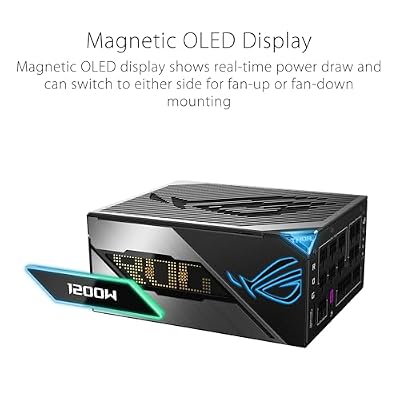


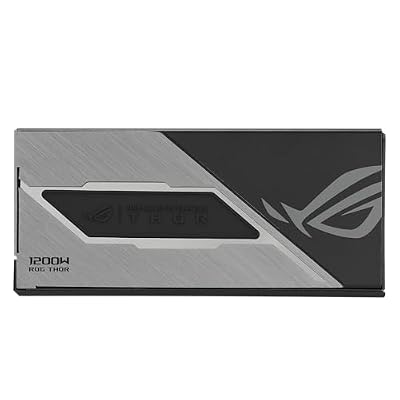


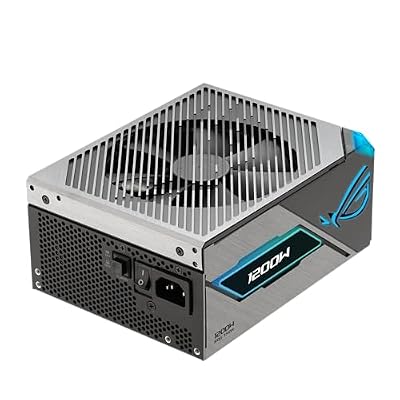


As an Amazon Associate we earn from qualifying purchases. Product prices and availability are accurate as of the date/time indicated.
Specifications to Check on a Platinum Unit
The Certification on the Model
Look for the 80 Plus Platinum certification on the specific product listing or spec sheet. Some marketing pages use the phrase loosely, so check the certification mark or the official database entry for the exact model number.
Wattage and Margin
Find the recommended system wattage for your graphics card, add the rest of your parts, and choose a Platinum unit with a sensible margin above that total. Efficiency is highest in the middle of a unit’s load range, so a unit sized with headroom tends to run efficiently in normal use. The 850W guide explains the most common size for one high-end card.
Cables and the 12V-2×6 Port
High-end RTX 50 series cards use the 12V-2×6 connector. Confirm that the Platinum model includes a native cable for that port. Count the PCIe outputs for any second device, and check the cable length against your case.
Comparing Platinum Options
The table compares the hero listing and four alternatives by role. It leaves out prices and ratings, because those change often and vary by seller. Check the live listing for each number before you order.
| Option | Role in this guide | Best for | What to confirm | Price |
|---|---|---|---|---|
| Hero listing | Primary pick for the Platinum query | Long-session gaming builds with one high-end card | Certification on the exact model | Check current price |
| Alternative 1 | Same tier, different wattage | Buyers sizing to a specific card | Rated output and cable count | Check current price |
| Alternative 2 | Same tier, different brand | Buyers comparing warranty and protections | Warranty length as written | Check current price |
| Alternative 3 | Same tier, newer revision | Builders who want the latest connector set | 12V-2×6 cable included | Check current price |
| Alternative 4 | Same tier, compact-friendly layout | Small cases with limited airflow | Unit length and fan behaviour in reviews | Check current price |
The table lets you compare units on the details that change the outcome. Two Platinum units can differ in warranty, cable set and fan noise, so the rating alone does not settle the decision.
Where Platinum Fits in a Gaming Build
A Platinum unit suits a builder who runs a high-end system for long hours, a compact case with limited airflow, or a system where lower heat output is a priority. For a mainstream gaming PC used a few hours a week, a well-reviewed Gold unit is often the better value. The 1000W roundup for RTX 5090 systems covers the higher wattage class where efficiency is most often discussed.
Cooling is the other half of the thermal picture. The air versus AIO cooling comparison explains how the cooler choice affects the heat inside the case, and the temperature checking guide shows how to confirm that the system runs cool once it is built.
Buying Checklist
Verify Certification on the Model
Confirm the 80 Plus Platinum certification for the exact model, not the brand in general. The power supply unit roundup helps place a Platinum unit among the other tiers. Keep the spec sheet and the listing screenshot in case the seller’s description changes later.
Balance Efficiency Against Warranty
Check the warranty length and the protection list before paying the Platinum premium. A well-documented Gold unit can be a better buy than a poorly documented Platinum one.
Plan the Build Around the Unit
The step-by-step build guide explains where the PSU fits in the assembly order, and the gaming PC buying guide helps you check that the power supply matches the rest of the system.
Frequently Asked Questions
Is 80 Plus Platinum worth the extra cost?
For long daily sessions or compact cases with limited airflow, it can be. For occasional use, a well-reviewed Gold unit is often a better value.
Does Platinum mean the PSU is quieter?
Not automatically. Higher efficiency produces less heat, which can help fan behaviour, but noise depends on the fan design and the case. Check reviews of the specific model.
What is the difference between Gold and Platinum?
Platinum must reach higher efficiency at each certified load point than Gold. The gap is most noticeable in heat output and energy waste, and it is usually modest in a typical gaming PC.
Does a Platinum rating guarantee a long life?
No. Efficiency is one factor. Build quality, component choice and warranty are equally important, so read the full specification and the warranty terms before buying.


