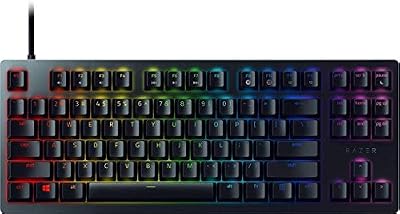
Move a gaming PC to Linux and the games mostly follow, thanks to Proton. The peripherals are another story. Razer Synapse, Logitech G Hub and Corsair iCUE publish no Linux versions, so the software layer that sets DPI stages, remaps buttons, pairs wireless receivers and paints lighting across a desk simply vanishes. The mouse still moves and the keyboard still types, because standard input drivers cover both, but every setting beyond the factory defaults is stranded on a Windows install many switchers no longer keep.
What replaces that layer is not one application but a stack of open-source projects, each owning a brand or a job: OpenRGB for lighting, Piper and libratbag for mouse configuration, Solaar for Logitech receivers, OpenRazer for Razer hardware and ckb-next for Corsair gear. This site already covers OpenRGB itself in depth in a general guide; this article is the wider map — which tool controls what, brand by brand, where coverage is genuinely complete, and which corners still require Windows. Every support claim below follows the projects’ own documentation and device lists.
As an Amazon Associate, we earn from qualifying purchases.
Quick answer
Linux has no official Synapse, G Hub or iCUE, but open-source tools cover most hardware: OpenRGB handles lighting across brands, Piper configures libratbag-supported mice, Solaar manages Logitech receivers, OpenRazer drives Razer gear, and ckb-next covers Corsair keyboards and mice. Firmware updates and some macro features remain Windows-only.
The tool map: five projects, two layers
The stack splits into two layers. Lighting tools talk to LED controllers: motherboard headers, memory modules on the SMBus, graphics cards, fan hubs and the lighting zones inside peripherals. Configuration tools talk to device settings: DPI stages, button assignments, stored profiles and receiver pairing. Some projects stay in one layer — OpenRGB is lighting only, Solaar is receiver management only — while OpenRazer and ckb-next span both layers for their own brands.
The architecture repeats across projects: a background daemon or driver holds the hardware connection, and a graphical front end sits on top. Piper is the front end for the ratbagd daemon, Polychromatic and RazerGenie front the OpenRazer daemon, and ckb-next ships its own interface. The quiet bridge is on-board memory: settings written into the device travel with it, which is why a profile saved anywhere still works at the Linux login screen.
OpenRGB: one lighting app for the whole desk
OpenRGB is the cross-brand lighting layer. Its device list covers motherboard controllers, memory kits, graphics cards, fan and cooling controllers, and a long tail of keyboards, mice, headsets and cases. On Linux it reaches hardware over USB and over the SMBus, and the project documents the SMBus side carefully: chipset support varies, I2C permissions need setting up, and memory lighting such as the Trident Z kit below depends on that path working.
An effects plugin adds reactive and ambient modes beyond static colours. The limits are equally clear in the documentation. OpenRGB does not set DPI, record macros or update firmware, support for a device can be partial where a protocol is only partly understood, and brand-new hardware waits for a contributor to add it. Treat it as the lighting hub, not a full vendor-suite replacement.
Piper and libratbag: real mouse configuration
libratbag is a library and daemon, ratbagd, that speaks the configuration protocols of gaming mice; Piper is its graphical front end. For a supported mouse, Piper exposes resolution stages, report rate, button remapping and LED control, and writes profiles to the device where the hardware offers slots. Logitech’s G series is the deepest part of the device database, with models from several other brands documented alongside.
The honest caveat is granularity: support is per exact model, not per brand, and individual features vary — one mouse exposes every control, another only basic resolution settings. A mouse outside the database still works as a mouse, but its configuration falls back to the desktop environment’s generic pointer settings. Checking the libratbag device list before a purchase is the single most useful habit in this whole landscape.
Solaar: the Logitech receiver specialist
Solaar manages Logitech’s Unifying, Lightspeed and Bolt receivers and the devices paired to them. It pairs and unpairs devices, reports battery state, and toggles features exposed through Logitech’s HID++ protocol, which depending on the device can include button behaviour, scroll-wheel modes and pointer settings. It is also the practical answer to a common problem: adding a second device to a Lightspeed receiver without G Hub, which Linux otherwise cannot do.
Solaar and Piper complement rather than compete with each other. Piper configures the mouse’s own profile; Solaar owns the receiver link and device-level toggles. Feature depth varies by device generation, as Solaar’s documentation states plainly, so a flagship and a budget model on the same receiver will not expose the same controls.
OpenRazer: Razer without Synapse
OpenRazer is a kernel driver plus a user-space daemon, with front ends such as Polychromatic and RazerGenie. For devices on its supported list it controls DPI stages and polling rate on mice, Chroma lighting effects and brightness, and keyboard features that vary by model. The Razer Basilisk V3 below is a representative case: a mainstream mouse whose core settings are fully reachable without Synapse.
The gaps are documented rather than hidden. Synapse cloud profiles do not transfer, newly launched devices can arrive months before support lands, and a few arrangements — a mouse configured through a charging dock, for instance — have known limitations in the driver. Razer’s own software remains Windows and Mac only, so OpenRazer is not an alternative to Synapse on Linux; it is the only route.
ckb-next: Corsair without iCUE
ckb-next pairs a daemon with a graphical interface for Corsair keyboards, mice, mousepads and headset stands. Its device support spans the legacy lines through to the current Bragi generation, which includes the K100 and the K70 RGB Pro below. It provides per-key lighting and animations, key bindings, mouse DPI adjustment and multiple modes, with saving to hardware on the devices that support it.
What stays behind is the iCUE ecosystem rather than the device basics: cross-product lighting scenes that reach beyond Corsair peripherals, integrations with other product lines, and firmware updates, which still route through iCUE on Windows. For the keyboard or mouse itself, ckb-next covers the settings most owners actually change.
What stays Windows-only
Firmware updates are the biggest holdout: across nearly every brand, updating a mouse, keyboard or receiver still means the vendor app on Windows. Cloud accounts and their cross-device profile sync stay behind too, as do suite-level extras such as automatic per-game profile switching driven by a Windows-only app.
Some brands have no real Linux counterpart at all. SteelSeries mice appear in the libratbag database, but the GG software’s audio and capture features are Windows-only. ASUS Armoury Crate functions beyond lighting — fan and device configuration — are not replaced by OpenRGB’s lighting support. HyperX owners have no established open-source equivalent to NGENUITY. The standard workaround is legitimate and widely used: configure a device once on Windows, save everything to its on-board memory, and let Linux inherit the result.
Five devices, five tool stacks
Logitech G502 HERO
A libratbag-supported wired mouse: Piper sets its resolution stages, buttons and lighting, and OpenRGB also lists its LIGHTSYNC zone.
- Sensor: HERO 25K optical, up to 25,600 DPI
- Buttons: 11 programmable
- Lighting: LIGHTSYNC RGB
- Extras: adjustable weights, on-board memory
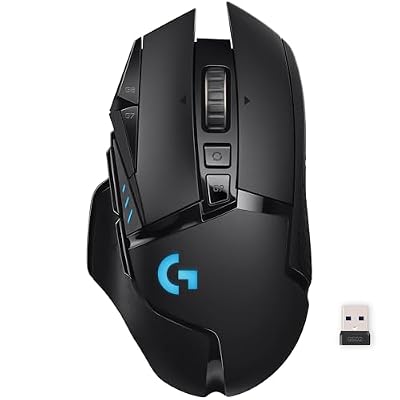
Logitech G502 Lightspeed
The wireless sibling is the Solaar case study — receiver pairing and battery live there — while Piper handles the profile.
- Sensor: HERO 25K optical
- Connection: LIGHTSPEED wireless receiver
- Battery: maker-rated up to 60 hours with lighting off
- Extras: POWERPLAY compatible, LIGHTSYNC RGB
Razer Basilisk V3
OpenRazer’s mainstream mouse: DPI stages, polling and Chroma effects are all documented as supported.
- Sensor: Focus+ optical, 26,000 DPI
- Buttons: 11 programmable
- Switches: Razer optical switches, generation 2
- Extras: HyperScroll tilt wheel, Chroma RGB
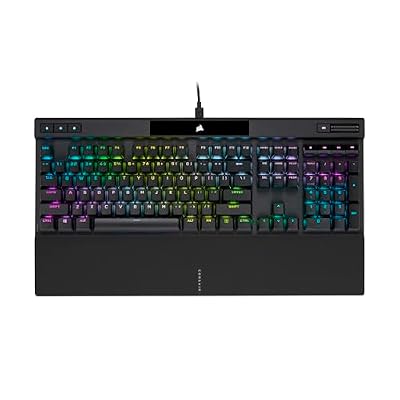
Corsair K70 RGB PRO
A Bragi-generation keyboard in ckb-next’s list, with per-key lighting, bindings and hardware-saved modes.
- Switches: Cherry MX Red linear (this listing)
- Polling: up to 8,000 Hz via AXON processing
- Keycaps: PBT double-shot
- Lighting: per-key RGB, plus a tournament switch
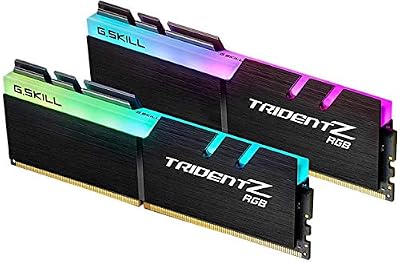
G.Skill Trident Z RGB 16GB memory kit
The OpenRGB SMBus case: its lighting is controlled through the motherboard’s memory bus, not USB.
- Capacity: 16GB (2 x 8GB) DDR4
- Speed: DDR4-3200, CL16-18-18-38 at 1.35V
- Model: F4-3200C16D-16GTZR
- Lighting: RGB diffuser bar
How to choose
Start from your brand mix. A single-brand desk needs that brand’s tool — OpenRazer, ckb-next, or Piper plus Solaar — with OpenRGB optional. A mixed-brand desk is where OpenRGB earns its place as the one lighting hub above the per-brand configurators. A Logitech wireless setup makes Solaar effectively mandatory, because receiver pairing has no other Linux route. If you are buying hardware for a Linux machine, read the five projects’ device lists first and let documented support make the decision; the best-specified mouse on paper is the wrong one if its configuration is stranded. Finally, if firmware updates matter to you, keep some Windows access — a dual boot or a second machine — because no tool in this stack removes that dependency.
Who should skip this
Skip this stack if you game only on Windows, where the vendor suites do everything in one place. Skip it if your peripherals are absent from every device list and the features you rely on are vendor-only, such as a HyperX setup built around NGENUITY. And skip it if factory defaults plus on-board memory configured elsewhere give you everything you use — plenty of players never open a configuration tool.
FAQ
Do these tools work on a Steam Deck?
On regular distributions they install from standard repositories or project packages. SteamOS keeps its system image read-only, which limits daemon-based installs, so for a Deck the common pattern is saving settings to a device’s on-board memory from another machine and letting the hardware carry them.
Can OpenRGB damage my hardware?
The project itself is candid that it works at a low level, talking directly to lighting controllers and the SMBus, and its documentation asks users to follow the setup guide for their chipset and avoid options they do not understand. Read the documentation for your exact devices before enabling access.
Do settings survive switching back to Windows?
Settings stored in a device’s on-board memory persist anywhere, because they live in the hardware. Profiles held only in a tool’s own configuration stay with that tool, and vendor suites will not read them — expect to keep one canonical setup per ecosystem.
Is there one app that does everything?
No. Lighting centralises well in OpenRGB, but configuration remains per brand by design: Piper for supported mice, Solaar for Logitech receivers, OpenRazer for Razer, ckb-next for Corsair. The stack is several small tools with documented scopes, not a unified suite.
Final verdict
Linux peripheral support is better than its reputation, provided you judge it tool by tool instead of brand by brand. Lighting is essentially solved for documented hardware through OpenRGB, Logitech and Razer owners have real configuration through Piper, Solaar and OpenRazer, and Corsair’s keyboards and mice are covered by ckb-next. What remains on Windows — firmware updates, cloud profiles and a few brands’ entire software layer — is a short, specific list, and on-board memory bridges most of it.