Our Short List of 3

- Tenkeyless layout with rotary knob
- QMK and VIA remapping support
- Hot-swappable K Pro Brown switches
- Wired USB-C connection

- Connectivity: Bluetooth wireless and USB-C wired
- Joysticks: TMR electromagnetic, anti-drift design
- Triggers: Hall effect, with mode switching
- Extras: two remappable back buttons, motion control

- Connectivity: Xbox Wireless and Bluetooth
- Port: USB-C for wired play
- Controls: hybrid D-pad, dedicated Share button
- Power: AA batteries or optional rechargeable pack
All 5 Picks at a Glance
| Product | Specs | Action |
|---|---|---|
| Keychron V3 |
| Check price on Amazon |
| 8BitDo Ultimate 2 Bluetooth Controller |
| Check price on Amazon |
| Xbox Wireless Controller, Carbon Black |
| Check price on Amazon |
 Logitech G502 HERO |
| Check price on Amazon |
 Samsung T9 Portable SSD 2TB |
| Check price on Amazon |
ELEX II, Piranha Bytes’ 2022 sequel to its science-fantasy RPG, sends Jax back across Magalan to face a new invasion. On Linux the paper trail is more interesting than the answer. Steam’s record flags the game for Windows alone, yet a scan of its own family can make it look Linux-supported: inside its DLC list sits a soundtrack app that flags all three platforms.
So the useful questions are the layered ones. What does the game’s own record say? How well does the one build travel under Proton? What did Valve’s Steam Deck test conclude, and does any other storefront sell a Linux copy? Each layer is read separately here, because the confusion comes from reading them together.
As an Amazon Associate, we earn from qualifying purchases.
Quick answer
ELEX II is not native on Linux. Steam’s record for app 900040 flags Windows only, with empty-shell Mac and Linux requirement fields and no Linux depot; the all-platform flags belong to the separate soundtrack app. The Windows build runs through Proton: ProtonDB settles at Gold from 38 reports, while Valve rates the game Unsupported on Steam Deck.
The status at a glance
| Question | Answer from the record |
|---|---|
| Native Linux build | No — Steam flags read Windows only |
| Linux requirements tab | Empty shell — headings over empty lists |
| Soundtrack app | Flags all three platforms — a separate music app |
| ProtonDB record | Gold settled, Platinum best and trending, 38 reports |
| Steam Deck verdict | Unsupported, tested April 2022 on an older build |
| GOG edition | Sold on GOG, Windows only |
| Anti-cheat | None named on the record; single-player game |
What Steam’s own record says
Steam’s appdetails record for ELEX II (app 900040) lists the platforms as Windows true, Mac false, Linux false. Developer Piranha Bytes, publisher THQ Nordic, release date on the record 1 March 2022, game still on sale. No second build hides beside the Windows one.
The requirements fields follow the empty-shell pattern. The Windows tab is genuinely populated at both tiers, from a Ryzen 3 3100 or Core i5-7400 with 12 GB of RAM at minimum up to 16 GB and an RX 5700 XT or RTX 2060 at recommended. The Mac and Linux fields keep their Minimum and Recommended headings over empty lists. A shell is one step above an absent field, but it is still a shell: no Linux machine specification exists anywhere on the record.
The rest of the record is plain. Steam lists single-player, Steam Achievements, Steam Cloud and Family Sharing. The game’s own controller field reads partial, matching the store category Partial Controller Support. No anti-cheat is named, no third-party DRM notice appears, and no external launcher is required.
The depot census
The delivery layer agrees. The content depots are a main content depot of about 48 GB, a binaries depot, and four language depots (German, English, Russian, Polish). The redistributables alongside are Windows components: Visual C++, DirectX and PhysX packages. Total size on disk reads a little over 86 GB. No Linux depot and no macOS depot appears in the census.
The branch list adds nothing either. Beside the public branch sits one extra branch, the DX12 version — a second Windows build of the same release, not another platform. The registered store assets are a client icon, a client tga, an icon and a logo; no Linux client icon is registered, and the record’s extended OS string is empty. At every layer, the answer is the same: one Windows build.
The soundtrack trap, in its strongest form
The one place a Linux flag appears anywhere near this game is inside its own DLC array. That array holds a single app, 1920970: the ELEX II Soundtrack, a music product carrying 26 tracks. Its platform flags read Windows, Mac and Linux all true — all three, on the add-on, while the game itself flags Windows alone.
That flag proves nothing about the game, and this is the soundtrack trap in its strongest form. A music app delivers audio files, which play on any operating system; its flags describe the soundtrack product, not the RPG. A family scan that unions the flags across a game’s DLC list would report ELEX II as supported on Linux and Mac alike. Read app by app, the record says the opposite: the game is Windows only, and only the album claims otherwise.
The Proton file
ProtonDB’s summary record for app 900040, read in full this session, gives a settled tier of Gold, a best-reported tier of Platinum and a trending tier of Platinum, across 38 reports with strong confidence. One caution: ProtonDB’s game page carries a stray heading claiming the game natively supports Linux. Steam’s record contradicts that heading on every layer checked above, so this article follows Steam and treats the heading as a labelling error.
The filings describe a game that runs, with one recurring fork. The default build uses DirectX 11; an optional beta branch switches it to DirectX 12. Several reports say the DX12 branch removes stutter but can break the night lighting on newer Proton versions — one filing describes nights rendering like daytime under a current Proton release, fixed by stepping back to Proton 9.0-4 — while the DX11 path avoids the fault.
The Steam Deck sheet
Valve’s own compatibility record rates ELEX II Unsupported on Steam Deck, and SteamOS carries the same category. The single resolved item on the sheet states that SteamOS does not support this game. The configuration notes add texture: the supported input class is listed as other, the game requires manually invoking the keyboard, and the recommended runtime is proton-stable.
The paperwork matters. Valve’s test is dated 23 April 2022, against build 8259710; the current public build is 10017820, from November 2022, so the badge grades a superseded build — a paperwork candidate for retesting, not a live verdict on today’s branch. That also explains the tension with the community file: ProtonDB holds Deck filings describing tweaked, playable sessions. Both can be true at once: the badge is a support verdict on the 2022 build; the filings describe what players have managed since.
The storefront ruling
There is a second copy to weigh this time, and it changes nothing. GOG’s catalogue holds an explicit product record for ELEX II (product 1937944261, slug elex_ii), and its operating-system list reads Windows alone. The GOG edition exists, but it is the same Windows build: no Linux installer is sold there either.
The Steam copy is therefore the buy for a Linux player. It is the build both compatibility records describe — the one ProtonDB’s reports were filed against and Valve’s Deck sheet graded — and the copy carrying the DX12 beta branch.
Gear for a desktop-first game
With an Unsupported Deck badge and a Windows-only record, the sensible setup is a desktop or laptop under Proton. The gear below follows that shape: a keyboard and mouse for the game’s menu-heavy systems, two pads despite the partial-support rating, and fast storage for an 86 GB install.
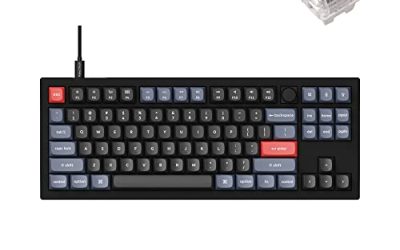
Keychron V3
- Tenkeyless layout with rotary knob
- QMK and VIA remapping support
- Hot-swappable K Pro Brown switches
- Wired USB-C connection
The keyboard pick for desktop sessions: QMK and VIA support lets you remap keys at the keyboard level, across every Linux install you plug it into.
8BitDo Ultimate 2 Bluetooth Controller
- Connectivity: Bluetooth wireless and USB-C wired
- Joysticks: TMR electromagnetic, anti-drift design
- Triggers: Hall effect, with mode switching
- Extras: two remappable back buttons, motion control
The pad for players who want one anyway. The record promises only partial controller support, so treat a pad as a complement to the keyboard, not a replacement; this one covers the couch case with modern sticks and triggers.
Xbox Wireless Controller, Carbon Black
- Connectivity: Xbox Wireless and Bluetooth
- Port: USB-C for wired play
- Controls: hybrid D-pad, dedicated Share button
- Power: AA batteries or optional rechargeable pack
The safest guest pad in PC gaming: Steam Input support is universal, the glyphs match what most games display, and it pairs over Bluetooth or its own wireless standard. For ELEX II it plays a supporting role, with the keyboard in reach for menus.
Logitech G502 HERO
- HERO optical sensor, up to 25,600 DPI
- 11 programmable buttons
- Adjustable weight system
- Wired USB connection
ELEX II’s faction screens, inventory and dialogue trees are mouse territory, and a precise wired mouse turns long management sessions into single clicks. Eleven programmable buttons cover the repeated inputs.
Samsung T9 Portable SSD 2TB
- Capacity: 2 TB portable SSD
- Interface: USB 3.2 Gen 2×2, USB-C connector
- Maker-rated speeds: up to 2,000 MB per second read, 1,950 MB per second write
- Features: Dynamic Thermal Guard, maker-rated drop resistance
For moving a Linux game library between machines, or keeping an offline backup of installers, a fast USB-C drive is the simple answer — an 86 GB install makes the case on its own. The headline figure needs a Gen 2×2 host port; on a lesser port it runs at that ceiling.
How to choose
Choose the Steam copy, because it is the edition both records describe, carrying the DX12 beta branch. On a desktop or laptop, install under Proton at its default first: the Gold headline with Platinum best and trending tiers says the current build travels well. If the DX12 branch produces the lighting fault the filings describe, the reported fixes are stepping back to Proton 9.0-4 or staying on the DirectX 11 path. On a Steam Deck, expect this: the official verdict is Unsupported, its test predates the current build, and community filings describe playable sessions with tweaks, not a guaranteed result. For input, plan on keyboard and mouse as primary, a pad as supplement.
Who should skip
Skip this one if you are shopping for a native Linux RPG: ELEX II is not one, whatever its soundtrack’s flags suggest. Skip it if the Steam Deck is your only machine and you want a badge-backed experience, because Valve’s verdict is Unsupported and the community route asks for tinkering. Skip it if you buy on GOG expecting a Linux installer, since that edition is Windows only too. And skip it if an 86 GB install is heavy for a compatibility-layer game.
FAQ
Is ELEX II native on Linux?
No. Steam’s record for app 900040 flags Windows only, the Linux requirements field is an empty shell, the depot census holds no Linux depot, and no Linux client icon is registered. It runs on Linux through Proton, not a native build.
Why do some listings say ELEX II supports Linux?
Because of the soundtrack. The ELEX II Soundtrack sits in the game’s DLC array as a separate music app and flags Windows, Mac and Linux all true. Scans that merge a family’s flags credit the game with the album’s paperwork. ProtonDB’s game page adds a stray native-support heading, which Steam’s record contradicts.
Is ELEX II Steam Deck Verified?
No. Valve rates it Unsupported, the lowest category, from a test dated 23 April 2022 against build 8259710. That build has since been superseded, so the verdict is old paperwork; community filings describe tweaked Deck sessions that run, but the rating stands.
Can I play the GOG version on Linux instead?
The GOG edition is Windows only: GOG’s own product record lists Windows as its sole operating system. No Linux installer exists on either storefront, and the ProtonDB file was filed against the Steam build.
Final verdict
ELEX II is a Windows-only release whose confusion has one traceable source: a soundtrack app whose all-platform flags keep getting read as the game’s. Read app by app, the record is unambiguous — Windows flags, an empty-shell Linux tab, a Windows-only depot census, an Unsupported Deck badge, a Windows-only GOG edition. What it offers Linux players is a respectable Proton route instead: a Gold community file whose best and trending tiers reach Platinum, with a known DX11-versus-DX12 fork. Buy the Steam copy, play it on a desktop under Proton, and let the album’s paperwork describe the album.
Product and ASIN Reference
| Product | ASIN |
|---|---|
| Keychron V3 | B0B2DMMMG2 |
| 8BitDo Ultimate 2 Bluetooth Controller | B0F194QFT2 |
| Xbox Wireless Controller, Carbon Black | B08DF248LD |
| Logitech G502 HERO | B07GBZ4Q68 |
| Samsung T9 Portable SSD 2TB | B0CHFS9K14 |