

🛒 Best Price Today on Amazon
Prime members get fast, free shipping on everything above, plus member-only deals. New members get a 30-day free trial — cancel anytime.
Top Choose Gaming Ram Definitive Buyer Picks for 2026
Here are our current top choose gaming ram definitive buyer picks, compared on real Amazon owner reviews, price, and features. Live prices update below.




Affiliate disclosure: GamingPCGuru is reader-supported. When you buy through links on our site, we may earn an affiliate commission at no extra cost to you. This does not influence our independent reviews.
By Alex Rivera, Hardware Reviewer · May 2026
How to Choose Gaming RAM in 2026: Capacity, Speed, and the AMD Sweet Spot
Quick Answer (TLDR)
For AMD Ryzen 7000/9000 gaming builds, buy 32GB (2x16GB) DDR5-6000 CL30 EXPO and move on with your life — that’s the universally recommended configuration for a reason. For Intel Core Ultra builds, step up to DDR5-7200 CL34 XMP, which the newer memory controller handles cleanly. Pure gamers stop at 32GB; hybrid gaming/streaming/AI builders should grab 64GB (2x32GB) for the modest $65 premium. Avoid 4 DIMMs of high-speed memory — both platforms force frequency drops with all four slots populated. Skip the RGB tax if you don’t have a windowed case; you’re paying $30–$50 for lights nobody sees. The right kit is boring, EXPO/XMP-certified, and from a brand you’ve heard of.
The Five Criteria That Matter
1. Platform-specific speed sweet spot. Your CPU determines the right memory speed, full stop. AMD Ryzen 7000/9000 wants DDR5-6000 because Infinity Fabric runs 1:1 at this speed. Pushing higher forces a 1:2 ratio that hurts gaming more than the bandwidth helps. Intel Core Ultra 200S benefits from DDR5-7200 and above because the new memory controller handles high frequencies cleanly. Choose your CPU first, then memory to match.
2. CAS Latency matters as much as the MHz number. True latency in nanoseconds = (CAS Latency / Memory Speed) x 2000. DDR5-6000 CL30 = 10.0ns. DDR5-6400 CL32 = 10.0ns. DDR5-7200 CL34 = 9.4ns. The “faster” kit is only really faster if the latency math works out. Look at the actual nanosecond figure, not just the MHz on the box.
3. Capacity for actual workload. 16GB is below the recommended floor in 2026 — modern games are pushing 14–18GB usage at 1440p+. 32GB is the gaming sweet spot. 64GB is for hybrid workloads (streaming, content creation, local AI). 96GB and 128GB are professional-tier capacities for video editing and AI work. Adding capacity above your application’s working set delivers diminishing returns for gaming specifically.
4. EXPO and XMP certification quality. A kit that runs DDR5-6000 with manual settings is not the same as one with verified EXPO 1.0 profiles. Properly certified kits boot at advertised speeds via BIOS one-click; uncertified kits often require manual sub-timing tuning. For AMD, look for EXPO certification specifically. For Intel, XMP 3.0 is the relevant standard.
5. Heatspreader design and module height. Tall RAM heatsinks can conflict with air coolers like the Noctua NH-D15 or Deepcool Assassin IV. Low-profile kits (G.Skill Aegis, Crucial Pro low-profile) clear these coolers but lack aggressive cooling for sustained heavy memory workloads. For most builds with AIO cooling, standard heatspreader height is fine. For air cooler builds, verify clearance before purchasing.
Buying Checklist
- Identify your CPU platform: AMD AM5 (DDR5-6000 sweet spot) or Intel LGA1851 (DDR5-7200+)
- Confirm motherboard supports your chosen kit (check QVL list for verified compatibility)
- Choose capacity: 32GB for pure gaming, 64GB for hybrid work, 96GB+ for professional creators
- Pick 2-DIMM configuration (2x16GB or 2x32GB) over 4-DIMM for best stability
- Verify EXPO (AMD) or XMP 3.0 (Intel) certification on the specific SKU
- Check CL latency and confirm nanosecond math works for your speed tier
- Verify cooler clearance if using air cooling — measure clearance to top RAM slot
- Match aesthetic to case (RGB only if you have a windowed case)
- Confirm lifetime warranty (standard from G.Skill, Corsair, Crucial, Kingston)
- Buy from authorized retailers — counterfeit DDR5 has appeared in 2024–2025
Spec Primer: What the Numbers Actually Mean
DDR5 vs DDR4. DDR5 doubles peak bandwidth versus DDR4 at equivalent speeds and adds on-die ECC for slightly better data integrity. DDR5 is the only option for current-gen AM5 and LGA1851 platforms. DDR4 remains valid for older AM4 and LGA1700 builds at much lower cost.
Single rank vs dual rank. Single-rank kits (typically 2x16GB) deliver slightly lower latency. Dual-rank kits (2x32GB and higher) deliver 5–10% better memory bandwidth via rank interleaving. For gaming, single rank is marginally faster; for productivity, dual rank wins.
Primary timings. CL-tRCD-tRP-tRAS sequence. Lower numbers = better. DDR5-6000 CL30 32-40-78 is a typical fast kit; DDR5-6000 CL36 36-40-78 is the value-tier equivalent. The primary CL matters most for gaming performance.
Voltage. DDR5-6000 typically runs 1.35V VDD/VDDQ. DDR5-7200 runs 1.4V. DDR5-8000+ runs 1.45V+. Higher voltages mean more heat and slightly accelerated wear, though within reasonable bounds for the rated specification.
Frequency vs MT/s. “DDR5-6000” means 6000 MT/s (mega-transfers per second). The actual clock speed is half this (3000 MHz) because DDR transfers data on both clock edges. Don’t be confused by spec sheets that list frequency in MHz vs MT/s.
Common Buyer Mistakes
Buying high-speed memory for AMD that runs at 1:2 ratio. DDR5-7200 on a Ryzen 9000 chip actively hurts gaming performance compared to DDR5-6000. This is the single most common AM5 build mistake in 2026.
Populating all 4 DIMM slots. Both AM5 and Z890 force significant memory frequency drops when all four slots are populated. A 64GB build is far better off as 2x32GB at full speed than 4x16GB at reduced speed. The performance penalty for 4-DIMM configurations can be 15–20% in memory-bound workloads.
Buying 16GB total in 2026. Modern games hit 14–18GB just for the game process. Add Windows, Discord, browser, and Steam overhead, and 16GB systems run into page-file thrashing constantly. 32GB is the genuine floor in 2026.
Mixing kits. Two separate 32GB kits don’t guarantee dual-channel operation at advertised speeds. Manufacturer matching across production batches is unreliable. Always buy matched kits in a single package.
Paying for unused RGB. A non-RGB G.Skill Trident Z5 Neo DDR5-6000 CL30 costs $25–$40 less than the RGB version. If your case doesn’t have a window, you’re paying for invisible lights.
FAQ
What’s the actual gaming performance difference between 16GB and 32GB? Significant in 2026 titles. Microsoft Flight Sim 2024, Star Citizen, Cyberpunk 2077 with mods, and Cities Skylines 2 all approach or exceed 16GB in active use. With only 16GB system memory, the OS pages aggressively to SSD, causing severe stutter. The 32GB upgrade fixes this entirely.
Will my Ryzen 9800X3D actually post DDR5-7200? Yes, it will boot. But Infinity Fabric will drop to 1:2 mode, increasing latency from 65ns to 90ns. The bandwidth gain doesn’t compensate. Stick with DDR5-6000 for AMD X3D.
Is DDR5-8000 worth it on Intel? Marginally. DDR5-8000 delivers 1–3% gaming improvement over DDR5-7200 on Intel Core Ultra, at a $60–$80 price premium. It also requires top-tier 2-DIMM-per-channel motherboards. For most Intel builders, DDR5-7200 is the practical maximum.
Should I get the kit with the better heatsink? If you’re doing manual memory overclocking, yes — premium heatsinks like Corsair’s Air Frame on Dominator Titanium or G.Skill’s Trident Z5 Royal extruded aluminum genuinely keep modules cooler under stress. For stock EXPO/XMP operation, basic heatspreaders are sufficient.
Brand and Kit Reputation in 2026
G.Skill’s Trident Z5 Neo (AMD EXPO) and Trident Z5 Royal (Intel XMP) lines remain the enthusiast favorites. Tight binning, reliable EXPO/XMP profiles, and consistent overclocking headroom justify the slight premium over budget brands.
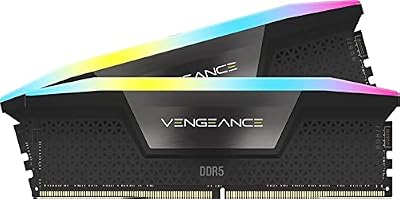
Corsair Vengeance RGB and Dominator Titanium cover the same enthusiast tiers with excellent quality. Dominator Titanium uses individually-screened modules and is the premium choice for builders who want absolute reliability at high speeds.
Kingston Fury Beast and Renegade are reliable mainstream choices, often available at slight discounts versus G.Skill and Corsair. Patriot Viper Elite 5 has improved dramatically and is a competitive value option in 2026.
Crucial Pro and Crucial Ballistix lines are conservative, well-binned, and value-priced. They’re slightly behind G.Skill in tight-timing kits but rock-solid for standard EXPO/XMP operation.
Future-Proofing and Upgrade Paths
DDR5 will remain the standard through 2028+ on AM5 and likely the next-generation Intel platforms. Buy 32GB minimum capacity in 2026; the upgrade to 64GB by adding two sticks later is unreliable due to memory matching issues. If you might need more capacity in 2–3 years, just buy 64GB upfront. The price difference is minor in the context of total build cost, and you avoid the compatibility headache of late-stage capacity upgrades.
Manual Memory Tuning Considerations
For most builders in 2026, EXPO/XMP profiles deliver 95%+ of the achievable memory performance with zero effort. Manual tuning of sub-timings (tRFC, tFAW, tRRDS/L) can extract another 3–5% memory performance, but requires hours of stability testing and reading enthusiast guides. Unless you genuinely enjoy memory tuning as a hobby, EXPO/XMP is the right answer. The exception: if you’re chasing competitive benchmark scores or pushing high-frequency Intel kits to the edge, manual tuning provides meaningful headroom.
Final Take
The RAM purchase in 2026 should be the most boring part of your build. For AMD: 32GB G.Skill Trident Z5 Neo (or Corsair Vengeance) DDR5-6000 CL30 EXPO, $124. For Intel: 32GB DDR5-7200 CL34 XMP, $179. Done. Don’t overthink it, don’t chase exotic specs, don’t pay for unused RGB. If you do hybrid work, double to 64GB. If you do heavy creative work, 96GB at DDR5-6400. The era of complex memory tuning is largely over for mainstream builders — EXPO and XMP 3.0 just work, and the platform-specific sweet spots are well-established. Spend your time researching GPUs and CPUs; the memory decision should take fifteen minutes maximum.
Frequently Asked Questions
Is 16GB still enough for gaming?
It is the bare minimum and increasingly limiting. Several recent AAA titles allocate more than 12GB on their own, leaving nothing for the browser, Discord and background services. 32GB is the sensible target for a new build, and it costs far less than the frustration of constant swapping.
What speed and timings should I buy?
On AM5, DDR5 6000MT/s at CL30 is the accepted sweet spot because it keeps the memory controller and Infinity Fabric synchronised; pushing much higher often reduces performance. Intel platforms scale further and can benefit from 7200MT/s or faster, provided the motherboard and CPU memory controller can handle it.
Two sticks or four?
Two, in the correct slots for dual channel, which is usually the second and fourth from the CPU. Populating all four slots increases load on the memory controller and typically forces lower stable speeds on DDR5. Buying a single matched kit also avoids mismatched dies that refuse to train together.
Do I need to enable XMP or EXPO?
Yes, absolutely. Without it, memory runs at a conservative JEDEC baseline that can cost 10 percent or more in CPU-bound games. Enable the profile in BIOS and then verify the reported speed in the operating system, since some boards fall back silently if the profile fails to train.
Does RGB or a heatspreader affect performance?
No. Heatspreaders help marginally at very high speeds and voltages, and RGB is purely cosmetic. What tall modules do affect is physical clearance with large air coolers, so check the cooler RAM clearance specification before buying tall kits.













