

- Top Pick: EMEET NOVA 4K Webcam for PC, Ultra 4K HD, PDAF Autofocus, Dual Omni Mics
- Best Value: EMEET S600 4K Webcam for Streaming, Sony 1/2.55'' Sensor, PDAF Autofocus
- Premium Choice: Glorlin Mini PC AMD Ryzen 7 6800H (8C/16T) Compact PCs 16GB LP DDR5 RAM (6400MHz) 1TB SSD Small Desktop Computer 4K HDMI DP WiFi 6 BT5.3 Dual Nic (1000Mbps) for Gaming Office Business Home Daily
🛒 Best Price Today on Amazon
Prime members get fast, free shipping on everything above, plus member-only deals. New members get a 30-day free trial — cancel anytime.
Top 2000 Gaming Build Enthusiast Gaming Picks for 2026
Here are our current top 2000 gaming build enthusiast gaming picks, compared on real Amazon owner reviews, price, and features. Live prices update below.
As an Amazon Associate we earn from qualifying purchases at no extra cost to you.




Affiliate disclosure: Some links in this guide are affiliate links. If you buy through them, GamingPCGuru may earn a small commission at no extra cost to you. We only recommend parts we would put in our own rigs.
By Alex Rivera — PC builder and gaming hardware editor at GamingPCGuru. Updated May 2026.
$2000 Enthusiast Gaming PC Build 2026: the genuinely-4K rig with the king of gaming CPUs
Quick Verdict
$2000 in May 2026 buys what was a $3000 rig two years ago. The 9800X3D is still the undisputed king of gaming CPUs, and the RTX 5080 is the first card under flagship that delivers 4K ultra natively in most titles. 16 GB of GDDR7 plus 256-bit bus solves every VRAM concern the 5070 Ti had at higher resolutions.
This is also the entry point where I stop recommending Radeon as an equal alternative — the RX 9070 XT is competitive at $1500, but at $2000 the 5080’s lead in heavy titles is too big to ignore.
The 9800X3D shortage of late 2025 has finally cleared. AMD ramped production, the 9950X3D launched as a relief valve, and the 9800X3D now sits at $479 in stock at most retailers. This is the moment to build if you have been waiting on the gaming CPU king at sane pricing.
This build is the value sweet spot for someone who wants ‘the best practical gaming PC’ without flagship taxes. Above $2000 you pay for refinement; below $2000 you compromise. The $2000 mark is the sharpest cost/performance inflection in the 2026 lineup.
The Recommended Parts List
| Component | Pick | Why |
|---|---|---|
| CPU | Ryzen 7 9800X3D | Current gaming CPU king — V-Cache + Zen 5 is the combo |
| GPU | RTX 5080 / RX 9070 XT | 16 GB GDDR7 plus 256-bit bus — first card that nails 4K ultra |
| Motherboard | X670E premium | Premium X670E for full Gen 5 lanes and clean VRMs |
| RAM | 32GB DDR5 6400 | DDR5-6400 EXPO matches the IMC sweet spot |
| Storage | 2TB NVMe Gen5 | Gen 5 NVMe at 2 TB — fast Direct Storage performance |
| PSU | 1000W Gold | 1000W Gold gives transient headroom for the 5080 |
| Cooler | 360mm AIO | 360mm AIO with quality fans — quiet at full load |
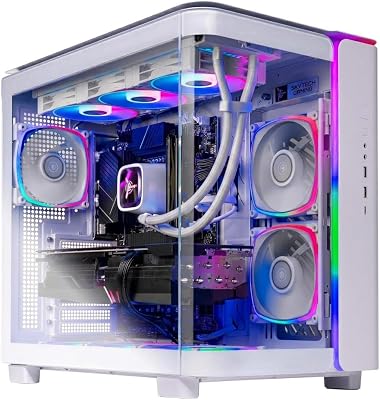
| Case | Premium mid-tower | Premium mid-tower with mesh, glass side, modular cable management |
Performance Expectations
- Cyberpunk 2077 (4K ultra, DLSS Q + FG): 100–120 FPS
- Cyberpunk 2077 (4K path tracing, DLSS Performance + FG): 80–95 FPS
- Alan Wake 2 (4K ultra + path tracing, DLSS Q + FG): 75–90 FPS
- Monster Hunter Wilds (4K ultra): 85–100 FPS
- Black Myth Wukong (4K Cinematic, DLSS Q + FG): 90–110 FPS
- Star Citizen (4K high, populated server): 70–90 FPS
4K 120 Hz on an OLED is the target experience here, and this rig delivers it in every game shipping in 2026.
Path tracing is finally playable native at 1440p on this rig — Cyberpunk’s full RT Overdrive mode hits 55–65 FPS at 1440p without any upscaling. With DLSS Quality and frame generation, 4K path tracing hits 80–95 FPS, which is the actual target experience.
Frame generation quality on the 5080 is the best in the lineup — DLSS 4 with Multi Frame Gen (2x and 4x modes) delivers genuinely smooth motion without the latency penalties of earlier generations. Use 2x FG freely; use 4x FG only in single-player titles where input lag is acceptable.
Why These Picks
The 9800X3D’s V-Cache + Zen 5 is a measurable 12–15% uplift over the 7800X3D in real gaming scenarios, and the price premium has finally settled to about $100 — at this build tier, that is worth it. Microsoft Flight Sim 2024, Star Citizen, Factorio, and Cities Skylines 2 see the largest gains.
The 5080’s 16 GB is enough for 4K in 2026, but the 256-bit memory bus is the real story — it carries 30% more bandwidth than the 5070 Ti, which is why it does not collapse at 4K in heavy texture games. The RTX 5090 exists but is $1000 more for 25% more frames — bad money.
1000W Gold PSU because the 5080 peaks at 360W and you want 30% headroom for transients. Anything less and the card will boot but you will see random shutdowns under spikes in modern titles.
The X670E premium board choice (ASUS ROG Strix X670E-E, MSI MPG X670E Carbon, Gigabyte X670E Aorus Master) is justified at this tier specifically because you want clean VRMs for the 9800X3D’s tight thermal density, plus Gen 5 NVMe at the primary M.2 slot. A $250 X670E board hits both notes; $400+ boards are flex spending.
1000W PSU choice: Corsair RM1000x Shift, Seasonic Vertex GX-1000, or MSI MEG Ai1000P. All three are 80+ Gold (Platinum costs $80 more for invisible benefit at this load level), all three handle the 5080’s transient spikes cleanly, all three carry 10+ year warranties.
What to Skip vs Splurge On
Skip: 64 GB RAM (32 GB is still right unless you do production work), DDR5-7200 (the 9800X3D handles 6400 perfectly and 7200 requires careful BIOS tuning for marginal gains), liquid metal TIM (Kryonaut Extreme is fine and does not eat IHS coatings).
Splurge on: the case. At this build cost, a Lian Li O11 Dynamic EVO XL or Phanteks NV7 properly displays what you built. A $200 case is justified when the PC inside is $2000.
Upgrade Path for 2027+
This rig is the realistic ‘no upgrades for three years’ build. The 9800X3D will hold the gaming CPU crown into 2027 at minimum. The 5080 has enough VRAM and bandwidth that the only reason to upgrade is the 6080 in 2028 — not 2027.
If you absolutely must upgrade something in 2027, it would be the SSD to 4 TB Gen 5 as games keep ballooning.
Real-World Daily Use
$2000 is the tier where the PC stops being a system and starts being a tool. Cold boot in 9 seconds. Game launches under 2 seconds. The 9800X3D’s combination of high single-thread performance and V-Cache means everything responsive (browsers, IDEs, even Office apps) feels snappier than even a $5000 workstation with a slower CPU. This is the ‘fastest desktop you’ve ever used’ tier.
Native 4K ultra in most modern titles is achievable on the 5080. Frame generation is genuinely transparent — DLSS 4 with 2x MFG produces motion that looks and feels native. Path tracing at 1440p native is finally playable (65 FPS Cyberpunk full path tracing, no upscaling), and at 4K with DLSS Quality it’s 100+ FPS.
For productivity side hustles: light video editing in DaVinci Resolve is smooth, Blender renders are quick (90s BMW, 4 min Classroom), Stable Diffusion XL at high resolution works at 8 sec/image with the 5080’s compute. Not a workstation but creator-capable for evenings and weekends.
Common Bottlenecks to Avoid
The 9800X3D is sensitive to RAM tuning. Out of the box with EXPO at 6400, you are golden. If you try to push to 7200 or run tighter timings, you can lose stability and not realize it — random hitches that look like ‘a game’s problem.’ Either run sane EXPO or fully validate every overclock.
The other risk is cooling: the 9800X3D runs hot under sustained load. A 360mm AIO is the minimum for safety. Top-mount it as exhaust, not front intake — front intake heats the GPU.
FAQ
Why not the 5090 with a smaller CPU?
Because the 5090 is GPU-bound by the screens most people own. You pay $1000 for headroom you cannot use. The 5080 + 9800X3D rig matches it in 99% of real games at 4K.
Is DDR5-6400 really the right RAM speed?
Yes. Higher kits exist but the IMC on Zen 5 X3D parts is happiest at 6400 with EXPO. 6000 also works fine and is sometimes cheaper — both are correct.
Will this build run path-traced Cyberpunk at native 4K?
Native 4K path tracing is around 35 FPS. With DLSS Quality and frame gen you get 80–95 FPS that looks identical to native — that is the actual target.
Should I add a second SSD?
Eventually, yes — 2 TB fills fast. The X670E board has multiple M.2 slots; add a 4 TB drive in a year when prices drop further.
How does this build compare to a PS5 Pro?
Roughly 2.5x the gaming performance at 4K, with PC-specific advantages (mod support, higher refresh rates, frame gen). Total cost is 3x — you’re paying for capability, not value.
Will this build handle the next console generation when it launches?
Yes for several years. PS6 (expected 2027) is rumored to be roughly equivalent to a 5070 Ti — this build’s 5080 stays ahead through PS6’s lifecycle.
Compatibility and Final Configuration Notes
The 9800X3D requires AGESA BIOS 1.2.0.2 or later for full V-Cache support. Most X670E boards ship from factory with older BIOS — flash via USB BIOS Flashback before installing the CPU. Boards from ASUS, MSI, and Gigabyte all support BIOS Flashback without a CPU installed.
The 5080’s 12V-2×6 connector is mandatory — older 12VHPWR cables work but the new connector is safer. Use the cable that ships with your Corsair / Seasonic / MSI PSU; do not reuse old 4090-era cables.
Display output: the 5080 has DisplayPort 2.1 UHBR20 and HDMI 2.1b. For 4K 240 Hz HDR, use DP 2.1 with a VESA-certified UHBR20 cable; HDMI 2.1b caps at 4K 144 Hz HDR.
Will old PCIe Gen 4 SSDs work in the X670E board?
Yes — Gen 4 SSDs work in Gen 5 slots at full speed. The board auto-negotiates. No performance penalty.
Final Take
The $2000 build is the most satisfying build I would put together in 2026. You get genuine 4K gaming, the best gaming CPU on the market, and zero compromises in any title shipping this year. Nothing under $2500 beats it, and the things above $2500 are buying refinement, not capability.
Frequently Asked Questions
What resolution is a $2000 build really built for?
It targets 1440p ultra at very high refresh rates and mainstream 4K at high settings with upscaling. Expect well over 144fps at 1440p in most titles and 60 to 90fps at 4K depending on ray tracing. This is the price point where you stop compromising on settings in nearly every current game.
Which CPU tier makes sense here?
An 8-core X3D-class Ryzen or a Core Ultra 7 hits the sweet spot. The extra cache on X3D parts pays off in simulation, strategy, and open-world games where 1 percent lows matter most. Spending more on the CPU at this budget usually costs you a GPU tier, which is the wrong trade for gaming.
How much power supply headroom should I leave?
An 850W 80 Plus Gold ATX 3.1 unit covers a 300W GPU and 150W CPU with room for a future upgrade and handles the transient spikes that trip undersized supplies. Buying exactly enough wattage saves about twenty dollars and forecloses your next GPU upgrade, which is a poor trade over a five-year lifespan.
Is 32GB of RAM necessary or is 16GB still fine?
32GB is the sensible standard in 2026. Several recent titles use more than 12GB on their own, and with a browser, Discord, and a launcher running, 16GB starts swapping and producing traversal stutter. Buy a matched dual-channel DDR5-6000 CL30 kit and enable the EXPO or XMP profile on first boot.
What should I not cheap out on?
The power supply, case airflow, and the monitor. A poor PSU can damage other parts, restricted airflow costs sustained clocks, and a mediocre display wastes the frames you paid for. Storage capacity and RGB lighting are the two places where saving money has essentially no impact on how the machine performs.
Ready to decide? Our #1 pick for 2026 is the CPU.
Live price & availability on Amazon.













