Builder Simulator is Live Motion Games and Frozen Way’s house-construction sandbox, released on Steam on 9 June 2022: plan a plot, lay foundations, raise walls brick by brick and finish interiors. Its Steam record is a Windows release, and nothing in that record has changed since launch day.
The Linux question this game raises is more interesting than most, because one layer of the paperwork points the wrong way. The game’s single content depot carries an operating-system list that names Linux alongside Windows. Read against the rest of the record — the platform flags, the requirements tabs, the depot’s own file census and Valve’s compatibility sheet — that tag is a label with no build behind it.
As an Amazon Associate, we earn from qualifying purchases.
Quick answer
Builder Simulator is not native on Linux. Steam flags the game Windows only, its Linux requirements are an empty shell, and its single content depot — tagged for Linux as well as Windows — holds only Windows binaries. Linux play means Proton: Gold across 13 reports, and a Playable Steam Deck badge.
The depot that names Linux and ships Windows
Start with the layer Steam shows buyers. The platform flags on app 1120320 read Windows true, Mac false, Linux false. The requirements tabs agree in their own way: the Windows minimum and recommended tiers are genuinely populated, while the Mac and Linux fields are populated-but-empty shells — the Minimum and Recommended headings printed over completely empty lists. A shell like that publishes no Linux specification of any kind.
The depot table is where the record gets strange. SteamDB lists three depots. Depot 1120321, at 12.99 GiB, is the game’s content depot, and its configuration names two operating systems: Windows and Linux. Depot 1120322, at 11.09 GiB, is tagged macOS — for a game whose Mac flag is also false. The third entry is the American Houses DLC depot, unused and size-less.
The depot’s own contents settle it. The current manifest of depot 1120321 — build 26462579, published 5 November 2026 — holds 249 files: four Windows executables, 183 Windows DLLs, and the Unity data bundles that make up the bulk of the 12.99 GiB. There are no Linux shared-object files anywhere in the census and no Linux binary format at all. The registered store assets agree: clienticon, clienttga, icon and logo are present, but there is no LinuxClientIcon in any form, and the record’s extended OS field is an empty string. No Linux launch entry exists either — nothing a Linux Steam client could start natively, whatever the depot tag says.
So the ruling is not native, and the depot tag is the trap this article exists to name: an operating-system list on a shared depot is metadata about how content may be delivered, not evidence of a build for that system. The macOS depot beside it — equally real as a depot, equally denied by the flags — shows the same paperwork habit in the other direction. No anti-cheat is named on the record either, and the AreWeAntiCheatYet database holds no entry for the game in either direction — an absence of documentation rather than a clearance, but one that fits a single-player sandbox.
The one DLC, read on its own record
The full DLC array holds exactly one app: Builder Simulator — American Houses DLC, app 4517820, released 30 July 2026. Read individually, its record repeats the base game’s shape exactly — Windows true, Mac false, Linux false, with the same empty-shell Mac and Linux requirements fields.
That single entry also closes off a familiar false positive: there is no music or soundtrack app anywhere in this game’s family, so the soundtrack package that flags every platform true in other catalogues cannot inflate this one.
Proton is the real Linux route, and its file is honest about the cracks
ProtonDB’s summary record for this game is complete, and it is a mixed file rather than a victory lap. The settled tier is Gold, the best-reported tier is Platinum, and the trending tier is Platinum, across 13 reports with confidence rated moderate. A Gold headline with Platinum at the top end usually means a game that runs well on the right Proton version and misbehaves on the wrong one — and the report text bears that out.
Several reporters describe the same specific failure: the game crashing at the end of a tutorial or contract, on stock Proton versions including the 7.0 and 8.0 lines. Two of them fixed it by switching to GE-Proton builds in the 7.x series and played through cleanly afterwards. The most recent filings, on Proton 9.0-3 and 9.0-4, sit at the Platinum end of the file. The practical reading: current Proton is the right starting point, the tutorial-end crash is the known fault line, and a GE-Proton fallback is the documented way around it.
One heading on the game’s ProtonDB page needs correcting on the record. The page carries the stray “Natively Supports:” heading above its requirements block, as ProtonDB pages for many Windows games do. Against Steam’s record — Linux flag false, empty Linux requirements, a depot full of Windows binaries — that heading is wrong for this game, and this article follows Steam. The Gold file describes the Windows build running through a compatibility layer, which is a different and perfectly respectable thing.
Steam Deck: a Playable badge grading an older build
Valve’s own compatibility endpoint returned no usable response this session, so the test sheet below is read through SteamDB’s republication of Valve’s data. The category is Playable, with SteamOS marked Compatible and the recommended runtime listed as proton-stable — Valve grading the Windows build under Proton, as the record everywhere else says it must.
The deductions are the familiar Playable set: some functionality is not accessible with the default controller configuration, requiring the touchscreen, the virtual keyboard or a community configuration; entering text requires manually invoking the on-screen keyboard; and some in-game text is small and may be difficult to read. On the passing side, the game shows Steam Deck controller icons and its default graphics configuration performs well.
The paperwork is stale, and the dates prove it. Valve’s test is timestamped 28 February 2024 against build 13431472. The current public build is 26462579, published 5 November 2026 — the badge grades a build the game left behind many updates ago. That does not make it worthless: the ProtonDB file’s recent Platinum reports cover the newer builds and point the same direction. It does mean the Playable verdict should be read as a floor established on an old build, not a fresh certification of the one on sale today.
Gear that fits the record
The setup below follows the record’s shape: a Playable handheld badge earned under Proton, partial controller support for docked play, a mouse for the planning work, and fast storage.
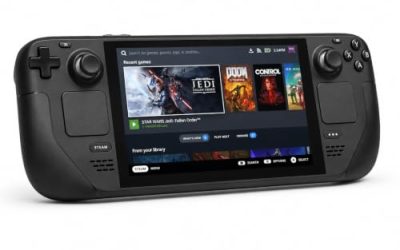
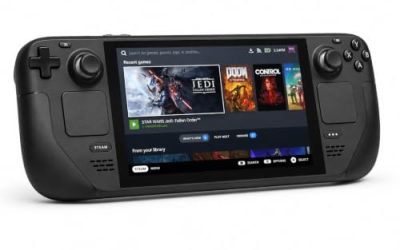
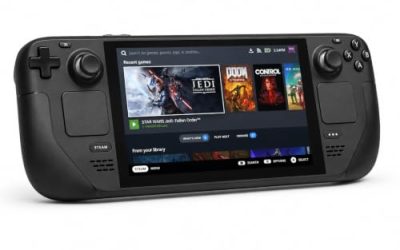
Valve Steam Deck OLED 512GB
The handheld the Playable badge was written for. Valve’s sheet gives the Windows build a passing performance mark under proton-stable, with the controller and small-text deductions noted above.
Specs
- Display: 7.4-inch HDR OLED, 1280 by 800, up to 90 Hz
- Processor: AMD Zen 2 and RDNA 2 custom APU
- Memory: 16 GB LPDDR5
- Storage: 512 GB NVMe, plus a microSD slot
- Wireless: Wi-Fi 6E and Bluetooth
- Channel note: Valve sells the Deck mainly through its own store, so Amazon listings are third-party sellers
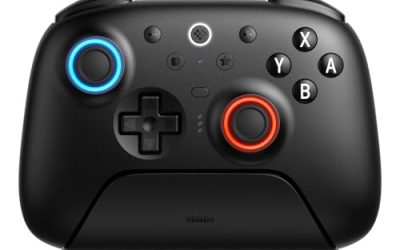
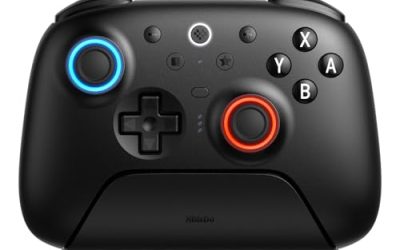
8BitDo Ultimate 2 Bluetooth Controller

The docked and desktop pad pick. Steam lists partial controller support for the game, and this pad covers the couch case with modern sticks and triggers plus back buttons.
Specs
- Connectivity: Bluetooth wireless and USB-C wired
- Joysticks: TMR electromagnetic, anti-drift design
- Triggers: Hall effect, with mode switching
- Extras: two remappable back buttons, motion control
- In the box: charging dock included
Xbox Wireless Controller, Carbon Black
The safest guest pad in PC gaming: Steam Input support is universal, the glyphs match what most games display, and it pairs over Bluetooth or its own wireless standard.
- Connectivity: Xbox Wireless and Bluetooth
- Port: USB-C for wired play
- Controls: hybrid D-pad, dedicated Share button
- Power: AA batteries or optional rechargeable pack
Logitech G502 HERO
Builder Simulator’s planning stages are menu-driven, and at a desk a precise wired mouse turns material lists and room layouts into single clicks.
Specs
- HERO optical sensor, up to 25,600 DPI
- 11 programmable buttons
- Adjustable weight system
- Wired USB connection
- On-board memory profiles
Samsung T9 Portable SSD 2TB
For moving a Linux game library between a desktop and a laptop, or keeping an offline backup of installers, a fast USB-C drive is the simple answer.
Specs
- Capacity: 2 TB portable SSD
- Interface: USB 3.2 Gen 2×2, USB-C connector
- Maker-rated speeds: up to 2,000 MB per second read, 1,950 MB per second write
- Features: Dynamic Thermal Guard, maker-rated drop resistance
How to choose
Choose the Steam copy, because it is the only PC edition on sale: GOG’s product records hold no edition of this game — the natural product address redirects to the general catalogue and its catalogue records return nothing — so there is no DRM-free alternative to weigh. On a Linux desktop, install the game, leave the compatibility tool on the current default Proton, and play; the recent end of the ProtonDB file is Platinum on the 9.0 line. If the tutorial-end crash appears, the documented fix is a GE-Proton build, not a reinstall. On Steam Deck, install and launch under the default runtime, expect to invoke the on-screen keyboard for text fields, and treat the small-text deduction as the real cost of the handheld screen.
Who should skip
Skip this one if you are shopping for a native Linux construction game: the depot tag is the closest thing to a Linux build in the record, and it delivers Windows binaries. Skip it if you only buy DRM-free installers, because no GOG edition exists. Skip it if a known crash at the end of tutorials — even one with a documented workaround — is more friction than you accept in a relaxing sandbox. And skip the Deck version if small interface text on a handheld screen is a deal-breaker, because Valve’s sheet flags exactly that.
FAQ
Is Builder Simulator native on Linux?
No. Steam flags the game Windows only, the Linux requirements field is an empty shell, and the one depot tagged for Linux contains Windows executables and DLLs with no Linux binary and no Linux launch entry. There is no native build to install.
Why does the depot mention Linux at all?
Because a depot’s operating-system list is delivery metadata, and this game’s single shared depot carries both Windows and Linux in that list while shipping only the Windows Unity build. The same paperwork habit tags a second depot macOS for a game whose Mac flag is also false.
How well does Builder Simulator run under Proton?
ProtonDB settles at Gold, with Platinum as both the best-reported and trending tier, across 13 reports at moderate confidence. The recurring complaint is a crash at the end of tutorials or contracts on older Proton versions; recent reports on the Proton 9.0 line are clean, and GE-Proton is the documented workaround.
Is Builder Simulator Steam Deck Verified?
No — it is one step below, at Playable. Valve reviewed it in February 2024 under proton-stable, passing its graphics performance and controller-icon checks, with deductions for the default controller configuration, manual keyboard invocation and small text. The tested build is older than the current public build, so read the badge as a floor.
Final verdict
Builder Simulator is a Windows-only release whose record contains exactly one Linux-shaped mirage: a depot tag. Every layer that decides what a buyer receives — the platform flags, the empty Linux requirements, the depot’s Windows-only file census, the missing Linux icon and launch entry — says the same thing, and Valve’s proton-stable Deck sheet confirms the intended route. What Linux players get instead is a workable Proton path: a Gold community file trending Platinum, one documented crash with a documented workaround, and a Playable handheld badge. Buy the Steam copy for Proton, and let the depot tag fool no one.
Product and ASIN Reference
| Product | ASIN |
|---|---|
| Valve Steam Deck OLED 512GB | B0CQ3RWQQZ |
| 8BitDo Ultimate 2 Bluetooth Controller | B0F194QFT2 |
| Xbox Wireless Controller, Carbon Black | B08DF248LD |
| Logitech G502 HERO | B07GBZ4Q68 |
| Samsung T9 Portable SSD 2TB | B0CHFS9K14 |