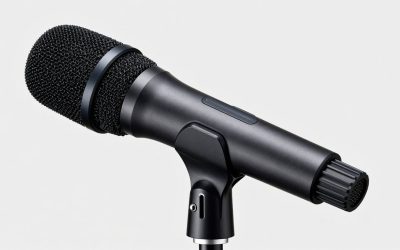
- Top Pick: Shure SM58 Pro XLR Dynamic Vocal Microphone | Cardioid dynamic vocal mic for studio and live performance, podcasting and recording; industry-standard sound
- Best Value: NEEWER NW-040 Cardioid Dynamic Microphone with XLR Cable, Metal Housing | Unidirectional Pickup Mic, for Musical Instruments, Voice, Public Speech, Podcast, Singing, PC Gaming, Streaming, Studio
- Premium Choice: Pyle Microphone, Dynamic Cardioid, XLR Cable Included, Unidirectional, Rugged Construction, Built-in Pop Filter, Perfect for Stage & Studio, High Gain, Ultra-Wide Frequency Response, 15ft Cable
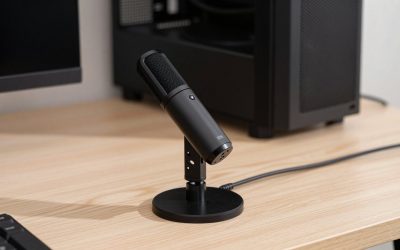
The best XLR dynamic microphones for a gaming or streaming desk are the Shure SM7B for a classic broadcast sound, the Rode PodMic for the best value, and the Shure SM7dB when your interface cannot supply enough gain. Dynamic XLR mics reject room noise far better than USB condensers, but they need an interface or mixer, and the right gain match matters more than the badge on the microphone. This guide compares nine models by sensitivity, frequency response, pickup pattern and desk fit, then shows how to calculate whether your interface can drive each one.
As an Amazon Associate we earn from qualifying purchases at no extra cost to you.


Quick answer: top picks
- Best overall for streaming: Shure SM7B.
- Best with built-in gain: Shure SM7dB.
- Best value broadcast mic: Rode PodMic.
- Best for tight budgets and handheld flexibility: Shure SM58.
- Best compact stream mic: Shure MV7X.
- Best for isolating a loud room: Audio-Technica AT2040.
- Best budget starter: Samson Q2U (XLR output).
- Best for mixer-based streaming rigs: Elgato Wave DX.
- Best for deep, full-range voices: Heil PR 40.
How we chose
These recommendations come from published manufacturer specifications and the comparison points buyers use when choosing a broadcast microphone. We did not run instrument measurements. We selected dynamic cardioid or hypercardioid models currently sold, that connect through standard three-pin XLR, and that are commonly used at desks rather than in recording studios. Where a figure could not be confirmed, we describe the product by class instead of quoting a number.
The criteria we weighted most heavily were:
- Required gain. Low-output dynamic mics demand a strong preamp. This is the number one reason an XLR microphone sounds weak or hissy.
- Pickup pattern. Cardioid and hypercardioid patterns reject sound from behind, and hypercardioid rejects more from the sides.
- Frequency response and voice tuning. A presence boost helps speech cut through game audio, and a bass roll-off tames proximity boost when you sit close.
- Handling noise and mounting. A mic hung on a boom arm should not transmit desk vibration.
- Size and weight. Heavy mics need a sturdy arm and fit poorly on cramped desks with big monitors.
- Total chain cost. The microphone is only one part. An interface or mixer, XLR cable and arm are all part of the budget.
Why a gamer would choose XLR at all
USB microphones are convenient, and many are good. XLR dynamic mics bring three advantages. First, a dynamic capsule hears much less of the room, so mechanical keyboards, case fans and echoey walls are easier to live with. Second, the chain is modular: you can swap the mic, the interface or the cable independently, and a good mic stays useful for a decade. Third, XLR connects to mixers and streaming consoles, which lets you route game audio, voice chat and music with physical faders.
The trade-off is complexity and cost. You need a preamp with enough clean gain, and you need to learn what phantom power is, because some microphones need it and others do not. Dynamic microphones do not require phantom power. A few active models do, as described below, so always read the manual before enabling 48 V.
Worked example: does your interface have enough gain?
The most common beginner failure is a low-output dynamic mic on a weak preamp. Here is a simple method to check compatibility before you buy.
- Find the mic’s needed gain. The Shure SM7B is a low-output microphone, and Shure’s guidance for typical speech levels points to around 60 dB of gain for a clean signal. The SM58 is more sensitive and usually needs less, often in the 40 to 50 dB range for speech at close range.
- Find your preamp’s maximum gain. Many budget interfaces and mixers offer about 50 to 56 dB, while stronger models offer 60 to 76 dB or more.
- Add headroom. You want the knob to sit comfortably below maximum. If the SM7B needs about 60 dB and your preamp tops out at 56 dB, you will be pushing the gain to the stops and amplifying noise.
- Decide. If the preamp cannot reach the required gain with some margin, choose a higher-output mic such as the SM7dB, which has an integrated preamp, or an inline preamp, or a more capable interface.
For example, a preamp with 56 dB maximum gain paired with an SM7B at a 60 dB requirement leaves you 4 dB short. A Shure SM7dB, with its built-in boost, removes the problem. A Rode PodMic or Shure MV7X, both of which are more sensitive, would work on that same preamp with room to spare.
Comparison table
| Model | Pattern | Frequency response | Gain demand | Best for |
|---|---|---|---|---|
| Shure SM7B | Cardioid | 50 Hz to 20 kHz | High | Broadcast-style voice |
| Shure SM7dB | Cardioid | Class-matched to SM7B | Built-in preamp | Weak interfaces |
| Rode PodMic | Cardioid | 20 Hz to 20 kHz | Medium | Value for money |
| Shure SM58 | Cardioid | 50 Hz to 15 kHz | Medium | Budget, handheld |
| Shure MV7X | Cardioid | 50 Hz to 16 kHz | Medium | Compact streamers |
| Audio-Technica AT2040 | Hypercardioid | 80 Hz to 16 kHz | Medium | Noisy rooms |
| Samson Q2U | Cardioid | 50 Hz to 15 kHz | Medium | Starter option |
| Elgato Wave DX | Cardioid | Not confirmed here | Medium | Elgato ecosystem |
| Heil PR 40 | Cardioid | 28 Hz to 18 kHz | Medium to high | Deep voices |
The picks in detail
Shure SM7B: best overall for streaming
Spec line: Dynamic · cardioid · 50 Hz to 20 kHz · XLR · high gain demand · internal air suspension shock isolation · bass roll-off and presence boost switches
The SM7B is the default broadcast and podcast microphone for good reason. It is forgiving, smooth through the midrange, and the switchable bass roll-off and presence boost let you shape the voice without software. Its biggest demand is gain: a weak interface leaves you with a noisy signal. It also works best close to the mouth with a foam cover.
Best for: streamers who want a proven broadcast voice and already own, or will buy, a capable interface or mixer.
Skip if: your preamp tops out around 50 dB of gain, or you want a compact mic. The body is large and the yoke needs a solid boom arm.
- Pros: excellent room rejection, voice-friendly tuning, strong shock isolation.
- Cons: needs lots of clean gain, large, premium tier.
Shure SM7dB: best when gain is the problem
Spec line: Dynamic · cardioid · XLR · built-in active preamp with selectable boost · requires phantom power for the preamp
The SM7dB takes the SM7B concept and adds an integrated preamp, so weaker interfaces can drive it. Because the preamp is active, it needs phantom power from your interface, so check that your device offers 48 V before purchase.
Best for: users with entry-level interfaces or mixers that struggle with the SM7B.
Skip if: your gear has no phantom power, or you already have a strong preamp, in which case the SM7B alone is enough.
- Pros: solves gain problems, same familiar voice character, works with modest interfaces.
- Cons: needs phantom power, premium tier.
Rode PodMic: best value broadcast microphone
Spec line: Dynamic · cardioid · 20 Hz to 20 kHz · XLR · internal pop filter · all-metal body
The PodMic is a heavy, solidly made dynamic with an integrated pop filter and a tuning aimed at speech. It does not need the extreme gain of the SM7B, so it suits many mid-range interfaces. It is large and heavy, and the weight demands a sturdy boom arm rather than a light desk stand.
Best for: streamers who want a broadcast voice without the highest gain demand or cost.
Skip if: your arm is light or your desk is very small.
- Pros: strong value, integrated pop filter, less demanding on preamps.
- Cons: heavy, needs sturdy mounting.
Shure SM58: best budget and handheld
Spec line: Dynamic · cardioid · 50 Hz to 15 kHz · XLR · built-in spherical pop filter
The SM58 is the familiar stage vocal microphone. It works well at close range, handles abuse and sits comfortably on a desk stand or handheld in a pinch. The voice is a little less smooth than a broadcast model, but at an entry-level price it remains a dependable choice.
Best for: low-cost XLR starters and shared desks that need a durable mic.
Skip if: you want the smooth low-mid warmth of a broadcast dynamic, or a quieter, less peaky sound.
- Pros: durable, well known, affordable, moderate gain demand.
- Cons: less refined voice tuning, no shock mount included in most kits.
Shure MV7X: best compact XLR-only streamer mic
Spec line: Dynamic · cardioid · 50 Hz to 16 kHz · XLR only · compact body · threaded mount
The MV7X keeps the voice character of the MV7 family but drops the USB output, which makes it a lighter, simpler XLR option. It suits desks where space is tight and an SM7B would dominate the view.
Best for: compact desks and creators moving from a USB MV7 who want an interface-based chain.
Skip if: you want USB convenience. Look at the MV7+ instead.
- Pros: compact, broadcast-leaning tuning, solid brand support.
- Cons: no USB, narrower top-end than some rivals.
Audio-Technica AT2040: best for noisy rooms
Spec line: Dynamic · hypercardioid · 80 Hz to 16 kHz · XLR · lighter body
The AT2040 uses a hypercardioid pattern, which is narrower than cardioid and rejects more sound from the sides. That is helpful in a room with a loud PC next to your desk. Hypercardioid mics also pick up a small amount directly behind them, so aim the rear away from speakers.
Best for: players with loud PCs, flat surfaces and untreated rooms.
Skip if: you move around a lot while talking. The narrow pickup punishes off-axis movement.
- Pros: strong side rejection, comparatively light, speech-oriented.
- Cons: less low-end warmth, small rear lobe.
Samson Q2U: best budget starter
Spec line: Dynamic · cardioid · 50 Hz to 15 kHz · XLR and USB · headphone output on the USB path
The Q2U is placed here because its XLR output lets you start on USB and grow into an interface. When used through XLR, it behaves like a normal moderate-gain dynamic microphone.
Best for: beginners unsure whether to commit to an XLR chain.
Skip if: you already have an interface and want a premium voice.
- Pros: low cost, dual outputs, forgiving of rooms.
- Cons: basic build, plain tuning.
Elgato Wave DX: best for Elgato-based setups
Spec line: Dynamic · cardioid · XLR · frequency range not confirmed here · designed for Elgato audio gear
The Wave DX is a dynamic cardioid microphone designed to pair with Elgato’s interface and Stream Deck ecosystem. If you already use Wave Link, the pairing is simple. Confirm the exact response and gain demand on the product page before buying.
Best for: creators who are already invested in the Elgato desk setup.
Skip if: you want a long-proven broadcast voice such as the SM7B.
- Pros: ecosystem fit, sensible desk size.
- Cons: less track record than the Shure and Rode models.
Heil PR 40: best for deep, full-range voices
Spec line: Dynamic · cardioid · 28 Hz to 18 kHz · XLR · large-diaphragm design
The PR 40 has a wide frequency range with strong low-end extension, which flatters deeper voices. It is a large, heavy microphone that likes a strong arm and decent gain.
Best for: deep-voiced streamers and podcasters who want full-bodied sound.
Skip if: you have a bright voice that already sounds thin or sibilant. The extended top may exaggerate that.
- Pros: wide frequency range, full-bodied sound.
- Cons: heavy, large, needs a stable arm.
The rest of the chain: interface, cable, arm
Interface or mixer
Pick an interface with at least the gain your microphone needs and clean preamps. For streamers, a mixer-style device with faders and loopback lets you route game, chat and music separately. Phantom power should be a switchable feature and must be off unless a microphone specifically requires it.
Cable
Use balanced three-pin XLR cable of a reasonable length. Keep cable runs away from power adapters and monitor cables to avoid interference.
Arm and mount
Heavy microphones such as the PodMic, SM7B and PR 40 need an arm rated for their weight. A weak arm droops during a session. A shock mount or integrated suspension limits desk vibration.
Phantom power safety
Do not enable 48 V on ribbon microphones or on unknown equipment without checking the manual. Most dynamic microphones are unaffected by phantom power on a balanced connection, but ribbons and some older equipment can be damaged. Plug in the XLR cable with phantom power off, and switch it on only after the connection is made.
Decision matrix
| Your situation | Pick | Reason |
|---|---|---|
| Strong interface, want the classic voice | Shure SM7B | Smooth broadcast tuning |
| Weak interface, want the SM7 voice | Shure SM7dB | Integrated preamp |
| Mid-range interface, value focus | Rode PodMic | Lower gain demand |
| Loud PC beside the desk | Audio-Technica AT2040 | Hypercardioid |
| Tiny desk | Shure MV7X | Compact body |
| Entry-level start | Shure SM58 or Samson Q2U | Lower cost |
Frequently asked questions
Do XLR dynamic microphones need phantom power?
Most passive dynamic microphones do not need phantom power. Active models, such as the Shure SM7dB, do, so always check the product manual first.
Phantom power is generally harmless to standard dynamic mics on balanced cables, but it can harm ribbon microphones. Switch it on only for mics that require it.
How much gain does a Shure SM7B need?
The SM7B generally needs very high gain, around 60 dB for typical speech levels. A preamp that tops out near 50 dB can leave you with a noisy signal.
If your interface falls short, choose a stronger preamp, add an inline gain booster, or choose a model such as the SM7dB with a built-in preamp.
Is the Rode PodMic as good as the Shure SM7B?
The PodMic is a strong value pick, with a less demanding gain requirement and a heavy, solid build. The SM7B has a smoother, more refined voice character.
Many streamers cannot hear a large difference through game audio and chat compression, so the PodMic is often the practical choice on a mid-range interface.
Why is my XLR microphone so quiet?
The usual cause is low preamp gain. Dynamic mics produce a weak signal and need a clean boost, so a weak interface leaves the level low or noisy.
Check the gain knob, confirm the mic is close to your mouth, and compare your interface’s maximum gain to the microphone’s demand.
Can I plug an XLR microphone directly into my PC?
Not without an interface, mixer or XLR-to-USB adapter. Standard PCs do not accept three-pin XLR connectors on their audio jacks.
An XLR-to-USB cable is a simple route, but a proper interface gives cleaner gain and better monitoring.
What is the difference between cardioid and hypercardioid?
Both pick up mostly from the front. Hypercardioid is narrower at the sides but has a small pickup lobe directly behind the mic, while cardioid rejects the rear more fully.
Hypercardioid suits a loud side noise source, and cardioid suits desks where the rear faces speakers or a wall.
Do I need a pop filter with a dynamic microphone?
Often yes. Close-up speech creates bursts of air that overload the capsule. The PodMic and SM58 have built-in filters, while the SM7B ships with foam covers.
If your mic lacks one, a foam cover or clip-on filter is a low-cost improvement.
Which XLR microphone works best with a boom arm on a small desk?
The Shure MV7X is the most compact option here, and the AT2040 is relatively light. Heavy mics such as the PodMic and SM7B need strong arms.
Check the arm’s rated payload against the mic’s weight, and leave margin for the shock mount and cable.
Bottom line
Choose the Shure SM7B when you own a strong interface, the Shure SM7dB when your preamp is weak, and the Rode PodMic when you want broadcast quality at a lower price and gain demand. The AT2040 is the best answer to a loud room, the MV7X fits small desks, and the SM58 and Samson Q2U keep entry costs low. Do the gain calculation before buying, budget for the interface and arm, and confirm current specifications on the manufacturer’s page.