FIFINE’s BM88 Low Profile Boom Arm is the best PC gaming microphone arm for a clean desk setup: it clamps at the desk edge, holds a low folded profile that keeps the arm out of your monitor sightline, and is rated for the heavier dynamic microphones that budget arms tend to sag under. Buy it if you already own a gaming mic and want the arm itself to disappear. If you need the microphone as well, the FIFINE AmpliGame AM8T XLR/USB set is the best complete kit — a dynamic capsule that ignores keyboard clatter, mounted on a boom arm built to carry it without drifting, with both USB and XLR outputs so the kit survives your next upgrade. Budget buyers who mainly want the mic off the desk should start with the TONOR Gaming Microphone Set with Boom Arm or the FIFINE CS1 scissor arm, both of which get the job done at the lowest cost. Everything below is compared on the seven things that actually decide whether a desk-mounted mic works: mounting method, arm reach, payload, movement noise, cable routing, desk clearance, and compatibility.
- Top 3 Picks
- Quick Comparison
- How We Chose
- 1. TONOR Gaming Microphone Set with Boom Arm – Best for Budget Starter Kits
- 2. FIFINE AmpliGame AM8T XLR/USB Gaming Microphone Set – Best for Hybrid XLR/USB Streaming
- 3. FIFINE AmpliGame A6T USB Gaming Microphone Kit – Best for Plug-and-Play Condenser Streaming
- 4. InnoGear Gaming Mic USB Computer Microphone for PC Boom Arm Stand – Best for Ultra-Low-Cost Desk Setups
- 5. MAONO DGM20S USB Gaming Microphone for PC – Best for Noise-Reduction Condenser Value
- 6. FIFINE AmpliGame AM8PROT Gaming Microphone Kit – Best for Premium Dynamic Gaming Audio
- 7. FIFINE AmpliTank K688CT Podcast Microphone Kit – Best for Podcast-Grade Dynamic Capture
- 8. TONOR RGB Gaming Microphone Arm Set – Best for RGB Desk Aesthetics
- 9. InnoGear USB Gaming Microphone for PC Boom Arm Condenser Mic Set – Best for Compact Beginner Bundles
- 10. FIFINE T669 Studio Condenser USB Microphone for Recording Podcasting – Best for Recording-First Condenser Kits
- 11. FIFINE BM88 Low Profile Boom Arm – Best for Clean Desk Arm Upgrades
Top 3 Picks
Best overall: FIFINE BM88 Low Profile Boom Arm. A premium arm-only upgrade that sits close to the desk surface, so it clears a monitor’s bottom bezel and doesn’t dominate the corner of your frame. It suits anyone who already has a gaming microphone and wants the mounting hardware to stop being the weak link. Its lower pivot geometry also means less leverage on the clamp, which is why it stays put with heavier dynamic mics.
Best budget: TONOR Gaming Microphone Set with Boom Arm. A complete USB condenser kit — mic, arm, mount and cable — at the lowest price tier, which is exactly what a first streaming setup needs. It suits students, casual Discord users and anyone building a second setup on a tight budget. The trade-off is a condenser capsule that hears more of your room than a dynamic one.
Best premium: FIFINE AmpliTank K688CT Podcast Microphone Kit. A USB/XLR dynamic microphone kit aimed at podcast-grade capture, with the heavier build that justifies a stronger arm. It suits creators who record voice seriously and want one purchase that works on USB today and XLR later. It costs more and needs more gain, but it rejects room noise far better than any condenser on this list.
Quick Comparison
| Product | Best for | Mounting style | Typical usable reach | Payload class | Mic type / connection | Price tier |
|---|---|---|---|---|---|---|
| TONOR Gaming Microphone Set with Boom Arm | First-time streamers on a tight budget | Desk-clamp boom arm, two-section spring | ~60–75 cm horizontal | Budget (~0.5–1.0 kg) | Condenser / USB | Budget |
| FIFINE AmpliGame AM8T XLR/USB | Hybrid USB-now, XLR-later streaming | Desk-clamp boom arm | ~65–80 cm horizontal | Mid (~1.0–1.5 kg) | Dynamic / USB + XLR | Premium |
| FIFINE AmpliGame A6T USB Kit | Plug-and-play condenser streaming | Desk-clamp boom arm | ~60–75 cm horizontal | Mid (~1.0–1.5 kg) | Condenser / USB | Mid-range |
| InnoGear Gaming Mic USB with Boom Arm | Absolute lowest-cost desk setups | Desk-clamp boom arm | ~55–70 cm horizontal | Budget (~0.5–0.9 kg) | Condenser / USB | Budget |
| MAONO DGM20S | Noise-reduction condenser value | Desk-clamp boom arm | ~60–75 cm horizontal | Mid (~0.8–1.2 kg) | Condenser / USB | Mid-range |
| FIFINE AmpliGame AM8PROT | Premium dynamic gaming audio | Desk-clamp boom arm | ~65–80 cm horizontal | Mid-to-high (~1.2–1.8 kg) | Dynamic / USB + XLR | Premium |
| FIFINE AmpliTank K688CT | Podcast-grade dynamic capture | Desk-clamp boom arm | ~65–80 cm horizontal | Mid-to-high (~1.2–1.8 kg) | Dynamic / USB + XLR | Premium |
| TONOR RGB Gaming Microphone Arm Set | RGB desk aesthetics with a quick-mute mic | Desk-clamp boom arm | ~60–75 cm horizontal | Mid (~0.9–1.3 kg) | Condenser / USB | Mid-range |
| InnoGear USB Gaming Microphone with Boom Arm Set | Compact beginner bundles | Desk-clamp boom arm | ~55–70 cm horizontal | Budget (~0.5–0.9 kg) | Condenser / USB | Budget |
| FIFINE T669 Studio Condenser USB | Recording-first condenser kits | Desk-clamp boom arm | ~60–75 cm horizontal | Mid (~0.9–1.3 kg) | Condenser / USB | Mid-range |
| FIFINE BM88 Low Profile Boom Arm | Clean-desk arm-only upgrades | Low-profile desk-clamp boom arm | ~60–75 cm horizontal, low arc | High (~1.5–2.5 kg) | Arm only / fits USB and XLR mics | Premium |
| FIFINE CS1 Scissor Boom Arm | Budget arm-only upgrades | Scissor (folding parallelogram) desk clamp | ~60–80 cm horizontal | Budget-to-mid (~0.6–1.2 kg) | Arm only / 3/8″ and 5/8″ threads | Budget |
Reach and payload figures above describe spec classes typical of each tier rather than measured values — always confirm the exact rating on the current listing, because manufacturers quietly revise arm hardware between production runs.
How We Chose
Selection started from the mounting hardware, not the microphone, because the arm is what decides whether a desk setup stays clean after a month of daily use. We weighed seven criteria: mounting method (desk clamp versus scissor versus low-profile boom), usable horizontal reach against a typical 60–80 cm desk depth, payload headroom over the microphone’s own weight plus mount and filter, movement noise risk (spring tension, pivot bushings, metal-on-metal joints), cable routing provisions such as clips and channel guides, desk clearance in the folded position, and compatibility with the thread standards and weights of gaming microphones.
Category fit came next. A reader searching for a gaming mic arm may want three different things: a complete kit, an arm-only upgrade, or a specific capsule type. Each product below is placed where its listing specs make it strongest, and the price tier reflects its general market band rather than a fixed figure, since listing prices change daily. We also considered upgrade path — whether the microphone offers XLR output later, whether the arm’s thread adapters cover both 3/8″ and 5/8″ mounts, and whether the clamp handles a desk thicker than 4 cm. Nothing here is based on physical use of the products; every claim traces back to published listing specifications and well-established facts about the microphone and arm categories.
1. TONOR Gaming Microphone Set with Boom Arm – Best for Budget Starter Kits
As an Amazon Associate we earn from qualifying purchases at no extra cost to you.

This is the kit to buy when the goal is “get a decent voice on stream this week without spending much.” It suits first-time streamers, students on a fixed budget, Discord regulars, and anyone assembling a second or travel setup. The bundle pairs a USB condenser microphone with a desk-clamp boom arm, so the microphone leaves the desk surface immediately and your keyboard, mouse and notebook get their space back.
Key specs
- Capsule: condenser, cardioid pickup pattern
- Connection: USB, plug-and-play with no audio interface required
- Mounting: two-section spring boom arm with a C-clamp at the desk edge
- Thread standards: typically ships with 3/8″ and 5/8″ adapters, the two sizes gaming mics use
- Reach class: roughly 60–75 cm of usable horizontal travel on a standard desk
- Payload class: budget arm, comfortable with a light condenser and a pop filter
- Included: microphone, arm, mount, pop filter or windscreen, USB cable
Strengths
The value proposition is completeness. A buyer gets microphone, arm, mount and cable in one purchase, which removes the compatibility guesswork that trips up first-time buyers — no separate thread adapter, no wondering whether the mic’s mount will fit the arm’s stud. Setup is a five-minute job: clamp the arm to the desk edge, thread the mic on, plug in USB, select the input in Windows or OBS.
The condenser capsule gives a bright, present voice that sounds “streamer-like” out of the box with minimal processing. That matters because a dynamic microphone on a budget USB interface often needs 20–30 dB of extra digital gain, which raises the noise floor; a condenser’s higher sensitivity sidesteps that problem entirely. The boom arm’s main contribution is acoustic as much as spatial: raising the mic off the desk removes the reflective surface directly beneath it, which reduces the boxy, hollow quality that desk-mounted mics often produce.
Cable routing is the usual weak point of budget kits. The included USB cable is often around 1.8–2 m, and the arm’s path from desk edge to microphone can consume 1.3–1.5 m of that once you account for rise and slack. Plan the route before you clamp anything: run the cable along the underside of the lower arm, secure it with the included clips or a strip of hook-and-loop tape, and leave a service loop at the pivot so the cable never pulls taut when you swing the arm.
Pros
- Complete kit at the lowest price tier — no separate adapter or mount purchase
- USB plug-and-play with no interface, preamp or phantom power needed
- Condenser capsule delivers a bright, articulate voice with little processing
- Raising the mic off the desk reduces reflection and frees desk space
- Standard 3/8″ and 5/8″ threads make later mic swaps straightforward
Cons
- Condenser capsule picks up keyboard clatter and room noise more than a dynamic mic
- Budget spring arms can transmit knocks and desk bumps into the recording
- Clamp and joint hardware is usually lighter-duty than mid-range arms
- Included USB cable may be shorter than an ideal routing path
- No XLR output, so upgrading to an interface later means replacing the mic
How it compares
Against the InnoGear budget bundles, the TONOR set generally carries the better-known microphone lineage and a slightly more established arm design, while InnoGear competes hardest on the absolute lowest entry cost. If your ceiling is truly minimal, the InnoGear sets are the cheaper door in; if you want the kit most likely to still be usable in two years without a rebuild, the TONOR set is the safer budget anchor. Against the FIFINE AmpliGame A6T, the TONOR gives up capsule refinement, mute controls and RGB, but costs meaningfully less.
2. FIFINE AmpliGame AM8T XLR/USB Gaming Microphone Set – Best for Hybrid XLR/USB Streaming

The AM8T is the pick for a streamer who wants a dynamic microphone now and a path to an audio interface later, without buying twice. It suits mid-size streamers, people who stream in a shared room or a room with a noisy PC, and anyone who has already been burned by a condenser picking up every keystroke. Dynamic capsules are the standard answer to a noisy environment, and this kit pairs one with a boom arm designed to carry it.
Key specs
- Capsule: dynamic, cardioid — markedly lower room sensitivity than a condenser
- Connection: USB and XLR outputs on the same microphone
- Controls: onboard gain, mute, and headphone monitoring with volume on the USB side
- Mounting: desk-clamp boom arm with a heavier clamp and joint set than budget kits
- Reach class: roughly 65–80 cm horizontal on a standard desk
- Payload class: mid-tier arm, typically comfortable around 1.0–1.5 kg
- Thread standards: 3/8″ and 5/8″ adapters for broad mount compatibility
Strengths
The dual output is the headline feature and the reason to pay the premium tier. On USB, the microphone is a self-contained device: plug it into the PC, select it in your capture software, and you have gain, mute and headphone monitoring in one box. On XLR, the same microphone plugs into an interface or mixer and inherits better preamps, cleaner gain staging and the ability to sit on a multi-input setup alongside a console or a second mic.
Dynamic capsules behave very differently from condensers in a gaming room. They reject off-axis sound — keyboard, mouse clicks, fans, a partner talking in the next room — and they tolerate a much closer working distance without the proximity boom becoming unusable. The practical consequence is that you can run a lower input gain, and a lower gain means less of the room reaches your viewers. The trade-off is real: a dynamic mic needs more gain, so onboard USB gain has to be pushed higher, and if you sit more than about 10–15 cm away the voice gets thin and distant.
Because the microphone body of a dynamic is heavier than a typical USB condenser, the arm matters more here than in budget kits. Weight sits at the far end of the arm, and the further out you extend the arm, the more torque the spring has to counter. If you extend this kit’s arm to its maximum reach and the mic slowly droops overnight, that’s not a fault — it’s leverage. Pull the arm back 10–15 cm and the droop usually disappears.
Pros
- Dynamic capsule sharply reduces keyboard, fan and room pickup
- USB and XLR on one microphone — no need to rebuy when you add an interface
- Onboard gain, mute and headphone monitoring simplify the USB workflow
- Heavier arm hardware suits the weight of a dynamic microphone body
- Standard threads keep it compatible with third-party mounts and shock mounts
Cons
- Higher price tier than any condenser kit on this list
- Dynamic capsules need more gain and reward close-mic technique
- Less “air” and brightness out of the box than a condenser
- More controls on the body means more to configure before the first stream
- Heavier mic plus arm stresses clamp hardware on thin desks
How it compares
Against the FIFINE AmpliGame A6T, this is the upgrade for anyone with a noisy room: the A6T is a condenser and will capture more of your environment, while the AM8T’s dynamic capsule trades a little brightness for a much cleaner noise floor. Against the premium AmpliTank K688CT, the AM8T is the more gaming-oriented package with a more aggressive feature set, while the K688CT leans toward broadcast-style voice capture. If your priority is noise rejection over tonal polish, the AM8T is the correct choice in this list.
3. FIFINE AmpliGame A6T USB Gaming Microphone Kit – Best for Plug-and-Play Condenser Streaming

The A6T is the straightforward answer for a streamer who wants a condenser’s brightness, RGB lighting that matches the rest of the desk, and zero interest in audio interfaces. It suits variety streamers, casual creators, and anyone whose room is reasonably quiet — a closed door, a carpeted floor, no adjacent washing machine. If your environment is noisy, look at the dynamic options instead.
Key specs
- Capsule: condenser, cardioid
- Connection: USB only
- Controls: tap-to-mute on the top of the body, gain control, headphone jack for zero-latency monitoring
- Mounting: desk-clamp boom arm included in the kit
- Reach class: roughly 60–75 cm horizontal
- Payload class: mid-tier arm around 1.0–1.5 kg
- Lighting: RGB with selectable effects
Strengths
The tap-to-mute control is the feature that matters most in practice. A physical mute on the microphone body means one gesture silences the mic — no keyboard shortcut to remember, no software window to find, no risk of muting the wrong input in a voice chat. For streamers who take calls, cough, or talk to someone in the room, a hardware mute is worth more than a modest step up in capsule quality.
The condenser capsule produces the bright, forward voice most viewers associate with streaming. It also needs less gain than a dynamic, which keeps the noise floor low on a USB connection where you have no external preamp to help. The headphone jack enables zero-latency monitoring, which is genuinely useful for checking plosives and level before you go live rather than after.
The arm in this kit is a step up from the budget tier in joint quality, which affects movement noise. Arms transmit two kinds of noise: structural vibration (a bump on the desk travelling up through the clamp) and mechanical noise from the joints themselves (springs, bushings, metal contact). Mid-tier arms reduce the second type noticeably. You can reduce the first type for free by putting a thin rubber or felt pad between the clamp jaws and the desk, and by isolating the mic from the arm with a shock mount if one is included or available separately.
Cable routing on a USB-only kit has a hard constraint: the cable carries both power and data, so a poor-quality or overly long extension can cause dropouts or buzz. Keep the run under about 3 m where possible, avoid running the cable parallel and adjacent to monitor DisplayPort or HDMI cables, and cross other cables at right angles rather than running alongside them.
Pros
- Hardware tap-to-mute is genuinely useful during live streams
- Bright condenser tone with a low noise floor on USB
- Headphone jack supports zero-latency monitoring
- RGB lighting integrates with an existing RGB desk theme
- Mid-tier arm joints reduce mechanical noise when repositioning
Cons
- Condenser capsule captures more room and keyboard noise
- USB only — no XLR path for a future interface
- USB power and data on one cable limits extension length
- RGB adds desk cabling and a lighting decision to manage
- Costs more than budget kits that cover the same basics
How it compares
Against the TONOR budget set, the A6T buys you better joints, a hardware mute and a more refined capsule — worth it if you stream regularly, wasteful if you only hop on voice chat occasionally. Against the MAONO DGM20S, the A6T leans on RGB and controls while the DGM20S leans on noise-reduction processing. If your room is quiet and you want the mic to look the part, the A6T is the better fit; if your room is noisy, neither condenser beats a dynamic.
4. InnoGear Gaming Mic USB Computer Microphone for PC Boom Arm Stand – Best for Ultra-Low-Cost Desk Setups

This is the entry point: a black USB condenser microphone bundled with a boom arm stand, priced to get a desk set up for the smallest possible outlay. It suits students, teenagers building a first setup, parents buying a gift, and anyone who needs a working microphone on a desk today rather than the best possible one. Expectations should be set accordingly — this is about clearing the bar, not clearing it beautifully.
Key specs
- Capsule: condenser, cardioid
- Connection: USB, no drivers required
- Mounting: desk-clamp boom arm stand included
- Reach class: roughly 55–70 cm horizontal — slightly shorter than mid-tier arms
- Payload class: budget, typically around 0.5–0.9 kg
- Finish: black, low-profile aesthetic that disappears against dark desks
- Thread standards: typically 3/8″ with a 5/8″ adapter supplied
Strengths
The black finish is more of a feature than it sounds. A matte black arm and microphone against a dark desk, a black monitor stand and black peripherals simply reads as cleaner than a silver arm catching light from a monitor or a window. For a “clean desk setup” brief, visual quiet is half the battle, and this kit is visually quiet by default.
Functionally, the kit covers the essentials: it gets the microphone off the desk, it connects over USB without an interface, and it works with the standard thread sizes that gaming microphones use. For voice chat, casual streaming and remote meetings, that is sufficient. The arm’s shorter reach suits narrower desks — around 60 cm of depth or less — where a longer arm would end up either over-extended or folded awkwardly against the wall.
The realistic limitations are worth stating plainly. Budget arms typically have lighter springs and simpler bushings, so they are more prone to transmitting desk bumps and to drifting under load when extended far. The condenser capsule will pick up keyboard noise, and in an untreated room with hard floors it will pick up reflections too. These are manageable: place the mic closer to your mouth (about 15–20 cm) and lower the input gain, which improves the ratio of voice to room. That single change does more for audio quality than any accessory.
Cable management on a budget arm usually means doing it yourself. Small adhesive cable clips or a wrap of hook-and-loop tape along the underside of the arm cost very little and are the difference between a clean desk and a desk with a USB cable swinging from the microphone. Route the cable along the arm, then down the back edge of the desk, keeping it clear of the keyboard’s path.
Pros
- Lowest entry cost of any kit on this list
- Black finish suits dark, minimal desk themes
- Shorter reach works well on narrow desks
- USB plug-and-play with no drivers or interface
- Standard threads accept later microphone swaps
Cons
- Budget arm springs and bushings transmit more movement noise
- Lighter payload rating limits heavier dynamic microphones
- Condenser capsule is sensitive to keyboard and room noise
- Fewer onboard controls — often no mute or gain knob
- Included cable is typically short and thin
How it compares
Against the other InnoGear bundle on this list, this one is the simpler, cheaper configuration — the alternative adds a fuller set of accessories and a slightly different microphone body for a modest step up. Against the TONOR budget kit, the InnoGear is the cheaper option while the TONOR set tends to offer the more complete package. If your budget has any flex at all, the step up to the TONOR or A6T tier is worth taking; if it doesn’t, this kit still gets the microphone off the desk, which is the main thing.
5. MAONO DGM20S USB Gaming Microphone for PC – Best for Noise-Reduction Condenser Value

The DGM20S targets the specific problem that ruins most budget gaming audio: background noise. It suits streamers in shared apartments, people gaming near a window or an air conditioner, and anyone who has tried to fix a noisy condenser with software and given up. If your room is quiet already, you are paying for a feature you won’t use; if it isn’t, this is one of the more sensible mid-range buys.
Key specs
- Capsule: condenser, cardioid
- Connection: USB
- Noise handling: onboard noise-reduction processing designed to suppress steady background sound
- Controls: gain and mute controls on the body, plus RGB lighting
- Mounting: desk-clamp boom arm in the kit
- Reach class: roughly 60–75 cm horizontal
- Payload class: mid-tier arm, typically around 0.8–1.2 kg
Strengths
Noise reduction in the microphone’s own signal chain is useful because it happens before the audio reaches your capture software, so it works in Discord, in-game chat, and in any app that isn’t running your VST chain. That portability across applications is the real argument for this microphone. Software noise gates in OBS do nothing for the voice chat your teammates hear; onboard processing does.
The controls on the body matter here too. A gain knob lets you match the microphone to your speaking volume without opening a settings panel, and a physical mute is faster and less error-prone than a hotkey. Combined with the included boom arm, the kit covers the practical needs of a mid-range streaming setup without requiring any additional purchase.
The important caveat with any noise-reduction processing is that it is a trade, not a free win. Aggressive reduction removes steady broadband noise — fans, air conditioning, PC hum — but it can also thin out the voice, soften consonants and introduce artefacts on sustained sounds. The correct way to use it is as a second line of defence: set the microphone 15–20 cm from your mouth, set gain so your normal speaking voice peaks around −12 dBFS in your recording software, and let the noise reduction handle what remains rather than asking it to rescue a badly placed microphone.
On the arm side, this kit’s hardware sits in the same mid-tier band as the FIFINE A6T: better than the budget kits, but not built to carry a heavy dynamic microphone at full extension. Cable routing follows the standard pattern — clips along the underside of the arm, a service loop at the pivot, and a clean drop down the back of the desk.
Pros
- Onboard noise reduction works in every application, not just your streaming software
- Physical gain and mute controls on the microphone body
- RGB lighting matches an existing desk theme
- Mid-tier arm hardware with a reasonable payload rating
- Complete kit with no additional purchase required
Cons
- Noise reduction can thin the voice if pushed too hard
- Still a condenser — less effective than a dynamic in a genuinely loud room
- USB only, with no XLR upgrade path
- Processing adds a step to your setup routine
- Mid-range pricing competes with kits that offer more hardware for similar money
How it compares
Against the FIFINE A6T, the DGM20S trades some tonal polish and the tap-to-mute convenience for onboard noise reduction that follows you across applications — a meaningful advantage if you spend as much time in voice chat as you do streaming. Against the dynamic FIFINE AM8T, the DGM20S is cheaper and easier to drive but fundamentally less capable of rejecting a loud room; software reduction can only subtract what the capsule already captured.
6. FIFINE AmpliGame AM8PROT Gaming Microphone Kit – Best for Premium Dynamic Gaming Audio
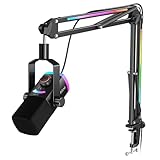
The AM8PROT sits at the top of the AmpliGame line: a dynamic XLR/USB microphone kit aimed at streamers who have outgrown entry-level gear and want their audio to stop being the weakest part of the broadcast. It suits established streamers, people running dual-PC or multi-input setups, and anyone whose room noise has already defeated a condenser. It is not the right first microphone for a casual user.
Key specs
- Capsule: dynamic, cardioid — high rejection of off-axis and room sound
- Connection: USB and XLR outputs
- Controls: onboard gain, mute and headphone monitoring on the USB side
- Mounting: desk-clamp boom arm with heavier hardware than mid-tier kits
- Reach class: roughly 65–80 cm horizontal
- Payload class: mid-to-high, typically around 1.2–1.8 kg
- Thread standards: 3/8″ and 5/8″ compatibility for third-party mounts
Strengths
The dynamic capsule is the core of the pitch. In a room with a mechanical keyboard, a case full of fans and a closed window, a dynamic microphone simply captures less unwanted sound than any condenser, and it does so without software. That matters for consistency: a dynamic setup sounds roughly the same at 2 p.m. and at 2 a.m., whereas a condenser’s noise floor shifts with the building’s ambient noise.
The dual output keeps the kit relevant. On USB, it works standalone with onboard gain and monitoring. On XLR, it becomes one input on a mixer or interface, which is where a serious setup eventually lands. Buying a microphone with both outputs means the upgrade to an interface is a cable change rather than a new purchase, and that is worth a meaningful premium over a USB-only mic.
Payload is where a premium kit earns its money. A dynamic microphone body plus a shock mount plus a pop filter can total well over 700 g, and that weight hangs at the end of a lever. When you extend the arm 70 cm horizontally, the torque on the clamp is significant. Heavier clamps, thicker tubing and better bushings keep that assembly from sagging or creeping through the day, and they also reduce the transmission of desk bumps into the recording.
Pros
- Dynamic capsule delivers strong rejection of keyboard, fan and room noise
- USB and XLR outputs on one microphone for a future interface upgrade
- Heavier arm hardware resists sag under a dynamic mic and accessories
- Onboard gain, mute and headphone monitoring for standalone USB use
- Standard threads accept shock mounts, boom arms and desk stands
Cons
- Premium price tier — the most expensive complete kits here
- Requires closer mic technique and more gain than a condenser
- Heavier assembly puts more load on the desk clamp and desk edge
- Overkill for voice chat and casual streaming
- Less bright out of the box; may need EQ to match condenser-style presence
How it compares
Against the AM8T, the AM8PROT is the step up in hardware and finish for people who stream seriously and want the arm and clamp to match the microphone. Against the AmpliTank K688CT, the difference is intent rather than quality: the AM8PROT is built around a gaming and streaming feature set, while the K688CT leans toward broadcast and podcast voice capture with a different tonal target. Pick the AM8PROT if your priority is a clean, consistent stream in a noisy room.
7. FIFINE AmpliTank K688CT Podcast Microphone Kit – Best for Podcast-Grade Dynamic Capture

The K688CT is the broadcast-leaning option: a USB/XLR dynamic vocal microphone kit aimed at podcasting, voiceover and commentary where the voice itself is the product. It suits podcasters, YouTube narrators, and streamers whose content is talk-heavy — commentary channels, interview streams, coaching and educational content. It is less suited to someone who wants RGB and tap-to-mute gimmicks.
Key specs
- Capsule: dynamic, cardioid, voiced for speech
- Connection: USB and XLR outputs
- Controls: onboard gain, mute and headphone monitoring
- Mounting: desk-clamp boom arm included in the kit
- Reach class: roughly 65–80 cm horizontal
- Payload class: mid-to-high, typically around 1.2–1.8 kg
- Thread standards: 3/8″ and 5/8″ adapters supplied
Strengths
A dynamic capsule voiced for speech is a different tool from a gaming condenser. It rolls off some of the extreme high end, which reduces sibilance — the harsh “sss” that becomes fatiguing over a two-hour podcast — and it holds a consistent tone across a small range of working distances. That consistency is what makes editing predictable: you can process a whole episode with one EQ curve instead of chasing variations take by take.
The USB/XLR combination gives the kit two lives. On USB it is a self-contained recording device with monitoring, suitable for a solo podcast recorded straight into editing software. On XLR it becomes a serious input for a multi-host setup on a mixer or interface, where each host needs their own channel. Because the microphone itself doesn’t change between those two modes, your voice stays consistent as the setup grows.
Weight and arm geometry matter more on a talk-heavy setup because the microphone rarely moves but is always extended. A boom arm that sags a centimetre per week will end up pointing at your chest within a month, and you will compensate by leaning in. Heavier clamps and stronger springs prevent that slow drift. If your arm does creep, the fix is usually mechanical: shorten the extension by 10–15 cm, tighten the clamp screw with a soft pad between the jaws and the desk to increase friction, and re-check the joint tension.
Cable routing deserves attention in a podcast kit because you may be running both USB and XLR cables, plus headphones. Route the USB and headphone cables together along the arm, keep the XLR run separate and balanced to the interface, and leave slack at every pivot. A taut cable at a joint will eventually fail at the connector, and that failure usually happens mid-recording.
Pros
- Speech-voiced dynamic capsule reduces sibilance and room pickup
- USB and XLR outputs support solo recording and multi-host setups
- Onboard gain, mute and headphone monitoring for standalone use
- Arm hardware rated for a heavier dynamic microphone and accessories
- Consistent tone across takes, which simplifies editing and processing
Cons
- Premium price tier among the most expensive kits listed
- Needs close placement and sufficient gain for best results
- Broadcast voicing is less bright for gaming commentary that wants presence
- Heavier assembly demands a solid desk edge and a firm clamp
- Fewer gaming-oriented features such as RGB or tap-to-mute
How it compares
Against the AM8PROT, the K688CT is the more recording-focused choice with a broadcast-style tonal target, while the AM8PROT leans toward streaming features and a livelier top end. Against the AM8T, the K688CT is a step up in build and voicing for talk content. If your output is a podcast or narration, this is the one; if it’s live gameplay, the AM8PROT fits better.
8. TONOR RGB Gaming Microphone Arm Set – Best for RGB Desk Aesthetics

This kit is aimed squarely at the desk as a visual object. It pairs an RGB condenser microphone with a boom arm, adds a quick-mute function and adjustable RGB brightness, and includes a pop filter. It suits streamers whose setup is part of the content — the ones whose viewers comment on the desk — and who want lighting they can dim without abandoning the aesthetic.
Key specs
- Capsule: condenser, cardioid
- Connection: USB
- Lighting: RGB with adjustable brightness
- Controls: quick mute on the body
- Included: boom arm, pop filter, mount, cable
- Reach class: roughly 60–75 cm horizontal
- Payload class: mid-tier, typically around 0.9–1.3 kg
Strengths
Adjustable RGB brightness is a smarter feature than it first appears. Microphone lighting that only has “on” competes with your face on camera, blows out the exposure on a webcam, and reflects off a glossy monitor. Being able to dim the same lighting to a low glow means it still reads on stream without becoming the brightest thing in frame. If you run a webcam, set your key light first, then dial the microphone’s brightness down until it stops clipping highlights on your face.
The pop filter inclusion is worth noting because it addresses the most common vocal defect in budget condenser recordings: plosives. Hard “P” and “B” sounds produce a burst of air that the capsule reads as a low-frequency thump. A pop filter placed 5–8 cm in front of the capsule breaks that air burst without colouring the voice much. Positioning matters more than the filter itself — a filter pressed against the grille does far less than one with a few centimetres of air gap.
Quick mute keeps the workflow simple, and the mid-tier arm hardware keeps repositioning reasonably quiet. As with every condenser kit here, the acoustic weak point is the room. If you can add a rug, close a door, or angle the microphone so its null points toward the noisiest part of the room, you will hear the improvement immediately.
Cable routing for an RGB kit involves one extra consideration: keep the USB cable away from the monitor’s power cable and any LED strip power supply. Switching power supplies can introduce a faint buzz into USB audio, and it is far easier to separate the runs during installation than to diagnose the hum later.
Pros
- Adjustable RGB brightness works on camera without blowing out exposure
- Quick mute on the body for fast silencing
- Pop filter included, addressing the most common condenser defect
- Mid-tier arm hardware with reasonable payload capacity
- Complete kit with mount and cable
Cons
- Condenser capsule remains sensitive to keyboard and room noise
- USB only, with no XLR upgrade path
- Lighting adds a cable and a configuration step
- RGB is a cost you pay for even if you turn it off
- Mid-range pricing overlaps with stronger microphone options
How it compares
Against the FIFINE A6T, the TONOR RGB set competes on lighting flexibility — adjustable brightness versus fixed effects — while the A6T offers a more established control layout and monitoring. Against the MAONO DGM20S, this is the aesthetics-first choice and the DGM20S is the noise-first choice. If your viewers see your desk more than they hear your room, the TONOR set earns its place; if the reverse, spend the money on a dynamic.
9. InnoGear USB Gaming Microphone for PC Boom Arm Condenser Mic Set – Best for Compact Beginner Bundles

This is InnoGear’s fuller beginner bundle: a black USB condenser microphone set with a boom arm, aimed at buyers who want everything in one box at the lowest possible cost. It suits compact desks, secondary setups, and buyers who want a black kit that matches an existing dark theme. It is a starting point, not a destination.
Key specs
- Capsule: condenser, cardioid
- Connection: USB, driver-free
- Mounting: desk-clamp boom arm included
- Finish: black, compact footprint
- Reach class: roughly 55–70 cm horizontal
- Payload class: budget, typically around 0.5–0.9 kg
- Thread standards: 3/8″ with a 5/8″ adapter typically supplied
Strengths
The advantage of a compact bundle is fit. On a narrow desk — 55 to 60 cm deep, with a monitor on a stand and a keyboard in front — a long arm has nowhere to go. It either folds back against the wall or reaches over the monitor, both of which look worse than a shorter arm tucked to the side. This kit’s shorter reach is a feature in that specific geometry, not a limitation.
Setup complexity is minimal: clamp, thread, plug in, select the input. For a buyer who has never mounted a microphone before, that low barrier matters more than any specification. The black finish keeps the hardware visually quiet against a dark desk, and the standard threads mean the microphone can be swapped later onto a better arm, or the arm reused with a different microphone.
The realistic upgrade path for this kit is the arm, not the microphone. If you later buy a dynamic microphone, the budget arm’s payload rating will likely be the limiting factor, so plan for a mid-tier or premium arm at that point. Until then, the practical improvements available to you are free: move the microphone closer (15–20 cm), lower the gain until your normal voice peaks around −12 dBFS, and put a soft pad under the clamp to reduce vibration transfer.
For cable routing, follow the same discipline as any USB kit: clips along the underside of the arm, a service loop at the pivot, and a clean drop behind the desk edge. Avoid coiling excess cable around the arm itself, which adds weight at the worst place and looks untidy.
Pros
- Compact reach suits narrow and shallow desks
- Black finish keeps the hardware visually quiet
- Complete bundle with arm, mount and cable
- Standard threads allow later microphone or arm swaps
- Lowest-cost way to get a microphone off the desk
Cons
- Budget payload rating limits heavier dynamic microphones
- Condenser capsule picks up keyboard and room noise
- Few onboard controls compared with mid-range kits
- Arm joints are more prone to movement noise
- Short included cable may require careful routing
How it compares
Against the other InnoGear bundle here, this is the more complete set with a fuller accessory package, while the simpler version is the cheaper route. Against the TONOR budget set, the InnoGear bundles compete on price and compactness; the TONOR kit generally offers the more established microphone and arm combination. If your desk is narrow, the InnoGear’s shorter reach is a genuine advantage rather than a compromise.
10. FIFINE T669 Studio Condenser USB Microphone for Recording Podcasting – Best for Recording-First Condenser Kits

The T669 is the long-running studio condenser in this group, sold as a USB microphone kit for recording and podcasting. It suits buyers who record edited content — YouTube videos, voiceover, podcast episodes — rather than streaming live, and who want a condenser’s detail with a kit that includes the mounting hardware. It is a familiar, well-established option rather than a new release.
Key specs
- Capsule: condenser, cardioid
- Connection: USB
- Controls: gain and mute on the body, headphone monitoring jack
- Mounting: boom arm included in kit configurations, with shock mount
- Reach class: roughly 60–75 cm horizontal
- Payload class: mid-tier, typically around 0.9–1.3 kg
- Included: shock mount, pop filter and cable in the full kit
Strengths
The shock mount is the underrated component here. It suspends the microphone in elastic rather than clamping it rigidly to the arm, which decouples the capsule from structural vibration. On a desk where you type, rest your hands, or bump the edge with a chair, a shock-mounted microphone is audibly quieter than a hard-mounted one. If you buy any kit with a shock mount, use it — the alternative is not worth the convenience.
As a recording microphone, a condenser’s detail is an asset rather than a liability, provided your room is treated or at least quiet. Detail means the capsule captures subtlety in the voice, which rewards good technique and good editing. For a podcast recorded in a carpeted room with soft furnishings, this is the right tool. For a live stream in a hard-floored room next to a running PC, it is the wrong one.
Gain staging on a USB condenser is simpler than on a dynamic. Set the body gain so that normal speech peaks around −12 dBFS with occasional peaks no higher than −6 dBFS. Below that, you are wasting headroom; above it, you risk clipping on laughs and shouts. In Windows, keep the input level at or near maximum and control level with the body gain, so the analog stage stays clean and you aren’t amplifying a weak signal digitally.
Because this is an established model, replacement parts and accessory compatibility are straightforward — the thread sizes are standard and third-party shock mounts and pop filters fit. That longevity is worth something for a kit you plan to keep.
Pros
- Shock mount decouples the capsule from desk vibration
- Condenser detail suits edited recording and voiceover
- Gain and mute controls plus headphone monitoring on the body
- Established model with predictable accessory compatibility
- Full kits include shock mount, pop filter and cable
Cons
- Condenser sensitivity is a liability in an untreated room
- USB only — no XLR output for an interface upgrade
- Less suited to noisy live streaming than a dynamic
- Mid-range pricing sits close to dynamic alternatives
- Requires more careful placement than a dynamic capsule
How it compares
Against the FIFINE A6T, the T669 is the recording-oriented sibling: it prioritises capsule detail and a shock mount over RGB and tap-to-mute, which makes it the better pick for edited content and the worse pick for live streaming in a noisy room. Against the TONOR RGB set, the T669 gives up lighting and gains a shock mount — for audio quality, the shock mount is the more valuable inclusion.
11. FIFINE BM88 Low Profile Boom Arm – Best for Clean Desk Arm Upgrades

The BM88 is the arm to buy when the arm itself is the problem. It is a low-profile boom arm for gaming and streaming that mounts at the desk edge and holds a low folded profile, which keeps it out of the camera frame and out of the space between you and your monitor. It suits anyone who already owns a microphone and has found that their desk still looks cluttered, or that their arm sags under a heavy mic.