A detachable tablet is two devices in one bag. The best Windows detachable tablets for portable office setups work as a slim touchscreen tablet for reading, annotating, and presenting, then attach a keyboard in seconds to become a full laptop for typing and spreadsheets. Because they run full Windows 11, they use the same desktop apps as an office PC, with no need to learn a mobile workflow.
That flexibility suits a portable office better than a fixed laptop. On a train, the keyboard stays in the bag and the tablet handles email and notes. At a client site, the kickstand props the screen up for a presentation. Back at a desk, the keyboard attaches and a USB-C hub adds a monitor. The detachable design also keeps the screen light in the hand.
This guide covers three Windows detachable tablets that suit a portable office. Each one runs Windows 11, includes or supports a detachable keyboard, and uses a kickstand or magnetic cover to stand on its own.
What to Look For
Detachable keyboard: Check whether a keyboard is included, how it attaches, and whether it includes a trackpad and backlighting. A magnetic keyboard that folds flat for travel is easier to pack, and a built-in trackpad removes the need for a mouse.
Kickstand and hinge: A built-in kickstand that adjusts to many angles is the most flexible option for a tablet, because it works with or without the keyboard.
Processor and memory: For office work, 16GB of memory and a modern multi-core processor keep Word, Excel, a browser, and a video call running together. Snapdragon X processors provide efficient battery life and an NPU for AI features, while Intel processors support broad compatibility with older Windows software. High-performance Ryzen models suit heavier multitasking and creative apps.
Screen size and resolution: A 12-inch or 13-inch screen gives room for side-by-side documents, while a 13.4-inch 2.5K display adds sharpness for text and images. A higher refresh rate, such as 180 Hz, makes scrolling feel smoother, though it uses more battery.
Storage: 512GB of SSD storage leaves room for Office, local files, and offline documents, while 1TB suits users who keep large media or project files on the device.
Battery life and ports: Long battery life matters when outlets are scarce, and USB-C ports handle charging, displays, and hubs. Two USB-C ports give more flexibility than one.
The Best Windows Detachable Tablets for Portable Office Setups
Microsoft Surface Pro 12-Inch 2-in-1 Laptop and Tablet, Snapdragon X Plus

- Amazon: https://www.amazon.com/dp/B0DZ5DBD83
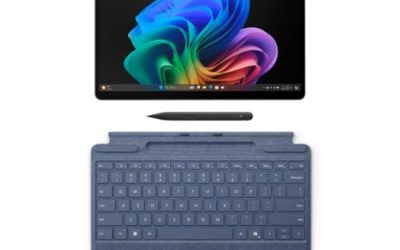
The Microsoft Surface Pro 12-inch is a 2-in-1 device that adapts between tablet and laptop modes. It runs Windows 11 as a Copilot+ PC, powered by a Snapdragon X Plus processor with 8 cores, 16GB of RAM, and 512GB of storage, with a 12-inch touchscreen display. The built-in kickstand props the screen up for work or video calls, and attaching a Surface Pro Keyboard, sold separately, turns it into a full laptop.
The Snapdragon X Plus processor includes an NPU that delivers up to 45 trillion operations per second for Copilot+ PC features, and the tablet is designed for long battery life during everyday productivity. Its 12-inch size is lighter and easier to carry than a 13-inch tablet. The touchscreen supports pen input, with the Surface Slim Pen sold separately.
This tablet suits a portable office worker who wants a compact Surface with strong battery life and a clean, light design. The 12-inch screen fits easily in a bag, and the kickstand works on any flat surface. One consideration is that the keyboard and pen are sold separately, so the total cost of a complete setup is higher than the tablet listing alone suggests.
Microsoft Surface Go 4 Tablet, 10.5-Inch, Windows 11 Pro

- Amazon: https://www.amazon.com/dp/B0CTB6SWBM
The Microsoft Surface Go 4 is a compact 10.5-inch Windows tablet with a Full HD touchscreen, an Intel Processor N200, 8GB of RAM, and 128GB of storage, running Windows 11 Pro in a Platinum finish. It weighs 521 grams without accessories, making it the lightest tablet in this guide, and its built-in kickstand and USB-C charging suit travel and shared workspaces.
The Go 4 works with a detachable Type Cover keyboard, sold separately, which attaches magnetically and includes a trackpad for laptop-style typing. It also supports Surface Pen input, with the pen sold separately. Windows 11 Pro adds business features such as device management and security controls, and the tablet supports up to 12.5 hours of battery life according to Microsoft.
This tablet suits a worker who prioritizes light weight and a small footprint over a large screen. It works well for email, documents, note-taking, and video calls on the move, with cloud storage handling larger files. One consideration is that 8GB of memory and 128GB of storage limit how many large apps and files it can hold at once, and the keyboard and pen add to the total cost because they are sold separately.
ASUS ROG Flow Z13 2.5K 180Hz Touchscreen 2-in-1 Gaming Notebook

- Amazon: https://www.amazon.com/dp/B0DT7MNLTD
The ASUS ROG Flow Z13 is a 13.4-inch detachable 2-in-1 with a 2.5K 180Hz ROG Nebula touchscreen, an AMD Ryzen AI MAX+ 395 processor, 32GB of RAM, and a 1TB SSD, running Windows 11. Its detachable keyboard turns the tablet into a laptop for typing, while the built-in kickstand holds the screen up for work, video, or presentations. The touchscreen supports touch input for navigation and annotation.
The Ryzen AI MAX+ 395 processor includes Radeon 8060S graphics and a 50 TOPS NPU, giving this tablet far more processing and graphics headroom than a typical office tablet. That makes it suitable for a portable office that also handles photo editing, video work, or gaming after hours.
This tablet suits a worker who wants one powerful device for office work and demanding apps, rather than a light tablet plus a separate desktop. The large memory and storage leave room for big projects. One consideration is that it is heavier and more power-hungry than the Surface models in this guide, so buyers who prioritize the lightest bag should weigh that against its performance.
Comparison
| Product | Screen | Processor | Memory and Storage | Keyboard | Best For |
|---|---|---|---|---|---|
| Surface Pro 12 | 12-inch touchscreen | Snapdragon X Plus, 8-core | 16GB, 512GB | Detachable, sold separately | Compact Surface, long battery |
| Surface Go 4 | 10.5-inch Full HD touchscreen | Intel Processor N200 | 8GB, 128GB | Type Cover, sold separately | Lightest travel tablet |
| ASUS ROG Flow Z13 | 13.4-inch 2.5K 180Hz touchscreen | Ryzen AI MAX+ 395 | 32GB, 1TB SSD | Detachable, included | Most powerful detachable |
FAQ
What is a detachable tablet?
A detachable tablet is a tablet with a keyboard that removes completely, leaving a slim touchscreen device. Unlike a convertible laptop, where the keyboard folds back but stays attached, a detachable tablet can be carried and used without the keyboard at all.
Do detachable tablets run full Windows software?
Yes. The models in this guide run full Windows 11, so they install and run desktop versions of Microsoft Office, browsers, PDF tools, and business apps. That makes them suitable as a primary portable office device rather than a companion device.
Is the keyboard always included?
No. Some listings include the keyboard in the box, while others are tablet-only and need a compatible keyboard bought separately. Check the listing title and included components before buying, and confirm that the keyboard is compatible with the specific tablet model.
Conclusion
A Windows detachable tablet earns its place in a portable office by changing shape to match the task. The Surface Pro 12 is the compact all-rounder with long battery life, the Surface Go 4 is the lightest choice for travel, and the ASUS ROG Flow Z13 brings desktop-class power to a detachable form. Check what the listing includes and match the screen and memory to your workload.
Disclosure: As an Amazon Associate, we earn from qualifying purchases.