

- Top Pick: ASUS TUF Gaming BE6500 WiFi 7 Router – Dual-Band, Up to 6.5 Gbps Wireless, Game Accelerator, Multi-Link Operation (MLO), (x4) 2.5GbE Ports, Mesh + VPN Compatible, & Subscription-Free Network Security
- Best Value: TP-Link BE6500 Dual-Band WiFi 7 Router (BE400)
- Premium Choice: ASUS ROG Strix GS-BE12000 WiFi 7 Gaming Router – Tri-Band, 12Gbps, Mesh
🛒 Best Price Today on Amazon
Prime members get fast, free shipping on everything above, plus member-only deals. New members get a 30-day free trial — cancel anytime.
- Top Wifi Gaming Routers Picks for 2026
- Best WiFi 7 Gaming Routers at a Glance
- 1. ASUS RT-BE90U Tri-Band WiFi 7 Router with AiMesh and Network Security
- 2. TP-Link Archer BE400 Dual-Band WiFi 7 Router (BE6500)
- 3. TP-Link Archer BE12000 Tri-Band WiFi 7 Router with 6GHz
- 4. NETGEAR Nighthawk RS140 Dual-Band WiFi 7 Router (BE5000)
- 5. NETGEAR Nighthawk WiFi 7 Router (BE9300) with 2.5G WAN
- 6. Amazon eero 7 Dual-Band Mesh WiFi 7 (single node — note: this is a mesh system)
- How to Choose a WiFi 7 Gaming Router
- Related Guides
- Frequently Asked Questions
- Related Guides
- Related Articles
- Related Guides
Top Wifi Gaming Routers Picks for 2026
Here are our current top wifi gaming routers picks, compared on real Amazon owner reviews, price, and features. Live prices update below.
As an Amazon Associate we earn from qualifying purchases at no extra cost to you.






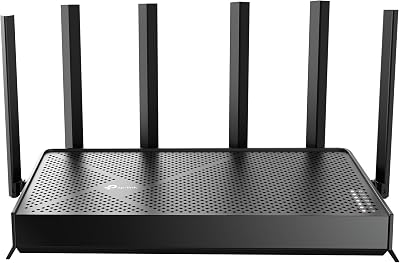


WiFi 7 is the next-generation wireless standard, formally known as IEEE 802.11be, and on paper it is a serious leap: 320MHz channel widths (double WiFi 6E’s 160MHz), Multi-Link Operation (MLO) that lets a single device use the 5GHz and 6GHz bands at the same time, and 4K-QAM modulation that packs more data into every transmission. For gamers, the headline benefit is not a magical FPS boost — no router makes a game render faster — but reduced jitter, more stable packet delivery under household load, and breathing room as more WiFi 7 client devices arrive on phones, laptops and handhelds. This guide rounds up the best WiFi 7 gaming routers in 2026, with prices ranging from around $130 to around $350, so you can pick the right step into the new standard for your home and your budget.
A few honesty notes up front, because WiFi 7 marketing is loud. The full benefits of the standard only appear when both ends of the link support it — if your laptop, phone or console is still WiFi 6 or 6E, the router will happily talk to it, but at the older device’s speeds and feature set. Tri-band models (2.4GHz + 5GHz + 6GHz) are what you want if 6GHz coverage and MLO matter to you; dual-band BE models, like the TP-Link BE6500 and one of the Nighthawks here, skip the 6GHz radio and behave more like a refined WiFi 6 router with WiFi 7 features. And the BE number on the box — BE5000, BE9300, BE19000 — is the theoretical combined throughput across all bands, not the speed any single device will see. Below is an at-a-glance comparison of all six picks, then a closer look at each, an honest ‘How to Choose’ walkthrough, and a frequently-asked-questions section focused on whether you should jump to WiFi 7 today or wait.
Best WiFi 7 Gaming Routers at a Glance
| Router | Best For | Standout Spec | Approx Price |
|---|---|---|---|
| ASUS RT-BE90U Tri-Band WiFi 7 | Premium tri-band with security suite | Tri-band BE, AiMesh, commercial-grade security | around $240 |
| TP-Link Archer BE400 (BE6500) | Dual-band entry into WiFi 7 | Dual-band BE6500, 2x 2.5G ports, USB 3.0 | around $130 |
| TP-Link Archer BE12000 Tri-Band | Mainstream tri-band sweet spot | Tri-band BE12000, full 6GHz support | around $250 |
| NETGEAR Nighthawk RS140 (BE5000) | Budget WiFi 7 entry | Dual-band BE5000, simple setup | around $180 |
| NETGEAR Nighthawk BE9300 | Tri-band performance on a budget | Tri-band BE9300, 2.5G WAN | around $230 |
| Amazon eero 7 (mesh, not router) | Whole-home WiFi 7 simplicity | Dual-band mesh node, eero app | around $350 |
1. ASUS RT-BE90U Tri-Band WiFi 7 Router with AiMesh and Network Security

11


As an Amazon Associate we earn from qualifying purchases. Product prices and availability are accurate as of the date/time indicated.
The ASUS RT-BE90U is the premium pick of this WiFi 7 lineup, built for the household that wants a serious tri-band gaming router with a full security stack baked in. It runs all three bands — 2.4GHz, 5GHz and the new 6GHz band — supports AiMesh so you can extend coverage by adding compatible ASUS nodes later, and ships with commercial-grade network security to keep an eye on connected devices. At around $240 it sits at the upper end of mainstream tri-band WiFi 7 pricing.
Tri-band is the key feature for futureproofing here: the 6GHz radio is what gives WiFi 7 most of its real-world headroom for nearby high-speed clients, and it is also where Multi-Link Operation can pair the 5GHz and 6GHz connections for more stable throughput on a supported client. Layered on top, ASUS’s gaming tooling — QoS profiles that prioritise gaming traffic, latency controls, and AiMesh for whole-home expansion — makes this the natural pick if you want a single high-end router that can grow with your home. Just remember the usual honest caveat: your client devices need WiFi 7 to see the full benefit; older laptops and phones will still work but fall back to their native WiFi 6 or 6E speeds.
Pros: Full tri-band WiFi 7 with 6GHz radio, AiMesh-extendable, commercial-grade security, strong gaming QoS.
Cons: Premium price; full benefits require WiFi 7 client devices.
2. TP-Link Archer BE400 Dual-Band WiFi 7 Router (BE6500)
35
Prime
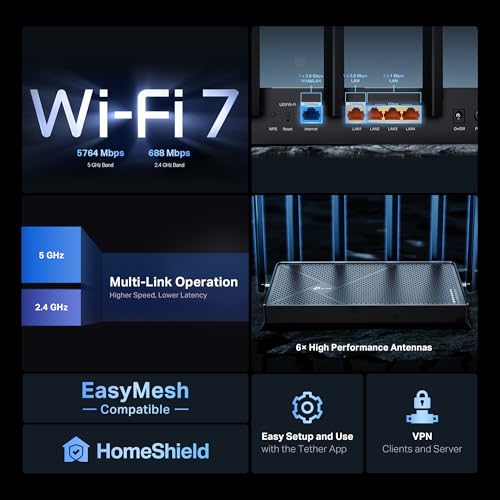
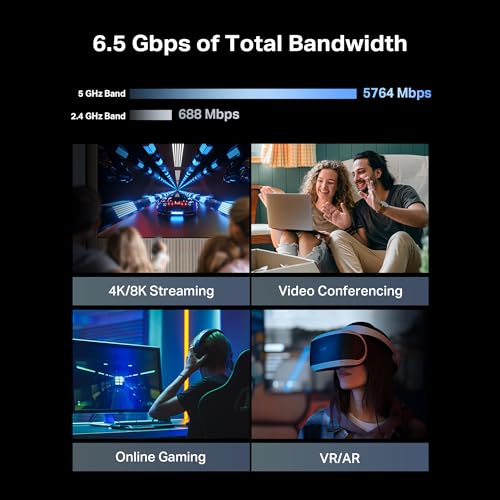
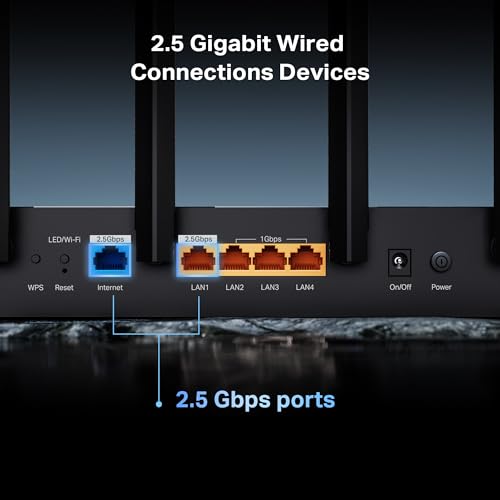
TP-Link BE6500 Dual-Band WiFi 7 Router (BE400) – Dual 2.5Gbps Ports, USB 3.0, Covers up to 2,400 sq. ft., 90 Devices, Quad-Core CPU, HomeShield, Private IoT, Free Expert Support
In Stock





As an Amazon Associate we earn from qualifying purchases. Product prices and availability are accurate as of the date/time indicated.
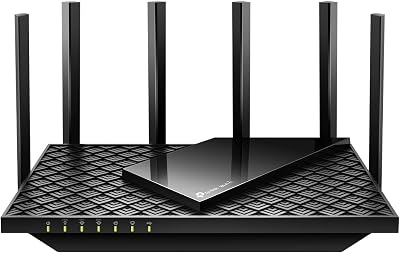
The TP-Link Archer BE400 is the entry-level WiFi 7 pick, perfect for the household that wants to step into the new standard without paying flagship money. It is a dual-band BE6500 model — meaning it supports WiFi 7 features on the 2.4GHz and 5GHz bands but does not include a 6GHz radio — and adds two 2.5Gbps Ethernet ports and a USB 3.0 port for storage sharing. At around $130 it is by far the most affordable WiFi 7 router in this guide.
Be honest about what dual-band BE buys you: most of WiFi 7’s gains are concentrated on the 6GHz band, so a dual-band BE6500 like this is best thought of as a refined WiFi 6 router that picks up some WiFi 7 efficiencies (better modulation, OFDMA, and improved handling of dense client loads) rather than a true next-generation tri-band setup. That is genuinely useful in a busy household — and the two 2.5G ports are great for a wired gaming PC and a NAS — but if 6GHz speeds and MLO are the reason you are buying into WiFi 7, step up to a tri-band model. As a low-cost upgrade from an aging WiFi 5 or basic WiFi 6 box, however, the BE400 is hard to beat.
Pros: Cheapest WiFi 7 router here, dual 2.5G ports, USB 3.0, solid WiFi 7 efficiencies on 2.4/5GHz.
Cons: Dual-band only — no 6GHz radio, so the headline WiFi 7 gains are limited.
3. TP-Link Archer BE12000 Tri-Band WiFi 7 Router with 6GHz

11
TP-Link Archer BE12000 | Tri-Band Wi-Fi 7 Router | Includes Latest 6GHz Wi-Fi Band | New Wi-Fi 7 Features | 10G Connectivity | Compatible with Alexa and Google Assistant (Archer BE670)
In Stock




As an Amazon Associate we earn from qualifying purchases. Product prices and availability are accurate as of the date/time indicated.
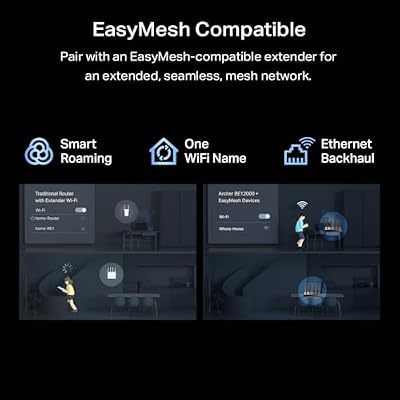
The TP-Link Archer BE12000 hits the mainstream tri-band sweet spot. It runs the full WiFi 7 stack across 2.4GHz, 5GHz and 6GHz, advertised as a BE12000 kit (the theoretical combined throughput across all bands), and is built for the household that wants a real tri-band WiFi 7 router without paying for a commercial-grade flagship. At around $250 it lands close to the BE90U but from a more value-focused vendor.
What makes the BE12000 the mainstream pick is that it does the thing most buyers actually care about — adding the 6GHz radio — at a sensible price. That is the band where new WiFi 7 phones, laptops and handhelds will see high-speed, low-jitter links over short distances, and where MLO can combine the 5GHz and 6GHz connections for more stable performance. Tri-band also helps under load: the router can keep older WiFi 5 and 6 clients on the legacy bands while newer devices use 6GHz, reducing congestion. As a single tri-band router for a gaming household that wants to grow into WiFi 7 over the next few years, this is a strong, balanced pick.
Pros: Full tri-band BE12000 with 6GHz, MLO support, sensible mainstream pricing for a real WiFi 7 setup.
Cons: Real-world gains still depend on having WiFi 7 client devices.
4. NETGEAR Nighthawk RS140 Dual-Band WiFi 7 Router (BE5000)
33
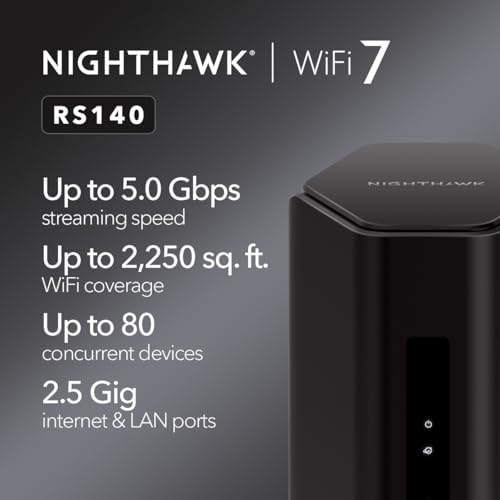
NETGEAR Nighthawk Dual-Band WiFi 7 Router (RS140) – Router Only, BE5000 Wireless Speed (up to 5.0 Gbps) – Covers up to 2,250 sq. ft., 80 Devices – 2.5 Gig Internet Port – Free Expert Help
In Stock







As an Amazon Associate we earn from qualifying purchases. Product prices and availability are accurate as of the date/time indicated.
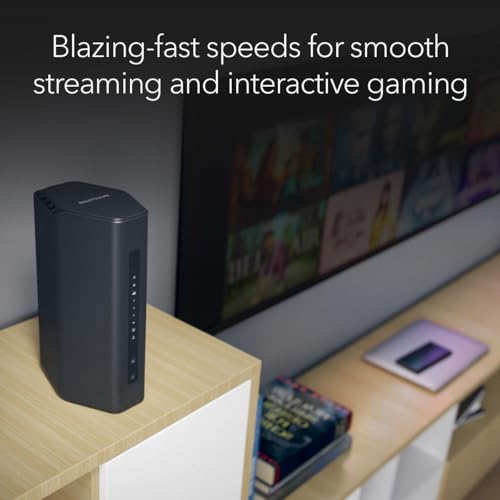
The NETGEAR Nighthawk RS140 is the budget WiFi 7 pick from a recognised name. It is a dual-band BE5000 model — like the TP-Link BE400, that means WiFi 7 features on 2.4GHz and 5GHz with no 6GHz radio — wrapped in the familiar Nighthawk styling and Nighthawk app for setup. At around $180 it sits between the cheapest entry models and the tri-band performance class.
The RS140 is the right pick if you already trust the NETGEAR ecosystem and want a dependable, easy-to-set-up dual-band step into WiFi 7. The dual-band configuration means the same honest caveat as the BE400 applies — most of WiFi 7’s headline 6GHz advantages are simply not available on this router — but if your gaming and streaming demands are mostly served by good performance on the 5GHz band and tidier handling of many devices, this is a sensible upgrade. For households on the edge of jumping to WiFi 7 but not ready for tri-band money, it does the job at a reasonable price.
Pros: Established NETGEAR brand, easy Nighthawk app setup, dual-band WiFi 7 efficiencies under load.
Cons: No 6GHz radio; honest WiFi 7 benefits are limited like all dual-band BE models.
5. NETGEAR Nighthawk WiFi 7 Router (BE9300) with 2.5G WAN

16
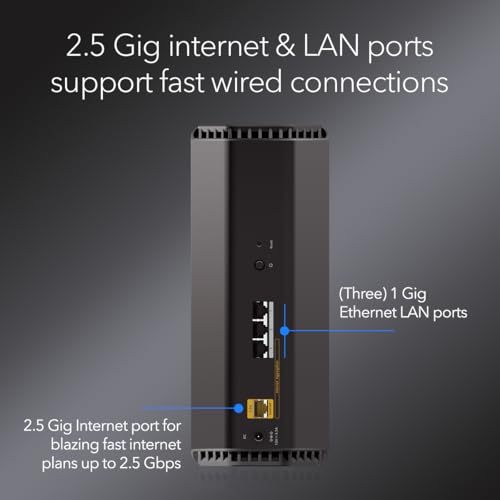
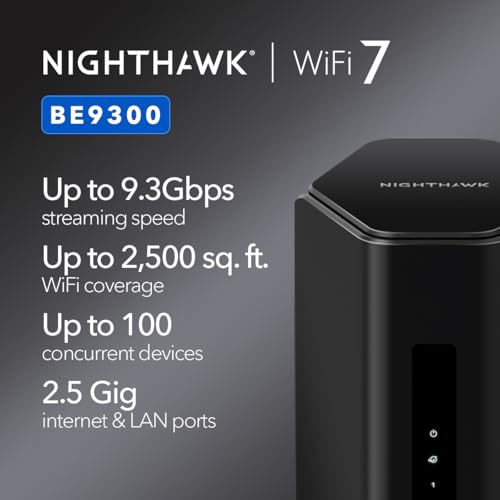
NETGEAR Nighthawk WiFi 7 Router (BE9300) – Router Only, 9.3Gbps Wireless Speed, 2.5 Gigabit Internet Port, Tri-Band for Gaming, Covers 2,500 sq. ft., 100 Devices, VPN – Free Expert Help
In Stock



As an Amazon Associate we earn from qualifying purchases. Product prices and availability are accurate as of the date/time indicated.
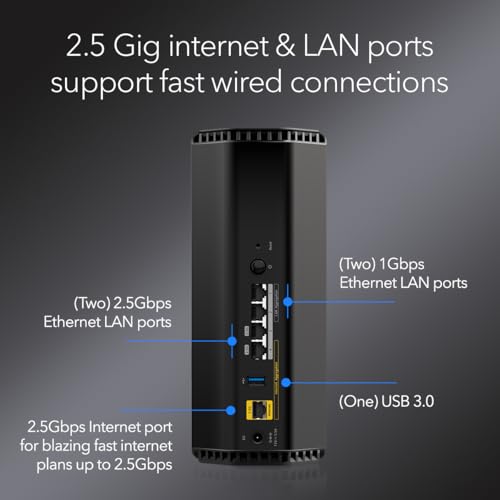
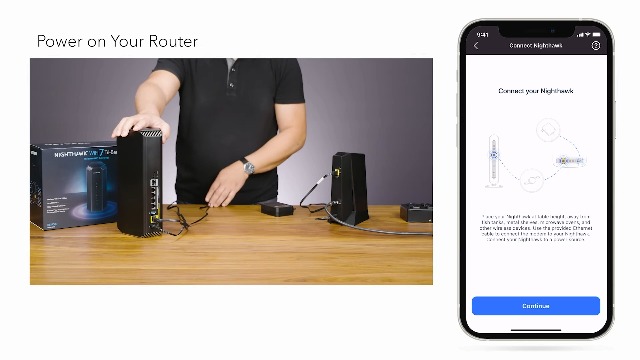
The NETGEAR Nighthawk BE9300 is the tri-band performance pick that does not break the bank. It runs the full 2.4 / 5 / 6GHz radio set advertised as a BE9300 router with up to 9.3Gbps of theoretical combined throughput, adds a 2.5Gigabit WAN port for multi-gig internet plans, and keeps the familiar Nighthawk styling and app workflow. At around $230 it is genuinely competitive against the ASUS and TP-Link tri-band models above.
This is the pick for the gamer who wants real tri-band WiFi 7 from a known NETGEAR pedigree without paying flagship money. The 6GHz radio unlocks the high-speed, low-jitter links WiFi 7 clients can take advantage of, MLO can combine bands for steadier connections on supported devices, and the 2.5G WAN port means the router will not be the bottleneck if you have or upgrade to a faster internet plan. As a no-fuss, branded tri-band WiFi 7 router with honest performance for the price, the BE9300 is one of the strongest all-rounders in this lineup.
Pros: Real tri-band BE9300 with 6GHz, 2.5G WAN port, MLO support, trusted Nighthawk experience.
Cons: Still requires WiFi 7 client hardware to fully exploit the new standard.
6. Amazon eero 7 Dual-Band Mesh WiFi 7 (single node — note: this is a mesh system)

6
Amazon eero 7 dual-band mesh Wi-Fi 7 router (newest model) – Supports internet plans up to 2.5 Gbps, Coverage up to 6,000 sq. ft., 3-pack
In Stock




As an Amazon Associate we earn from qualifying purchases. Product prices and availability are accurate as of the date/time indicated.
A genuine honesty note: the Amazon eero 7 listed here is, strictly speaking, a mesh WiFi 7 system rather than a traditional single gaming router. It is designed to be deployed either alone or as one of several nodes spread around a home, managed entirely through the eero app, and tuned for whole-home coverage and simplicity rather than enthusiast-grade gaming tooling. We have included it because it is a popular WiFi 7 purchase, but it deserves a different framing than the routers above. At around $350 it is the most expensive option in this guide.
If your household priorities are coverage, ease of setup and a clean app experience rather than gaming-specific QoS dashboards, the eero 7 is genuinely attractive. It is dual-band (no dedicated 6GHz radio on this version), supports internet plans up to the gigabit-class speeds typical WiFi 7 marketing targets, and integrates tidily with the broader Amazon ecosystem. For a gamer specifically, however, a tri-band router like the BE90U, BE12000 or BE9300 above will offer more granular control, better wired gaming connectivity, and the 6GHz radio that WiFi 7 phones and laptops can take advantage of. Pick the eero if simplicity and coverage matter more to you than tweakability — and consider it for a ‘mesh’ guide rather than a single-router setup.
Pros: Effortless app setup, strong whole-home coverage focus, WiFi 7 support, plays well with the Amazon ecosystem.
Cons: It is a mesh node, not a single gaming router; dual-band only and pricier than tri-band alternatives here.
How to Choose a WiFi 7 Gaming Router
Start by being honest about what WiFi 7 actually delivers, because the marketing can run ahead of the reality. A WiFi 7 router cannot make a game render faster, give you better ping to a game server, or fix problems caused by your ISP — those are CPU, GPU, internet-plan and server-side concerns. What it can do is reduce jitter and packet loss in your home, especially when many devices are active, and prepare your network for the wave of WiFi 7 phones, laptops and handhelds arriving over the next few years. That is genuinely valuable, but only if you understand it as a network-quality upgrade, not a frame-rate one.
Next, choose between dual-band and tri-band — the most important decision in this category. Tri-band models like the ASUS RT-BE90U, TP-Link Archer BE12000 and NETGEAR Nighthawk BE9300 include the 6GHz radio that gives WiFi 7 most of its real-world headline gains, and they support Multi-Link Operation across 5GHz and 6GHz on capable clients. Dual-band BE models like the TP-Link BE400 and Nighthawk RS140 omit the 6GHz radio and behave more like a refined WiFi 6 router with some WiFi 7 efficiencies; they are great value, but if 6GHz access is your reason for upgrading, step up to tri-band.
Decode the BE number on the box honestly. BE5000, BE9300, BE12000, BE19000 and similar are theoretical combined throughput across all bands, not the speed any single device will see — a BE12000 router will not give your laptop a 12Gbps link. What matters more is the per-band capability, the wired ports (a 2.5G or 10G WAN/LAN is genuinely useful if your internet plan or NAS is gigabit-plus), and how the router handles many concurrent clients. Tri-band, 2.5G ports, and OFDMA / MLO support are the specs that translate into smoother gaming under load, not the raw BE number.
Finally, weigh your client devices and your budget. If your gaming PC, laptop, phone and console are still WiFi 6 or 6E, a WiFi 7 router will still work — they fall back gracefully — but you will not see WiFi 7 speeds until you also upgrade those clients. For most households, a tri-band model in the $200–$250 range like the BE90U, BE12000 or BE9300 is the sweet spot of future-readiness and price; a dual-band BE400 or RS140 is the right pick if you mainly want efficient handling of many devices and are happy waiting on the 6GHz transition; and the eero 7 is the choice if whole-home simplicity matters more than gaming-grade tooling. Match your router to your clients, your house size, and your appetite for fiddling, and the upgrade pays off.
Frequently Asked Questions
Will a WiFi 7 router make my games faster?
No — and beware of any vendor that suggests it will. A router cannot make a game render faster or shorten your ping to a game server. What a quality WiFi 7 router can do is reduce jitter and packet loss under household load, deliver more stable connections to nearby devices, and prepare your network for the wave of WiFi 7 clients coming over the next few years. Think of it as a network-quality upgrade, not a frame-rate or ping upgrade.
Do I need a WiFi 7 device to benefit from a WiFi 7 router?
To see the full benefits, yes. A WiFi 7 router will happily talk to your existing WiFi 6, 6E and even older clients, but at those devices’ native speeds and feature sets. The headline 320MHz channels, MLO and 6GHz performance only show up when both ends of the link support WiFi 7. Many buyers still upgrade now to futureproof the network, which is a reasonable decision as long as you know what you are buying.
Tri-band or dual-band — which WiFi 7 router should I get?
Tri-band if the 6GHz band and MLO matter to you, which is usually the case if you are buying into WiFi 7 specifically. Models like the ASUS RT-BE90U, TP-Link Archer BE12000 and NETGEAR Nighthawk BE9300 include the 6GHz radio. Dual-band BE models like the TP-Link BE400 and NETGEAR RS140 skip the 6GHz band and behave more like polished WiFi 6 routers with WiFi 7 efficiencies — still useful, but not the full WiFi 7 picture.
Is the Amazon eero 7 a gaming router?
Not really, in the enthusiast sense. The eero 7 is a mesh WiFi 7 system tuned for whole-home coverage, simple app-driven setup and broad family use, rather than for granular gaming QoS dashboards and wired enthusiast tweaking. It is great if simplicity and coverage are your priorities, but for dedicated gaming tooling and 6GHz tri-band performance the ASUS, TP-Link and NETGEAR tri-band routers here will serve a gamer better.
Related Guides
- Best Mesh WiFi Systems for Gaming
- Best WiFi 6E Gaming Routers
- Best ASUS ROG Gaming Routers
- Best Budget Gaming Routers
- Best Gaming PC Builds
- Best Gaming Monitors
- Best Ethernet Cables for Gaming
- Best Network Switches
Affiliate Disclosure: As an Amazon Associate, we earn from qualifying purchases. If you click a link and make a purchase, we may earn a small commission at no extra cost to you. Prices and availability are accurate as of publication and may change.










