

A white mouse is the finishing touch on a clean, light-themed desk. If your keyboard, monitor and PC already lean white, a matching mouse pulls the whole battlestation together in a way a black one cannot. The honest starting point, though, is that color is purely cosmetic: a white shell does not track better or click faster than a black one, so you should still choose based on the sensor, shape, weight and connection that actually determine how a mouse performs. This guide rounds up the best white and light options for 2026, with the color as the tie-breaker rather than the spec sheet.
- Best White Mice at a Glance
- 1. Logitech G305 Lightspeed Wireless Gaming Mouse, Hero Sensor, 12,000 DPI, Lightweight
- 2. Razer DeathAdder Essential Gaming Mouse: 6400 DPI Optical Sensor – 5 Programmable
- 3. Logitech G203 Wired Gaming Mouse, 8,000 DPI, Rainbow Optical Effect LIGHTSYNC RGB
- 4. Redragon M602 Gaming Mouse, Ergonomic RGB Gaming Mouse Wired with 7200 Adjustable DPI
- 5. Logitech M170 Wireless Mouse for PC, Mac, Laptop, 2.4 GHz with USB Mini Receiver
- 6. KTRIO Large Gaming Mouse Pad Desk Mat, Superior Micro-Weave Cloth for Precise Mouse
- How to Choose a White Mouse
- Frequently Asked Questions
- Related Guides
- Related Articles
Our picks were chosen on what genuinely makes a good mouse — sensor accuracy and DPI range, comfortable shape and weight, programmable buttons, and connection reliability — with a clean white or light finish as the reason they suit a color-matched setup. We have included wired and wireless options plus a white desk mat to complete the aesthetic, with prices from around $13 up to around $37, because a tidy white setup should not cost a fortune. Below is an at-a-glance comparison of all six, then a closer look at each and a buyer’s guide that puts performance first and color second.
As an Amazon Associate we earn from qualifying purchases at no extra cost to you.


🛒 Best Price Today on Amazon
Prime members get fast, free shipping on everything above, plus member-only deals. New members get a 30-day free trial — cancel anytime.
Best White Mice at a Glance
| Product | Best For | Standout Spec | Approx Price |
|---|---|---|---|
| Logitech G305 Lightspeed | Best white wireless gaming | LIGHTSPEED, HERO 12K sensor | around $37 |
| Razer DeathAdder Essential | Comfortable wired shape | 6400 DPI optical, ergonomic | around $24 |
| Logitech G203 LIGHTSYNC | White wired gaming value | 8,000 DPI, LIGHTSYNC RGB | around $24 |
| Redragon M602 RGB | Budget ergonomic gaming | 7200 DPI, RGB, wired | around $21 |
| Logitech M170 Wireless | Cheapest white everyday mouse | 2.4GHz, USB mini receiver | around $13 |
| KTRIO Large Mouse Pad | Completing the white desk | Large desk mat, micro-weave cloth | around $14 |
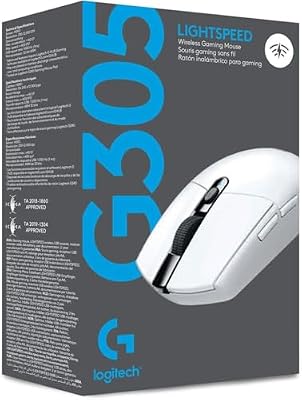
1. Logitech G305 Lightspeed Wireless Gaming Mouse, Hero Sensor, 12,000 DPI, Lightweight

Logitech G305 Lightspeed Wireless Gaming Mouse - White | 12,000 DPI, Lightweight, 6 Programmable Buttons, 250h Battery, On-Board Memory, Compatible with PC and Mac





As an Amazon Associate we earn from qualifying purchases. Product prices and availability are accurate as of the date/time indicated.
The Logitech G305 Lightspeed is the pick to lead with for a clean wireless setup, available in a crisp white finish. It pairs Logitech’s acclaimed LIGHTSPEED wireless — engineered to rival wired response times — with an accurate HERO sensor up to 12,000 DPI in a lightweight shell. At around $37 it is the priciest mouse here and the best performer, and the white version slots neatly into a color-matched battlestation.
For a white setup that does not sacrifice performance, this is the standout. LIGHTSPEED wireless is genuinely competitive with wired connections for low-latency input, the HERO sensor tracks precisely for gaming, and the light weight makes quick, repeatable movements easier. Long battery life adds real convenience for a cable-free desk. Be clear that the white color is the aesthetic match — the performance comes from the sensor and wireless tech, not the finish. If you want a serious white wireless gaming mouse, the G305 is the obvious top choice.
Pros: LIGHTSPEED wireless rivals wired latency, accurate HERO sensor, light, clean white finish.
Cons: Priciest pick here; white is cosmetic and does not affect tracking.
2. Razer DeathAdder Essential Gaming Mouse: 6400 DPI Optical Sensor – 5 Programmable

Razer DeathAdder Essential Gaming Mouse: 6400 DPI Optical Sensor - 5 Programmable Buttons - Mechanical Switches - Rubber Side Grips - Mercury White


As an Amazon Associate we earn from qualifying purchases. Product prices and availability are accurate as of the date/time indicated.
The Razer DeathAdder Essential brings one of gaming’s most respected shapes to a white setup, with the iconic DeathAdder ergonomic contour offered in a clean light finish. It pairs a responsive 6400 DPI optical sensor with five programmable buttons over a reliable wired connection. At around $24 it is an affordable way to get a proven, comfortable shape that also matches a color-coordinated desk.
For the player who values a time-tested, comfortable shape and reliable wired response — and wants it to fit a white aesthetic — the DeathAdder Essential is an easy call. The optical sensor and direct wired link deliver the snappy, repeatable input fast games reward, the famous DeathAdder shell supports the palm beautifully through long sessions, and the five buttons cover the essentials. The white finish is the cosmetic match; the value is the legendary ergonomics and dependable performance. For a comfortable white wired mouse, it is a classic recommendation.
Pros: Acclaimed ergonomic DeathAdder shape, reliable wired link, responsive 6400 DPI sensor, clean finish.
Cons: Wired only; DPI ceiling lower than flagships, and color is purely cosmetic.
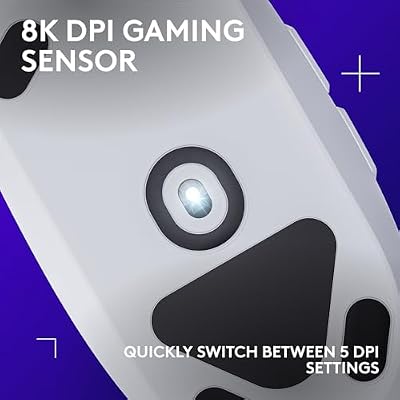
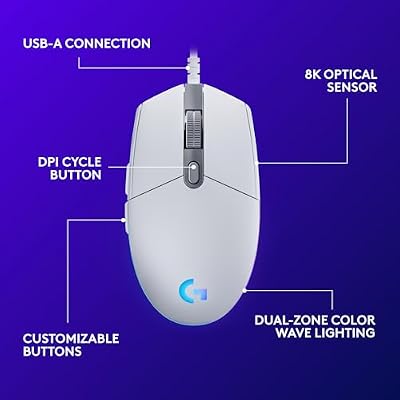
3. Logitech G203 Wired Gaming Mouse, 8,000 DPI, Rainbow Optical Effect LIGHTSYNC RGB

Logitech G203 Wired Gaming Mouse - White | LIGHTSYNC RGB, On-Board Memory, 6 Programmable Buttons, Compabile with PC/Mac





As an Amazon Associate we earn from qualifying purchases. Product prices and availability are accurate as of the date/time indicated.
The Logitech G203 LIGHTSYNC is the white wired gaming value pick. It combines an 8,000 DPI optical sensor with vivid LIGHTSYNC RGB lighting in a compact, lightweight classic shape, offered in a clean white finish. At around $24 it is one of the most popular budget gaming mice, and the white version is a natural fit for a light-themed desk that also wants a touch of glow.
For a gamer building a clean setup on a budget, the G203 delivers proven performance and looks. The 8,000 DPI sensor is accurate and responsive for everyday and competitive play, the lightweight classic shape suits most grips, and the customizable LIGHTSYNC RGB lets you tune the lighting to match your white-and-color theme through Logitech’s software. The wired connection keeps input consistent with nothing to charge. The white color completes the aesthetic, while the sensor and shape do the real work. For affordable white wired gaming, it is a strong choice.
Pros: Accurate 8,000 DPI sensor, customizable LIGHTSYNC RGB, light classic shape, clean white look.
Cons: Wired only; fewer buttons than feature mice, and the finish is cosmetic.
4. Redragon M602 Gaming Mouse, Ergonomic RGB Gaming Mouse Wired with 7200 Adjustable DPI
![Redragon M602 Gaming Mouse, Ergonomic RGB Gaming Mouse Wired with 7200 Adjustable DPI, 9 Programmable Buttons, Professional Software for Gamer Office [White]](https://m.media-amazon.com/images/I/31RLs9r7T8L._SL400_.jpg)
Redragon M602 Gaming Mouse, Ergonomic RGB Gaming Mouse Wired with 7200 Adjustable DPI, 9 Programmable Buttons, Professional Software for Gamer Office [White]


As an Amazon Associate we earn from qualifying purchases. Product prices and availability are accurate as of the date/time indicated.
The Redragon M602 is the budget ergonomic gaming pick, available in a clean white-and-light finish. It is a wired RGB mouse with an ergonomic contoured shape, adjustable DPI up to 7200, and multiple programmable buttons. At around $21 it offers a lot of features and a comfortable shape for the money, and the light version suits a color-matched desk.
For the gamer who wants an ergonomic, feature-rich mouse without spending much — and wants it to match a white theme — the M602 is a sensible pick. The contoured shape supports the hand comfortably through long sessions, the adjustable 7200 DPI lets you set a sensitivity that suits your games, and the extra programmable buttons add handy commands. The RGB lighting ties into the aesthetic. As always, the white finish is the cosmetic match while the shape and sensor handle performance. For affordable, comfortable white gaming, the Redragon M602 punches above its price.
Pros: Comfortable ergonomic shape, adjustable 7200 DPI, programmable buttons, RGB, budget-friendly.
Cons: Wired only; entry sensor versus flagships, and color does not affect performance.
5. Logitech M170 Wireless Mouse for PC, Mac, Laptop, 2.4 GHz with USB Mini Receiver

Logitech M170 Compact Ambidextrous 2.4 GHz Wireless Mouse - Black | Ambidextrous mouse with 2.4 GHz USB-A Nano Receiver, Optical Tracking, 12-Months Battery Life, PC, Mac, Laptop compatible


As an Amazon Associate we earn from qualifying purchases. Product prices and availability are accurate as of the date/time indicated.
The Logitech M170 is the cheapest white everyday mouse here. It is a compact, ambidextrous 2.4GHz wireless mouse with a tidy USB mini receiver and long battery life, offered in a clean white-and-grey finish. At around $13 it is the most affordable mouse on this list, honestly an everyday productivity pointer rather than a gaming mouse — but a tidy, reliable match for a clean desk.
For a white setup where the mouse is for browsing, work and light use rather than competitive gaming, the M170 is a practical, low-cost choice. The wireless 2.4GHz connection with a plug-and-play receiver keeps the desk tidy, the compact ambidextrous shape suits either hand, and the long battery life means you rarely think about it. It will not satisfy a serious gamer, but as a clean, dependable everyday wireless mouse that matches a light theme, it does exactly what it should at a rock-bottom price. For a tidy white desk on a budget, it fits perfectly.
Pros: Cheapest pick here, tidy 2.4GHz wireless, long battery life, clean ambidextrous design.
Cons: Everyday pointer, not a gaming mouse; basic sensor and the color is cosmetic.
6. KTRIO Large Gaming Mouse Pad Desk Mat, Superior Micro-Weave Cloth for Precise Mouse

KTRIO Large Gaming Mouse Pad Desk Mat for Gamer, 31.5" x 11.8", Black, XL | Extended Size Design, Superior Micro-Weave Cloth, Non-Slip Rubber Base, Durable Stitched Edges, Water-Resistant Coating


As an Amazon Associate we earn from qualifying purchases. Product prices and availability are accurate as of the date/time indicated.
Rounding out the list is the KTRIO large mouse pad, the piece that completes a clean white desk. It is a large desk-mat-style pad with a superior micro-weave cloth surface tuned for precise tracking and a non-slip rubber base, available in light finishes to match a white setup. At around $14 it is an inexpensive way to give your white mouse a smooth, coordinated surface to glide on.
This is the accessory, not a mouse — and it earns its place by tying the aesthetic together and improving how your mouse performs. The large surface gives you plenty of room for low-sensitivity sweeps, the micro-weave cloth provides a smooth, consistent glide that helps the sensor track accurately, and the rubber base keeps it planted during fast movements. In a white-themed setup, a matching light desk mat finishes the look and protects the desk. For a coordinated, practical surface that completes a clean battlestation, the KTRIO is the obvious choice.
Pros: Large smooth micro-weave surface, non-slip rubber base, completes a white desk, very affordable.
Cons: It is a mouse pad, not a mouse; an accessory rather than a pointing device.
How to Choose a White Mouse
Choosing a white mouse starts with the same honest reminder that applies to any colored peripheral: the finish is cosmetic. A white shell does not track more accurately, click faster or weigh less than the same mouse in black, so it adds nothing to performance. Use the color as the tie-breaker that completes your clean, light-themed desk, and choose the mouse first on the sensor, shape, weight and connection that genuinely determine how it feels and performs.
The sensor is the most important component for any mouse you will game with. It decides how accurately the mouse tracks your movement, and a quality unit like Logitech’s HERO sensor in the white G305 tracks precisely without smoothing or acceleration that can throw off your aim. The headline DPI figure — whether 6400, 7200 or 8,000 on the mice here — matters far less than tracking quality, since most people game at a fraction of the maximum and simply use a DPI button to switch sensitivity.
Shape, weight and connection shape how the mouse feels in the hand. A well-regarded ergonomic contour like the DeathAdder Essential’s supports the palm comfortably over long sessions, while lighter shells are easier to flick and reposition quickly. On connection, wired mice like the G203, DeathAdder and Redragon give inherently consistent input with nothing to charge, while modern wireless — specifically Logitech’s LIGHTSPEED in the G305 — now rivals wired response, so you can match a clean setup without a cable and without sacrificing performance. Choose based on grip comfort and whether you value simplicity or cable-free movement.
Finally, match the mouse to your actual use and think about the wider setup. A serious gamer should prioritise a quality sensor and shape — the G305, G203, DeathAdder and Redragon all fit — while someone who mainly browses and works can happily save money with an everyday wireless pointer like the white M170. To finish the aesthetic, a matching light desk mat such as the KTRIO gives the mouse a smooth, coordinated surface and protects the desk. Decide how you actually use the mouse, prioritise performance accordingly, and let the white finish be the satisfying final touch on a setup that looks as good as it works.
Frequently Asked Questions
Does a white mouse perform differently from a black one?
No. The color of a mouse is purely cosmetic and has no effect on performance. A white shell tracks, clicks and weighs exactly the same as the identical mouse in black, so you are choosing the finish to match a clean, light-themed desk rather than for any functional benefit. Always pick a white mouse on its sensor, shape and connection first.
Which white mouse here is best for gaming?
The Logitech G305 Lightspeed is the top white gaming pick, pairing accurate HERO tracking with LIGHTSPEED wireless that rivals wired latency. For wired gaming on a budget, the white Logitech G203, Razer DeathAdder Essential and Redragon M602 are all strong, comfortable choices. The white M170, by contrast, is an everyday pointer rather than a gaming mouse.
Do white mice get dirty or discolor more easily?
Light-colored shells do show grime and oils from your hand more readily than black, so a white mouse benefits from the occasional wipe with a slightly damp cloth to stay looking sharp. Quality plastics resist discoloration in normal use; the main culprits are heavy hand oils and direct sunlight. A little routine cleaning keeps a white mouse crisp and matching your setup.
Should I add a white mouse pad to match?
If you want the complete look, yes — a matching light desk mat like the KTRIO ties the aesthetic together and gives your mouse a smooth, consistent surface to track on, which genuinely helps sensor accuracy. A large pad also gives room for low-sensitivity sweeps and protects the desk. It is an inexpensive, practical way to finish a coordinated white battlestation.
Related Guides
- Best Gaming Mouse
- Best Wireless Gaming Mouse
- Best Mechanical Keyboards
- Best Mouse Pads for Gaming
- Best White Gaming PCs
- Best Budget Gaming Setup
Affiliate Disclosure: As an Amazon Associate, we earn from qualifying purchases. If you click a link and make a purchase, we may earn a small commission at no extra cost to you. Prices and availability are accurate as of publication and may change.










