

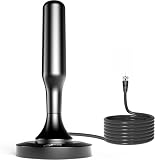
- Top Pick: TV Antenna for Smart TV 2026, Digital TV Antenna Indoor for Local Channels, 5000+ Miles Long-Range High-Gain Reception with Amplifier Support 4K 1080P/ Older TVs, 33Ft Coaxial Cable
- Best Value: HIDB TV Antenna for Smart TV Indoor, Digital TV Antenna for Local Channels | OTA Digital HD Signal Antenna with Magnetic Base and 10ft Cable for Easy Setup
- Premium Choice: TV Antenna for Smart TV Indoor, Digital TV Antenna for Local Channels | HD Digital Antenna with Amplifier Signal Booster for Local Channels Supports 4K 1080p-16.5 ft Long Cables
Apartment dwellers face a puzzle that house owners rarely do: the best spot for an antenna is probably a window you do not control, on a floor with a view of one building instead of the horizon, and with no permission to drill into the exterior. That changes what a good antenna looks like. Cable length, a flat or magnetic mounting method, and a clean indoor setup matter at least as much as the headline range number.
This guide ranks nine indoor-friendly antennas by what each listing states, for renters who want local channels without a cable subscription. As you read in 2026, remember that every range claim in a product title is marketing language. Actual reception depends on how far you live from the broadcast towers, what stands between you and them, and which floor you are on.
Quick Picks
As an Amazon Associate we earn from qualifying purchases at no extra cost to you.





| Product | Best for | Key spec from the title |
|---|---|---|
| 33 ft Long-Range Amplified Antenna | Window far from the TV | 33 ft coaxial cable, amplifier |
| HIDB Magnetic Base Antenna | Metal window frames | Magnetic base, 10 ft cable |
| HD Amplified Antenna (16.5 ft) | Mid-distance setups | 16.5 ft cable, amplifier signal booster |
| Indoor/Outdoor Wider-Reach Antenna | Balcony flexibility | Indoor or outdoor use, amplifier |
| Black Signal Booster Antenna (16.5 ft) | Discreet look | 16.5 ft cable, booster, black finish |
| DAANT Indoor Antenna | Simple, no amplifier | 16 ft HDTV coax, 4K 1080p |
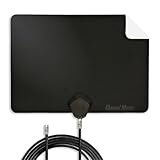
| Channel Master FLATenna | Flat, window-mounted look | 12 ft coax, NextGen TV support |
| RTKJEQQ 360-Degree Antenna | Minimal, no-frills setup | 360-degree reception, 4K HD |
| 360-Degree Easy-Setup Indoor Antenna | Cord-cutters with no cable box | 360-degree, easy setup, 4K 1080P |
How to Choose
Think about where the antenna will sit
Windows are the best indoor position because glass passes broadcast signals far better than brick or concrete, and metal screens or coated glass can block them. In an apartment, that usually means a window on the side that faces the towers. Check how far that window is from the TV, then compare it with the cable length in the title. A 10 ft lead may not reach across a living room, while 33 ft is enough for most layouts.
Understand what an amplifier does
Four of the nine listings mention an amplifier or booster. An amplifier can help when the signal must travel a long cable or be split between TVs, but it also boosts noise along with the channels you want. If you live close to the towers, a strong signal can overload an amplified antenna and cause dropouts. Look for models that let you operate the antenna with or without the booster, and be willing to try both.
Read range claims skeptically
Terms like “5000+ miles” or “200% wider” in a title are not measurements you can plan around. Broadcast reception is limited by the curve of the earth, terrain, and buildings. Instead, use an online signal-coverage lookup by address to learn how far away the towers are, then treat any listed range as a loose guide.
Check standards and TV compatibility
Most listings say 4K and 1080p, which describe the resolution a TV can display rather than a property of the antenna. What matters is that your TV has a built-in digital tuner. The Channel Master listing also names NextGen TV, which only helps if the set supports that standard. After connecting any antenna, run a channel scan from the TV’s menu, and rescan after moving the antenna.
The 9 Best Options
33 ft Long-Range Amplified Antenna
For renters whose best window sits across the room from the TV. The title lists a 33 ft coaxial cable, high-gain reception, an amplifier, and support for 4K, 1080P, and older TVs, so it can also feed a spare bedroom set.
- The long cable gives flexibility to reach a good window without extension joints.
- Older TVs are named as supported, helpful for a secondary room.
- Trade-off: the 5000-plus mile range claim is not realistic, so judge it by your own distance to the towers.
Skip it if you live near the towers, where amplification can overload the signal and cause dropouts.
HIDB Magnetic Base Antenna
Built for easy placement, with a magnetic base and a 10 ft cable. It is an OTA digital HD antenna for smart TVs and local channels, and the title promises a simple setup for people who have never tried antenna TV.
- The magnetic base lets you attach it to a metal surface without adhesive or screws.
- Setup is described as easy, which suits first-time cord-cutters.
- Trade-off: a 10 ft cable limits where the TV can sit relative to the window.
Skip it if your TV is far from the window or you have no metal surface nearby to hold the base.
HD Amplified Antenna (16.5 ft)
A middle-ground option with a 16.5 ft cable and an amplifier signal booster. The title states support for 4K and 1080p and targets local channels on smart TVs, with no unusual extras to learn.
- The cable reaches across a typical living room from a window.
- The booster may help on a long run or a split signal.
- Trade-off: the listing gives no mounting method, so you will need your own tape or clips.
Skip it if you prefer a clearly described, no-adhesive mount or live right next to the towers.
Indoor/Outdoor Wider-Reach Antenna
For apartments with a balcony or patio. It is labeled for indoor and outdoor use, promises wider signal reach, and includes an amplifier booster with support up to 4K and 8K.
- Outdoor use opens a balcony rail as another placement option.
- The listing names 4K, 8K, and 1080p support, though resolution depends on your TV, not the antenna.
- Trade-off: the 200 percent reach claim is marketing, and no cable length is given.
Skip it if your lease forbids hanging anything on the balcony or if you need to know the cable length in advance.
Black Signal Booster Antenna (16.5 ft)
A black antenna with a 16.5 ft cable and a built-in signal booster, listed for local channels and long-range reception on smart TVs. It suits shoppers who want something that fades into a dark window frame or shelf.
- The black finish blends in against a dark frame or TV stand.
- A 16.5 ft cable gives you room to experiment with placement.
- Trade-off: there is little detail beyond booster and range language.
Skip it if you want a brand with a known support page behind the purchase.
DAANT Indoor Antenna
A simple long-range indoor antenna with a 16 ft HDTV coax cable and support for 4K and 1080p reception. It leaves out any mention of an amplifier, which can be a plus in a building near the broadcast towers.
- No amplifier means less risk of overload near the towers.
- A 16 ft cable fits most rooms from a window to a media console.
- Trade-off: without a booster, a long run or a signal split may weaken reception.
Skip it if you plan to feed several TVs from one antenna, or if you live far from the towers.
Channel Master FLATenna
The best-known name here, a flat indoor antenna with a 12 ft coaxial cable. The title stresses reception range, signal reliability, 4K smart TV support, and NextGen TV broadcasts, with easy installation.
- A flat design suits window mounting and tight apartments.
- NextGen TV is named, a plus if your set supports it.
- Trade-off: the 12 ft cable is shorter than several rivals, so the TV needs to be near the window.
Skip it if your TV sits more than a few steps from the window you plan to use.
RTKJEQQ 360-Degree Antenna
A minimal listing for a smart TV antenna with 360-degree reception for local channels in 4K HD. It suits renters who want one small device and would rather not decode a long specification list.
- Omnidirectional wording suggests you will not need to aim it precisely.
- The listing is short, with few claims to second-guess.
- Trade-off: no cable length or amplifier detail is given, so ask yourself how far it must reach.
Skip it if you need to match the cable to a known distance before ordering.
360-Degree Easy-Setup Indoor Antenna
Pitched at cord-cutters, with 360-degree long-range reception, easy setup, and support for 4K and 1080P. It is written for TVs without cable, which fits a studio apartment with a single screen.
- 360-degree wording again points to flexible placement.
- Setup is described as easy, with no box or subscription implied, and the wording suits a first antenna.
- Trade-off: no cable length or booster detail is stated.
Skip it if you want to know the exact cable length or amplifier status before buying, or if the listing’s loose wording makes you uneasy.
Which One Fits Your Situation
Your best window is far from the TV
Take the 33 ft Long-Range Amplified Antenna, which has the longest cable listed. The 16.5 ft models are the next step down, and the DAANT at 16 ft is close behind. Measure the path along the wall, not the straight line, because cables follow baseboards and door frames.
You live close to the broadcast towers
The DAANT Indoor Antenna skips an amplifier, avoiding the overload that strong signals can cause on boosted designs. The Channel Master FLATenna is another unboosted choice, with a flat shape that suits a short run to a window.
You rent and cannot use adhesives
Go with the HIDB Magnetic Base Antenna if you have a metal surface, or the Channel Master FLATenna for a flat design.
You have a balcony
The Indoor/Outdoor Wider-Reach Antenna is the only listing described for outdoor use, if your building allows it. Check your lease and any building rules first, and bring it inside during storms or high wind.
Common Mistakes
- Choosing based on a range figure instead of a tower map.
- Putting the antenna behind the TV instead of at a window.
- Forgetting to rescan channels after moving the antenna.
- Using an amplifier near the towers, where it can cause dropouts.
- Assuming 4K on the box affects reception rather than TV resolution, when it only describes the picture your TV can show.
Related guides
- Battery Operated Smoke And Carbon Monoxide Detectors
- Combination Smoke And Carbon Monoxide Detectors
- Aio Liquid Coolers For High Performance Gaming
Frequently Asked Questions
Do I need an amplifier?
Not always. Boosters help with long cable runs or splitters, but they can hurt near the towers by overloading the tuner. If reception is weak, try both modes where available, and remember that some listings do not say whether the booster can be switched off.
Why do I lose channels at certain times?
Weather, nearby electronics, and moving objects can change a weak signal. Moving the antenna a few inches and rescanning often helps. Keeping it away from routers, power adapters, and metal blinds also reduces interference, which matters in crowded apartment buildings.
Will it work on any TV?
Modern TVs include a digital tuner, so a smart TV only needs the coaxial lead plugged into its antenna input. Older sets may need a converter box, though several listings say older TVs are supported, and the 33 ft model names them directly.
Is a higher floor better?
Often, since height clears nearby buildings and trees. A window facing the towers usually matters more than floor number, so test two or three spots with a channel scan before fixing the antenna in place.











