

🛒 Best Price Today on Amazon
Prime members get fast, free shipping on everything above, plus member-only deals. New members get a 30-day free trial — cancel anytime.
- Top Thermal Paste Workstation Picks for 2026
- Best Thermal Paste for Workstation at a Glance
- 1. Noctua NT-H1 3.5g, Pro-Grade Thermal Compound Paste
- 2. ARCTIC MX-4 (4 g) – Premium Performance Thermal Paste for All Processors
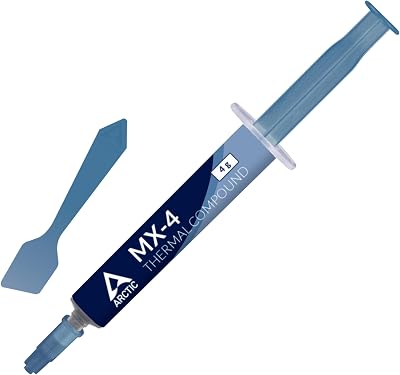
- 3. ARCTIC MX-4 (incl. Spatula, 4 g) – Premium Performance Thermal Paste
- 4. Thermal Grizzly Kryonaut – 1 Gram – Extremely High Performance Thermal Paste
- 5. Corsair TM30 Performance Thermal Paste, Ultra-Low Thermal Impedance
- 6. Arctic Silver 5 AS5-3.5G Thermal Paste
- How to Choose Thermal Paste for a Workstation
- Frequently Asked Questions
- Related Guides
- Related Articles
- Related Guides
Top Thermal Paste Workstation Picks for 2026
Here are our current top thermal paste workstation picks, compared on real Amazon owner reviews, price, and features. Live prices update below.
As an Amazon Associate we earn from qualifying purchases at no extra cost to you.


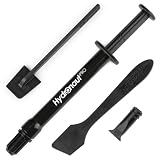
A workstation lives a harder life than a gaming PC. It runs heavy, sustained loads for hours at a time — rendering, compiling, simulation, virtual machines — often for years between teardowns, and frequently with high-core-count CPUs that dump a lot of heat into a small contact area. The thermal paste sitting between that chip and its cooler is what carries that heat away, and for a machine you depend on it has to do two things above all: stay effective for a long time, and never put your hardware at risk. This guide rounds up the best thermal paste for a workstation in 2026, with a deliberate bias toward reliable, long-life, non-conductive compounds.
Our picks were chosen on what matters for a professional, always-on machine: consistent thermal transfer under continuous load, longevity before the paste dries out or pumps out, and — critically — electrical safety, since a spill onto pins or surface-mount components should never short anything out. We have kept prices realistic, from around $5 to around $9 a tube, because paste is cheap insurance for an expensive build. The list spans easy-to-apply non-conductive pastes, a high-performance ceramic compound, and one specialist metal-oxide paste we are honest about. Below is an at-a-glance comparison, then a closer look at each option and a buyer’s guide focused on the things a workstation actually needs.
Best Thermal Paste for Workstation at a Glance
| Thermal Paste | Best For | Standout Spec | Approx Price |
|---|---|---|---|
| Noctua NT-H1 (3.5g) | Set-and-forget reliability | Non-conductive, long-life, forgiving | around $9 |
| ARCTIC MX-4 (4g) | Value workhorse | Non-conductive, no cure time, large 4g | around $5 |
| ARCTIC MX-4 with Spatula (4g) | First-time application | Includes spatula, non-conductive | around $5 |
| Thermal Grizzly Kryonaut (1g) | Maximum thermal headroom | High-performance, non-conductive | around $9 |
| Corsair TM30 Performance | Modern non-conductive pick | Low thermal impedance, non-conductive | around $8 |
| Arctic Silver 5 (3.5g) | Legacy / experienced users | Silver-based, very long track record | around $8 |
1. Noctua NT-H1 3.5g, Pro-Grade Thermal Compound Paste

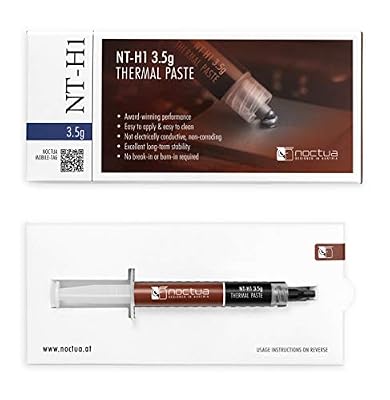
Noctua NT-H1 3.5g, High-Performance Thermal Paste | High-Performance, Easy to Apply and Clean, Good Long-term Stability, for 3-20 Applications


As an Amazon Associate we earn from qualifying purchases. Product prices and availability are accurate as of the date/time indicated.
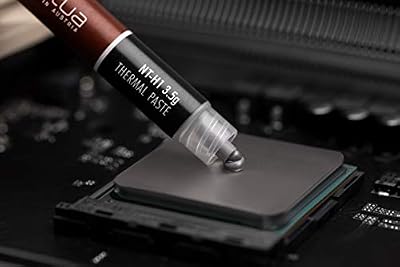
The Noctua NT-H1 is our top workstation pick because it embodies exactly what a professional machine wants: dependable, non-conductive, long-life performance with almost nothing to go wrong. It is a proven hybrid compound that needs no cure or burn-in time, is electrically non-conductive and non-corrosive, and is famously forgiving to apply. The generous 3.5g tube is enough for many applications. At around $9 it is the set-and-forget choice.
For a workstation, the appeal is reliability over years rather than a chase for the last fraction of a degree. NT-H1 is known for a long service life before it needs replacing, which matters when a build may run flat-out for months between teardowns, and its non-conductive formula means a stray smear on the socket or board will not short anything out. Because it works at full effectiveness immediately, you can mount the cooler and put the machine straight to work. If you want a paste you can fit once and forget, this is the one we reach for first.
Pros: Non-conductive and non-corrosive, long service life, no cure time, very forgiving to apply, large tube.
Cons: Not the absolute lowest temperature in benchmarks; premium price per gram.
2. ARCTIC MX-4 (4 g) – Premium Performance Thermal Paste for All Processors

ARCTIC MX-4 (4 g) - Premium Performance Thermal Paste for All Processors




As an Amazon Associate we earn from qualifying purchases. Product prices and availability are accurate as of the date/time indicated.
The ARCTIC MX-4 is the value workhorse of workstation paste and one of the most widely used compounds in the world. It is a carbon-based, electrically non-conductive paste with strong thermal transfer, no cure time, and a reputation for staying stable for years without drying out. The large 4g tube at around $5 makes it superb value for anyone maintaining several machines.
This is the pick when you want proven, safe, long-lasting performance without paying a premium. Being non-conductive, it is well suited to a professional build where you cannot risk a spill shorting components, and its long claimed lifespan means fewer reapplications over the life of the workstation. It is easy to spread, works the moment you mount the cooler, and the big tube covers many CPUs. For a dependable everyday workstation compound that does not break the bank, the MX-4 is an easy recommendation.

Pros: Non-conductive, excellent value, long claimed lifespan, no cure time, generous 4g tube.
Cons: Slightly thick to spread for some users; performance is great rather than chart-topping.
3. ARCTIC MX-4 (incl. Spatula, 4 g) – Premium Performance Thermal Paste


As an Amazon Associate we earn from qualifying purchases. Product prices and availability are accurate as of the date/time indicated.
This is the same trusted ARCTIC MX-4 compound bundled with an application spatula, and it is the pick for anyone applying paste for the first time or who simply prefers to spread rather than dot-and-press. You get the identical non-conductive, long-life 4g formula at around $5, plus the small tool that makes laying down a thin, even layer on a large workstation CPU straightforward.
For a workstation builder, the spatula is more useful than it sounds. High-core-count CPUs often have large heat spreaders, and an even coat helps ensure consistent contact across the whole die area — the spatula makes that easy to achieve without guesswork. The compound itself carries all the same advantages: non-conductive for safety, no cure time, and a long stable life. If you maintain your own machines and want a clean, controlled application every time, the spatula bundle is the sensible version of the MX-4 to buy.
Pros: Identical non-conductive MX-4 formula, included spatula for even spreading, long life, great value.
Cons: Spatula is basic; otherwise no performance difference from the standard tube.
4. Thermal Grizzly Kryonaut – 1 Gram – Extremely High Performance Thermal Paste

Thermal Grizzly Kryonaut - 1 Gram Thermal Paste Extremely High Performance | Thermal Compound for Demanding Applications and Overclocking - Thermal Paste for CPU/GPU/PS4/PS5/Xbox




As an Amazon Associate we earn from qualifying purchases. Product prices and availability are accurate as of the date/time indicated.
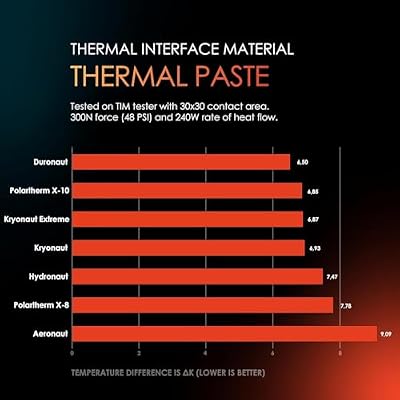
The Thermal Grizzly Kryonaut is the pick for a workstation builder who wants maximum thermal headroom on a hot, high-core-count CPU. It is a high-performance compound engineered for low thermal resistance and stability across a wide temperature range, and crucially for a professional machine it is electrically non-conductive. The 1g tube at around $9 is sized for a few applications on large chips.
This is the compound to choose when your CPU runs genuinely hot under sustained all-core load and every degree of margin helps the cooler keep up. Kryonaut is a long-time favorite among enthusiasts for its strong heat transfer, and because it is non-conductive you get that performance without the electrical risk of liquid-metal compounds. It does not require a cure period, so the machine is ready immediately. For a demanding workstation where thermals are the limiting factor, Kryonaut delivers the extra cooling margin while staying safe to handle.

Pros: Strong low-resistance thermal transfer, non-conductive, stable across temperatures, ready immediately.
Cons: Small 1g tube; can dry out faster than some pastes, so plan periodic reapplication.
5. Corsair TM30 Performance Thermal Paste, Ultra-Low Thermal Impedance

Corsair TM30 Performance Thermal Paste | Ultra-Low Thermal Impedance CPU/GPU | 3 Grams|w/applicator, Silver for Desktop


As an Amazon Associate we earn from qualifying purchases. Product prices and availability are accurate as of the date/time indicated.
The Corsair TM30 is a strong modern non-conductive option that suits a workstation well. It is a zinc-oxide-based compound formulated for ultra-low thermal impedance, designed to transfer heat efficiently from CPU or GPU into the cooler while remaining electrically non-conductive and safe around components. At around $8 it is competitively priced for a current-generation paste.
For an always-on professional build, the TM30 hits the right notes: efficient heat transfer for sustained loads, plus a non-conductive formula that will not short a board if some squeezes out past the edge of the heat spreader. It spreads cleanly and works immediately with no cure time, so you can mount and go. As a dependable, safe, well-priced compound from a familiar brand, the TM30 is a solid choice for anyone building or maintaining a workstation who wants modern performance without venturing into conductive territory.
Pros: Non-conductive zinc-oxide formula, low thermal impedance, clean application, no cure time, fair price.
Cons: Tube size is smaller than the 4g MX-4; performance is competitive rather than class-leading.
6. Arctic Silver 5 AS5-3.5G Thermal Paste

Arctic Silver 5 AS5-3.5G Thermal Paste,Black, Grey | NBR Material, 12mm Inner Diameter, 2mm Thickness, Spare Gasket


As an Amazon Associate we earn from qualifying purchases. Product prices and availability are accurate as of the date/time indicated.
Rounding out the list is Arctic Silver 5, a legendary silver-based compound with one of the longest track records in the business. It uses micronized silver particles for strong thermal conductivity and has cooled enthusiast and workstation CPUs for many years. We include it for experienced users — but with an important honesty note for a workstation audience. At around $8 the 3.5g tube is good value.
Here is the caveat to be clear about: Arctic Silver 5 is not fully electrically non-conductive. It is described as not electrically conductive in normal use, but it is slightly capacitive, so it must be kept away from pins, pads and surface-mount components — and it has a break-in period of some hours before it reaches peak performance. For a careful, experienced builder applying a neat layer it is a fine, long-proven paste. For a set-and-forget workstation where you want zero electrical risk and instant performance, one of the fully non-conductive options above is the safer pick.
Pros: Proven silver-based performer, very long track record, strong thermal conductivity, good value tube.
Cons: Slightly capacitive (keep off pins/SMD parts) and needs a break-in period — less ideal as a safe set-and-forget choice.
How to Choose Thermal Paste for a Workstation
For a workstation, the first and most important question is electrical safety. A professional machine is an investment, and the last thing you want is a stray smear of paste shorting out a socket or a surface-mount component. That is why we lead with non-conductive compounds: the Noctua NT-H1, ARCTIC MX-4, Corsair TM30 and Thermal Grizzly Kryonaut are all electrically non-conductive, so a little excess at the edge of the heat spreader is harmless. Arctic Silver 5, by contrast, is slightly capacitive and must be applied with more care — fine for an experienced hand, less so for a worry-free build.
Longevity is the second pillar, because a workstation may run flat-out for months or years between teardowns. A paste that dries out or ‘pumps out’ from between the surfaces will let temperatures creep up over time, so you want a compound with a long, stable service life. The Noctua NT-H1 and ARCTIC MX-4 are particularly well regarded here, holding their performance for years. Higher-performance pastes like Kryonaut deliver lower peak temperatures but can dry sooner, so factor a periodic reapplication into your maintenance plan if you choose one.
Application matters more on a workstation than people expect, because high-core-count CPUs tend to have large heat spreaders. An even, thin layer across the whole contact area gives consistent transfer, and a forgiving compound makes that easy — NT-H1 in particular is praised for being hard to get wrong. If you are not confident spreading by hand, the MX-4 bundle with a spatula takes the guesswork out, and any paste that needs no cure time lets you mount the cooler and put the machine straight back to work.
Finally, match the paste to your thermal situation and your tolerance for maintenance. If your CPU runs hot under sustained all-core load and you are chasing margin, Kryonaut’s stronger transfer earns its place. If you value a fit-once-and-forget machine, NT-H1 or MX-4 are the safe, long-life defaults. Paste is inexpensive relative to the hardware it protects, so do not skimp — but for a workstation, prioritise a non-conductive compound with a long service life over a half-degree of benchmark bragging rights, and pick the one on this list that fits how hard your machine works.
Frequently Asked Questions
Why does a workstation need non-conductive thermal paste?
Because a professional machine is an expensive investment and a stray smear of paste should never be able to short out a component. Non-conductive compounds such as the Noctua NT-H1, ARCTIC MX-4, Corsair TM30 and Thermal Grizzly Kryonaut are electrically safe, so a little excess at the edge of the heat spreader is harmless. Conductive or capacitive pastes can damage hardware if they touch the wrong place, which is a needless risk on a build you rely on.
How long does workstation thermal paste last before reapplication?
It varies by compound, but a quality non-conductive paste like the Noctua NT-H1 or ARCTIC MX-4 can hold its performance for several years of normal use, which is exactly why they suit always-on machines. Very high-performance pastes such as Kryonaut can dry out somewhat sooner, so plan a periodic reapplication if you use one. If CPU temperatures start creeping up over time, that is the usual sign the paste needs refreshing.
Is Arctic Silver 5 safe to use on a workstation?
It can be, but with care. Arctic Silver 5 is silver-based and slightly capacitive — described as not conductive in normal use but able to cause issues if it bridges pins or surface-mount components — and it has a break-in period before reaching peak performance. An experienced builder applying a neat layer will be fine, but for a worry-free, instant-performance build, a fully non-conductive paste like the NT-H1 or MX-4 is the safer choice.
Do I need expensive thermal paste for a high-core-count CPU?
Not necessarily. The biggest factors for a workstation are a non-conductive formula and a long, stable service life, both of which the affordable ARCTIC MX-4 delivers. A premium paste like Kryonaut gives a little extra thermal margin that helps if your CPU runs genuinely hot under sustained load, but for most always-on machines a reliable mid-priced non-conductive compound, applied evenly across the large heat spreader, is all you need.
Related Guides
- Best CPU Coolers
- Best AIO Liquid Coolers
- Best CPUs for Your Build
- Best PC Cases
- Best Case Fans for Airflow
- Best Workstation PC Builds
Affiliate Disclosure: As an Amazon Associate, we earn from qualifying purchases. If you click a link and make a purchase, we may earn a small commission at no extra cost to you. Prices and availability are accurate as of publication and may change.










