

- Top Pick: Lenovo Idea Tab – College Tablet – 11″ 2.5K IPS Touchscreen Display – 90Hz – MediaTek Dimensity 6300-8 GB Memory – 256 GB Storage – Integrated Arm Mali-G57 MC2 – Tab Pen and Folio Case
- Best Value: Apple iPad 11-inch: A16 chip, 11-inch Model, Liquid Retina Display, 128GB, Wi-Fi 6, 12MP Front/12MP Back Camera, Touch ID, All-Day Battery Life — Blue
- Premium Choice: Lenovo Idea Tab Plus – Lightweight Tablet – 12.1″ 2.5K IPS Touchscreen Display – 90Hz – MediaTek Dimensity 6400-8GB Memory – 128GB Storage – Integrated Arm Mali-G57 MC2 – tab Pen & Folio case
A tablet for college has to survive a schedule that no couch tablet ever faces: lecture notes at nine, a PDF-heavy reading list at noon, a video call in the afternoon and a late-night study session. The decision is whether you want a pen-first note-taking slate, a laptop substitute with a keyboard case, or a light reading device that rides in a jacket pocket. Each of those jobs favors a different screen size, storage amount and accessory set.
This 2026 comparison covers ten listings, from a premium Apple model to keyboard-and-mouse bundles with enormous memory claims. Judging them is mostly a matter of reading titles with care. A listing that bundles a pen and folio case solves a real student problem, while one that stacks memory figures without explaining them deserves skepticism. The sections below separate what the titles actually state from what they merely imply.
Quick Picks
As an Amazon Associate we earn from qualifying purchases at no extra cost to you.




| Product | Best for | Key spec from the title |
|---|---|---|
| Lenovo Idea Tab 11″ (256GB) | Notes plus storage for files | 2.5K IPS 90Hz, 8GB memory, 256GB, pen and folio |
| Apple iPad 11-inch (A16) | Longest-lasting all-rounder | A16 chip, 128GB, Wi-Fi 6, Touch ID |
| Lenovo Idea Tab Plus 12.1″ | Larger canvas for notes | 12.1″ 2.5K IPS 90Hz, 8GB, pen and folio |
| Fire HD 10 Tablet | Reading and media | 10.1″ Full HD, 4GB RAM, 32GB |
| Lenovo Idea Tab 11″ (128GB) | Notes at a lower storage tier | Android 15, 8GB, 128GB, pen and folio |
| TABWEE 11″ Keyboard Tablet | Laptop-style typing | Keyboard, stylus case, 8000mAh |
| Lenovo Idea Tab Pro 12.7″ | Highest-spec Android option here | 12.7″ 3K display, Dimensity 8300 |
| CUPEISI 10″ 2-in-1 Tablet | Keyboard and mouse bundle | Keyboard case, mouse, stylus, Wi-Fi 6 |
| Bnegynng 10″ 2-in-1 Tablet | Bundle with larger battery claim | 6000mAh, keyboard case, stylus, mouse |
| Lenovo Tab One 8.7″ | Pocket reader | 8.7″ HD display, folio case, long streaming claim |
How to Choose
Decide on pen, keyboard, or both
Handwritten notes need a pen that is included, not an optional extra, and a screen smooth enough to write on. Four of these listings include a pen and a folio case. Typing papers or coding is easier with a keyboard case, which the TABWEE, CUPEISI and Bnegynng bundle. If a title bundles neither, you will be adding accessories after purchase, which erases the apparent advantage of a basic model.
Screen size and sharpness
A screen of 10 to 11 inches is a comfortable middle for notes and reading. At 12 inches and above, the Idea Tab Plus and Pro suit split-screen work with a textbook and a notes page side by side. Sharpness varies a lot in the titles: 2.5K and 3K panels read crisply, a 1920 by 1200 display is adequate, and a 1280 by 800 panel will look noticeably softer on small text. A 90Hz refresh rate, as listed on several Lenovo models, makes pen strokes feel smoother.
Memory and storage claims that deserve caution
Eight gigabytes of memory is a solid figure for juggling apps. Listings reading 20GB or 24GB combine physical and extended memory in their headline, and the titles do not say how much is physical. Compare processors instead: a named chip such as the Dimensity series or Apple’s A16 tells you more than a memory total. For storage, 128GB suits cloud-first students, while 256GB suits those saving lecture recordings locally. Expandable storage, listed as up to 2TB on some bundles, helps for media.
Software, battery, and school requirements
Check whether your school requires specific apps, because iPadOS and Android differ in app availability for note-taking, lab software and exam portals. Battery claims differ: the Tab One cites up to 12.5 hours of video streaming and the iPad lists all-day battery, while others list capacity in mAh, which is not comparable across screen sizes. For long lecture days, a charger in your bag is still wise. Budget tablets often cut corners on cameras and speakers, which matters for video calls. Mid-range models usually add a smoother screen, while premium ones add stronger chips and sharper displays.
The 10 Best Options
Lenovo Idea Tab 11″ (256GB)
Aimed at the student who wants one device for handwritten notes and a big pile of files. The title lists a 2.5K IPS touchscreen at 90Hz, a MediaTek Dimensity 6300, 8GB of memory, 256GB of storage, and a Tab Pen with a folio case.
- The 256GB drive is the largest among the Lenovo models here.
- A pen and folio case are part of the package, so there is nothing else to buy to start taking notes.
- Trade-off: the processor sits in the mainstream Dimensity tier, not the top one.
Skip it if you want a 12 inch screen for split windows or plan to use it mainly as a media viewer.
Apple iPad 11-inch (A16)
For students who want a tablet that stays comfortable for years. The title lists the A16 chip, a Liquid Retina display, 128GB, Wi-Fi 6, 12MP front and back cameras, Touch ID, and all-day battery life.
- The A16 chip and Touch ID give a polished, secure everyday experience.
- Front and rear 12MP cameras are helpful for scanning notes and video calls.
- Trade-off: no pen or keyboard appears in the title, so accessories are separate purchases.
Skip it if you want an all-inclusive bundle, or if you need a bigger screen for two-page layouts. Students who rely on handwriting should budget time to pick a compatible pen.
Lenovo Idea Tab Plus 12.1″
For students who need a larger canvas for diagrams and annotated slides. It lists a 12.1 inch 2.5K IPS touchscreen at 90Hz, a Dimensity 6400, 8GB of memory, 128GB of storage, and a pen with a folio case.
- The larger screen suits side-by-side reading and note-taking.
- Pen and folio case arrive together.
- Trade-off: only 128GB, so use cloud storage.
Skip it if you need a pocketable size or prefer a lighter slate for hallway reading.
Fire HD 10 Tablet
Built for relaxation, per its own title, so it is best for reading and video rather than serious note-taking. It lists a 10.1 inch Full HD screen, an octa-core processor, 4GB of RAM, and 32GB of storage.
- The Full HD display handles textbooks and streaming well.
- It is the simplest device in the group for casual use.
- Trade-off: 32GB of storage fills quickly, and no pen is listed.
Skip it if you plan to take handwritten notes, run many apps at once, or keep large lecture recordings on the device.
Lenovo Idea Tab 11″ (128GB)
A near twin of the 256GB version with less storage and a Luna Grey finish. The title lists Android 15, a Dimensity 6300, 8GB of RAM, 128GB of storage, a 2.5K 90Hz display, and a pen and folio case.
- It keeps the sharp 2.5K 90Hz panel and the included pen.
- Android 15 is named as the version.
- Trade-off: half the storage of its sibling.
Skip it if you save large files locally; the 256GB sibling is the better match for that habit.
TABWEE 11″ Keyboard Tablet
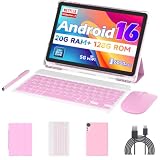
For students who want to type papers on a tablet. The title lists Android 16, a keyboard, a stylus case, a 1920 by 1200 display, 128GB of storage expandable up to 2TB, a 13MP camera, and an 8000mAh battery.
- Keyboard and stylus case come together.
- Expandable storage helps with large files.
- Trade-off: the 24GB memory figure does not say how much is physical.
Skip it if you want a recognized brand with a clear software update record behind it.
Lenovo Idea Tab Pro 12.7″
The most capable Android tablet here on paper. The title lists a 12.7 inch 3K display, a MediaTek Dimensity 8300, 8GB of memory, 128GB of storage, Google Gemini, and a pen with folio case.
- The Dimensity 8300 is the strongest chip among the Lenovo models.
- The 3K panel suits detailed notes and diagrams.
- Trade-off: it is the premium tier among the Android options.
Skip it if you want something small enough for a crowded lecture seat with a fold-down desk.
CUPEISI 10″ 2-in-1 Tablet
For students who want a laptop-style setup. The title lists Android 16, an octa-core processor at 2.0GHz, a keyboard case, a mouse, a stylus, Wi-Fi 6, and expandable storage up to 2TB.
- Keyboard, mouse, and stylus all come with it.
- Wi-Fi 6 is a current standard.
- Trade-off: the 1280 by 800 screen is the lowest-resolution display listed.
Skip it if you read small text for hours; the listed screen resolution is the weak point of an otherwise full bundle.
Bnegynng 10″ 2-in-1 Tablet
Another bundle for typing and note-taking. The title lists a 2.0GHz quad-core processor, a keyboard case, a stylus, a mouse, Wi-Fi 6, a 6000mAh battery, and GMS support.
- The bundle covers typing, pointing, and writing.
- GMS is named, which signals Google services support.
- Trade-off: a quad-core chip and a smaller battery than the TABWEE.
Skip it if you want the strongest chip or the longest battery claim in the bundle category.
Lenovo Tab One 8.7″
A small reader that fits a jacket pocket. The title lists an 8.7 inch HD display, 4GB of memory, 64GB of storage, a MediaTek Helio G85, a folio case, and up to 12.5 hours of video streaming.
- The size and long streaming figure suit commuters.
- A folio case is included.
- Trade-off: HD resolution and 4GB of memory are modest.
Skip it if you write many notes by hand or need a full-size page for diagrams.
Which One Fits Your Situation
Handwritten notes on a tight schedule
The Lenovo Idea Tab 11″ (256GB) includes the pen and folio case and carries the most storage among the Lenovo models. If you want more screen for the same job, step up to the Idea Tab Plus 12.1″.
One device for years of study
The Apple iPad 11-inch (A16) pairs a current chip with Touch ID and all-day battery. Add a keyboard and pen later as your courses demand.
Typing papers on a tablet
The TABWEE 11″ Keyboard Tablet bundles a keyboard and stylus case with an 11 inch screen. Pair it with a card for extra storage if your files outgrow the internal drive.
A commute reader
The Lenovo Tab One 8.7″ is small, light, and cites a long video streaming figure. It works best alongside a laptop rather than as the main device.
Common Mistakes
- Treating combined memory totals as real working memory.
- Buying a tablet without checking that your school’s apps run on its operating system.
- Ignoring screen resolution on keyboard bundles.
- Skipping a pen when your courses rely on handwritten notes, then discovering that a small screen cramps every page.
- Assuming 32GB of storage will last a full year.
Related guides
- Battery Operated Smoke And Carbon Monoxide Detectors
- Combination Smoke And Carbon Monoxide Detectors
- Aio Liquid Coolers For High Performance Gaming
Frequently Asked Questions
Can a tablet replace a laptop for college?
For reading, notes, and writing, often yes. For specialized software such as engineering or statistics packages, check requirements first, because tablet versions are frequently limited.
Is a pen worth having?
If you take handwritten notes or annotate PDFs, yes. Models that include one save a purchase.
How much storage is enough?
128GB works for cloud-first students. Choose 256GB if you store recordings locally.
Are bundles with a mouse and keyboard a good idea?
They are convenient, but check the screen resolution and the chip, because the accessories do not make up for a weak tablet. Also look at how the keyboard attaches, since a loose case is awkward on a lap.










