

- Top Pick: HP 14" HD Chromebook Laptop for Students, Intel Quad-Core N4120(> N4020), 4GB RAM, 64GB eMMC, WiFi, Webcam, HDMI, USB-A&C, 14 Hours Battery Life, Zoom, Chrome OS, CUE Accessories
- Best Value: 15.6 Inch Laptop Computer, N4020, 4GB DDR4 RAM, 128GB eMMC,with Windows 11 | Supports 1TB TF Card Expansion, FHD LCD Display, Portable Notebook for Students & Home Office, Space Gray
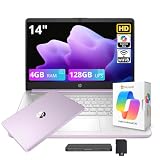
- Premium Choice: HP Stream 14" HD Student&Business Laptop with AI Copilot, Intel Processor N150, 4GB RAM, 128GB UFS&1TB Cloud Storage, 1 Year Office 365, Intel Graphics, Wi-Fi 6, Win 11, Lavender Purple
A student laptop has one job above all: survive a full school day. That means a lid that opens in seconds, enough battery to skip the wall outlet in a lecture hall, and a keyboard that holds up through essays, spreadsheets, and a few late-night video calls. With a ceiling of under 600 dollars, the question is not whether a laptop can be found but which compromises are acceptable. The eight machines below mostly sit at the lean end of that range, so the differences come down to memory, storage type, and operating system.
This guide is for high school and college students, and for parents shopping on their behalf. It uses only what each listing states and flags the specs that can frustrate people later, such as 4GB of RAM, slow eMMC storage, or a locked-down Windows mode. A 2026 school year asks more of a laptop than older ones did, with cloud documents, browser-heavy coursework, and video lessons all running at once, so the choice deserves a second look before checkout.
Quick Picks
As an Amazon Associate we earn from qualifying purchases at no extra cost to you.




| Product | Best for | Key spec from the title |
|---|---|---|
| HP 14-inch Chromebook (N4120) | Browser-based classes | Chrome OS, 14 hours battery, HDMI, USB-A and USB-C |
| 15.6-inch N4020 laptop | Bigger screen with card expansion | 128GB eMMC, supports 1TB TF card, Windows 11 |
| HP Stream 14-inch (N150) | Light Windows use with Copilot | Intel N150, 128GB UFS, Wi-Fi 6, 1 year Office 365 |
| HP 14-inch Ultra-Light (Celeron N4500) | All-day battery | 12-hour battery, fast charge, 64GB eMMC plus SD card |
| HP 14-inch 628GB Pro edition | Large file-storage needs | 128GB UFS plus 500GB external, Windows 11 Pro |
| HP 14-inch N150, Silver | Cloud-storage workflows | Intel N150, 1TB cloud storage, Windows 11 Home |
| HP 14-inch DDR5 edition | Slightly newer memory type | 4GB DDR5 RAM, Wi-Fi 6, Windows 11 Pro |
| TRHRO 15.6-inch Pentium Gold | More memory for multitasking | 12GB RAM, 128GB SSD, IPS screen |
How to Choose
RAM is the spec students regret most
Four gigabytes can run a browser and a document, but not many tabs and a video call together. For a laptop that must last through college, 8GB is the comfortable target; 12GB, as in the TRHRO listing, gives more headroom. Chromebooks stretch 4GB further than Windows machines because Chrome OS is lighter, so a 4GB Chromebook is less risky than a 4GB Windows laptop. Remember that a student laptop is meant to last several school years, and software only grows hungrier, so lean toward the higher memory figure when two options are otherwise close.
Storage type and size
An SSD opens files and applications quickly, while eMMC and UFS storage are slower and often smaller. Anything labeled 64GB leaves little room once Windows updates arrive. Cloud storage and SD card slots help, but they do not replace internal speed. Cloud space is also tied to an account and sometimes to a time-limited offer, so keep a backup of important essays and projects on a flash drive. Ignore total storage figures that add external or cloud allotments; judge the internal drive alone.
Battery life and screen
Look for twelve hours or more on the spec sheet for a full day of classes, and treat the number as a best case. A 14-inch screen keeps weight down, while 15.6 inches is easier on the eyes for long reading and writing sessions. IPS panels, as listed on the TRHRO, give better viewing angles than basic TN screens, which matters in a crowded lecture hall.
Operating system and software
Windows 11 in S mode only installs apps from the Microsoft Store, which may block software your course requires. Chrome OS fits web-based classes but cannot run some desktop programs. A bundled year of Office 365 is convenient, though it expires, so plan for what comes after. Budget laptops often cut corners on build quality and port selection, so check for USB-C and HDMI, and look for a webcam if classes meet over video. A fast-charge claim is a bonus that saves time between lectures.
The 8 Best Options
HP 14-inch Chromebook (N4120)
This is the lightest-weight setup in the group, built on Chrome OS. The listing names an Intel quad-core N4120, 4GB of RAM, 64GB eMMC storage, a webcam, HDMI, and both USB-A and USB-C ports, with a 14-hour battery. It suits a student whose school runs on Google Docs, learning portals, and video lessons.
- Strength: A 14-hour battery claim is the longest on the list.
- Strength: HDMI and USB-C ports make connecting a monitor or projector easy.
- Trade-off: Chrome OS cannot run every desktop program.
Skip it if your course requires specific Windows software.
15.6-inch Laptop with N4020 and Windows 11
This larger machine lists an N4020 processor, 4GB of DDR4 RAM, and 128GB of eMMC storage. It supports up to a 1TB TF card, has a full HD LCD, and arrives in Space Gray for students and home offices. It fits someone who writes long papers and wants a roomier display than the 14-inch crowd offers.
- Strength: Card expansion up to 1TB gives a path to more storage later.
- Strength: The 15.6-inch FHD screen suits reading and writing.
- Trade-off: 4GB of RAM on Windows is tight for modern multitasking.
Skip it if you plan to keep many browser tabs open at once.
HP Stream 14-inch with Intel N150
The HP Stream pairs an Intel N150 with 4GB of RAM and 128GB of UFS storage. The listing adds 1TB of cloud storage, a year of Office 365, Wi-Fi 6, and an AI Copilot feature, in Lavender Purple. It is aimed at students who prefer Windows and want the basics bundled so setup takes minutes.
- Strength: Wi-Fi 6 is helpful on busy campus and dorm networks.
- Strength: Cloud storage and Office are included for the first year.
- Trade-off: 4GB of memory limits heavy multitasking.
Skip it if you want a larger screen than 14 inches.
HP 14-inch Ultra-Light with Celeron N4500
This white 14-inch notebook lists a Celeron N4500, 4GB of RAM, and 64GB of eMMC with a 64GB SD card. It claims a 12-hour battery, fast charging, a webcam, Wi-Fi 6, and Windows 11 Home in S mode. It suits a commuter who moves between buildings and cannot count on finding an outlet between classes.
- Strength: Fast charge helps when an outlet is only available for a short break.
- Strength: The ultra-light design is easy to carry across campus.
- Trade-off: S mode limits installs to the Microsoft Store.
Skip it if your classes need software from outside the store.
HP 14-inch Laptop with 628GB Storage and Windows 11 Pro
This Lavender model lists an Intel four-core CPU, 4GB of RAM, and 628GB of storage split between 128GB of UFS and 500GB external. Copilot AI and Microsoft Office come with it, along with Windows 11 Pro. It fits students who handle photos, slides, and project folders and want an obvious place to put them.
- Strength: Windows 11 Pro avoids the S mode limits.
- Strength: The external storage helps with large project files.
- Trade-off: only 128GB is internal, and 4GB of RAM is limited.
Skip it if internal speed matters more than total gigabytes.
HP 14-inch Laptop with N150 in Silver
This Silver model combines an Intel N150 with Office 365, 1TB of cloud storage, Copilot AI, Wi-Fi 6, and Windows 11 Home. It describes a lightweight, portable design with long battery life for business and students. It makes sense for someone who keeps most files online and wants a neutral, professional look.
- Strength: A lightweight build suits students who carry the laptop all day.
- Strength: Cloud storage supports sync-first workflows across devices.
- Trade-off: the listing does not state RAM or internal storage, so verify them.
Skip it if you want clear memory specifications up front.
HP 14-inch DDR5 Edition with Windows 11 Pro
Another Lavender HP, this one lists 4GB of DDR5 RAM, 628GB of combined storage, Wi-Fi 6, Microsoft Office, and Windows 11 Pro. A four-core Intel processor and Copilot AI are named as well. It is the choice for a student who wants the newer memory type while staying in the same 14-inch family.
- Strength: DDR5 is the newer memory type and can be faster than DDR4.
- Strength: Wi-Fi 6 and Windows 11 Pro round out the connectivity.
- Trade-off: internal storage is the 128GB UFS portion only.
Skip it if you want more than 4GB of memory.
TRHRO 15.6-inch Pentium Gold Laptop
The TRHRO stands out for memory: 12GB of RAM alongside a 128GB SSD and a Pentium Gold 6500Y running up to 3.4GHz. The 15.6-inch screen is an FHD IPS panel, with USB-C, USB 3.2, Wi-Fi 5, and Bluetooth 5.2. It is for the student who runs a browser, a notes app, and a video call together.
- Strength: 12GB of RAM and an SSD offer more multitasking room than the HP models.
- Strength: An IPS display with USB-C connectivity feels current for the tier.
- Trade-off: Wi-Fi 5 is a generation behind the Wi-Fi 6 on the HP models.
Skip it if you want a brand name with a larger support network.
Which One Fits Your Situation
Your school lives in Google Docs and web portals
The HP 14-inch Chromebook fits, with its long battery claim and simple Chrome OS.
You run many tabs and a video call together
The TRHRO 15.6-inch with 12GB of RAM and an SSD gives the most memory in the group.
You need Windows software without S mode
Either HP 14-inch with Windows 11 Pro avoids the Store-only limit, and the DDR5 edition offers the newer memory type.
You carry the laptop all day
The HP 14-inch Ultra-Light lists a 12-hour battery with fast charge, which suits back-to-back classes.
You want the most storage-friendly Windows option
The TRHRO lists a real SSD, while the HP 14-inch with 628GB lists external storage, so the choice depends on whether speed or total capacity matters more.
Common Mistakes
- Buying 4GB of RAM on a Windows laptop and expecting it to last four years.
- Counting external or cloud storage as if it were an internal drive.
- Ignoring Windows 11 in S mode and discovering a required program will not install.
- Choosing by battery claim alone, since figures are best-case.
- Overlooking that bundled Office subscriptions expire after a year.
Frequently Asked Questions
Is a Chromebook enough for college?
For web-based coursework, writing, and video calls, yes. Check your program first, since some majors need Windows-only software. Ask the department or look at the syllabus before buying, because engineering, design, and accounting courses often name required programs.
How much RAM does a student need?
Eight gigabytes is a comfortable target. Four gigabytes works for basic use, especially on Chrome OS, but feels tight on Windows.
Is eMMC storage a problem?
It is slower than an SSD and usually smaller. It works for light use, though students who store large files should prefer an SSD.
Should I get a 14-inch or 15.6-inch screen?
Fourteen inches is easier to carry and fits most lecture-hall desks without crowding a notebook. A 15.6-inch screen is more comfortable for long reading and writing sessions at a desk.









