

- Top Pick: WALI Adjustable Single Monitor Arm for 13-34 inch Screens, up to 26.4 lbs
- Best Value: ErGear Single Monitor Arm, Fully Adjustable Monitor Mount for 13–34 Inch Screens, Fast Install Computer Monitor Stand with Tool-Free VESA Mount, Cable Management, Holds 19.8 lbs, Max VESA 100x100mm
- Premium Choice: HUANUO FlowLift™ Single Monitor Mount, 13 to 32 Inch Monitor Arm, Adjustable Monitor Stand, Vesa Mount with Clamp and Grommet Base – Fits 4.4 to 19.8lbs LCD Computer Monitors
A single monitor arm is one of the cheapest, highest-impact upgrades you can make to a desk. It clears the chunky factory stand from your work surface, lets you raise, lower, tilt and swing the screen to the exact spot your eyes and neck want, and frees the area behind the monitor for a keyboard tray, a headset stand or just a tidier cable run. For most 13 to 32 inch gaming and office monitors, a $20 to $60 gas-spring arm is plenty — you do not need an Ergotron LX to feel the benefit. This guide rounds up the best single monitor arms in 2026 from the affordable, reliable brands worth shortlisting.
- Best Single Monitor Arms at a Glance
- 1. HUANUO FlowLift Pro Monitor Arm for 13-32 inch Screens, MechaSpring
- 2. Pixio PS1S Wave White Single Monitor Arm Stand Desk Mount up to 32 inch
- 3. Pixio PS1S Wave Black Single Monitor Arm Stand Desk Mount up to 32 inch
- 4. HUANUO FlowLift Single Monitor Mount 13-32 inch Adjustable Height
- 5. HUANUO Single Monitor Mount 13-32 inch Gas Spring Adjustable
- 6. MOUNT PRO Single Monitor Stand Fits Max 32 inch, Free-Standing
- How to Choose a Single Monitor Arm
- Related Guides
- Frequently Asked Questions
- Related Guides
- Related Articles
- Related Guides
Our picks were chosen on what genuinely matters at this price point: VESA support (75×75 and 100×100 are the common patterns), weight capacity for today’s heavier 27-inch QHD and 32-inch 4K panels, range of motion via the gas spring, and overall build quality versus cost. Prices here run from around $20 to around $60, covering everything from a basic free-standing stand to a smart, design-led Pixio Wave. Below is an at-a-glance comparison of all six, then a closer look at each arm and a buyer’s guide built around VESA, weight, clamp style, and cable management — the criteria that decide whether a single monitor arm fits your screen and desk.
As an Amazon Associate we earn from qualifying purchases at no extra cost to you.




🛒 Best Price Today on Amazon
Prime members get fast, free shipping on everything above, plus member-only deals. New members get a 30-day free trial — cancel anytime.
Best Single Monitor Arms at a Glance
| Monitor Arm | Best For | Standout Spec | Approx Price |
|---|---|---|---|
| HUANUO FlowLift Pro (MechaSpring) | Premium HUANUO single arm | MechaSpring tension, 13-32 inch | around $30 |
| Pixio PS1S Wave White | Design-led white desks | Aesthetic curved arm, 32 inch | around $60 |
| Pixio PS1S Wave Black | Design-led dark builds | Matching black aesthetic arm | around $60 |
| HUANUO FlowLift Single (Adjustable Height) | Tilt, swivel, height set | Full range gas spring 13-32 inch | around $36 |
| HUANUO Single Gas Spring Monitor Arm | Classic VESA-arm buyer | Gas spring, full motion 13-32 inch | around $40 |
| MOUNT PRO Single Monitor Stand (Free-Standing) | Renters or no-clamp desks | Free-standing weighted base | around $20 |
1. HUANUO FlowLift Pro Monitor Arm for 13-32 inch Screens, MechaSpring

9
HUANUO FlowLift™ Pro Monitor Arm for 13–32" Screens, MechaSpring Monitor Mount, Fully-Adjustable Monitor Stand with Tilt/Swivel/Rotation, Tool-Free VESA Mount, C-Clamp/Grommet Base, Max Load 19.8 lbs
In Stock


As an Amazon Associate we earn from qualifying purchases. Product prices and availability are accurate as of the date/time indicated.
The HUANUO FlowLift Pro is HUANUO’s step-up single arm and the premium-feel pick of this list at a still-affordable price. It uses HUANUO’s MechaSpring tension system — a refined take on a gas-spring arm — designed for smoother height adjustment, less drift over time, and a tidier overall feel than their entry-level models. It supports 13 to 32 inch monitors via the standard 75×75 and 100×100 VESA patterns, and clamps to most desk edges.
This is the arm for the buyer who has read enough Reddit threads to know they want HUANUO but does not want the cheapest one. The MechaSpring mechanism keeps the monitor exactly where you set it, the build quality is a step above the brand’s $20 stands, and the included clamp and grommet options cover most desks. For a single arm that feels closer to a premium product without leaving the budget tier, the FlowLift Pro is the pick that earns its small premium and is at around $30 a smart middle-of-the-road buy.
Pros: MechaSpring tension, smooth motion, 13-32 inch VESA 75/100 support, sturdy clamp.
Cons: Cable management is functional rather than premium; PU finish, not aluminium.
2. Pixio PS1S Wave White Single Monitor Arm Stand Desk Mount up to 32 inch

7
Pixio PS1S Wave White Single Monitor Arm Stand Desk Mount – Fits up to 32 inches Monitors and up to 19.8lbs. VESA Compatibility and Integrated Cable Management
In Stock


As an Amazon Associate we earn from qualifying purchases. Product prices and availability are accurate as of the date/time indicated.
The Pixio PS1S Wave in white is the design-led pick of the list. Pixio is a gaming-monitor brand that has expanded into ergonomics with a clean, sculpted arm aesthetic that looks at home on minimalist white desks. It supports monitors up to 32 inches over the usual 75×75 and 100×100 VESA patterns, uses a gas-spring mechanism for full tilt, swivel and height adjustment, and comes with a desk clamp and grommet hardware.
This is the arm for the buyer who treats their desk as a curated space and wants the mount to disappear into a tidy aesthetic rather than scream industrial. The white finish suits Scandi-style setups, the curved arm is a more deliberate shape than the typical black-tube competition, and Pixio’s brand recognition is reassuring at this price. At around $60 it is towards the top of the budget tier here, but you are paying for design as much as function — and for a single 32-inch screen on a white-themed desk it earns its place.
Pros: Strong design, clean white finish, full motion gas spring, 32-inch support.
Cons: Price is towards the top of single-arm budget; less hardware than dual-pivot models.
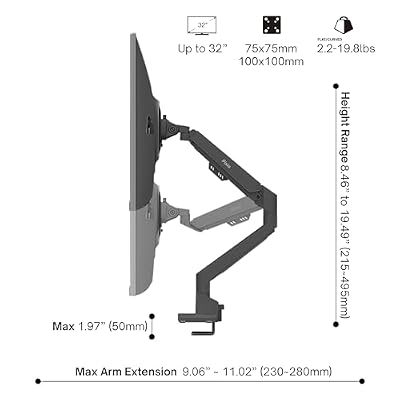
3. Pixio PS1S Wave Black Single Monitor Arm Stand Desk Mount up to 32 inch

7
Pixio PS1S Wave Black Single Monitor Arm Stand Desk Mount – Fits up to 32 inches Monitors and up to 19.8lbs. VESA Compatibility and Integrated Cable Management
In Stock




As an Amazon Associate we earn from qualifying purchases. Product prices and availability are accurate as of the date/time indicated.
The Pixio PS1S Wave in black is the same well-designed arm as the white version for setups where dark hardware fits better. It uses the same Pixio sculpted aesthetic, the same gas-spring mechanism, and the same 32-inch and 75/100 VESA support, just with a matte-black finish that blends with most gaming-style monitors, mechanical keyboards and dark desks. At around $60 it sits in the same price bracket as its white sibling.
This is the pick if your build leans dark or if your monitor itself is black-bezelled — the arm visually disappears behind the screen, which is exactly what you want from a desk mount. The full tilt, swivel and height adjustment cover normal ergonomic positioning, the clamp and grommet options cover most desks, and the brand carries enough monitor-world credibility that you trust the engineering. As the dark twin to the white Wave, it is the natural pick for any setup that is not aiming for a white aesthetic.
Pros: Same Pixio Wave design in black, gas-spring full motion, fits dark builds.
Cons: Same higher price point as the white version; styling-led rather than feature-stuffed.
4. HUANUO FlowLift Single Monitor Mount 13-32 inch Adjustable Height

35
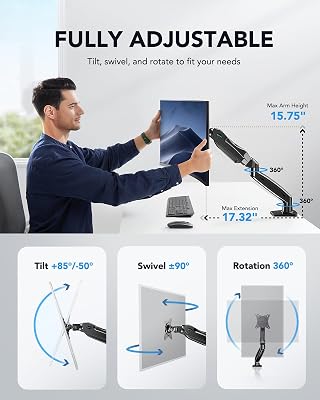
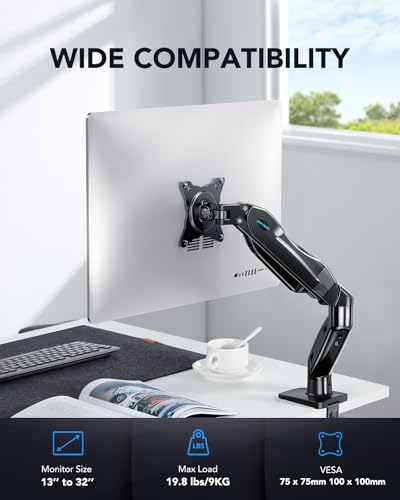
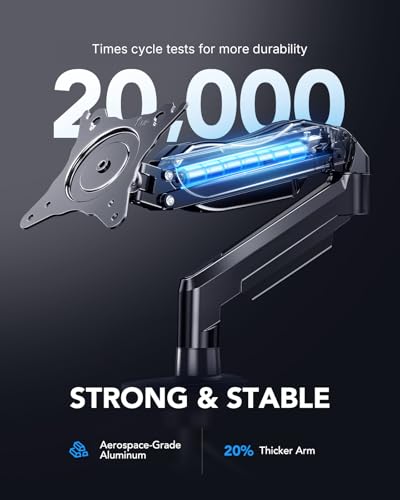
HUANUO FlowLift™ Single Monitor Mount, 13 to 32 Inch Monitor Arm, Adjustable Monitor Stand, Vesa Mount with Clamp and Grommet Base – Fits 4.4 to 19.8lbs LCD Computer Monitors
In Stock




As an Amazon Associate we earn from qualifying purchases. Product prices and availability are accurate as of the date/time indicated.
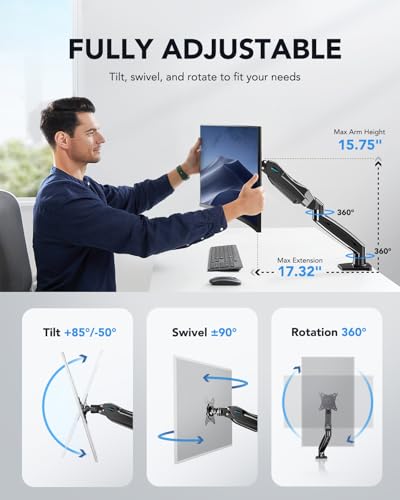
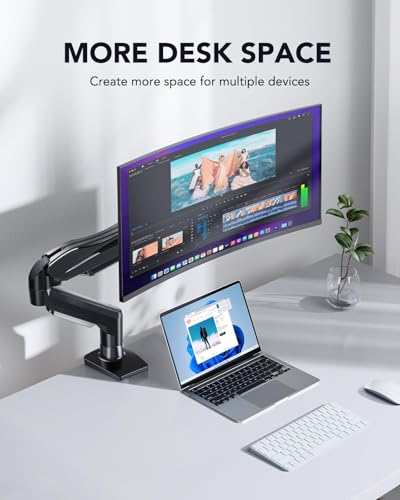
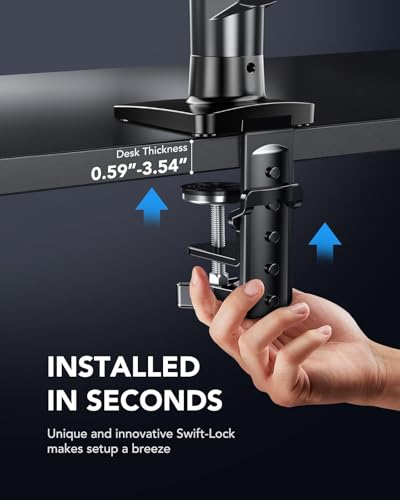
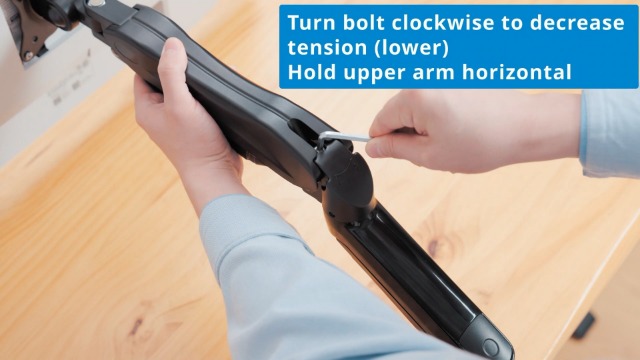
The HUANUO FlowLift Single is the brand’s mainstream gas-spring single arm and one of the most popular budget mounts on Amazon. It supports 13 to 32 inch screens on 75×75 and 100×100 VESA, offers full tilt, swivel and height adjustment via a standard gas spring, and ships with both a desk clamp and a grommet mount so it fits more desks. At around $36 it sits squarely in the value zone and is the default starting point for many first-time arm buyers.
This is the arm to choose for the buyer who wants the classic ‘cheap HUANUO’ experience: well-known brand, broad compatibility, full range of motion, and a reassuring number of review stars to lean on. The gas spring holds a 22-pound 27-inch monitor with no obvious drift, the clamp is sturdy enough for typical office and gaming desks, and the cable channel keeps the back of the screen tidy. For a no-fuss single arm at well under $50, the HUANUO FlowLift is the safe, sensible default.
Pros: Popular HUANUO design, broad 13-32 inch support, clamp and grommet included, full motion.
Cons: Plain black plastic finish; not as refined as the FlowLift Pro.
5. HUANUO Single Monitor Mount 13-32 inch Gas Spring Adjustable

6
HUANUO Single Monitor Mount, 13 to 32 Inch Gas Spring Monitor Arm, Adjustable Stand, Vesa Mount with Clamp and Grommet Base – Fits 4.4 to 19.8lbs LCD Computer Monitors
In Stock



As an Amazon Associate we earn from qualifying purchases. Product prices and availability are accurate as of the date/time indicated.
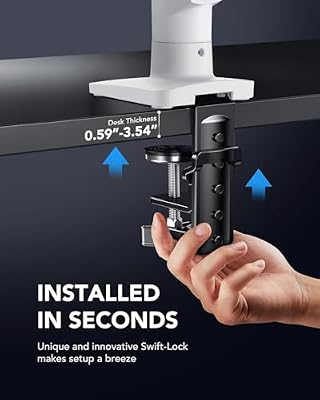
This second HUANUO single arm covers the same core territory — 13 to 32 inch screens, 75×75 and 100×100 VESA, gas-spring full motion, desk clamp and grommet mounting — at a slightly different price point of around $40. It is essentially HUANUO’s classic gas-spring monitor arm, updated and re-listed, and it is the one to consider if the FlowLift is out of stock or if reviews tip you toward this specific SKU.
This is the pick for the buyer who lands on this exact listing first and wants to know that yes, it is a perfectly fine arm — sturdy gas spring, full range of motion, easy installation, and the same broad compatibility as the rest of the HUANUO single-arm range. Practically speaking it is interchangeable with the FlowLift Single in feature set, so let price and stock decide. As a dependable, well-priced HUANUO gas-spring arm, it earns its spot on the list.
Pros: Classic HUANUO gas-spring arm, full motion, broad VESA support, clamp and grommet options.
Cons: Essentially overlaps with FlowLift Single; pick by price and availability.
6. MOUNT PRO Single Monitor Stand Fits Max 32 inch, Free-Standing

8
MOUNT PRO Single Monitor Stand Fits Max 32 inch Screen, Free-Standing Computer Desk Stand, Display Mount with Height Adjustable, Swivel, Tilt, Rotation, VESA Monitor Stand 100×100
In Stock



As an Amazon Associate we earn from qualifying purchases. Product prices and availability are accurate as of the date/time indicated.
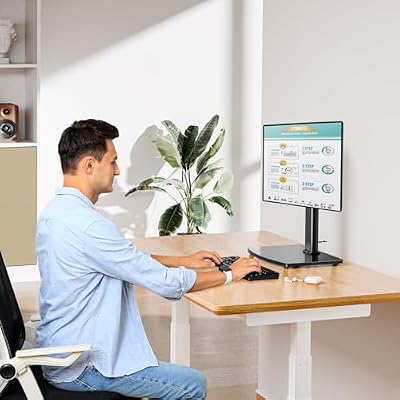
The MOUNT PRO Single Monitor Stand is the no-clamp pick of the list, and at around $20 the cheapest option. Unlike every other arm here, it is a free-standing weighted base rather than a desk-clamp mount, so it does not attach to your desk edge at all. It supports monitors up to 32 inches over standard VESA patterns and offers basic height, tilt and swivel adjustment.
This is the pick for renters, glass-top desks, or anyone whose desk simply cannot take a clamp. The weighted base sits on the desk surface and holds a single monitor in place without damaging the desktop or requiring access to the desk edge or a grommet hole. The trade-off is stability — a weighted base is never as rock-solid as a clamp, especially with heavier 32-inch panels — and the build quality is the most basic on the list. For no-installation portability at the cheapest price, though, it is a useful and honest option.
Pros: Free-standing weighted base (no clamp), low price, fits up to 32 inch.
Cons: Less stable than clamp arms; bottom-tier build; not ideal for heaviest 32-inch 4K panels.
How to Choose a Single Monitor Arm
A single monitor arm decision starts with VESA compatibility and weight capacity. VESA is the four-hole mounting pattern on the back of the monitor — 75×75 millimetres for smaller and lighter panels, 100×100 for most modern 24 to 32 inch monitors, and 200×100 or larger for some heavy ultrawides. Every arm on this list supports 75×75 and 100×100, which covers the vast majority of 13 to 32 inch screens, but you should still flip your monitor over and confirm the pattern and that it has not been replaced by a proprietary stand-only mount before you buy.
Weight capacity is the other half of the same question. A typical 27-inch gaming monitor weighs around 12 to 15 pounds, a 32-inch 4K panel runs 18 to 22 pounds, and an ultrawide can exceed that easily. Single arms in this guide are rated for the 13 to 32 inch range and typically up to roughly 22 pounds of glass; if your monitor is at the heavier end or you have plans for a 49-inch ultrawide later, look at the heavy-duty category instead. Right-sizing the arm to the screen avoids a drifting, drooping mount on day three.
Clamp style and gas-spring quality decide how the arm actually behaves on your desk. A C-clamp gripping the desk edge is the most common attachment and the most stable, with a grommet (a hole through the desktop) as the tidier alternative if your desk supports it. A weighted free-standing base, as on the MOUNT PRO, avoids clamping entirely but is less rigid. The gas spring is what holds the screen in place once positioned — the HUANUO MechaSpring on the FlowLift Pro is a refined version of this, smoother and less prone to drift than basic implementations.
Finally, weigh aesthetics, cable management, and budget. Cable channels on the back of the arm — present on every HUANUO and Pixio model here — keep DisplayPort, USB-C and power leads tidy and out of sight. Aesthetics matter more than people admit: the Pixio Wave costs more than the basic HUANUO because it looks better, and that is a legitimate reason to spend the extra if the desk is in plain view. Set your budget, confirm VESA and weight, pick the clamp style your desk allows, and choose the arm on this list that fits your screen and your eye.
Frequently Asked Questions
What VESA pattern do I need for a single monitor arm?
Most modern 13 to 32 inch monitors use 75×75 mm or 100×100 mm VESA hole patterns on the back, and every arm on this list supports both. Flip your monitor over and look at the four mounting holes — if the spacing matches either of those, you are good. Some monitors hide the holes behind a clip-on plate or use a proprietary stand-only mount, so always confirm before buying.
How heavy a monitor can a single arm hold?
Single arms in this guide are rated for 13 to 32 inch screens, which typically run from around 6 pounds up to roughly 22 pounds. A 27-inch gaming monitor at 12 to 15 pounds is well within range; a heavier 32-inch 4K panel pushes 18 to 22 pounds and works for most models here. For 34-inch or larger ultrawides, look at the heavy-duty category instead.
Are free-standing monitor stands as stable as clamp arms?
Not quite. A weighted free-standing base like the MOUNT PRO sits on the desk and supports the monitor without any attachment, which is great for renters or glass desks, but it is inherently less rigid than a C-clamp biting the desk edge. For typical office use it is fine; if you bump your desk often or run a heavier 32-inch panel, a clamp arm is more solid.
Do I need a gas-spring arm or is a fixed mount enough?
A gas-spring arm — every model here except the MOUNT PRO uses one in some form — lets you raise, lower, push and pull the screen with one hand and have it stay where you put it. Fixed mounts are cheaper but lock the monitor in one position. For most desks the small upcharge for a gas spring is worth it; you will adjust the screen far more often than you expect.
Related Guides
- Best Dual Monitor Arms
- Best Heavy Duty Monitor Arms for Ultrawide
- Best Premium Monitor Arms
- Best Triple Monitor Arms
- Best Gaming Monitors
- Best Monitors
Affiliate Disclosure: As an Amazon Associate, we earn from qualifying purchases. If you click a link and make a purchase, we may earn a small commission at no extra cost to you. Prices and availability are accurate as of publication and may change.










