

- Top Pick: TP-Link AC1200 WiFi Router Dual Band Wireless Internet Router (Archer A54)
- Best Value: TP-Link AX1800 WiFi 6 Router (Archer AX21 V5)
- Premium Choice: NETGEAR WiFi 6 Router 4-Stream (R6700AX) – Router Only, AX1800 Wireless Speed (Up to 1.8 Gbps), Covers up to 1,500 sq. ft., 20 Devices – Free Expert Help, Dual-Band
In a small apartment, the router problem is the opposite of a big house: you do not need to blanket thousands of square feet, you need a compact, affordable unit that covers a studio or a one- to two-bedroom flat reliably without wasting money on coverage you will never use. A single well-placed router is usually all a small space requires, and the best small-apartment picks deliver solid Wi-Fi, easy setup and good value rather than sprawling whole-home range. This guide rounds up the best routers for small apartments in 2026, leading with compact single-unit value routers and including right-sized mesh options for awkward layouts.
- Best Routers for Small Apartments at a Glance
- 1. TP-Link Archer AC1750 WiFi Router – Dualband Gigabit (Archer A7)
- 2. TP-Link AX1800 WiFi 6 Router (Archer AX21 V5) – Dual Band Wireless Internet, Gigabit
- 3. Google WiFi System, 1-Pack – Router Replacement for Whole Home Coverage
- 4. NETGEAR Nighthawk Smart Wi-Fi Router, R6700 – AC1750 Wireless
- 5. TP-Link Deco S4 Mesh AC1900 WiFi System – Up to 5,500 Sq.ft. Coverage
- 6. Amazon eero 6 mesh wifi system – Supports plans up to 500 Mbps
- How to Choose a Router for a Small Apartment
- Frequently Asked Questions
- Related Guides
- Related Articles
Our picks were chosen on what genuinely matters in a small space: coverage that comfortably fits a studio or small flat (not overkill), an up-to-date but affordable Wi-Fi standard, a compact single-unit footprint that tucks onto a shelf, easy setup, and value. We have included a price spread from around $38 to around $139, mostly single-unit routers plus a couple of mesh systems for tricky layouts, because the best small-apartment router is the one that fits your floorplan and budget without paying for a mansion’s worth of range. Below is an at-a-glance comparison of all six, then a closer look at each and a buyer’s guide built around coverage, Wi-Fi standard and value for small spaces.
As an Amazon Associate we earn from qualifying purchases at no extra cost to you.





🛒 Best Price Today on Amazon
Prime members get fast, free shipping on everything above, plus member-only deals. New members get a 30-day free trial — cancel anytime.
Best Routers for Small Apartments at a Glance
| Router | Best For | Standout Spec | Approx Price |
|---|---|---|---|
| TP-Link Archer AC1750 (Archer A7) | Best compact value pick | AC1750 dual-band, single unit | around $38 |
| TP-Link Archer AX21 (AX1800 WiFi 6) | Future-proof small-flat WiFi 6 | WiFi 6 AX1800, single unit | around $52 |
| Google WiFi System, 1-Pack | Simplest single-unit setup | App-managed, 1-pack router | around $54 |
| NETGEAR Nighthawk R6700 (AC1750) | Speed headroom in one unit | AC1750, Nighthawk single router | around $39 |
| TP-Link Deco S4 Mesh AC1900 | Awkward layouts / dead corners | Mesh AC1900, expandable | around $95 |
| Amazon eero 6 mesh WiFi | WiFi 6 mesh for tricky walls | WiFi 6 mesh, app setup | around $140 |
1. TP-Link Archer AC1750 WiFi Router – Dualband Gigabit (Archer A7)

TP-Link Archer AC1750 WiFi Router - Dualband Gigabit, Qualcomm inside, Works with Alexa(A7), Black
As an Amazon Associate we earn from qualifying purchases. Product prices and availability are accurate as of the date/time indicated.
The TP-Link Archer AC1750 is the best compact value pick for a small apartment, and the obvious place to start. It is a single dual-band gigabit router rated at AC1750, with a Qualcomm chipset and broad device compatibility, and at around $38 it is the cheapest router here. For a studio or one-bedroom flat, a single AC1750 unit delivers all the speed and coverage most people need without spending more than necessary.
This is the router to choose for the typical small-apartment renter who wants reliable Wi-Fi at the lowest sensible price. AC1750 dual-band easily handles streaming, video calls, browsing and everyday gaming across a compact space, the gigabit ports cover wired devices, and TP-Link’s setup is straightforward. It does not try to blanket a large home, which is exactly right here — you are not paying for range you cannot use. As a no-fuss, single-unit value router for a small flat, the Archer AC1750 is hard to beat on price.
Pros: Lowest price here, capable AC1750 dual-band, single compact unit, ideal for studios and one-bed flats.
Cons: WiFi 5 rather than WiFi 6; coverage suits small spaces, not large homes.
2. TP-Link AX1800 WiFi 6 Router (Archer AX21 V5) – Dual Band Wireless Internet, Gigabit
The TP-Link Archer AX21 is the future-proof single-unit pick for a small apartment. It steps up to the WiFi 6 standard (AX1800) in a compact dual-band, gigabit router, bringing better efficiency with many connected devices and newer phones and laptops. At around $52 it is an affordable way to get current Wi-Fi technology in a single tidy unit sized for a small space.
This is the router for the small-flat renter who wants to buy once and stay current. WiFi 6 handles a modern apartment full of phones, laptops, a TV and smart-home gadgets more gracefully than older standards, which matters even in a small space if you have a lot of devices. The single-unit form factor fits a studio or one- to two-bedroom flat without mesh complexity, and TP-Link’s app setup is simple. For a compact, value WiFi 6 router that will not feel dated soon, the Archer AX21 is the smart middle choice.
Pros: Modern WiFi 6 (AX1800), efficient with many devices, single compact unit, strong value.
Cons: Single-router coverage; very thick interior walls may still need mesh.
3. Google WiFi System, 1-Pack – Router Replacement for Whole Home Coverage

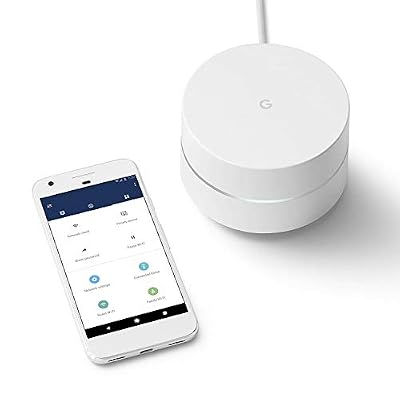
Google WiFi System, 1-Pack - Router Replacement for Whole Home Coverage - NLS-1304-25,white


As an Amazon Associate we earn from qualifying purchases. Product prices and availability are accurate as of the date/time indicated.
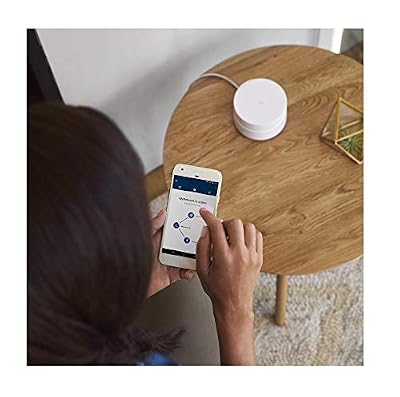
The Google WiFi 1-Pack is the simplest single-unit setup here. Sold as one node, it works as a compact standalone router managed entirely through a clean, beginner-friendly app, with the option to add more units later if you ever move somewhere bigger. At around $54 it offers an easy, app-driven Wi-Fi experience in a single small puck that suits a studio or small flat.
This is the router for someone who wants the least fiddly setup possible. The app walks you through installation in minutes, network management (guest Wi-Fi, pausing devices, checking what is connected) is genuinely approachable, and the discreet design looks at home on a shelf rather than bristling with antennas. As a single unit it comfortably covers a small apartment, and because it is part of a mesh family you can expand later. For small-space simplicity and a tidy look, the Google WiFi 1-Pack is a friendly, low-stress choice.
Pros: Very simple app setup, discreet single-puck design, expandable later, great for small flats.
Cons: Single node covers a small space only; WiFi 5-class, fewer manual controls.
4. NETGEAR Nighthawk Smart Wi-Fi Router, R6700 – AC1750 Wireless
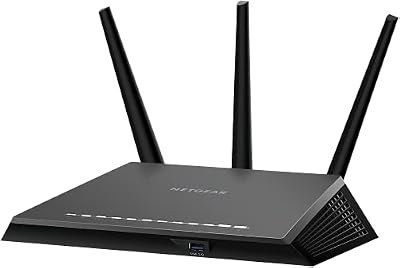
NETGEAR Nighthawk Smart Wi-Fi Router (R7000) - AC1900 Wireless Speed (Up to 1900 Mbps) | Up to 1800 Sq Ft Coverage & 30 Devices | 4 x 1G Ethernet and 2 USB Ports | Armor Security


As an Amazon Associate we earn from qualifying purchases. Product prices and availability are accurate as of the date/time indicated.
The NETGEAR Nighthawk R6700 brings a recognisable performance name to the small-apartment list. It is a single AC1750 dual-band router under NETGEAR’s Nighthawk badge, with the antenna array and software features the line is known for, at around $39. For a small flat it offers dependable AC1750 speed and a touch more headroom than the most basic boxes, in one unit.
This is the router for the small-space user who wants a familiar brand and a little extra capability without going mesh. The AC1750 dual-band performance easily covers a studio or one-bedroom flat for streaming, calls and gaming, NETGEAR’s app and parental-control features add convenience, and the Nighthawk design pushes a confident signal across a compact area. It is more router than a tiny studio strictly needs, but for a one- to two-bedroom flat that wants speed headroom in a single trusted unit, the R6700 is a solid pick.
Pros: Trusted Nighthawk name, capable AC1750 dual-band, single unit with useful app features.
Cons: WiFi 5 generation; coverage and features aimed at small-to-medium spaces.
5. TP-Link Deco S4 Mesh AC1900 WiFi System – Up to 5,500 Sq.ft. Coverage

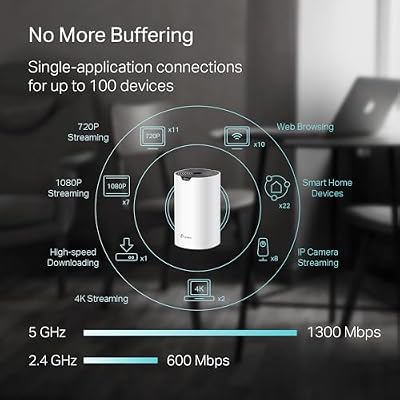
TP-Link Deco S4 Mesh AC1900 WiFi System, Deco S4(3-Pack) | Up to 5,500 Sq.ft. Coverage, Replaces WiFi Router and Extender, Gigabit Ports, Works with Alexa



As an Amazon Associate we earn from qualifying purchases. Product prices and availability are accurate as of the date/time indicated.
The TP-Link Deco S4 is the mesh pick for small apartments with awkward layouts. Rather than one router, it uses multiple Deco units that work together as a single seamless network, which is the right tool when thick walls or an L-shaped flat leave a dead corner a single router cannot reach. At around $95 it is an affordable way to add whole-space mesh coverage when a standalone unit is not enough.
This is the system for the small-apartment renter whose floorplan, not its size, is the problem — a long hallway, a back bedroom behind a thick wall, or a layout where the router can only live at one end. Spreading two Deco units around eliminates dead spots and hands devices off seamlessly as you move, and the AC1900 mesh has plenty of speed for everyday use. For most studios a single router is enough, but when walls and angles defeat one box, the Deco S4 is the value mesh answer.
Pros: Seamless mesh for tricky layouts, eliminates dead corners, affordable whole-space coverage.
Cons: Overkill for an open studio; WiFi 5-class and pricier than a single router.
6. Amazon eero 6 mesh wifi system – Supports plans up to 500 Mbps

Rounding out the list is the Amazon eero 6 mesh system, the WiFi 6 mesh pick for tricky walls. It combines the latest mainstream Wi-Fi standard with eero’s famously simple app-driven mesh, supports internet plans up to 500 Mbps, and spreads coverage across multiple compact units. At around $140 it is the premium option here, aimed at small spaces where modern Wi-Fi and effortless mesh both matter.
This is the system for the small-apartment user who wants WiFi 6 efficiency, the smoothest possible setup, and the reassurance of mesh for a wall-heavy or oddly-shaped flat. The eero app makes installation and management almost trivial, WiFi 6 handles a device-dense modern home gracefully, and the mesh design clears dead spots a single router would leave. It is more than a plain studio needs, but for a small space with difficult walls and a wish for current technology plus painless management, the eero 6 is the standout.
Pros: Modern WiFi 6 mesh, effortless eero app, clears dead spots, ideal for wall-heavy small flats.
Cons: Highest price here; mesh is unnecessary for a simple open studio.
How to Choose a Router for a Small Apartment
For a small apartment, the first thing to get right is not chasing too much coverage. Manufacturers advertise huge square-footage figures, but a studio or one- to two-bedroom flat rarely needs them — a single well-placed router like the Archer AC1750, Archer AX21, Nighthawk R6700 or Google WiFi 1-Pack comfortably covers a small space. Buying a sprawling whole-home system for a compact flat usually means paying for range you will never use. Match the coverage to your floorplan, and remember that placement (central and out in the open, not hidden in a cabinet) matters more than raw advertised range in a small space.
The Wi-Fi standard is your next decision, and it balances future-proofing against price. WiFi 5 (AC) routers like the Archer AC1750 and Nighthawk R6700 are cheap and perfectly capable for a small flat’s streaming, calls and everyday gaming. WiFi 6 (AX) options like the Archer AX21 and eero 6 handle a device-dense modern apartment — phones, laptops, a TV and smart-home gadgets all at once — more efficiently and stay current longer. If you have lots of devices or want to buy once for years, the modest extra cost of WiFi 6 is worth it; if budget rules, WiFi 5 still does the job in a small space.
Single router versus mesh is the choice that trips small-apartment shoppers up most. For an open studio or a simple one-bedroom layout, a single unit is almost always the right answer — cheaper, simpler and entirely sufficient. Mesh systems like the Deco S4 and eero 6 only earn their place when your floorplan, not its size, is the problem: thick interior walls, a long hallway or an L-shaped flat that leaves one corner unreachable from a single point. Do not pay the mesh premium unless your layout genuinely needs it; size is rarely the deciding factor in a small flat.
Finally, weigh setup, features and budget. App-driven routers like the Google WiFi 1-Pack and eero 6 make installation and management almost effortless, which is appealing if you would rather not touch settings, while traditional routers give more manual control for the same money. Set a budget — there are great single-unit options here from around $38 — decide whether WiFi 6 and simple app management matter to you, and only step up to mesh if your walls demand it. The best small-apartment router is the compact, well-placed unit that covers your space reliably without paying for a mansion’s worth of range.
Frequently Asked Questions
Do I need a mesh system for a small apartment?
Usually not. For an open studio or a simple one- to two-bedroom flat, a single well-placed router like the Archer AC1750 or Archer AX21 covers the space comfortably and costs far less than mesh. Mesh systems like the Deco S4 or eero 6 only make sense when your layout — thick walls, a long hallway, an L-shape — leaves a corner a single router cannot reach. In a small flat, layout, not size, decides whether you need mesh.
Is WiFi 6 worth it in a small flat?
It can be, especially if you have many devices. WiFi 5 routers like the Archer AC1750 and Nighthawk R6700 are cheap and fully capable for streaming, calls and everyday gaming in a small space. WiFi 6 options like the Archer AX21 and eero 6 handle a device-dense modern apartment more efficiently and stay current longer. If you want to buy once for years or run lots of gadgets, the small premium for WiFi 6 is worthwhile.
Where should I place my router in a small apartment?
Central and out in the open. Even in a small flat, hiding a router inside a cabinet, behind a TV or on the floor weakens the signal. Put it on a shelf or table roughly in the middle of your space, away from thick walls, large metal objects and the microwave. Good placement does more for coverage in a compact apartment than chasing a bigger advertised range figure.
How much should I spend on a router for a small space?
Less than you might think. A capable single-unit router for a small apartment starts around $38 with the Archer AC1750, and even a modern WiFi 6 unit like the Archer AX21 is around $52. You generally only need to spend more — on a Deco S4 or eero 6 mesh system — if your layout has dead corners a single router cannot reach. For most small flats, a good single router in the $38 to $55 range is plenty.
Related Guides
- Best Gaming Routers
- Best Mesh WiFi Systems
- Best WiFi 6 Routers
- Best WiFi Extenders
- Best Budget Gaming Setup
- Best Gaming PCs
Affiliate Disclosure: As an Amazon Associate, we earn from qualifying purchases. If you click a link and make a purchase, we may earn a small commission at no extra cost to you. Prices and availability are accurate as of publication and may change.










