

- Top Pick: NETGEAR Nighthawk Dual-Band WiFi 7 Router (RS140) – Router Only, BE5000 Wireless Speed (up to 5.0 Gbps) – Covers up to 2,250 sq. ft., 80 Devices – 2.5 Gig Internet Port – Free Expert Help
- Best Value: Statelinker S2 Portable WiFi Hotspot,10GB Free USA Data 4g LTE Mobile MiFi
- Premium Choice: NETGEAR Nighthawk Smart Wi-Fi Router (R6900P) – AC1900 Wireless Speed (Up to 1900 Mbps), Up to 1800 Sq Ft Coverage & 30 Devices, 4 x 1G Ethernet and 1 x 3.0 USB Ports, Armor Security
The modern home is crowded with devices. Between phones, laptops, game consoles, smart TVs, speakers, cameras and a growing pile of smart-home gadgets, a typical household now juggles dozens of simultaneous wireless connections — and a basic single-point router quickly buckles under that load, causing buffering, lag and drop-outs. Handling many devices well comes down to a few things: MU-MIMO to serve multiple clients at the same time, mesh coverage so every room has a strong signal, and QoS to prioritise the traffic that matters. This guide rounds up the best routers for multiple devices in 2026, leaning heavily on mesh systems built precisely for busy homes.
- Best Routers for Multiple Devices at a Glance
- 1. TP-Link Deco X55 AX3000 WiFi 6 Mesh System, up to 6,500 Sq.Ft
- 2. Amazon eero 6 Mesh WiFi 6 System with Built-in Smart Home Hub
- 3. TP-Link Deco M5 Mesh WiFi System, up to 5,500 sq ft, HomeCare
- 4. TP-Link Deco S4 Mesh AC1900 WiFi System, up to 5,500 Sq.Ft
- 5. TP-Link AX1800 WiFi 6 Router (Archer AX21 V5), Dual Band
- 6. TP-Link AC1200 Gigabit WiFi Router (Archer A6), Dual Band MU-MIMO
- How to Choose a Router for Multiple Devices
- Frequently Asked Questions
- Related Guides
- Related Articles
Our picks were chosen on what genuinely helps a network carry a high device count: MU-MIMO support, total coverage and the ability to add nodes, QoS and smart-home features, and value. We have spanned whole-home mesh kits and capable standalone routers, with prices from around $39 up to around $149, so there is an option whether you live in an apartment or a large multi-storey house. We are also clear about which products are mesh systems and which are single-unit routers, since that shapes how they scale. Below is an at-a-glance comparison of all six, then a closer look at each and a buyer’s guide built around client capacity, mesh and prioritisation.
As an Amazon Associate we earn from qualifying purchases at no extra cost to you.


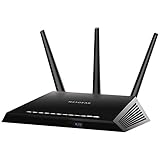


Check Price on Amazon →

🛒 Best Price Today on Amazon
Prime members get fast, free shipping on everything above, plus member-only deals. New members get a 30-day free trial — cancel anytime.
Best Routers for Multiple Devices at a Glance
| Router / Mesh | Best For | Standout Spec | Approx Price |
|---|---|---|---|
| TP-Link Deco X55 AX3000 (WiFi 6 mesh) | Large busy WiFi 6 homes | WiFi 6 mesh, up to 6,500 sq ft | around $149 |
| Amazon eero 6 mesh WiFi 6 | Simple smart-home mesh | WiFi 6 mesh, built-in smart hub | around $139 |
| TP-Link Deco M5 mesh | Whole-home with security | Mesh, 5,500 sq ft, HomeCare | around $139 |
| TP-Link Deco S4 AC1900 mesh | Budget whole-home mesh | AC1900 mesh, 5,500 sq ft | around $95 |
| TP-Link Archer AX21 AX1800 (WiFi 6) | Single-room WiFi 6 router | WiFi 6 router, dual-band | around $52 |
| TP-Link Archer A6 AC1200 (router) | Budget MU-MIMO router | AC1200 router, MU-MIMO | around $39 |
1. TP-Link Deco X55 AX3000 WiFi 6 Mesh System, up to 6,500 Sq.Ft

TP-Link Deco X55 AX3000 WiFi 6 Mesh System, Deco X55(3-Pack) | Covers up to 6500 Sq.Ft. , Replaces Wireless Router and Extender, 3 Gigabit ports per unit, supports Ethernet Backhaul





As an Amazon Associate we earn from qualifying purchases. Product prices and availability are accurate as of the date/time indicated.
The TP-Link Deco X55 is the top pick for a busy home, combining modern WiFi 6 with whole-home mesh coverage. It is an AX3000 WiFi 6 mesh system rated to cover up to 6,500 square feet, and because WiFi 6 is built specifically to handle many devices more efficiently than older standards, it is exactly the kind of system a crowded household needs. At around $149 it is the premium pick here and the most capable for high device counts.
This is the system for a large home packed with devices — multiple gamers, streamers, phones and a fleet of smart-home gear all online together. WiFi 6 with MU-MIMO and OFDMA serves many clients at once far more gracefully than older routers, the mesh design blankets up to 6,500 square feet so there are no dead zones, and you can add more Deco units to extend coverage further. For the busiest, largest homes that demand both capacity and reach, the Deco X55 is the standout choice.
Pros: WiFi 6 AX3000 for high device counts, mesh up to 6,500 sq ft, expandable with more units.
Cons: Most expensive option here; full benefit needs WiFi 6 client devices.
2. Amazon eero 6 Mesh WiFi 6 System with Built-in Smart Home Hub

The Amazon eero 6 is the simple smart-home mesh pick. It is a WiFi 6 mesh system supporting internet plans up to 500 Mbps with a built-in smart-home hub, designed to be exceptionally easy to set up and manage through the eero app. At around $139 it is a polished, beginner-friendly way to give a device-heavy home reliable mesh coverage.
This is the system for the household that wants strong multi-device WiFi 6 performance with minimal fuss, especially one invested in smart-home gear. WiFi 6 handles many simultaneous connections efficiently, the mesh design spreads coverage across the home and expands with extra eero units, and the built-in smart-home hub helps tie compatible devices together. The eero app makes managing a busy network genuinely simple. For an easy-to-live-with mesh that keeps lots of devices connected, the eero 6 is an excellent pick.
Pros: WiFi 6 mesh, built-in smart-home hub, very easy app setup, expandable coverage.
Cons: Some advanced features sit behind an optional subscription.
3. TP-Link Deco M5 Mesh WiFi System, up to 5,500 sq ft, HomeCare

TP-Link Deco M5 Mesh WiFi System Deco M5 3-Pack | Up to 5,500 sq. ft. Whole Home Coverage and 100+ Devices,WiFi Router/Extender Replacement, Anitivirus


As an Amazon Associate we earn from qualifying purchases. Product prices and availability are accurate as of the date/time indicated.
The TP-Link Deco M5 is the whole-home mesh pick with built-in security. It is a mesh WiFi system covering up to 5,500 square feet that includes TP-Link’s HomeCare suite — antivirus, parental controls and QoS — to manage and protect a household full of devices. At around $139 it is a well-rounded mesh kit for families who value coverage and control together.
This is the system for the busy home that wants reliable mesh coverage plus the tools to manage many devices safely. The mesh design eliminates dead zones across up to 5,500 square feet and expands with more units, while HomeCare’s QoS lets you prioritise important traffic, and its parental controls and security features help oversee every connected gadget. For a household that wants whole-home coverage with built-in protection and prioritisation, the Deco M5 is a strong, family-friendly choice.
Pros: Whole-home mesh up to 5,500 sq ft, HomeCare security and QoS, parental controls, expandable.
Cons: Dual-band AC design rather than the newest WiFi 6 standard.
4. TP-Link Deco S4 Mesh AC1900 WiFi System, up to 5,500 Sq.Ft

TP-Link Deco S4 Mesh AC1900 WiFi System, Deco S4(3-Pack) | Up to 5,500 Sq.ft. Coverage, Replaces WiFi Router and Extender, Gigabit Ports, Works with Alexa

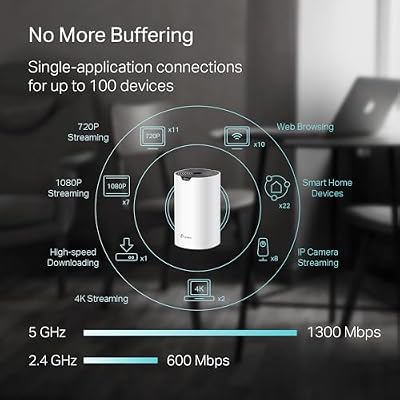


As an Amazon Associate we earn from qualifying purchases. Product prices and availability are accurate as of the date/time indicated.
The TP-Link Deco S4 is the budget whole-home mesh pick. It is an AC1900 mesh system rated to cover up to 5,500 square feet, replacing both router and range extenders with a single seamless network. At around $95 it is an affordable way to bring true mesh coverage to a device-heavy home without stretching the budget.
This is the system for the household that needs to cover a larger space and connect plenty of devices, but wants to keep costs down. The mesh design spreads a single network name across up to 5,500 square feet so devices roam seamlessly without dead zones, you can add more Deco units to extend it, and MU-MIMO helps serve multiple clients. It uses the AC (WiFi 5) standard rather than WiFi 6, but for affordable whole-home coverage that handles a busy household, the Deco S4 delivers excellent value.
Pros: Affordable mesh, up to 5,500 sq ft coverage, seamless single network, expandable, MU-MIMO.
Cons: AC (WiFi 5) standard; less device-handling headroom than WiFi 6 kits.
5. TP-Link AX1800 WiFi 6 Router (Archer AX21 V5), Dual Band
The TP-Link Archer AX21 is a single-unit router rather than a mesh system, and it is the WiFi 6 standalone pick. It is an AX1800 dual-band WiFi 6 router that brings the multi-device efficiency of WiFi 6 — including OFDMA and MU-MIMO — to homes that do not need full mesh coverage. At around $52 it is an affordable way to get modern WiFi 6 for a busy single-router setup.
This is the pick for an apartment or smaller home where one well-placed router can reach everywhere, but where many devices still connect at once. WiFi 6 handles simultaneous clients far better than older single routers, so phones, consoles, laptops and smart-home gadgets share the airwaves more efficiently, and TP-Link’s app makes setup and QoS straightforward. It will not blanket a large house like a mesh kit, but for affordable WiFi 6 in a space a single router can cover, the Archer AX21 is a smart, capable choice.
Pros: WiFi 6 router with OFDMA and MU-MIMO, efficient multi-device handling, affordable, easy app.
Cons: Single unit, not mesh — coverage limited to what one router reaches.
6. TP-Link AC1200 Gigabit WiFi Router (Archer A6), Dual Band MU-MIMO

TP-Link AC1200 Gigabit Dual Band WiFi Router (Archer A6) | MU-MIMO Wireless Internet Router, 4 x Antennas, OneMesh and AP Mode, Long Range Coverage


As an Amazon Associate we earn from qualifying purchases. Product prices and availability are accurate as of the date/time indicated.
Rounding out the list is the TP-Link Archer A6, a single-unit router and the budget pick. It is an AC1200 dual-band gigabit router with MU-MIMO, which lets it communicate with several devices at once rather than queuing them one at a time. At around $39 it is the cheapest option here and a sensible upgrade for a smaller home with a moderate number of devices.
This is the router to choose on the tightest budget, for an apartment or a home with a modest device count where mesh coverage and WiFi 6 are not essential. MU-MIMO is the key multi-device feature here, helping the router serve multiple clients simultaneously for smoother shared use, the dual-band design separates traffic across 2.4GHz and 5GHz, and gigabit Ethernet ports handle wired devices. It is an entry-level, single-unit router rather than a whole-home solution, but for affordable multi-device basics, the Archer A6 does the job.
Pros: Very affordable, MU-MIMO for multiple devices, dual-band, gigabit ports, easy setup.
Cons: AC (WiFi 5) single router; limited range and capacity for large, busy homes.
How to Choose a Router for Multiple Devices
When many devices share one network, the first thing to look for is MU-MIMO. Standard older routers talk to one device at a time, queuing the rest, which causes the slow-down you feel when the house is busy. MU-MIMO (multi-user, multiple-input, multiple-output) lets the router communicate with several devices simultaneously — every product here supports it — which keeps shared use smoother. WiFi 6 takes this further with OFDMA, packing more devices into each transmission, so the WiFi 6 picks like the Deco X55, eero 6 and Archer AX21 are the most efficient at high client counts.
Coverage is the next decision, and it determines whether you need a mesh system or a single router. A mesh kit — the Deco X55, eero 6, Deco M5 and Deco S4 here — uses multiple units to blanket a large or multi-storey home in one seamless network with no dead zones, and lets you add nodes as needed. A single-unit router like the Archer AX21 or Archer A6 is ideal for an apartment or smaller home one device can reach, and costs far less. Match the type to your home’s size and layout: buy mesh for reach, a single router for compact spaces.
QoS and smart features decide how well the network manages a heavy, mixed load. Quality of Service lets you prioritise latency-sensitive traffic like gaming and video calls over background downloads, so a busy network stays responsive for what matters — the Deco M5’s HomeCare suite includes QoS along with security and parental controls. If your home is full of smart-home gadgets, a system with a built-in hub like the eero 6 helps tie them together. Decide which management and prioritisation tools you will actually use, and favour systems that make them simple.
Finally, weigh your internet speed, device count and budget together. There is little point buying the fastest mesh if you have a slower plan or only a handful of devices, and equally a single budget router will struggle in a large home with dozens of clients. Estimate how many devices connect at once, measure the area you need to cover, and set a budget — then pick a WiFi 6 mesh for a large, crowded home, an affordable mesh for whole-home coverage on a budget, or a capable single router for a smaller space. Match capacity and coverage to your home, and the right system on this list will keep every device connected and happy.
Frequently Asked Questions
How many devices can these routers handle at once?
All are built to serve many simultaneous devices through MU-MIMO, and the WiFi 6 models — the Deco X55, eero 6 and Archer AX21 — go further with OFDMA, which packs even more clients into each transmission. The mesh kits scale best for the busiest homes because you can add units and spread the load, while the single routers suit smaller homes with a moderate device count. For dozens of devices across a large home, a WiFi 6 mesh like the Deco X55 is the strongest choice.
Do I need a mesh system or will a single router do?
It depends on your home’s size and layout. A single-unit router like the Archer AX21 or Archer A6 is perfect for an apartment or smaller home where one well-placed router can reach every room, and it costs much less. A mesh system like the Deco or eero kits uses multiple units to cover a large or multi-storey house in one seamless network with no dead zones. Buy mesh for reach across a big space; choose a single router for compact homes.
What is MU-MIMO and why does it matter for many devices?
MU-MIMO (multi-user, multiple-input, multiple-output) lets a router communicate with several devices at the same time instead of serving them one by one and making the rest wait. In a busy household that means smoother, more responsive performance when phones, consoles, laptops and smart-home gadgets are all online together. Every router in this guide supports MU-MIMO, and the WiFi 6 models add OFDMA for even better multi-device efficiency.
Does QoS help when lots of devices share the connection?
Yes — Quality of Service lets the router prioritise time-sensitive traffic like online gaming and video calls over background tasks such as downloads or updates, so the connection stays responsive for what matters even when the network is busy. The TP-Link Deco M5’s HomeCare suite includes QoS alongside security and parental controls, making it easy to keep priority traffic smooth in a device-heavy home.
Related Guides
- Best Gaming Routers
- Best Mesh WiFi Systems
- Best WiFi 6 Routers
- Best WiFi Extenders
- Best Ethernet Cables for Gaming
- Best Pre-Built Gaming PCs
Affiliate Disclosure: As an Amazon Associate, we earn from qualifying purchases. If you click a link and make a purchase, we may earn a small commission at no extra cost to you. Prices and availability are accurate as of publication and may change.










