

🛒 Best Price Today on Amazon
Prime members get fast, free shipping on everything above, plus member-only deals. New members get a 30-day free trial — cancel anytime.
- Top Routers Gaming Picks for 2026
- Best Routers for 4K Gaming at a Glance
- 1. ASUS RT-AX86U (AX5700) Dual Band WiFi 6 Extendable Gaming Router with 2.5G Port
- 2. ASUS RT-AX82U (AX5400) Dual Band WiFi 6 Extendable Gaming Router with Gaming Port
- 3. TP-Link Archer AXE75 (AXE5400) Tri-Band WiFi 6E Router
- 4. ASUS RT-AC86U (AC2900) Dual Band Gigabit WiFi Gaming Router
- 5. TP-Link Archer AX21 (AX1800) Dual Band WiFi 6 Router
- 6. ASUS RT-AC66U B1 (AC1750) Dual Band Gigabit WiFi Router
- How to Choose a Router for 4K Gaming
- Frequently Asked Questions
- Related Guides
- Related Articles
Top Routers Gaming Picks for 2026
Here are our current top routers gaming picks, compared on real Amazon owner reviews, price, and features. Live prices update below.
As an Amazon Associate we earn from qualifying purchases at no extra cost to you.





Gaming at 4K is as much about your network as your graphics card. Whether you are cloud-gaming in 4K, streaming a console to a big-screen TV, or just want lag-free online matches while a 4K video plays in another room, the router is the device that decides whether everything stays smooth or stutters. The qualities that matter for 4K gaming are low latency, dependable throughput to carry high-bitrate streams, and gaming QoS that prioritises your game traffic over everything else on the network. This guide rounds up the best routers for 4K gaming in 2026, from purpose-built gaming routers with dedicated gaming ports to strong-value WiFi 6 and WiFi 6E all-rounders.
Our picks were chosen on the things that genuinely affect a 4K gaming connection: low and consistent latency, total throughput and the WiFi standard (WiFi 6 or 6E), the presence of gaming QoS and traffic prioritisation, wired port speed for a hardline connection, and value. We have included a deliberate spread, with prices from around $52 up to around $121, because the best router is the one that fits your home, your internet speed, and your budget. We do not invent benchmark numbers; instead we describe where each router fits and who it is for. Below is an at-a-glance comparison of all six, then a closer look at each and a buyer’s guide built around latency, QoS, throughput and connectivity — the criteria that matter for a router built around 4K gaming.
Best Routers for 4K Gaming at a Glance
| Router | Best For | Standout Spec | Approx Price |
|---|---|---|---|
| ASUS RT-AX86U (AX5700) | Serious 4K gaming, low latency | WiFi 6, 2.5G gaming port, AiMesh | around $120 |
| ASUS RT-AX82U (AX5400) | Gaming QoS on a budget | WiFi 6, gaming port, Mobile Game Mode | around $120 |
| TP-Link Archer AXE75 (AXE5400) | Less-congested 6GHz throughput | WiFi 6E tri-band, OFDMA | around $100 |
| ASUS RT-AC86U (AC2900) | Wired-priority gaming | WAN/LAN aggregation, gaming QoS | around $113 |
| TP-Link Archer AX21 (AX1800) | Affordable WiFi 6 4K streaming | Dual-band WiFi 6, gigabit | around $52 |
| ASUS RT-AC66U B1 (AC1750) | Budget reliable backbone | Dual-band gigabit, AiProtection | around $121 |
1. ASUS RT-AX86U (AX5700) Dual Band WiFi 6 Extendable Gaming Router with 2.5G Port

ASUS RT-BE58U WiFi 7 Router - Dual-WAN, 3.6 Gbps, Mesh + VPN Compatible | Triple-level Network Security, Parental Controls Included, 2.5G Port x1, 1G Port x4, VPN support


As an Amazon Associate we earn from qualifying purchases. Product prices and availability are accurate as of the date/time indicated.
The ASUS RT-AX86U is the top pick for serious 4K gaming. It is a dual-band WiFi 6 (AX5700) router built for low latency, headlined by a dedicated 2.5G port for a high-speed wired or WAN connection, a physical gaming port that auto-prioritises a plugged-in console or PC, and ASUS’s adaptive gaming QoS that pushes game packets to the front of the queue. At around $120 it is the most complete gaming router here.
For 4K gaming this is exactly the intent it serves. The 2.5G port lets you exceed gigabit on a wired link, which matters when a 4K stream and online play share the pipe, while WiFi 6 with MU-MIMO and OFDMA keeps many devices fed without choking your latency. Mobile Game Mode and the gaming port reduce ping spikes, and AiMesh lets you extend coverage to a TV room down the hall. If you want the lowest, most consistent latency for 4K cloud gaming and online matches, the RT-AX86U is the clear standout.
Pros: Dedicated 2.5G port and gaming port, adaptive gaming QoS, low latency, AiMesh extendable.
Cons: Highest gaming-focused price; full feature set is more than casual users need.
2. ASUS RT-AX82U (AX5400) Dual Band WiFi 6 Extendable Gaming Router with Gaming Port
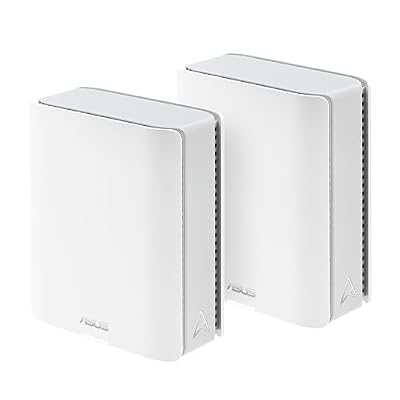
ASUS ZenWiFi BT10 WiFi 7 Mesh Router - Tri-Band, 6K sq ft, x2 10G (2 Pack) | 10G Port x2, Subscription Free Network Security, Parental Controls Included, Custom SSIDs, Ethernet Backhaul for Thick Walls





As an Amazon Associate we earn from qualifying purchases. Product prices and availability are accurate as of the date/time indicated.
The ASUS RT-AX82U is the pick for gaming QoS without paying flagship money. It is a dual-band WiFi 6 (AX5400) router with a physical gaming port that instantly prioritises a wired device, Mobile Game Mode for prioritising phone gaming, and the same adaptive QoS engine as pricier ASUS models. At around $120 it brings genuine gaming-grade traffic management to a mainstream router.
This is the router to choose if low latency for online play is your priority but you do not need a 2.5G port. The gaming port and adaptive QoS keep your game traffic ahead of 4K streams and downloads, WiFi 6 with OFDMA handles a busy household of devices smoothly, and AiMesh support means you can grow the network later. For 4K gaming where prioritisation and a stable connection matter more than multi-gig wired speed, the RT-AX82U hits the sweet spot of features and price.
Pros: Gaming port plus adaptive QoS, WiFi 6 with OFDMA, Mobile Game Mode, AiMesh ready.
Cons: Gigabit ports only (no 2.5G); RGB and styling are gamer-themed.
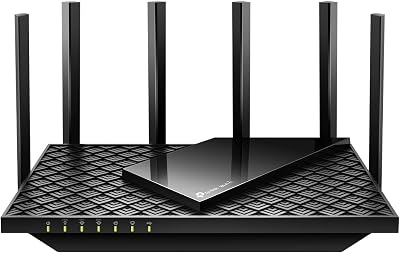
3. TP-Link Archer AXE75 (AXE5400) Tri-Band WiFi 6E Router

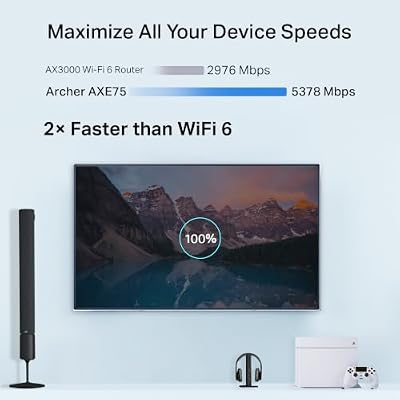
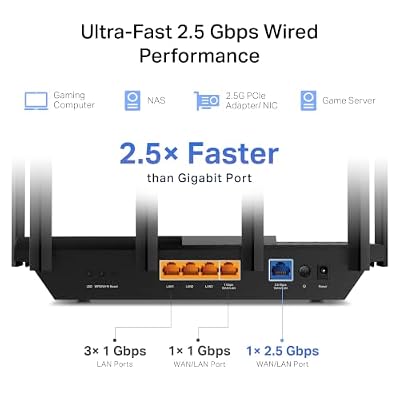
TP-Link AXE5400 Tri-Band WiFi 6E Router, 2025 PCMag Editors' Choice | 2.5Gbps WAN Port for Gaming & Streaming, 6GHz Band, 160MHz, OneMesh, Dual-Core CPU, VPN & WPA3 (Archer AXE75)





As an Amazon Associate we earn from qualifying purchases. Product prices and availability are accurate as of the date/time indicated.
The TP-Link Archer AXE75 is the pick for throughput on a less-congested band. It is a tri-band WiFi 6E (AXE5400) router, adding the brand-new 6GHz band on top of 2.4 and 5GHz — a wide, uncrowded lane ideal for a 4K-gaming device that wants maximum bandwidth and minimal interference. A 2025 PCMag Editors’ Choice, it lands at around $100.
This is the router for the 4K gamer with a WiFi 6E-capable PC, phone or streaming device who wants to escape the congestion of the crowded 5GHz band. The 6GHz band offers high throughput with very low airtime contention, which helps high-bitrate 4K streams and keeps latency tight, while OFDMA and MU-MIMO efficiently serve everything else. TP-Link’s HomeShield QoS lets you prioritise gaming traffic too. For future-proof bandwidth on the cleanest available band, the AXE75 is the standout value pick.
Pros: Tri-band WiFi 6E with clean 6GHz band, high throughput, OFDMA/MU-MIMO, strong value.
Cons: 6GHz benefits need a WiFi 6E client device; shorter 6GHz range than 5GHz.
4. ASUS RT-AC86U (AC2900) Dual Band Gigabit WiFi Gaming Router

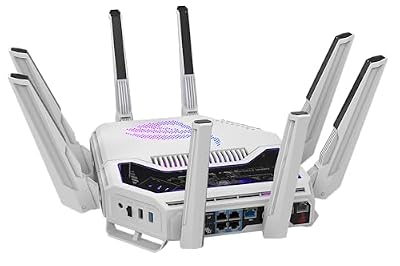
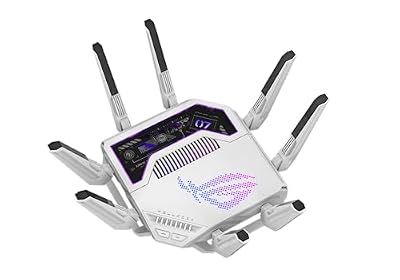
ASUS GT-BE19000AI Tri-Band WiFi 7 AI Gaming Router - 10G, Game Boost | Coverage up to 3,500 Sq. Ft., 10G Port x2, 2.5G Port x4. Game Boost for Low Latency Gaming & Streaming. VPN support








As an Amazon Associate we earn from qualifying purchases. Product prices and availability are accurate as of the date/time indicated.
The ASUS RT-AC86U is the wired-priority gaming pick. A dual-band AC2900 (WiFi 5) router, it earned its reputation on a fast dual-core processor, adaptive gaming QoS, and WAN/LAN link aggregation that can bond two gigabit ports for extra wired headroom. At around $113 it remains a capable, lower-latency choice, particularly for hardwired play.
This is the router for the 4K gamer who connects their main rig or console by Ethernet and wants rock-solid wired latency plus smart traffic shaping. The adaptive QoS prioritises game packets over a 4K stream sharing the line, link aggregation gives the wired backbone extra throughput, and the strong CPU keeps NAT and QoS fast under load. It is WiFi 5 rather than WiFi 6, so it is best where wired performance leads, but for a dependable, gaming-tuned wired backbone it still delivers.

Pros: Adaptive gaming QoS, WAN/LAN link aggregation, strong processor, great for wired play.
Cons: WiFi 5 not WiFi 6; wireless throughput trails the newer picks here.
5. TP-Link Archer AX21 (AX1800) Dual Band WiFi 6 Router
The TP-Link Archer AX21 is the affordable WiFi 6 pick, and at around $52 it is by far the cheapest router on this list. It is a dual-band AX1800 WiFi 6 router with gigabit ports, OFDMA, and TP-Link’s HomeShield features. It is not a dedicated gaming router, but it brings the efficiency of WiFi 6 to 4K streaming and online play at a budget price.
This is the router to choose for a 4K gaming setup on a tight budget, or for a moderately busy home where outright low-latency tuning is less critical than value. WiFi 6 with OFDMA serves multiple devices more efficiently than older WiFi 5 budget routers, the gigabit WAN handles typical broadband for 4K streams, and basic QoS lets you give gaming some priority. It lacks a gaming port and multi-gig wired speed, but as an inexpensive, capable WiFi 6 foundation it punches above its cost.
Pros: Very affordable WiFi 6 with OFDMA, gigabit ports, easy setup, solid everyday value.
Cons: No gaming port or 2.5G; QoS is basic versus dedicated gaming routers.
6. ASUS RT-AC66U B1 (AC1750) Dual Band Gigabit WiFi Router

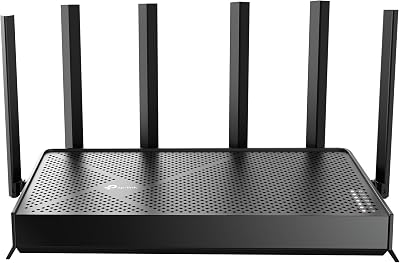
TP-Link Archer AC1750 WiFi Router - Dualband Gigabit, Qualcomm inside, Works with Alexa(A7), Black
As an Amazon Associate we earn from qualifying purchases. Product prices and availability are accurate as of the date/time indicated.
Rounding out the list is the ASUS RT-AC66U B1, the budget reliable-backbone pick. It is a dual-band AC1750 (WiFi 5) router with gigabit ports, ASUS’s AiProtection security, and the dependable ASUSWRT firmware that powers the brand’s pricier models. At around $121 it is an established, no-drama router for a stable home network rather than a latency-tuned gaming flagship.
This is the router for a 4K gaming household that values proven reliability and clean firmware over the newest WiFi standard. The dual-band WiFi 5 design comfortably carries 4K streams and online play for a typical home, ASUSWRT offers genuine QoS controls to prioritise gaming, and AiProtection adds network security. It is WiFi 5 and lacks a dedicated gaming port, so it sits lower for pure low-latency intent, but as a stable, well-supported backbone it does the job dependably.
Pros: Reliable ASUSWRT firmware with QoS, AiProtection security, dual-band gigabit, proven stability.
Cons: WiFi 5 only; no gaming port and lower throughput than the WiFi 6 picks.
How to Choose a Router for 4K Gaming
For 4K gaming, latency is the figure that matters most. A high download speed means little if your connection spikes mid-match, so look for routers built to keep latency low and consistent. The ASUS gaming models here — the RT-AX86U and RT-AX82U — use adaptive gaming QoS and a physical gaming port to push game packets to the front of the queue, which is exactly the behaviour you want when a 4K stream and online play share the same line. Prioritise low, stable latency over a big headline speed number.
Quality of Service (QoS) is the feature that actually delivers that low latency in a busy home. Good gaming QoS lets the router recognise game traffic and prioritise it over 4K video, large downloads and other devices, so your ping stays flat even when the network is loaded. ASUS’s adaptive QoS and gaming ports lead the pack here, TP-Link’s HomeShield offers prioritisation too, and a router with no real QoS — only basic budget routing — will struggle to keep gaming smooth when the household is streaming in 4K.
Throughput and the WiFi standard decide whether the network can carry everything at once. WiFi 6 (as on the AX21, RT-AX82U and RT-AX86U) and WiFi 6E (the Archer AXE75, which adds a clean 6GHz band) use OFDMA and MU-MIMO to serve many devices efficiently, which keeps high-bitrate 4K streams flowing without starving your game. For wired performance, a 2.5G port like the RT-AX86U’s lets a hardwired rig exceed gigabit, and link aggregation on the RT-AC86U bonds two ports for extra backbone headroom. Match the throughput to your internet speed and how many devices share the line.
Finally, weigh wired connectivity, coverage and budget together. For the lowest, most consistent latency, connect your main 4K-gaming device by Ethernet where you can — every router here has gigabit LAN, and the RT-AX86U adds 2.5G. If your gaming room is far from the router, choose an AiMesh-capable ASUS model so you can extend coverage without a latency penalty. Decide whether you need a dedicated gaming router with a gaming port and adaptive QoS, or whether a strong-value WiFi 6 all-rounder is enough, and pick the router on this list that lands on your priority. The best router for 4K gaming is the one that keeps your latency flat and your throughput high under real household load.
Frequently Asked Questions
Does the router really matter for 4K gaming?
Yes. The router decides how stable and low your latency is and whether the network can carry a high-bitrate 4K stream alongside online play without stutter. A router with gaming QoS and a gaming port, like the ASUS RT-AX86U or RT-AX82U, prioritises your game traffic so ping stays flat even when the household is loaded — exactly what 4K cloud gaming and online matches need.
Do I need WiFi 6 or WiFi 6E for 4K gaming?
WiFi 6 is a meaningful upgrade for a busy home because OFDMA and MU-MIMO serve many devices more efficiently, keeping latency lower under load — the AX21, RT-AX82U and RT-AX86U all offer it. WiFi 6E, like the Archer AXE75, adds a clean 6GHz band for high throughput with little interference, but you need a 6E-capable device to use it. For the lowest-latency play, wire your main rig regardless of WiFi standard.
Is QoS or raw speed more important for 4K gaming?
QoS matters more for the feel of online play. Raw speed determines how fast you download, but it is QoS that keeps your game packets prioritised over a 4K stream and other traffic, preventing ping spikes when the network is busy. Routers with strong gaming QoS, such as the ASUS RT-AX86U, RT-AX82U and RT-AC86U, keep latency consistent — which a fast-but-dumb router cannot guarantee under load.
Should I connect my gaming device with a cable or WiFi?
For the lowest, most consistent latency, use a wired Ethernet connection whenever you can. Every router here has gigabit LAN, and the RT-AX86U adds a 2.5G port for above-gigabit wired speed, while the RT-AC86U supports link aggregation. WiFi is fine for streaming and casual play, but a hardline to your main 4K-gaming rig removes wireless variability and is the single best step for stable online gaming.
Related Guides
- Best Gaming Monitors
- Best 4K Monitors
- Best Gaming PCs
- Best Mesh WiFi Systems
- Best Ethernet Cables for Gaming
- Best Budget Gaming Setup
Affiliate Disclosure: As an Amazon Associate, we earn from qualifying purchases. If you click a link and make a purchase, we may earn a small commission at no extra cost to you. Prices and availability are accurate as of publication and may change.










