

Liquid cooling is the answer when air alone struggles to keep a powerful CPU in check. An all-in-one (AIO) liquid cooler moves heat off the processor far more effectively than a traditional air tower, using a pump, coolant and a radiator with fans to dissipate it, which lets a hot flagship chip hold high clock speeds without throttling. It also frees up space and can lower CPU temperatures dramatically under sustained load. This guide rounds up the best liquid cooled gaming PCs in 2026, led by a true AIO flagship and supported by efficient, cool-running prebuilts for buyers weighing the liquid question.
- Best Liquid Cooled Gaming PCs at a Glance
- 1. Corsair Vengeance i5200 Gaming PC, Liquid-Cooled Intel Core Ultra 9 285K
- 2. Skytech Gaming O11 Vision, AMD Ryzen 7 7700X, NVIDIA RTX 5070
- 3. Skytech Gaming Archangel 5, AMD Ryzen 7 7700X, NVIDIA RTX 5070
- 4. Skytech Gaming Archangel, Intel i5 14400F, NVIDIA RTX 5060, 1TB
- 5. Skytech Gaming Azure 3, AMD Ryzen 7 5700, NVIDIA RTX 5060, 1TB
- 6. Skytech Gaming O11 Vision, AMD Ryzen 7 7800X3D, NVIDIA RTX 5060
- How to Choose a Liquid Cooled Gaming PC
- Frequently Asked Questions
- Related Guides
- Related Articles
Our picks were chosen on cooling capability and value: how effectively the system keeps its CPU cool, the headroom that cooling provides for sustained performance, the components it is paired with, and price. We are honest about which systems use a dedicated liquid loop and which are efficient air-cooled builds, because misrepresenting cooling helps no one. Prices span from a around $1,200 build up to a around $6,400 liquid-cooled flagship. Below you will find an at-a-glance comparison, then a closer look at each system and a buyer’s guide covering AIO coolers, radiators, and when liquid cooling is genuinely worth it.
As an Amazon Associate we earn from qualifying purchases at no extra cost to you.



🛒 Best Price Today on Amazon
Prime members get fast, free shipping on everything above, plus member-only deals. New members get a 30-day free trial — cancel anytime.
Best Liquid Cooled Gaming PCs at a Glance
| Gaming PC | Best For | Standout Spec | Approx Price |
|---|---|---|---|
| Corsair Vengeance i5200 | True liquid-cooled flagship | Liquid-cooled Core Ultra 9 285K | around $6,400 |
| Skytech O11 Vision (Ryzen 7 7700X / RTX 5070) | Liquid-ready showcase chassis | O11 case, RTX 5070 | around $2,000 |
| Skytech Archangel 5 (Ryzen 7 7700X / RTX 5070) | Cool mid-range alternative | Efficient 7700X, RTX 5070 | around $1,900 |
| Skytech Archangel (i5 14400F / RTX 5060) | Affordable cool build | Efficient i5 14400F, RTX 5060 | around $1,200 |
| Skytech Azure 3 (Ryzen 7 5700 / RTX 5060) | Budget air-cooled value | Cool Ryzen 7 5700, RTX 5060 | around $1,300 |
| Skytech O11 Vision (Ryzen 7 7800X3D / RTX 5060) | Efficient gaming CPU | Cool 7800X3D, roomy case | around $1,900 |
1. Corsair Vengeance i5200 Gaming PC, Liquid-Cooled Intel Core Ultra 9 285K

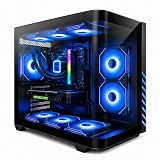
Corsair Vengeance i7500 Gaming PC – Black | Liquid Cooled Intel Core i9-14900KF CPU, NVIDIA GeForce RTX 5080 GPU, 32GB VENGEANCE RGB DDR5 Memory, 2TB M.2 SSD




As an Amazon Associate we earn from qualifying purchases. Product prices and availability are accurate as of the date/time indicated.
The Corsair Vengeance i5200 is the true liquid-cooled flagship of this list and the reason the category exists. It pairs Intel’s top-tier Core Ultra 9 285K with a dedicated liquid cooling loop, mounting an AIO-style cooler whose radiator and fans pull heat off the powerful CPU far more effectively than any air tower could. At around $6,400 it is the premium system here, and the liquid cooling is central to its appeal.
This is the system for the buyer who wants liquid cooling done properly. The Core Ultra 9 285K is an extremely powerful, heat-generating processor, and the liquid loop is exactly what keeps it running at high clocks without thermal throttling under sustained load. The roomy Corsair chassis houses the radiator and components with proper airflow, and the high-end build is matched to cooling that can feed it. If you want a genuine liquid-cooled gaming PC with no compromises, the Vengeance i5200 is the definitive pick on this list.
Pros: Dedicated liquid CPU cooling, flagship Core Ultra 9 285K, radiator-fed sustained clocks, premium build.
Cons: By far the most expensive system here; overkill for mainstream gaming.
2. Skytech Gaming O11 Vision, AMD Ryzen 7 7700X, NVIDIA RTX 5070
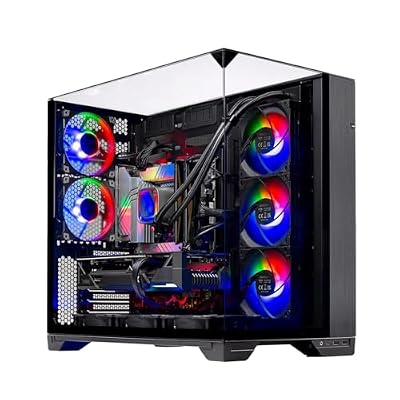
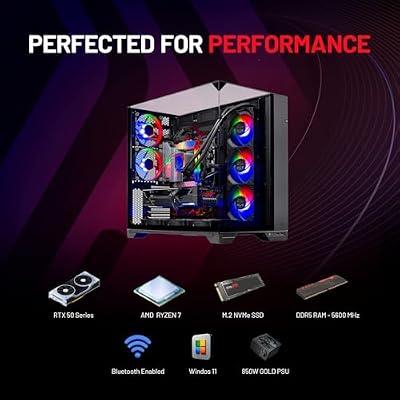
Skytech Gaming O11 Vision Gaming PC, AMD Ryzen 7 7700X 4.5GHz, NVIDIA RTX 5070 12GB, X670 Board, 1TB Gen4 NVMe SSD, 32GB DDR5 RAM 5600, 850W Gold ATX 3 PSU, 360 ARGB AIO, Wi-Fi, Win 11, Desktop







As an Amazon Associate we earn from qualifying purchases. Product prices and availability are accurate as of the date/time indicated.
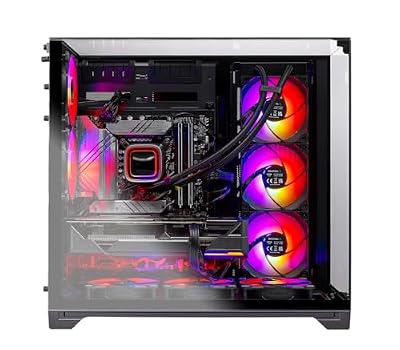
The Skytech O11 Vision is the liquid-ready showcase pick. Its dual-chamber O11-style case is one of the most popular chassis for liquid cooling builds because it offers generous radiator mounting space and a clean, glass-fronted look that shows off a loop beautifully. As configured it pairs an efficient Ryzen 7 7700X with an RTX 5070, and at around $2,000 it is a strong performer in a chassis built with liquid cooling in mind.
This is the system for the buyer drawn to the liquid-cooling aesthetic and upgrade potential. The O11-style case is purpose-designed to display and accommodate radiators, so it is the natural home for an AIO, and the efficient Ryzen 7 7700X stays cool while the RTX 5070 drives high-refresh 1440p gaming. Whether it ships with an AIO or a quality air cooler, the chassis is ready for liquid and looks the part. For a liquid-ready showcase build with strong performance, the O11 Vision is the standout.
Pros: Liquid-friendly O11-style chassis, efficient Ryzen 7 7700X, RTX 5070, show-quality looks.
Cons: Confirm whether your unit ships with an AIO or air cooler; open case shows dust.
3. Skytech Gaming Archangel 5, AMD Ryzen 7 7700X, NVIDIA RTX 5070

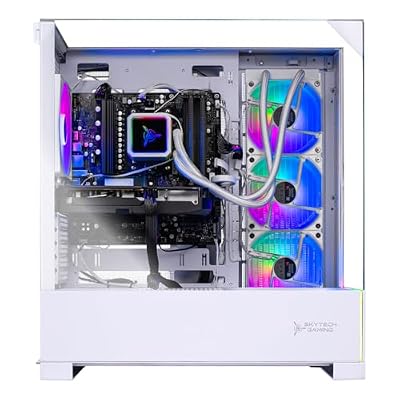
Skytech Gaming Archangel 5 Gaming PC, AMD Ryzen 7 7700X 4.5GHz, NVIDIA RTX 5070 12GB, 1TB Gen4 NVMe SSD, 32GB DDR5 RAM 6000, 750W Gold PSU, 360 ARGB AIO, Wi-Fi, Win 11, Desktop


As an Amazon Associate we earn from qualifying purchases. Product prices and availability are accurate as of the date/time indicated.
The Skytech Archangel 5 in its Ryzen form is the cool mid-range alternative for buyers weighing liquid against air. It pairs the thermally efficient Ryzen 7 7700X with an RTX 5070 in a ventilated Archangel chassis, and because the 7700X runs cool, a quality air cooler keeps it comfortably in check — making this a case where liquid cooling is a nice-to-have rather than a necessity. At around $1,900 it offers excellent value.
This is the system for the buyer who wants flagship-adjacent performance and is deciding whether liquid cooling is worth the premium. The honest answer for an efficient CPU like the 7700X is that good air cooling handles it well, so the Archangel 5 delivers strong, cool 1440p gaming without the cost or complexity of a loop. The RTX 5070 drives modern titles at high settings, and the ventilated case keeps temperatures sensible. For cool performance at a great price, the Ryzen Archangel 5 is the value pick.
Pros: Efficient cool Ryzen 7 7700X, RTX 5070, ventilated chassis, strong value without a loop.
Cons: Air-cooled rather than liquid-cooled; not the pick if a loop is the goal.
4. Skytech Gaming Archangel, Intel i5 14400F, NVIDIA RTX 5060, 1TB

Skytech Gaming PC Desktop, Intel i5 14400F, RTX 5060, 16GB RAM, 1TB SSD | Windows 11, NVMe SSD, DDR5 6000, 750W GOLD PSU, Wi-Fi 5, Archangel 5 Series


As an Amazon Associate we earn from qualifying purchases. Product prices and availability are accurate as of the date/time indicated.
The Skytech Archangel with the Intel i5 14400F is the affordable cool build of this list. The six-core i5 14400F is an efficient, relatively cool processor that a standard air cooler handles easily, paired with an RTX 5060 and a 1TB SSD in the ventilated Archangel chassis. At around $1,200 it is the most affordable system here and a reminder that not every build needs liquid cooling.
This is the system to choose for a budget gaming PC that runs cool without the expense of a liquid loop. The i5 14400F does not generate enough heat to require liquid cooling, so the included air cooling and case fans keep it comfortable, the RTX 5060 handles popular titles at high settings, and the 1TB SSD gives ample fast storage. For an affordable, cool-running build where liquid cooling would be unnecessary overkill, the i5 Archangel is the sensible entry point.
Pros: Affordable, cool efficient i5 14400F, RTX 5060, 1TB SSD, air cooling that fits the CPU.
Cons: Entry-tier GPU and air cooling; not a liquid-cooled system.
5. Skytech Gaming Azure 3, AMD Ryzen 7 5700, NVIDIA RTX 5060, 1TB
The Skytech Azure 3 with the Ryzen 7 5700 is the budget air-cooled value pick. The eight-core Ryzen 7 5700 is an efficient, cool-running CPU well within the comfort zone of standard air cooling, paired with an RTX 5060 and a 1TB SSD in the Azure chassis. At around $1,300 it is an affordable all-rounder that demonstrates how far efficient air-cooled builds can take you.
This is the system for the buyer who wants solid, cool gaming on a budget and does not need a liquid loop. The Ryzen 7 5700 runs cool enough that air cooling keeps it composed, the RTX 5060 delivers strong 1080p and entry-1440p performance, and the Azure case provides steady airflow. Liquid cooling would add cost without meaningful benefit for a CPU this efficient, so the air-cooled Azure 3 is the smart, value-focused choice for mainstream gaming.
Pros: Efficient eight-core Ryzen 7 5700, RTX 5060, 1TB SSD, capable air cooling, great value.
Cons: Older-generation CPU and air cooling; not a liquid-cooled build.
6. Skytech Gaming O11 Vision, AMD Ryzen 7 7800X3D, NVIDIA RTX 5060
Skytech Gaming O11 Vision Gaming PC, AMD Ryzen 7 7700X 4.5GHz, NVIDIA RTX 5070 12GB, X670 Board, 1TB Gen4 NVMe SSD, 32GB DDR5 RAM 5600, 850W Gold ATX 3 PSU, 360 ARGB AIO, Wi-Fi, Win 11, Desktop
As an Amazon Associate we earn from qualifying purchases. Product prices and availability are accurate as of the date/time indicated.
Rounding out the list is the Skytech O11 Vision with the Ryzen 7 7800X3D, the efficient gaming-CPU pick. The 7800X3D is one of the best gaming processors available and notably efficient thanks to its 3D V-Cache, so it runs cool for its performance. Housed in the liquid-friendly O11-style case with an RTX 5060, at around $1,900 it is a chassis ready for a loop paired with a CPU that barely needs one.
This is the system for the buyer who values gaming-leading performance and appreciates a chassis built for liquid cooling, even if the efficient 7800X3D is comfortable on quality air cooling. The O11-style case offers the radiator space and clean looks that liquid builds prize, the 7800X3D delivers exceptional gaming responsiveness while staying cool, and the RTX 5060 keeps the GPU side calm. For a liquid-ready showcase paired with the most efficient gaming CPU, the 7800X3D O11 Vision is a standout.
Pros: Efficient gaming-leading 7800X3D, liquid-friendly O11 case, RTX 5060, cool and showcase-ready.
Cons: Confirm cooler type before buying; GPU is mid-tier relative to the CPU.
How to Choose a Liquid Cooled Gaming PC
Choosing a liquid cooled gaming PC starts with understanding what liquid cooling actually does. An all-in-one (AIO) cooler uses a pump to circulate coolant through a block on the CPU and out to a radiator, where fans dissipate the heat. This moves heat away from a hot processor far more effectively than an air tower, which is why a flagship like the Core Ultra 9 285K in the Corsair Vengeance i5200 pairs with liquid cooling — it keeps a power-hungry chip at high clocks without throttling under sustained load.
Radiator size is the key spec for liquid cooling capacity. A larger radiator — 240mm, 280mm or 360mm — has more surface area and more fans, so it can dissipate more heat and run quieter. A bigger radiator matched to a hot CPU delivers lower temperatures and steadier clocks, which is exactly what a flagship build needs. The chassis matters here too: a case like the O11-style design is popular for liquid builds precisely because it offers generous radiator mounting room.
The most important question, though, is whether you actually need liquid cooling at all. Efficient CPUs like the AMD Ryzen 7 7700X, the Ryzen 7 5700 and the gaming-focused 7800X3D run cool enough that a quality air cooler keeps them comfortably in check, as the Archangel and Azure builds here show. Liquid cooling shines on very hot, high-wattage flagship processors; for an efficient mainstream CPU it is often a nice-to-have for looks and headroom rather than a performance necessity.
Finally, weigh cost, looks and honesty about what you are buying. Liquid cooling adds expense and a pump as a potential point of maintenance, but it delivers superb thermals on hot chips and a clean, premium aesthetic — especially in a glass-fronted O11-style case. When shopping prebuilts, confirm whether a system genuinely ships with a liquid loop or an air cooler, since both can be excellent for the right CPU. Decide whether your processor truly benefits from liquid, set your budget, and pick the system on this list that matches your cooling goals honestly.
Frequently Asked Questions
What does liquid cooling do that air cooling cannot?
Liquid cooling moves heat off the CPU far more effectively than an air tower. An AIO cooler circulates coolant from a block on the processor to a radiator where fans dissipate the heat, which lets a hot, high-wattage flagship like the Core Ultra 9 285K in the Corsair Vengeance i5200 hold high clocks without throttling. It also looks clean and frees up space around the CPU socket.
Do I actually need a liquid cooled gaming PC?
Often not. Liquid cooling is most valuable for very hot flagship CPUs. Efficient processors like the Ryzen 7 7700X, 7800X3D and 5700 in several systems here run cool enough that a quality air cooler handles them well. For those chips, liquid cooling is more about aesthetics and extra headroom than a performance requirement, so do not pay for a loop you do not need.
Is liquid cooling reliable and does it need maintenance?
Modern sealed AIO coolers, like the type used in the Corsair Vengeance i5200, are designed to run for years without refilling and are very reliable. The pump is the one moving part that could eventually wear, but failures are uncommon within a system’s typical life. Sealed AIOs require essentially no routine maintenance beyond keeping the radiator fans free of dust.
How can I tell if a prebuilt is truly liquid cooled?
Check the specification rather than the case style. A chassis like the O11-style design is built for liquid cooling but can also house an air cooler, so a liquid-friendly case does not guarantee a loop. The Corsair Vengeance i5200 explicitly lists liquid cooling for its CPU. If a listing does not state an AIO or liquid loop, assume it uses an air cooler.
Related Guides
- Best Gaming PCs
- Best Air Cooled Gaming PCs
- Best AIO Liquid Coolers
- Best CPU Coolers
- Best PC Cases
- Best Gaming Monitors
Affiliate Disclosure: As an Amazon Associate, we earn from qualifying purchases. If you click a link and make a purchase, we may earn a small commission at no extra cost to you. Prices and availability are accurate as of publication and may change.










