

A quiet keyboard is the unsung hero of any shared room, late-night desk, or video-call-heavy workday. The loud clatter of a typical keyboard carries across an open-plan office, wakes a sleeping partner, and bleeds into your microphone on every meeting — which is exactly why so many people now shop specifically for silent, low-click typing. Where gaming keyboards chase tactile clicks and loud feedback, a good quiet keyboard leans the other way, using softer switches, membrane domes, or dampening so each keystroke lands with a muted, gentle thud instead of a sharp clack. This guide rounds up the best quiet keyboards in 2026, focused on the silent wireless keyboard-and-mouse combos that suit offices, studies, and any space where noise matters.
- Best Quiet Keyboards at a Glance
- 1. Logitech MK295 Wireless Mouse & Keyboard Combo with SilentTouch Technology
- 2. Logitech MK270 Wireless Keyboard and Mouse Combo, 2.4 GHz
- 3. Vssoplor 2.4GHz Rechargeable Quiet Full-Size Keyboard and Mouse Combo
- 4. Logitech MK335 Quiet Wireless Keyboard and Mouse Combo – Black/Silver
- 5. Vssoplor Rechargeable Quiet Full-Size Keyboard and Mouse Combo
- 6. Redragon S101M-KS Gaming Keyboard and Mouse Wireless with Tri-Mode, RGB
- How to Choose a Quiet Keyboard
- Frequently Asked Questions
- Related Guides
- Related Articles
Our picks were chosen on a simple basis: how quiet the typing genuinely is, the comfort and feel of the keys, wireless reliability, the value of a bundled mouse, and overall price. Several of these combos are explicitly engineered for silence — Logitech’s SilentTouch keys and dedicated ‘Quiet’ models lead the way — and we have kept the price spread tight and friendly, from around $24 to around $55, because a peaceful workspace should not cost a fortune. A note up front: these are full keyboard-and-mouse combos rather than standalone boards, so you get a matching low-noise mouse in the box too. Below you will find an at-a-glance comparison, then a closer look at each combo and a buyer’s guide covering what really makes a keyboard quiet.
As an Amazon Associate we earn from qualifying purchases at no extra cost to you.


🛒 Best Price Today on Amazon
Prime members get fast, free shipping on everything above, plus member-only deals. New members get a 30-day free trial — cancel anytime.
Best Quiet Keyboards at a Glance
| Combo | Best For | Standout Feature | Approx Price |
|---|---|---|---|
| Logitech MK295 SilentTouch Combo | Quietest office typing | SilentTouch, 90% noise reduction claim | around $33 |
| Logitech MK270 Wireless Combo | Budget reliable quiet combo | Compact wireless, long battery | around $24 |
| Vssoplor Rechargeable Quiet Combo | Rechargeable full-size | Quiet keys, rechargeable | around $36 |
| Logitech MK335 Quiet Combo | Comfortable quiet full-size | Quiet typing, palm rest | around $34 |
| Vssoplor Quiet Full-Size Combo (2.4GHz) | Plug-and-play quiet value | Quiet full-size, nano receiver | around $34 |
| Redragon S101M-KS Tri-Mode Combo | Quiet-ish with RGB extras | Tri-mode wireless, RGB | around $55 |
1. Logitech MK295 Wireless Mouse & Keyboard Combo with SilentTouch Technology

Logitech MK295 Full Size Silent Wireless Keyboard Mouse Combo - Graphite


As an Amazon Associate we earn from qualifying purchases. Product prices and availability are accurate as of the date/time indicated.
The Logitech MK295 is the pick for anyone whose top priority is genuine silence at the desk. Its headline feature is Logitech’s SilentTouch technology, which the company markets as reducing typing and clicking noise by up to 90% versus a standard keyboard, applied to both the full-size keyboard and the bundled mouse. At around $33 it is purpose-built for quiet, and that focus is exactly why it leads this list.
For an office, a study you share, or a desk near a sleeping household, this is the intent it serves best: every keystroke and click is muted to a soft, padded sound that will not carry across a room or into a video call. The full-size layout keeps a number pad for spreadsheet work, the wireless receiver keeps the desk tidy, and Logitech’s long-standing reliability means it simply works. If you want the quietest typing experience here without overthinking it, the MK295 is the obvious starting point and the most deliberately silent combo on the list.
Pros: SilentTouch keys and mouse, up to 90% noise-reduction claim, full-size, reliable wireless.
Cons: Membrane feel rather than mechanical; mouse is basic.
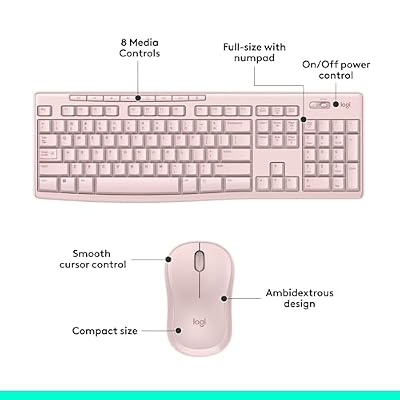
2. Logitech MK270 Wireless Keyboard and Mouse Combo, 2.4 GHz

Logitech MK270 Full Size Wireless Keyboard and Mouse Combo - Rose




As an Amazon Associate we earn from qualifying purchases. Product prices and availability are accurate as of the date/time indicated.
The Logitech MK270 is the budget pick for a dependable, low-noise wireless combo. It is a long-running favorite that pairs a compact full-size keyboard with a comfortable wireless mouse over a single 2.4GHz receiver, and at around $24 it is the most affordable option on this list. While it is not branded as a dedicated silent model, its membrane keys are naturally soft and muted compared with clicky mechanical boards.
This is the combo to choose when you want quiet, fuss-free typing on a tight budget. The membrane keys press with a gentle, cushioned feel rather than a sharp clack, the long battery life means you rarely think about it, and the plug-and-play receiver makes setup instant. It is the no-drama pick for a home office, a student desk, or a second machine where you want peaceful operation and reliability without spending much. For affordable everyday quiet, the MK270 is hard to beat.
Pros: Very affordable, soft membrane keys, long battery life, reliable plug-and-play wireless.
Cons: Not a dedicated silent model; basic feature set.
3. Vssoplor 2.4GHz Rechargeable Quiet Full-Size Keyboard and Mouse Combo
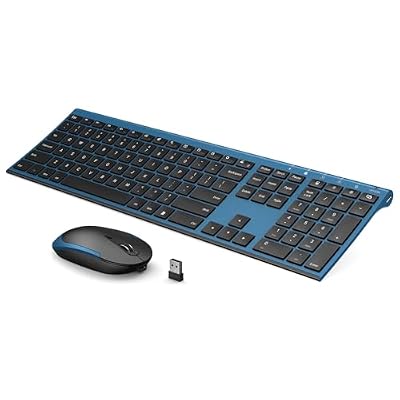
Vssoplor Wireless Keyboard and Mouse, Rechargeable Ultra Slim, Black Blue


As an Amazon Associate we earn from qualifying purchases. Product prices and availability are accurate as of the date/time indicated.
The Vssoplor rechargeable combo is the pick for quiet typing without the battery hassle. It pairs a full-size keyboard explicitly designed for quiet operation with a matching mouse, and crucially both are rechargeable rather than reliant on disposable batteries. At around $36 it offers low-noise keys and a tidy 2.4GHz wireless connection in one convenient, sustainable package.
This is the combo for the desk worker who wants muted keystrokes and never wants to hunt for spare AAs. The quiet keys keep typing discreet for offices and shared rooms, the full-size layout retains a number pad, and the built-in rechargeable batteries mean a quick top-up over USB keeps you going. If you value the combination of quiet operation and rechargeable convenience over a premium brand name, this Vssoplor set is a practical, well-priced choice that covers the essentials cleanly.
Pros: Quiet full-size keys, rechargeable keyboard and mouse, tidy 2.4GHz wireless, good value.
Cons: Lesser-known brand; relies on charging rather than swappable cells.
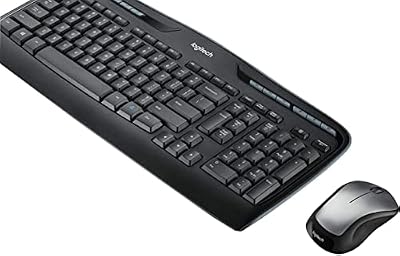
4. Logitech MK335 Quiet Wireless Keyboard and Mouse Combo – Black/Silver

Logitech MK335 Full Size Quiet Wireless Keyboard Mouse Combo - Black/Silver


As an Amazon Associate we earn from qualifying purchases. Product prices and availability are accurate as of the date/time indicated.
The Logitech MK335 is the pick for comfortable quiet typing over long days. It is a full-size wireless combo that Logitech positions for quiet operation, pairing soft-pressing keys with an integrated palm rest for support and a comfortable wireless mouse. At around $34 it brings Logitech reliability and an ergonomic touch to the low-noise category.
This is the combo to choose when you type for hours and want both peace and comfort. The quiet keys keep the sound down in an office or study, the built-in palm rest takes pressure off your wrists during long sessions, and the full-size layout keeps the number pad handy for data work. With Logitech’s dependable wireless and a comfort-focused design, the MK335 suits anyone who spends all day at the keyboard and wants a calm, supportive typing experience rather than a loud, fatiguing one.
Pros: Quiet keys, integrated palm rest for comfort, full-size layout, reliable Logitech wireless.
Cons: Palm rest is fixed; mouse is a basic everyday model.
5. Vssoplor Rechargeable Quiet Full-Size Keyboard and Mouse Combo

Vssoplor Wireless Keyboard and Mouse, Rechargeable Ultra Slim, Dark Gray


As an Amazon Associate we earn from qualifying purchases. Product prices and availability are accurate as of the date/time indicated.
This second Vssoplor combo is the plug-and-play quiet value pick. Like its sibling above it is a full-size, low-noise keyboard-and-mouse set built around quiet operation, connecting over a 2.4GHz nano receiver for simple, cable-free use. At around $34 it is another affordable route to discreet typing, aimed at users who want straightforward wireless without complications.
This is the combo for someone who simply wants quiet keys, a matching mouse, and an instant plug-in-and-go setup. The low-noise keystrokes keep things peaceful in shared spaces, the full-size layout covers everything including a number pad, and the nano receiver tucks into a USB port and disappears. It is a sensible, no-frills option for a home office or family computer where quiet operation and ease of use matter more than brand prestige or extra features. For uncomplicated, affordable silence, it does the job well.
Pros: Quiet full-size keys, simple nano-receiver wireless, affordable, easy plug-and-play setup.
Cons: No-frills feature set; lesser-known brand than Logitech.
6. Redragon S101M-KS Gaming Keyboard and Mouse Wireless with Tri-Mode, RGB

Redragon S101M-KS Gaming Keyboard and Mouse Wireless with Tri-Mode, RGB Keyboard and 4800 DPI Gaming Mouse, 10 Independent Multimedia Keys for Wins, PC, Computer, Wireless S101 Ideal for Gamer




As an Amazon Associate we earn from qualifying purchases. Product prices and availability are accurate as of the date/time indicated.
Rounding out the list is the Redragon S101M-KS, the pick for someone who wants quieter-than-gaming typing but still likes a few extras. It is a tri-mode wireless combo — connecting via 2.4GHz, Bluetooth, or a wired cable — with RGB lighting and a gaming-oriented design, at around $55 the most feature-rich option here. It is the crossover choice rather than a dedicated silent board.
Be clear on what this is: a gaming-styled combo with flexible connectivity and RGB, not a purpose-built silent keyboard like the Logitech SilentTouch models. That said, it suits a user who games and works at the same desk and wants muted, membrane-style keys that are calmer than a loud clicky mechanical board, plus the convenience of switching between three connection modes. If you want moderate quiet alongside RGB flair and tri-mode wireless, the S101M-KS fits — just temper expectations on outright silence compared with the dedicated quiet picks above.
Pros: Flexible tri-mode wireless, RGB lighting, calmer than clicky mechanical, feature-rich.
Cons: Gaming-styled rather than dedicated silent; loudest option here and priciest.
How to Choose a Quiet Keyboard
Choosing a quiet keyboard starts with understanding what actually makes one silent. The biggest factor is the switch type. Membrane and dome-switch keyboards — which describes most of the combos here — are naturally softer and more muted than clicky mechanical boards, because the keys press into a cushioned rubber layer rather than snapping a sharp mechanical click. Logitech’s SilentTouch keys on the MK295 take this further with dedicated dampening, which is why dedicated ‘Quiet’ and ‘Silent’ branded models like the MK295, MK335 and Vssoplor sets are your safest bet if near-silence is the goal.
Layout and the bundled mouse are the next decisions. Every option here is a full-size combo, which keeps a number pad for spreadsheet and data work and throws in a matching mouse — and remember the mouse matters for noise too, since a loud clicker can be just as disruptive as a clattery keyboard. The SilentTouch combo quiets both halves deliberately; with others, the keys are the quiet focus and the mouse is a standard everyday model. Decide whether you need the number pad and how much the click noise of the mouse will bother you in your particular room.
Wireless type, power, and reliability round out the practical side. All these combos are wireless: most use a simple 2.4GHz nano receiver that plugs into a USB port and just works, while the Redragon adds Bluetooth and wired modes for flexibility. On power, you choose between long-life disposable batteries (the Logitech MK270 and MK295 famously run for ages) and rechargeable designs (the Vssoplor combos) that top up over USB. Both are fine — it comes down to whether you prefer years of set-and-forget battery life or the convenience of never buying replacements.
Finally, match the keyboard to where and how you will use it, and be honest about your priority. If silence in a shared office or near a sleeping household is the whole point, lead with a dedicated SilentTouch or Quiet model and accept a soft membrane feel. If you want quiet on a budget, the MK270 is excellent value. If you game and work at the same desk and want RGB and tri-mode connectivity, the Redragon is the crossover pick, though it is the least silent here. Set your budget, decide how quiet you truly need, and pick the combo on this list that lands on your priority. The best quiet keyboard is the one you stop noticing — and so does everyone around you.
Frequently Asked Questions
What makes a keyboard quiet?
Quiet keyboards rely on softer switch designs. Membrane and dome-switch boards — like most combos in this guide — press into a cushioned rubber layer for a muted, padded sound rather than the sharp click of a mechanical keyboard. Dedicated quiet models go further with dampening, such as Logitech’s SilentTouch technology on the MK295, which the company says cuts typing and click noise by up to 90% versus a standard keyboard.
Are these silent keyboards mechanical or membrane?
The dedicated quiet combos here, including the Logitech SilentTouch and Quiet models and the Vssoplor sets, use membrane or dome-switch designs, which are naturally quieter than clicky mechanical boards. If absolute silence is your goal, a quiet membrane keyboard is usually the easier choice than hunting for specially dampened mechanical switches, and it tends to cost less too.
Does the mouse noise matter as much as the keyboard?
It can. A loud clicking mouse is just as disruptive in a quiet office or shared room as a clattery keyboard, which is why every option here ships as a matching combo. The Logitech MK295 quiets both the keyboard and the mouse with SilentTouch; with the other combos the keys are the quiet focus while the mouse is a standard everyday model, so factor in click noise if it is a concern.
Is a quiet keyboard good for gaming too?
It can work for casual gaming, but quiet membrane keyboards are built for discreet typing rather than fast, tactile gaming feedback. If you game and work at the same desk, the tri-mode Redragon S101M-KS here is the crossover pick — calmer than a loud clicky mechanical board while still adding RGB and gaming styling. For serious competitive play, a dedicated gaming keyboard remains the better tool.
Related Guides
- Best Mechanical Keyboards
- Best Wireless Keyboards
- Best Wireless Gaming Mouse
- Best Gaming Keyboards
- Best Office Chairs for Working From Home
- Best Budget Gaming Setup
Affiliate Disclosure: As an Amazon Associate, we earn from qualifying purchases. If you click a link and make a purchase, we may earn a small commission at no extra cost to you. Prices and availability are accurate as of publication and may change.
Ready to decide? Our #1 pick for 2026 is the Logitech MK295 SilentTouch Combo.
Live price & availability on Amazon.


