

Affiliate disclosure: As an Amazon Associate we earn from qualifying purchases. This post contains affiliate links — if you buy through them we may earn a small commission at no extra cost to you. This never affects our recommendations.
- Top Picks at a Glance: Best Prebuilt Gaming PC Under $700
- What a $700 Prebuilt Gaming PC Gets You in 2026
- The 6 Best Prebuilt Gaming PCs Under $700
- Prebuilt Gaming PC Under $700 Compared: Specs That Matter
- How We Chose These Prebuilt Gaming PCs
- How to Choose a Prebuilt Gaming PC Under $700
- Prebuilt vs Building Your Own PC at $700
- Best Upgrades After You Buy a Budget Prebuilt
- Which Prebuilt Under $700 Should You Buy? Match the PC to How You Play
- Prebuilt Gaming PC Under $700: Quick Answers
- Final Verdict
- Related Articles
- What to Expect in Games From a Prebuilt Gaming PC Under $700
- Budget Prebuilt Red Flags to Avoid
- Is It Better to Wait or Buy a Prebuilt Gaming PC Under $700 Now?
- Frequently Asked Questions
- Related Articles
Updated October 2026 – specifications below come from each listing title and maker documentation, and the ranking reflects research rather than our own benchmarks.
The best prebuilt gaming PC under $700 in 2026 is a six-core Ryzen 5 5500 tower paired with an RTX 3050 6GB or a Radeon RX 6500 XT, 16GB of dual-channel DDR4 and a 512GB NVMe drive. Our top three picks are the STGAubron Gaming PC (Ryzen 5 5500, RTX 3050 6G), the SKYESEV Prebuilt Gaming Desktop (Ryzen 5 5500, RX 6500 XT) and the LXZ Gaming PC (Ryzen 5 4500, RX 6500 XT). Expect solid 1080p gaming at medium to high settings, not high-refresh 1440p, and plan on one or two cheap upgrades after delivery.
This guide is built for a hard budget. Memory and graphics card prices have pushed the old “$700 RTX 4060 desktop” out of reach, so the honest answer is a more modest machine than you may have seen in older roundups. Below you will find what a $700 budget buys today, six specific prebuilt towers compared on real listing specifications, a checklist for avoiding weak configurations, and answers to the questions budget buyers ask most.
Top Picks at a Glance: Best Prebuilt Gaming PC Under $700
| Pick | CPU | Graphics | Memory / Storage | Best For |
|---|---|---|---|---|
| STGAubron Ryzen 5 5500 + RTX 3050 6G | Ryzen 5 5500 (6 cores) | GeForce RTX 3050 6GB | 16GB DDR4 / 512GB SSD | Best overall, DLSS support |
| SKYESEV Ryzen 5 5500 + RX 6500 XT | Ryzen 5 5500 (6 cores) | Radeon RX 6500 XT | 16GB DDR4-3200 / 512GB NVMe | Best AMD graphics pick |
| LXZ Ryzen 5 4500 + RX 6500 XT | Ryzen 5 4500 (6 cores) | Radeon RX 6500 XT | 16GB / 512GB SSD | Best low-cost 1080p starter |
| STGAubron Ryzen 5 2600 + RTX 2060 6G | Ryzen 5 2600 (6 cores) | GeForce RTX 2060 6GB | 16GB DDR4 / 512GB SSD | Best graphics card for the money |
| YAWYORE Ryzen 5 5600GT | Ryzen 5 5600GT (6 cores) | Integrated Radeon graphics | 16GB DDR4-3200 / 1TB NVMe | Esports and office hybrid |
| ZOTAC MEK Ryzen 5 5500 + RTX 3050 6GB | Ryzen 5 5500 (6 cores) | GeForce RTX 3050 6GB | 16GB DDR4 / 500GB NVMe | Brand-name stretch pick |
Prices change daily, and this tier moves the most. The first five sit around or just under $700 in current listings, while the ZOTAC MEK usually lands in the $750-$850 range, so treat it as a stretch option.
What a $700 Prebuilt Gaming PC Gets You in 2026
A budget of $700 is the entry point for 1080p gaming. It no longer buys the RTX 4060-class desktop that older guides promised, because graphics card and memory costs rose through 2026 and the cheapest complete systems moved to older, smaller parts. That shift is why the picks in this guide use RTX 3050 6GB, RTX 2060 and Radeon RX 6500 XT cards instead.
Realistic performance targets
- Esports titles at 1080p: games such as Valorant, Counter-Strike 2, Fortnite (performance mode), Rocket League and Apex Legends run at high frame rates on any GPU in this guide, usually well above 100 FPS at low to medium settings.
- Modern single-player games at 1080p: expect medium settings, with upscaling (DLSS on the NVIDIA cards, FSR on the Radeon cards) turned on to hold 60 FPS in demanding releases.
- 1440p: possible only in lighter games; this is not the tier to buy for a 1440p monitor.
- Ray tracing: technically supported on the RTX cards, but not a realistic setting at this price. Leave it off.
These ranges come from the class of each graphics card and published coverage of those cards, not from our own measurements.
What gets cut at this price
Every system near $700 cuts the same corners. Learn them before you buy so a weak spec does not surprise you.
- Power supply: usually a generic 450W-550W unit with no efficiency rating named. It runs the stock parts fine but limits later GPU upgrades.
- Storage: 512GB is common. Windows and a handful of large games fill it quickly.
- Cooling and case airflow: a basic air cooler and a case with a few RGB fans. Fine for these low-power parts.
- Graphics memory: 4GB to 6GB cards run out of video memory in newer games at high texture settings.
- Brand and warranty: many of the cheapest towers come from small system builders whose support is thinner than HP, Dell or Lenovo.
The 6 Best Prebuilt Gaming PCs Under $700
STGAubron Gaming PC (Ryzen 5 5500 + RTX 3050 6G) – Best Overall Under $700

The STGAubron Gaming PC with a Ryzen 5 5500 and an RTX 3050 6G is the best balance of features and price in this guide. It is one of the few systems at this budget with an NVIDIA graphics card, which means DLSS upscaling, hardware video encoding for streaming and broad driver support.
- CPU: AMD Ryzen 5 5500, 6 cores, up to 4.2GHz
- GPU: GeForce RTX 3050 6G
- Memory / storage: 16GB DDR4, 512GB SSD
- Connectivity: Wi-Fi 6, Bluetooth 5.2, HDMI and DisplayPort
- Operating system: Windows 11 Home
The Ryzen 5 5500 is a Zen 3 chip with six cores and twelve threads, enough to keep an entry-level graphics card fed in nearly every game. The RTX 3050 6GB is a 1080p card; it trades some performance against the 8GB version for a lower price, so pair it with medium settings and DLSS Quality mode in newer titles.
Pros:
- NVIDIA graphics with DLSS support at the budget ceiling
- Six-core, twelve-thread Zen 3 processor
- Wi-Fi 6 and modern display outputs included
- Windows 11 Home preinstalled
Cons:
- Only 6GB of graphics memory
- 512GB of storage fills quickly
- Smaller builder with a thinner support network than big OEMs
Skip it if you want a long manufacturer warranty from a household brand; look at the ZOTAC MEK below instead.
SKYESEV Prebuilt Gaming Desktop (Ryzen 5 5500 + RX 6500 XT) – Best AMD Graphics Pick

The SKYESEV Prebuilt Gaming Desktop pairs the same Ryzen 5 5500 with a Radeon RX 6500 XT, which makes it the pick for buyers who prefer AMD drivers and FSR upscaling. The listing names 16GB of DDR4-3200 memory and a 512GB NVMe drive, a better storage type than the SATA drives some rivals use.
- CPU: AMD Ryzen 5 5500
- GPU: Radeon RX 6500 XT
- Memory / storage: 16GB DDR4-3200, 512GB NVMe SSD
- Cooling: ARGB air cooling
- Connectivity: Wi-Fi
The RX 6500 XT is a compact 1080p card with 4GB of video memory. In older and esports titles that is plenty. In newer games it forces lower texture settings, so keep expectations at medium or low presets for the latest releases.
Pros:
- NVMe storage and DDR4-3200 memory named in the listing
- Same capable six-core Ryzen 5 5500 as the top pick
- FSR upscaling helps newer titles
Cons:
- 4GB of video memory limits texture quality in new games
- No DLSS or NVIDIA features
- Power supply details are not spelled out in the title
Skip it if you play the latest releases at high texture settings; an RTX 3050 6GB or RTX 2060 system has more video memory.
LXZ Gaming PC (Ryzen 5 4500 + RX 6500 XT) – Best Low-Cost 1080p Starter

The LXZ Gaming PC is the lowest-cost way to get a dedicated Radeon graphics card in a complete tower. It pairs a Ryzen 5 4500 with the RX 6500 XT and describes itself as built for 1080p casual gaming, which is the honest framing for this tier.
- CPU: AMD Ryzen 5 4500, 6 cores, up to 4.1GHz
- GPU: Radeon RX 6500 XT
- Memory / storage: 16GB RAM, 512GB SSD
- Connectivity: Wi-Fi 6
- Finish: white case
The Ryzen 5 4500 is a Zen 2 six-core chip, one generation behind the 5500, so it gives up some frame rate in CPU-heavy games. For esports titles and 60 FPS targets it is fine, and the white case is a design choice most budget towers do not offer.
Pros:
- Six-core processor and 16GB of memory at a very low price
- Wi-Fi 6 included
- White case for a lighter-looking desk setup
Cons:
- Older Zen 2 CPU generation
- Only 4GB of graphics memory
- Small-builder warranty and support
Skip it if you can spend a little more; the STGAubron RTX 3050 system is the better long-term value.
STGAubron Gaming PC (Ryzen 5 2600 + RTX 2060 6G) – Best Graphics Card for the Money

The STGAubron Gaming PC with a Ryzen 5 2600 and an RTX 2060 6G is the pick for players who care about graphics performance more than platform age. The RTX 2060 6GB is a generation older than the RTX 3050 but is generally the stronger 1080p card, and it supports DLSS 2 upscaling.
- CPU: AMD Ryzen 5 2600, 6 cores, up to 3.9GHz
- GPU: GeForce RTX 2060 6G
- Memory / storage: 16GB DDR4, 512GB SSD
- Connectivity: Wi-Fi 6, Bluetooth 5.0
- Operating system: Windows 11 Home
The weak point is the Ryzen 5 2600, a 2018 processor that will limit frame rates in CPU-heavy games and has no upgrade path to the newest Ryzen chips beyond older AM4 models. If you mainly play graphics-bound single-player games at 1080p, the card matters more than the CPU. If you play fast competitive shooters, pick a Ryzen 5 5500 system instead.
Pros:
- RTX 2060 with DLSS support at the lowest price in this guide
- Six cores and 16GB of memory
- Good fit for graphics-heavy 1080p games
Cons:
- Old Zen+ processor limits CPU-bound games
- Older graphics architecture with no DLSS 3 frame generation
- 512GB storage
Skip it if you want the newest platform or plan to upgrade the CPU later without changing the board.
YAWYORE Gaming PC (Ryzen 5 5600GT) – Best for Esports and Office Hybrid

The YAWYORE Gaming PC uses a Ryzen 5 5600GT, a processor with built-in Radeon graphics, and the listing does not name a separate graphics card. That makes it a different kind of pick: a roomy 1TB NVMe drive and a fast Zen 3 processor for light gaming, school and office work, with a graphics card you can add later.
- CPU: AMD Ryzen 5 5600GT with integrated Radeon graphics
- Memory / storage: 16GB DDR4-3200, 1TB M.2 NVMe PCIe SSD
- Power supply: 550W 80 Plus rated
- Connectivity: Wi-Fi and Bluetooth
Integrated graphics handle esports titles and older games at low settings, but they are not in the same league as a dedicated RTX 3050 or RX 6500 XT for modern 3D games. Choose this system only if gaming is secondary or if you intend to add a graphics card soon. The rated 550W supply gives that plan a realistic starting point.
Pros:
- 1TB NVMe storage, the most in this guide
- Rated 550W power supply that can support a modest graphics card later
- Strong Zen 3 CPU for productivity
Cons:
- Integrated graphics only, so weak for new 3D games out of the box
- Needs a separate graphics card purchase to match the other picks
Skip it if you want to play current games at 1080p on day one.
ZOTAC MEK Gaming PC (Ryzen 5 5500 + RTX 3050 6GB) – Best Brand-Name Stretch Pick
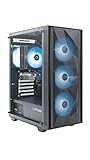
The ZOTAC MEK Gaming PC is the stretch pick for buyers who will pay a little over $700 for a recognizable hardware brand. ZOTAC is a long-established graphics card maker, and the listing names a Gold-rated power supply, a quality signal that most sub-$700 towers do not provide.
- CPU: AMD Ryzen 5 5500, up to 4.2GHz
- GPU: GeForce RTX 3050 6GB (GDDR6)
- Memory / storage: 16GB DDR4, 500GB NVMe SSD
- Power supply: 650W 80 Plus Gold
- Connectivity: Wi-Fi 6E, Windows 11 Home
Its core hardware matches the top pick, so you are paying for the brand, the stronger power supply and the faster Wi-Fi 6E. The 650W Gold unit also leaves room to drop in a stronger graphics card later, which none of the cheaper systems can claim with confidence.
Pros:
- 650W 80 Plus Gold power supply
- Recognizable hardware brand
- Wi-Fi 6E and NVMe storage
Cons:
- Costs more than the cheaper RTX 3050 system with the same core parts
- 500GB of storage is small
Skip it if your hard limit is $700; the STGAubron RTX 3050 system gives you almost the same gaming performance for less.
Prebuilt Gaming PC Under $700 Compared: Specs That Matter
| System | Graphics memory | Upscaling | Storage | Power supply named | Upgrade headroom |
|---|---|---|---|---|---|
| STGAubron RTX 3050 6G | 6GB | DLSS, FSR | 512GB SSD | No | Limited |
| SKYESEV RX 6500 XT | 4GB | FSR | 512GB NVMe | No | Limited |
| LXZ RX 6500 XT | 4GB | FSR | 512GB SSD | No | Limited |
| STGAubron RTX 2060 6G | 6GB | DLSS 2, FSR | 512GB SSD | No | Limited |
| YAWYORE Ryzen 5 5600GT | Shared with system memory | FSR | 1TB NVMe | 550W 80 Plus | Good (add a card) |
| ZOTAC MEK RTX 3050 | 6GB | DLSS, FSR | 500GB NVMe | 650W Gold | Good |
How We Chose These Prebuilt Gaming PCs
We do not run our own benchmarks or use these systems ourselves. This ranking is built from research and each pick had to clear four screens.
- Graphics card first. We required a dedicated graphics card with at least 4GB of video memory (or a clear explanation, as with the YAWYORE) because the card sets the ceiling for 1080p gaming.
- Memory and storage. We favored 16GB of memory and NVMe storage and flagged every configuration that falls short.
- Price fit. Five picks sit at or near the $700 line in current listings; the ZOTAC MEK is labeled as a stretch option.
- Specs stated in the listing. We only report parts the listing title or the maker documentation names. When a detail such as the power supply is missing, we say so instead of guessing.
Sources included manufacturer specification pages for the AMD Ryzen and Radeon parts and NVIDIA GeForce cards, published reviews of the RTX 3050 6GB, RTX 2060 and RX 6500 XT, and the product listings themselves.
How to Choose a Prebuilt Gaming PC Under $700
Check the graphics card first
At this price the graphics card matters more than any other part. Rank the options by what they offer: an RTX 2060 6GB or RTX 3050 6GB is a better buy than an RX 6500 XT 4GB for newer games because of the extra video memory and DLSS support. Avoid anything with a GTX 1050 Ti, GTX 1650 or integrated-only graphics if you want to play current 3D games.
Insist on dual-channel memory
Look for 16GB listed as two 8GB sticks, or a “dual-channel” mention. A single 16GB stick runs in single-channel mode, which can cost noticeable frame rate in CPU-bound games. If a listing does not say, ask the seller or check the return policy before you commit.
Prefer NVMe storage and at least 500GB
An NVMe SSD loads games faster than a SATA drive. Under 500GB is too small for Windows plus modern installs, which often exceed 100GB each. A budget of about $40-$60 adds a 1TB drive later.
Look at the power supply
A named 550W or larger 80 Plus unit is a good sign. A generic supply with no rating is common and fine for the stock parts, but plan to replace it before installing a stronger graphics card. Budget roughly $60-$90 for a quality 650W replacement.
Match the CPU generation to your games
A Ryzen 5 5500 or 5600GT (Zen 3) gives better frame rates in CPU-heavy games than a Ryzen 5 4500 (Zen 2) or a Ryzen 5 2600 (Zen+). If you play competitive shooters, prioritize the CPU; if you play graphics-heavy single-player titles, prioritize the graphics card.
Check the seller and the return window
Smaller builders ship from third-party sellers. Read the return policy, confirm what the warranty covers and who handles it, and keep the order packaging for the first 30 days so a return stays simple. A dead-on-arrival system is easier to replace than to repair.
Prebuilt vs Building Your Own PC at $700
Building a $700 PC yourself usually gets you a better power supply, a name-brand motherboard and a clearer upgrade path, but it takes several hours and you handle every warranty claim separately. At this budget the price gap between prebuilt and DIY has narrowed, because system builders buy cases, boards and Windows licenses in bulk. Choose a prebuilt when you want a working system out of the box and a single point of contact. Choose DIY when you enjoy the process or want specific parts. If you are comfortable assembling, a self-built system around a Ryzen 5 5500 and an RTX 3050 6GB or RX 6600 often gives you a better supply and cooler for the same money.
Best Upgrades After You Buy a Budget Prebuilt
- Add storage: a 1TB NVMe drive is the most useful first upgrade on a 512GB system.
- Check memory mode: confirm two sticks are installed; if only one is present, add a matching second stick.
- Replace the power supply before a graphics card upgrade: a 650W 80 Plus Bronze or Gold unit is the safe target.
- Update the graphics driver and BIOS: new drivers from NVIDIA or AMD often improve compatibility with newer games.
- Enable XMP or EXPO memory profiles: in the BIOS, so the memory runs at its rated speed rather than the default.
Which Prebuilt Under $700 Should You Buy? Match the PC to How You Play
- Esports and fast shooters: the STGAubron Ryzen 5 5500 system or the ZOTAC MEK, for the newer CPU generation.
- Newer single-player games at 1080p medium: the STGAubron RTX 3050 or RTX 2060 system, for the 6GB of video memory and DLSS.
- Lowest price with a dedicated GPU: the LXZ Ryzen 5 4500 + RX 6500 XT.
- Light gaming plus school or office work: the YAWYORE Ryzen 5 5600GT with 1TB of storage.
- Peace of mind and upgrade room: the ZOTAC MEK with a 650W Gold supply, if you can stretch the budget.
Prebuilt Gaming PC Under $700: Quick Answers
Can you get a good gaming PC for $700?
Yes, a $700 prebuilt can play modern games at 1080p with medium settings and upscaling, and it runs esports titles at high frame rates. It will not handle 1440p or ray tracing in demanding games.
What graphics card should a $700 gaming PC have?
Look for an RTX 3050 6GB, RTX 2060 or Radeon RX 6500 XT. Anything older, such as a GTX 1050 Ti, will struggle with current games.
Is a prebuilt gaming PC under $700 worth it?
It is worth it as an entry point if you value a working system and a single warranty contact. Treat it as a starter machine and budget for a storage or power supply upgrade later.
Which is better under $700, RTX 3050 or RX 6500 XT?
The RTX 3050 6GB is the better choice for most players because it carries 6GB of video memory and DLSS support, while the RX 6500 XT has 4GB. The RX 6500 XT is still fine for esports and older games.
Final Verdict
For most buyers, the STGAubron Gaming PC with a Ryzen 5 5500 and an RTX 3050 6G is the best prebuilt gaming PC under $700 in 2026. It combines a capable six-core processor, NVIDIA graphics with DLSS and 16GB of memory at the budget ceiling. If you prefer Radeon graphics and NVMe storage, the SKYESEV Ryzen 5 5500 + RX 6500 XT is the alternative, and the LXZ Ryzen 5 4500 + RX 6500 XT is the cheapest way to start. If graphics power matters most, the STGAubron RTX 2060 system offers the best card for the money, and if you can stretch past $700, the ZOTAC MEK adds a Gold-rated power supply and a recognizable brand.
Whatever you choose, check the memory configuration, storage size and seller return policy before you pay. Those three details separate a good budget system from a frustrating one.
Recommendations rely on manufacturer specifications and listing details, and prices and availability change often. We earn a commission from qualifying purchases made through our links.
Related Articles
Looking for more on this topic? Browse the hand-picked guides below — each one applies the same scoring rubric used in this review.
What to Expect in Games From a Prebuilt Gaming PC Under $700
Frame rates depend on the exact card, the game and the settings, and we have not measured these systems ourselves. The ranges below describe the typical performance class of each graphics card at 1080p based on published coverage, so use them to set expectations rather than as promises.
Esports and older games
Valorant, Counter-Strike 2, League of Legends, Rocket League and similar titles are light on graphics hardware. An RTX 3050 6GB, RTX 2060 or RX 6500 XT should reach well above 100 FPS at low to medium settings, and the Ryzen 5 5500 systems have the extra CPU speed to push higher in competitive shooters. The YAWYORE Ryzen 5 5600GT can also run these games at low settings on its integrated graphics, which makes it a reasonable starter for younger players.
Popular online games
Fortnite, Apex Legends, Call of Duty and Marvel Rivals sit in the middle. Expect medium settings and 60 FPS or more on the RTX 3050 and RTX 2060 systems, with upscaling doing the heavy lifting in the busiest scenes. On the RX 6500 XT systems, drop texture quality one step because of the 4GB video memory limit.
Demanding single-player games
New releases built around ray tracing or heavy streaming of high-resolution textures are the hardest on this tier. Plan on low to medium presets at 1080p, DLSS or FSR set to Quality or Balanced, and ray tracing off. The 6GB cards cope better than the 4GB cards, which can stutter when a game wants more video memory than the card has.
Budget Prebuilt Red Flags to Avoid
Budget shelves are full of look-alike towers with impressive-sounding titles. These warning signs separate systems that are worth the money from ones that are not.
- “Gaming PC” with no named graphics card. If the title only says “gaming” and lists a processor, it probably relies on integrated graphics.
- GTX 1050 Ti, GTX 1650 or GT-class cards. These are too slow for current games and give you little room to grow.
- Memory listed as one 16GB stick, or no memory configuration at all. Single-channel memory costs frame rate in CPU-bound games.
- Storage under 500GB or a mechanical hard drive as the boot drive. Windows loads slowly and modern games will not fit.
- Vague claims such as “up to” clock speeds, “4K gaming” or “10K support”. At this price, 4K gaming is not a realistic claim.
- No return policy or no named seller support. A small builder with unclear support turns a minor fault into a long dispute.
- Price far below similar listings. If one tower costs hundreds less than comparable ones, check which part was cut before you buy.
When in doubt, compare the graphics card, memory, storage and power supply across two or three listings in a simple table before you decide, the same way the comparison table in this guide does.
Is It Better to Wait or Buy a Prebuilt Gaming PC Under $700 Now?
Component prices have stayed high through much of 2026, so waiting for a large drop is a gamble. Buy now if your current PC is unusable, if you need a system for school or work as well as games, or if the listing offers a clear return window. Wait if you can stretch to the $900-$1,100 range, because that tier jumps to RTX 4060 or RTX 5050-class graphics, which is a noticeable step up for newer games. In either case, prioritize the graphics card and memory configuration over case lighting and bundled accessories.
If you already own a monitor, keyboard and mouse, a system without bundled peripherals is a better use of your budget than a bundle with a cheap keyboard and mouse that you will replace soon.
Frequently Asked Questions
What frame rates can a $700 prebuilt gaming PC actually hit?
Expect 60 to 100 FPS at 1080p with high settings in most modern titles, and well over 144 FPS in esports games like Valorant, CS2, and Rocket League. Demanding ray-traced games will need upscaling such as DLSS or FSR set to Quality mode to stay above 60 FPS comfortably.
How much RAM and storage should a $700 prebuilt include?
Insist on 16GB of DDR4 or DDR5 in dual-channel, since single 16GB sticks cost meaningful frame rate in CPU-bound games. Storage should be at least a 500GB NVMe SSD, though 1TB is far better because modern installs frequently exceed 100GB each and there is no room for a slow mechanical boot drive.
Is the power supply in budget prebuilts good enough to upgrade later?
Often not. Many sub-$700 systems ship with unrated or generic 400W to 500W units that lack the headroom and PCIe connectors for a stronger GPU. Budget roughly $70 for an 80 Plus Bronze or Gold 650W replacement before installing anything more power hungry than the card that came in the box.
Should I buy a prebuilt or build my own at this price?
At $700 prebuilts are usually competitive because system integrators get volume pricing on cases, boards, and OEM Windows licenses. Building yourself gains better component quality, especially the PSU and cooler, but rarely saves cash outright. Buy prebuilt for convenience and warranty, build if you want specific parts and upgrade headroom.
Can these machines handle 1440p gaming?
Yes for lighter and older titles, esports shooters, and indie games where 1440p at 60 FPS is very achievable. For current AAA releases you will need to drop to medium presets and enable upscaling. If 1440p is your main goal, stretching to the $900 to $1000 tier gives a much better long-term experience.
















