The Razer DeathAdder’s optical sensor tracks on almost any surface, so the question is not whether a pad works with it — it is how much room your arm needs and how much friction you want under the mouse. A player running low sensitivity sweeps the mouse across an arc and needs space to spare, while someone playing at high sensitivity on a small desk can get by with less. Surface texture, pad size, thickness and edge finish all change how the DeathAdder feels over a long session.
This guide is for DeathAdder owners sorting out those trade-offs: competitive shooter players chasing aim, MMO and strategy players who want predictable control, and anyone setting up a first desk who would rather buy once than twice. Every pick below is a mouse pad and nothing else — no mice, no keyboards — chosen from the size, surface and base details stated on its Amazon listing, so you can match the pad to your sensitivity and your desk instead of guessing.
Quick Picks
As an Amazon Associate we earn from qualifying purchases
| Product | Best for | Key spec from title |
|---|---|---|
| Razer Gigantus V2 (Medium) | Compact desks, controlled cloth glide | Textured micro-weave cloth, medium |
| Razer Gigantus V2 (XXL) | Low sensitivity, desk-wide coverage | Thick high-density foam, XXL |
| SteelSeries QcK Large | Controlled aim, mouse-only area | 490 x 420 mm, non-slip silicone base |
| Logitech G840 XL | Thin desk-wide surface | 900 x 400 x 3 mm, 0.12 in thin |
| Corsair MM350 PRO Extended XL | Spill protection, cushioned wide desk | Spill-proof cloth, 930 x 400 mm |
How to Choose
Start with size, not brand
Measure the sweep your arm actually makes before you look at brands. Play a few rounds, note how far the mouse travels in each direction, then add a margin on every side — a pad that ends mid-flick will throw your aim off at the worst moment. Low-sensitivity players often need an extended or XXL pad that stretches under the keyboard, while high-sensitivity players can stay comfortable on a medium or large pad. Desk depth matters too: a pad that hangs over the edge curls and slides, so check the depth of your desk against the pad’s listed dimensions before you commit.
Match the surface to your aim style
Cloth pads with a micro-weave texture give the DeathAdder’s feet a controlled, even drag that suits players who stop on a dime and value precise crosshair placement. Smoother hybrid surfaces trade some of that stopping power for a faster glide, which helps when you track moving targets across long distances. Hard plastic and glass pads sit at the far end of that scale and wear mouse feet down faster. The DeathAdder’s optical sensor reads all of these surfaces reliably, so the choice comes down to feel: if your aim overshoots, lean toward cloth; if your wrist tires from dragging, lean toward a smoother surface.
Thickness and base decide comfort
A pad’s thickness changes how your wrist sits over hours of play. Slim pads around 3 mm keep the mouse close to the desk and suit players who rest their wrist on the desk edge, while thicker 4 mm pads add cushioning that helps when the desk surface is cold, rough or slightly uneven. The base matters just as much: a dense rubber or silicone base grips the desk and keeps the pad still during fast flicks, while a thin foam base can creep across a smooth desk. If your desk has a glass top or a polished finish, a heavier pad with a textured rubber base will stay put far better than a light one.
Edges and upkeep affect lifespan
Stitched edges keep a cloth pad from fraying where your wrist rubs against the border, and they matter most if you play daily or rest your arm on the pad’s edge. Unstitched pads can start shedding threads within months of heavy use, and loose threads snag under the mouse. Spill-resistant coatings are worth having if drinks sit near your setup, since a soaked cloth pad dries slowly and can warp. Whatever you buy, check the care notes on the listing: most cloth pads clean with a damp cloth and mild soap, while harsh cleaners and machine washing can damage the surface weave and the rubber base.
The 5 Best Options
Razer Gigantus V2 (Medium)

The classic pairing for a DeathAdder on a compact desk. Its textured micro-weave cloth gives the mouse a controlled glide with enough friction to stop precisely, and the thick, high-density rubber foam base keeps the pad flat and still through fast flicks. At medium size it fits desks where an extended mat would hang over the edge, yet still leaves room for the wide, relaxed sweeps the DeathAdder’s ergonomic shape encourages. The plain black finish suits almost any setup without drawing attention to itself.
Specs
- Surface: Textured micro-weave cloth
- Base: Thick, high-density rubber foam, non-slip
- Size: Medium, 360 x 275 mm
- Colour: Classic Black
Best for: DeathAdder owners on compact desks who want controlled cloth glide.
Watch out for: Confirm it is still sold before buying — the listing could not be re-checked live at writing time; the Medium size runs out of room quickly at low sensitivity.
Razer Gigantus V2 (XXL)
Same cloth surface and rubber base as the Medium, stretched across a desk-wide XXL footprint. That extra room is the point: low-sensitivity players can sweep the DeathAdder through long arcs without lifting the mouse or running off the edge, and the pad doubles as a rest for the keyboard. The thicker foam build smooths out minor desk imperfections, so the mouse glides evenly even on a less-than-perfect surface. It is the straightforward choice when your desk has the space and your sensitivity is on the low side.
Specs
- Surface: Cloth, textured micro-weave
- Base: Thick, high-density foam, non-slip
- Size: XXL
- Colour: Classic Black
- Model: RZ02-03330400-R3U1
Best for: Low-sensitivity players who want one pad for mouse and keyboard.
Watch out for: Confirm it is still sold before buying — the listing could not be re-checked live at writing time; measure your desk depth first, as XXL pads overhang shallow desks.
SteelSeries QcK Large
A long-running cloth pad that pairs well with the DeathAdder’s optical sensor, which the listing describes as optimized for gaming sensors. The micro-woven surface gives a steady, predictable drag that suits controlled aim, and the non-slip silicone rubber base holds the pad firmly in place. At 490 x 420 mm it is nearly square, so it covers a generous sweep area without stretching under the keyboard — a good fit for players who keep their keyboard on the desk itself and want the mouse area clearly defined.
Specs
- Surface: Micro-woven cloth
- Base: Non-slip silicone rubber
- Size: Large, 490 x 420 mm
- Colour: Black
- Listed for: FPS, MOBAs, RTS, MMO
Best for: Players who want a square, controlled cloth pad for the mouse alone.
Watch out for: Confirm it is still sold before buying — the listing could not be re-checked live at writing time; no stitched edging is listed, so heavy wrist contact may fray the edges over time.
Logitech G840 XL

At 0.12 in thick, the G840 XL keeps the DeathAdder close to the desk and avoids the raised lip that can catch a wrist during long sessions. Its performance-tuned cloth surface gives a moderate, even friction that works across shooters, MOBAs and everyday use, while the stable rubber base stops the mat creeping. The 900 x 400 mm footprint covers mouse and keyboard in one sweep, making it a tidy option for players who want a single surface under the whole setup.
Specs
- Surface: Cloth, performance-tuned
- Base: Stable rubber
- Size: XL, 900 x 400 x 3 mm
- Thickness: 0.12 in
- Colour: Black
Best for: Players who want a thin, desk-wide surface for mouse and keyboard.
Watch out for: Confirm it is still sold before buying — the listing could not be re-checked live at writing time; the slim build offers little cushioning if your desk is cold or uneven.
Corsair MM350 PRO Extended XL
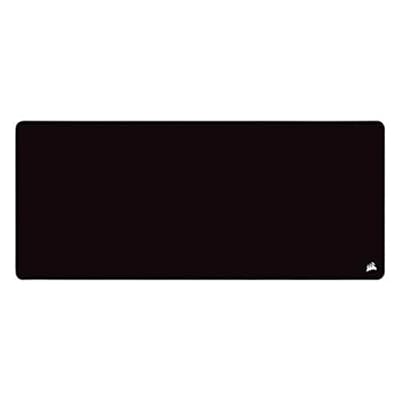
The practical pick for desks where drinks, snacks and long sessions mix. Its spill-proof cloth coating lets liquid sit on the surface instead of soaking in, and the glide-enhanced micro-weave gives the DeathAdder a smooth, fast feel without losing control. The 4 mm plush rubber build adds cushioning under the wrist, and the anti-skid textured base keeps the 930 x 400 mm surface planted. It covers mouse and keyboard with room to spare, and wipes clean more easily than an untreated cloth pad.
Specs
- Surface: Spill-proof cloth, glide-enhanced micro-weave
- Base: Anti-skid textured natural rubber
- Size: Extended XL, 930 x 400 mm (36.6 x 15.7 in)
- Thickness: 4 mm plush rubber
- Colour: Black
Best for: Players who want spill protection and cushioning across a wide desk.
Watch out for: Confirm it is still sold before buying — the listing could not be re-checked live at writing time; the 4 mm thickness raises the mouse noticeably above the desk.
Which One Fits Your Situation
A small desk and high sensitivity
Pick the Razer Gigantus V2 (Medium). Its compact footprint fits a tight desk without overhang, and the micro-weave cloth gives the DeathAdder enough friction for precise stops at high sensitivity, where small movements matter most. The thick rubber base keeps it planted even when the desk is crowded and short on space.
Low sensitivity and long sweeps
Go for the Razer Gigantus V2 (XXL) or the SteelSeries QcK Large. The XXL gives low-sensitivity players the widest arc without lifting the mouse, while the QcK Large covers a generous square area for players who keep the keyboard off the pad. Both use cloth surfaces that suit controlled, deliberate aim.
One surface for mouse and keyboard
Choose the Logitech G840 XL or the Corsair MM350 PRO Extended XL. Both stretch 900 mm or more across the desk, so the keyboard sits on the same level as the mouse and nothing catches your wrist at the boundary. Pick the G840 XL for a slim profile, or the MM350 PRO when cushioning and spill protection matter more.
Drinks near the desk
Take the Corsair MM350 PRO Extended XL. Its spill-proof coating keeps liquid on the surface where it can be wiped away, instead of soaking into the weave and warping the pad. That alone makes it the sensible choice for anyone who keeps a drink within arm’s reach during long sessions, and the wide footprint still covers the full setup.
Common Mistakes
- Buying a pad smaller than your sweep — if the mouse runs off the edge mid-fight, the pad is too small no matter how good the surface feels.
- Picking a hard pad for control play — slick surfaces trade stopping power for glide, so crosshair placement suffers if your style relies on short, precise stops.
- Ignoring desk depth — an extended pad that overhangs the edge curls upward and slides, undoing the point of a wide surface.
- Skipping the base check — a pad with a weak base creeps across smooth desks; look for dense rubber or silicone in the listing.
- Washing a cloth pad roughly — harsh cleaners and machine washing can damage the weave and loosen the base; a damp cloth and mild soap do the job.
Frequently Asked Questions
Does the DeathAdder need a Razer pad?
No. The DeathAdder’s optical sensor tracks reliably on cloth, hybrid and hard surfaces from any brand, so the pad’s size and texture matter far more than its logo. Razer pads like the Gigantus V2 pair naturally with the mouse, but the QcK, G840 XL and MM350 PRO in this list work just as well.
What size pad suits low sensitivity?
A low-sensitivity setup needs room for long arm movements, so an XXL or extended pad is the safer choice — the Gigantus V2 XXL and the MM350 PRO Extended XL both give the DeathAdder space to sweep without lifting. Measure your longest flick first, then pick a pad that covers it with margin on every side.
Cloth or hard pad for the DeathAdder?
Cloth suits most DeathAdder owners because the controlled friction helps with precise stops, and the DeathAdder’s ergonomic shape is built for long, relaxed sessions that cloth supports well. A hybrid pad such as the Razer Strider is the middle ground, offering a faster glide while staying rollable and portable. Hard pads suit speed-first players but wear mouse feet down faster.
How do I clean a cloth gaming pad?
Wipe the surface with a damp cloth and a little mild soap, then let the pad air-dry flat away from direct heat. Avoid machine washing and harsh cleaners, which can damage the weave and loosen the rubber base. Spill-proof pads like the MM350 PRO are easier to maintain, since liquid stays on the surface instead of soaking in.