Rust is not a game where you can ignore memory and storage and hope the graphics card carries everything else. Requirements summarised from the Steam listing put the minimum at 12GB of RAM and the recommended level at 16GB of RAM, with 45GB of available storage and an SSD required at the recommended level.
As an Amazon Associate we earn from qualifying purchases.
If you are also weighing a Ryzen machine more broadly, our guide to the best gaming laptop with an AMD Ryzen processor is a useful companion before you choose between an Intel and an AMD route.
What Rust Asks From a Laptop
RAM and storage come first
Sixteen gigabytes is the recommended amount, and it is the practical floor here. A laptop with 32GB, like the Lenovo configuration below, gives more headroom for Rust alongside a browser, chat apps and recording tools, but headroom is not a promised frame rate. This guide makes no benchmark claims.
CPU, GPU and power limits
The processors below are Intel Core i7 HX or H series chips, or an AMD Ryzen 7 HS chip, as stated in each listing. Three models use the GeForce RTX 4060 Laptop GPU and one uses the GeForce RTX 4070 Laptop GPU.
Power limits decide how much you can compare. The ASUS listings state 140W Max TGP for their RTX 4060 configurations, and the Lenovo listing states a 140W TGP figure. The MSI listing checked does not state a TGP figure in the details shown, so do not assume it matches the others. Confirm the model number and look for the TGP line before comparing RTX laptops on name alone.
Display, ports and warranty
Where a listing does not state a figure, this guide says so. Check the exact variant, seller and warranty on the live page, because seller-upgraded configurations can carry different cover.
Comparison Table
| Model | CPU | GPU and stated power | Display | RAM | Storage |
|---|---|---|---|---|---|
| ASUS ROG Strix G16 G614JV-AS74 | Intel Core i7-13650HX | GeForce RTX 4060, 140W Max TGP stated | 16-inch FHD, 165Hz | 16GB DDR5-4800 | 1TB PCIe Gen4 SSD |
| ASUS TUF Gaming A15 FA507NV-EH74 | AMD Ryzen 7 7735HS | GeForce RTX 4060, 140W Max TGP stated | 15.6-inch FHD, 144Hz | 16GB DDR5-4800 | 1TB PCIe SSD |
| MSI Katana 15 B13VGK-484US | Intel Core i7-13620H | GeForce RTX 4070, TGP not stated in listing checked | 15.6-inch FHD, 144Hz | 16GB DDR5 | 1TB NVMe SSD |
| Lenovo Legion 5i | Intel Core i7-13650HX | GeForce RTX 4060, 140W TGP stated, 8GB | 16-inch QHD, 165Hz, G-SYNC | 32GB DDR5 | 1TB PCIe NVMe SSD |
The Laptops
1. ASUS ROG Strix G16 G614JV-AS74

View the ASUS ROG Strix G16 on Amazon
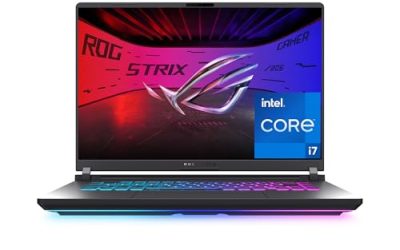
The Strix G16 has the clearest power statement here. Amazon states an Intel Core i7-13650HX, a GeForce RTX 4060 Laptop GPU at 140W Max TGP, 16GB of DDR5-4800 memory and a 1TB PCIe Gen4 SSD. That memory matches the recommended RAM level for Rust, and the drive gives far more than the 45GB the game requires.
The display is a 16-inch FHD panel at 165Hz, listed with 100% sRGB and Pantone Validation. The listing describes ROG Intelligent Cooling, with liquid metal on the CPU and a third intake fan. For connections, the details list HDMI, one Thunderbolt port, one Ethernet port and Wi-Fi 6E. The warranty description is one year, listed as a limited warranty type.
2. ASUS TUF Gaming A15 FA507NV-EH74

View the ASUS TUF Gaming A15 on Amazon
The TUF Gaming A15 is the AMD option. Its listing states an AMD Ryzen 7 7735HS and a GeForce RTX 4060 Laptop GPU at 140W Max TGP, the same stated power figure as the Strix. It also lists 16GB of DDR5-4800 memory, 1TB of PCIe storage and a graphics card memory size of 8GB in its technical details.
The screen is 15.6 inches, Full HD, 144Hz, with 100% sRGB stated in the product title. Wi-Fi 6 is listed, rather than Wi-Fi 6E. The core Rust boxes are still ticked: 16GB of RAM, a 1TB SSD and a dedicated RTX 4060 with a stated power limit.
Upgradeability and warranty length are not clearly stated for the TUF in the details shown; confirm both for FA507NV-EH74 before buying.
3. MSI Katana 15 B13VGK-484US

View the MSI Katana 15 on Amazon
The Katana 15 is the RTX 4070 option. Its listing states an Intel Core i7-13620H, a GeForce RTX 4070, 16GB of DDR5 memory and a 1TB NVMe SSD. The display is 15.6 inches at Full HD and 144Hz. The listing names USB Type-C and Cooler Boost 5, with Windows 11 Home.
That GPU name is a reason to look closely, not to skip checks. The details shown do not state a GPU TGP figure, so this guide does not compare its power limit with the 140W figures stated elsewhere. Confirm the full model code B13VGK-484US and look for a power figure in the manufacturer details.
Warranty is clearer for the Katana: one year limited, including one year global. Upgradeability is not stated for this ASIN in the details shown.
4. Lenovo Legion 5i

View the Lenovo Legion 5i on Amazon
This Legion 5i stands out on memory and screen. The listing states an Intel Core i7-13650HX, a GeForce RTX 4060 with 8GB of GDDR6 and a 140W TGP figure, 32GB of DDR5 memory and a 1TB PCIe NVMe SSD. The 32GB is described as two 16GB modules at 4800MHz. That is a documented configuration detail, not a promise that you can change it later without consequence.
The display is a 16-inch QHD panel at 165Hz with G-SYNC. The listing also mentions a Legion Coldfront 5.0 cooling system, a numeric keypad and a backlit keyboard, and video output by HDMI and DisplayPort in its details. The 32GB exceeds the recommended 16GB, and the 1TB SSD covers the required space and the recommended SSD condition.
For the Legion, read seller and warranty lines carefully, as seller-configured listings can differ from factory ones.
How to Choose
Pick by the check you care about most
If a stated GPU power limit matters most, start with the ASUS models and the Legion, where a 140W figure is stated. If memory headroom matters most, the Legion with 32GB is the only one above 16GB here. If a step up in GPU name matters most, look at the Katana, but finish the power and warranty checks first. If you prefer an AMD processor, the TUF Gaming A15 is the Ryzen choice.
Selection criteria used in this guide
Laptops were included only if the Amazon US listing stated a dedicated RTX laptop GPU, at least 16GB of RAM, a 1TB SSD in the configurations above, and a high-refresh display. Listings were then checked for a stated processor model, a GPU power figure where available, port and wireless details, and warranty wording. No model was included on the basis of a benchmark, a frame-rate claim or a specification that could not be found in its listing.
FAQ
How much RAM does Rust need on a laptop?
The published requirements put the minimum at 12GB and the recommended amount at 16GB. Every laptop here has at least 16GB, and the Lenovo configuration has 32GB. More RAM gives headroom for other apps alongside the game, but it is not a guarantee of a specific frame rate.
Does Rust need an SSD?
At the recommended level, yes. The requirements list 45GB of available space and state that an SSD is required at that level. All four laptops include a 1TB SSD or NVMe SSD, so space for the game and its updates should not be the limiting factor.
Is an RTX 4060 laptop enough for Rust?
An RTX 4060 configuration that also meets the RAM and SSD points above fits the hardware framing of this guide, especially where the listing states a 140W power limit. This guide does not publish benchmark results, so check the exact model code, power figure and display before deciding, rather than judging by the GPU name alone.
Should I buy a laptop I can upgrade later?
Only if upgradeability is documented for that exact model. Some listings state a memory layout without promising an upgrade path, and seller-opened configurations can change warranty terms. Confirm the slot layout, drive options and warranty effect in the manufacturer or seller documentation for the model code first.
What display should I look for?
Look at size, resolution and refresh rate together. This guide includes 144Hz and 165Hz panels at Full HD and QHD resolutions. A higher refresh rate is useful only if the rest of the configuration is sound, so check RAM, storage and GPU power first.
Conclusion
The best gaming laptop for Rust is the one that clears the documented basics without guesswork: at least 16GB of RAM, an SSD with plenty of room beyond the required 45GB, a dedicated RTX GPU with its power limit stated where possible, and warranty wording you have actually read. The ASUS ROG Strix G16 offers a clear 140W statement and a 165Hz screen, the ASUS TUF Gaming A15 gives a Ryzen alternative at the same stated GPU power, the MSI Katana 15 provides an RTX 4070 configuration with a stated one-year limited warranty, and the Lenovo Legion 5i leads on memory with 32GB and a QHD 165Hz display. Open the exact Amazon page for the model you favour, recheck the ASIN, configuration and warranty, and buy the variant you verified.