

Streaming is multitasking in real time. While you play, you are also switching scenes, muting audio, triggering alerts, replying to chat and managing your broadcast software — often all at once. That is why the best mouse for streaming is not necessarily the lightest esports flyweight but the one that makes all of that easier: programmable buttons to bind hotkeys, a comfortable shape for long broadcasts, and the flexibility to move smoothly between gaming and the productivity work that running a channel involves. The right mouse turns a frantic stream into a smooth one.
This guide rounds up six mice that suit a streaming and content-creation setup, from a heavily programmable gaming workhorse to comfortable wireless options ideal for desktop control between streams. We have prioritised useful extra buttons for binding broadcast hotkeys, all-day ergonomic comfort, and dependable wireless freedom for a tidy desk. Each pick lists its key features, an honest set of pros and cons, and an approximate price, so you can match it to your workflow and budget. Whether you are a full-time streamer or building your first creator setup, there is a versatile, comfortable option here for you.
As an Amazon Associate we earn from qualifying purchases at no extra cost to you.





![Redragon M602 Gaming Mouse, Ergonomic RGB Gaming Mouse Wired with 7200 Adjustable DPI, 9 Programmable Buttons, Professional Software for Gamer Office [Black]](https://m.media-amazon.com/images/I/4189L2UBl9L._SL160_.jpg)

🛒 Best Price Today on Amazon
Prime members get fast, free shipping on everything above, plus member-only deals. New members get a 30-day free trial — cancel anytime.
Streaming Mice at a Glance
| Product | Best For | Standout Spec | Approx Price |
|---|---|---|---|
| Logitech G502 Hero | Best overall (hotkeys) | 11 programmable buttons | around $32 |
| Logitech G305 Lightspeed | Best gaming wireless | Lightspeed, 12,000 DPI | around $37 |
| Logitech M510 | Best comfort wireless | Ergonomic, USB receiver | around $28 |
| Razer DeathAdder Essential | Best budget gaming | 6,400 DPI, 5 buttons | around $20 |
| Logitech M185 | Best ultra-budget | 12-month battery, compact | around $14 |
| TECKNET Wireless Mouse | Best value ergonomic | Adjustable DPI, ergonomic | around $10 |
1. Logitech G502 Hero

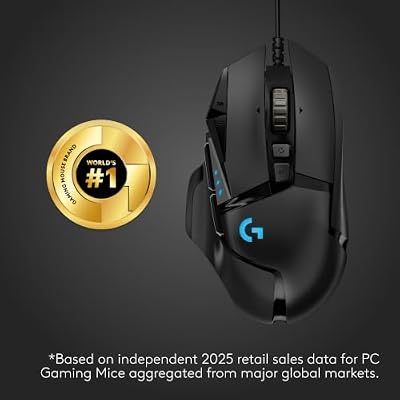
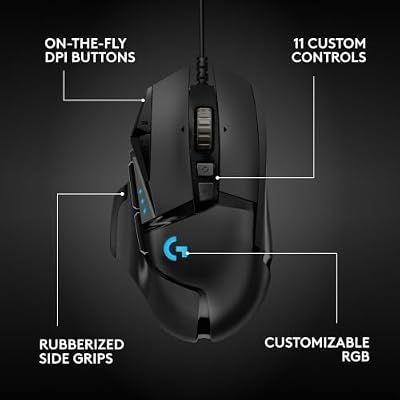
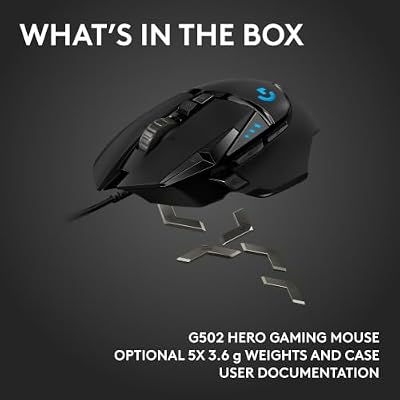
Logitech G502 Hero Wired Gaming Mouse - Black | High performance, 25,600 DPI, RGB, adjustable weights, 11 programmable buttons, on-board memory, PC/Mac




As an Amazon Associate we earn from qualifying purchases. Product prices and availability are accurate as of the date/time indicated.
The Logitech G502 Hero is our top pick for streaming, and the reason is simple: buttons. With 11 programmable buttons, it is a streamer’s dream for binding the broadcast actions you reach for constantly — scene switches, mic mutes, alert triggers, clip markers and chat shortcuts can all live under your thumb, letting you control your stream without breaking away from the game or hunting for keyboard shortcuts. For real-time multitasking, that is transformative.
Beyond the button count, the G502 is a genuinely capable gaming mouse, with Logitech’s accurate HERO 25K sensor up to 25,600 DPI for the actual gameplay your stream is built around. The adjustable weight system lets you tune the feel, and the sculpted right-handed shape stays comfortable through long broadcasts. It is wired, which for a stationary streaming desk is a non-issue and one less battery to manage. At around $32 the G502 Hero delivers unmatched programmability and proven gaming performance, making it the most versatile streaming companion in this guide.
Pros: 11 programmable buttons ideal for stream hotkeys; accurate HERO 25K sensor up to 25,600 DPI; adjustable weight; comfortable sculpted shape; outstanding value.
Cons: Heavier than minimalist mice; wired only; right-handed shape only.
2. Logitech G305 Lightspeed

Logitech G305 Lightspeed Wireless Gaming Mouse - White | 12,000 DPI, Lightweight, 6 Programmable Buttons, 250h Battery, On-Board Memory, Compatible with PC and Mac






As an Amazon Associate we earn from qualifying purchases. Product prices and availability are accurate as of the date/time indicated.
The Logitech G305 Lightspeed is the best wireless gaming pick for streamers who want a clean, cable-free desk without sacrificing gameplay performance. It uses Logitech’s Lightspeed wireless technology for a fast, reliable connection and the accurate HERO sensor up to 12,000 DPI, so the gaming side of your stream stays sharp and responsive. For creators who value a tidy on-camera setup, losing the cable is a real aesthetic and practical win.
The G305 is light and compact with a simple, comfortable shape, and it runs on a single AA battery with long life, so it will not die mid-broadcast. It does have programmable buttons for binding a few key stream actions, though fewer than the G502 — making it best for streamers who lean on their keyboard or a dedicated control deck for hotkeys and want the mouse mainly for responsive gameplay and a clean look. At around $37 it is an excellent wireless option that balances gaming performance, tidiness and value for a content-creation desk.
Pros: Reliable Lightspeed wireless for a clean desk; accurate HERO sensor up to 12,000 DPI; light and compact; long single-AA battery life; programmable buttons.
Cons: Fewer buttons than the G502 for hotkeys; no rechargeable battery; pared-back feature set.
3. Logitech M510

Logitech M510 Full Size Ambidextrous 2.4 GHz Wireless Mouse | 2.4 GHz USB-A Nano Receiver, tilt-to-scroll function, 2-year battery life, Windows Mac Linux compatible, certified for Chrome






As an Amazon Associate we earn from qualifying purchases. Product prices and availability are accurate as of the date/time indicated.
The Logitech M510 is the comfort-focused wireless pick, and for streamers who spend long hours at the desk between and during broadcasts that ergonomic shape is the standout. Its contoured, right-handed body with soft rubber grips is designed for all-day comfort, supporting your hand through long sessions of editing, scheduling, replying to your community and the general desk work that running a channel demands. Comfort over a full broadcast day is worth more than headline gaming specs for many creators.
It connects wirelessly through a tiny USB receiver for a clutter-free desk, and adds handy extras: a side scroll wheel and back/forward buttons that speed up navigating editing timelines, dashboards and browser tabs during a stream. Laser tracking works on most surfaces, and battery life is long. It is a productivity-first mouse rather than a dedicated gaming one, but for a streaming workflow built around multitasking and desk comfort, the M510 is a comfortable, practical choice at around $28.
Pros: Comfortable ergonomic shape for all-day desk work; wireless via compact USB receiver; side scroll and back/forward buttons aid navigation; reliable laser tracking; long battery life.
Cons: Not a dedicated gaming mouse; no high-DPI gaming sensor; fewer fully programmable buttons than gaming options.
4. Razer DeathAdder Essential

Razer DeathAdder Essential Ergonomic Wired Gaming Mouse, Black | 6400 DPI Optical Sensor, 5 Programmable Buttons, Rubber Side Grips, Mechanical Mouse Switches


As an Amazon Associate we earn from qualifying purchases. Product prices and availability are accurate as of the date/time indicated.
The Razer DeathAdder Essential is the best budget gaming pick for new streamers building a setup without overspending. It brings the renowned ergonomic DeathAdder shape, which cradles the hand comfortably for the long hours a broadcast demands — comfort that matters as much for the productivity side of streaming as for the gameplay. For creators who want a dependable, comfortable gaming mouse on a tight budget, it is a sensible foundation.
Its 6,400 DPI optical sensor delivers accurate tracking that is more than enough for the games most streamers play, and five programmable buttons let you bind a handful of useful stream actions like mic mute or a scene switch. The wired connection means zero latency and no battery to manage on a stationary desk. There is no RGB or weight tuning, but at around $20 those omissions are entirely reasonable. For a first creator setup that needs a comfortable, capable gaming mouse with a few bindable buttons, the DeathAdder Essential is excellent value.
Pros: Comfortable ergonomic DeathAdder shape; accurate 6,400 DPI optical sensor; five programmable buttons for stream actions; zero-latency wired link; excellent value at around $20.
Cons: Lower DPI ceiling; basic feature set with no RGB; right-handed only; fewer buttons than the G502.
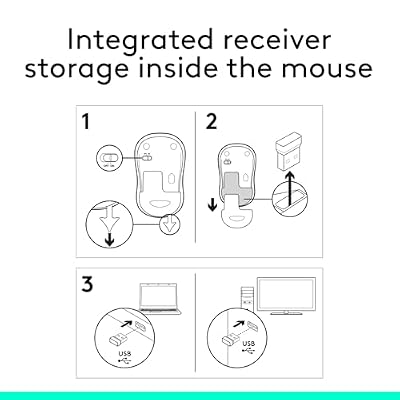
5. Logitech M185

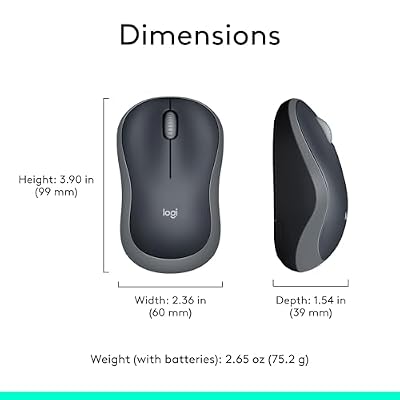
Logitech M185 Compact Ambidextrous 2.4 GHz Wireless Mouse - Swift Grey | Ambidextrous mouse with 2.4 GHz USB-A Nano Receiver, Optical Tracking, 12-Months Battery Life, PC, Mac, Laptop compatible




As an Amazon Associate we earn from qualifying purchases. Product prices and availability are accurate as of the date/time indicated.
The Logitech M185 is the ultra-budget pick, and for streamers who need a reliable, no-fuss secondary or starter mouse it is hard to argue with. It connects wirelessly through a plug-and-forget USB receiver, keeping your desk tidy, and runs for an exceptional 12 months on a single AA battery — so it is genuinely set-and-forget hardware you will not have to think about between or during streams. For a creator on a strict budget, that reliability is worth a great deal.
The compact, contoured shape is comfortable for general desk navigation, and it handles the everyday productivity side of streaming — managing your dashboard, replying to chat, scheduling content and browsing — with no fuss. It is not a gaming mouse and lacks programmable buttons, so it suits streamers who handle gameplay on another device, want a dependable second mouse, or are setting up a productivity-focused channel. At around $14 the M185 delivers Logitech reliability and excellent battery life at a price that fits any budget.
Pros: Very affordable at around $14; reliable wireless via USB receiver; outstanding 12-month battery life; compact, comfortable shape; dependable Logitech quality.
Cons: Not a gaming mouse; no programmable buttons; basic sensor; best as a secondary or productivity mouse.
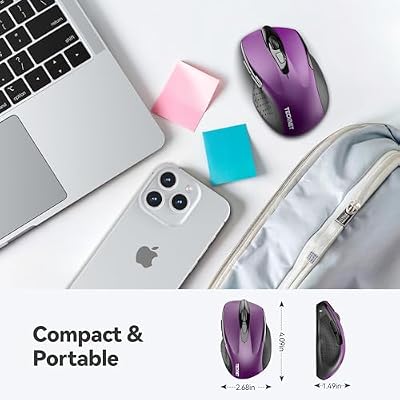
6. TECKNET Wireless Mouse

TECKNET Wireless Mouse, 2.4G Ergonomic Computer Mouse, 2600 DPI, Purple | Ergonomic Design with Side Grips, Adjustable DPI, 2-Year Battery, Compact Size, USB-A Plug & Play, Wide OS Compatibility


As an Amazon Associate we earn from qualifying purchases. Product prices and availability are accurate as of the date/time indicated.
The TECKNET Wireless Mouse rounds out this guide as the best value ergonomic pick, ideal for streamers who want comfortable desk control on the absolute tightest budget. Its ergonomic, contoured shape is designed for comfort during the long stretches of productivity work that running a channel involves — editing, scheduling, moderating chat and managing your setup — making it a practical companion for the non-gaming side of a creator’s day.
It offers adjustable DPI so you can set a comfortable cursor speed for precise editing or quick navigation, and connects wirelessly through a 2.4G USB receiver for a clutter-free desk. Battery efficiency is strong, and the broad compatibility means it works seamlessly with a laptop or desktop streaming rig. It is a productivity mouse rather than a gaming one, so it suits streamers who game on another device or whose channel centres on creative and just-chatting content. At around $10 the TECKNET is the value champion here — a comfortable, dependable ergonomic mouse for the streaming desk at a remarkably low price.
Pros: Cheapest pick at around $10; comfortable ergonomic shape for long desk work; adjustable DPI; reliable 2.4G wireless; broad compatibility.
Cons: Not a gaming mouse; basic feature set; no dedicated programmable stream buttons; build reflects the low price.
How to Choose
Choosing a mouse for streaming means thinking about your whole workflow, not just gameplay, because a stream is constant multitasking. The single most useful feature is programmable buttons. Binding broadcast actions — scene switches, mic mutes, alert triggers, clip markers — to your mouse lets you manage your stream without breaking concentration or reaching for the keyboard. This is exactly why the Logitech G502 Hero, with its 11 programmable buttons, is our top pick: for a hands-on streamer it is genuinely transformative.
Comfort is the second major factor, and for streaming it carries extra weight because you may be at the desk for many hours across a broadcast day. An ergonomic shape that supports your hand, like the Logitech M510’s contoured body or the renowned Razer DeathAdder grip, prevents the fatigue that creeps in over a long stream. Unlike esports, where ultralight weight is prized, streaming rewards a comfortable, planted feel you can rely on for hours of mixed gaming and desk work.
Connection type comes down to your desk and your priorities. Wired mice like the G502 and DeathAdder remove any charging worry on a stationary streaming desk and keep latency at zero for gameplay. Wireless options like the G305, M510, M185 and TECKNET give you a cleaner, cable-free desk that looks tidier on camera — just note whether they use a single long-life AA battery, as several here do, so you are never caught out mid-broadcast. Finally, weigh how much your channel is gaming versus productivity: the G502, G305 and DeathAdder are true gaming mice, while the M510, M185 and TECKNET are comfortable productivity picks for creators who game elsewhere or focus on creative content. Match the buttons, comfort and connection to how you actually stream and your mouse will keep up with you.
Frequently Asked Questions
What makes a mouse good for streaming?
Programmable buttons are the most valuable feature, letting you bind stream actions like scene switches and mic mutes without leaving the game. Comfort for long broadcasts and the flexibility to handle both gaming and productivity work matter more than the ultralight weight an esports player chases.
How many buttons do I need on a streaming mouse?
It depends on how much you control from the mouse. A heavily programmable mouse like the Logitech G502 Hero, with 11 buttons, lets you bind many broadcast hotkeys directly. If you use a keyboard or a dedicated control deck for hotkeys, a simpler mouse with a few programmable buttons, like the G305 or DeathAdder Essential, is plenty.
Should a streaming mouse be wired or wireless?
Either works. Wired mice like the G502 remove any charging worry on a stationary desk and keep latency at zero, while wireless options like the G305 and M510 give a cleaner, cable-free desk that looks tidier on camera. Several wireless picks here run on a single long-life AA battery for set-and-forget use.
Can I use a non-gaming mouse for streaming?
Yes, especially if your channel centres on creative or just-chatting content, or you game on another device. Comfortable productivity mice like the Logitech M510, M185 and TECKNET handle the editing, moderating and desk work of running a channel well, though dedicated gaming mice like the G502 are better if gameplay is central to your stream.
Related Guides
- best mouse for esports
- best headsets for esports
- best headsets for 4K gaming
- best RTX 5070 gaming laptops
- best 240Hz gaming laptops
- best gaming laptops under $1,200
Affiliate Disclosure: As an Amazon Associate, we earn from qualifying purchases. If you click a link and make a purchase, we may earn a small commission at no extra cost to you. Prices and availability are accurate as of publication and may change.










